Nodejs란? 역할?
- 유저의 컴퓨터에다가 javascript를 통해 서버 개발을 할 수 있게 해주는 런타임환경을 제공해준다
-> 자바 스크립트를 통해 특정한 명령어를 수행하도록 만들 수 있다
버전관리 NVM, n
- 어떤 프로젝트에서는 버전13을, 다른 프로젝트에서는 버전11이 필요하다. 그런데 그때마다 프로그램을 삭제하고 다시 깔 수는 없으니
그 부분을 도와주는 버전관리 프로그램인 NVM이 존재한다
vue 설치
- 다음과 같은 두가지 방법이 있다.
- vue, 홈페이지에 다운로드 받아서 프로젝트에 직접 연결
- 직접 <scr.ipt>에 추가
- 다운로드 안받고 cdn을 통해 web에 있는 vuejs파일을 연결하는 것
직접 연결하기
- html
<!DOCTYPE html>
<html lang="ko">
<head>
    <meta charset="UTF-8">
    <meta http-equiv="X-UA-Compatible" content="IE=edge">
    <meta name="viewport" content="width=device-width, initial-scale=1.0">
    <title>Vue Test</title>
    <script src="vue.js"></script>
</head>
<body>
    <div id="app">
        {{msg}}
    </div>
    <script>
        new Vue(
            {
                el: "#app",
                data: {msg : 'Hello Vue!!!'}
            }
        )
    </script>
</body>
</html>
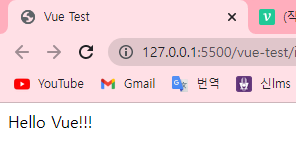
- script부분을 보면 vue.js라고 써있는데 해당 html파일이 있는 폴더 내에 vue.js코드를 가져와서 쓰겠다는 의미이다.
- vuejs를 통해 기본적인 vue의 문법이 적용됐다는거고 우리는 vue를 다운로드 받아 적용한 것임
cdn(콘텐츠 전송 네트워크) 사용하기
- 전세계에 cdn서버가 분산되어있고 전세계에 있는 어딘가의 서버에서 다운로드 받아서 그 파일을 사용하는 것
- 물리적으로 멀리 떨어져 있는 사용자에게 컨텐츠를 빠르게 제공할 수 있는 기술
- CDN을 통해 라이브러리를 사용할 때는 사용하고 싶은 라이브러리를 [https://cdnjs.com/] 에서 검색한 후 검색된 URL을
<script src="url">과 같은 태그로 호출해서 사용하면 된다. - 즉, 아까와같은 vue.js파일이 필요 없고, 아까와 script부분을 다르게 짜주면된다
v-bind : 텍스트 보간 이외에 다르게 binding하는 법
- v-bind: 란 vue에 있는 특정한 data를 붙이는 개념, :뒤에 나오는 thle이라는 속성에 붙일 것이다
- 태그의 속성을 동적으로 변경할 때 사용한다.
- 서버를 거치지않고 view영역에서 처리해서 data를 동적으로 변경할 수 있다
이미지 데이터 연결 : v-bind:src
링크를 통한 연결 : v-bind:href
스타일시트 연결 : v-bind:class, v-bind:style
키를 통한 연결 : v-bind:key
- html
<!DOCTYPE html>
<html lang="ko">
<head>
    <meta charset="UTF-8">
    <meta http-equiv="X-UA-Compatible" content="IE=edge">
    <meta name="viewport" content="width=device-width, initial-scale=1.0">
    <title>Vue Test</title>
    <script src="https://cdn.jsdelivr.net/npm/vue@2.7.10/dist/vue.js"></script>
</head>
<body>
    <div id="app2">
        <span v-bind:title="msg">
            span안에 있는 내용1
        </span>
    </div>
    <script>
        new Vue(
            {
                el: "#app2",
                data: {msg : '이 message는 ' + new Date() + '에 작성되었스니다.'}
            }
        )
    </script>
</body>
</html>
- v-bind속성 : '디렉티브' 라고 부른다
- html
<div id="app">
   <div class="text" v-bind:class="{active : active}">
     {{msg}}
  </div>
</div>
- css
.text {
  font-size: 70px
}
.text.active{
  color: red,
}
- 만약에 text의 active가 붙어있다면 color를 red로 바꾸겠다
- javascript
new Vue({
  el: '#app',
  data: {
    msg: 'Hello vue',
    active : true
  }
})
- 해석) active라는 class를 추가하고 싶은데 active라는 data가 true일때만 추가하고 싶다
- data가 true일때만 css의 적용을 받아 red로 색이 변하게 된다
- v-bind 뒤에 class가 나오는건 style을 변경할때 사용하는거다
- 나의 해석) 일단 active를 vue에서(js) true로 설정해놨고 v-bind를 통해 vue에 있는 data를 가져오겠다고했다.
그래서 active라는 변수를 가져왔고 그 변수는 true값이다 그 값이 true값이면 class,,즉 stypesheet에 있는 객체 active를 추가할것이다
근데 그 active는 css에 정의한 색이 red인 active야 그래서 빨개졌다
조건문과 반복문
- "v-xxx"의 형식을 가지는 것들을 디렉티브라고 한다 : vue에 있는 특정한 data를 붙이는 개념
- "v-if" : 이 요소를 화면에 렌더링할건지 말건지를 결정하는 디렉티브
- html
<div id="app">
  <p v-if="seen">
    나를 보세요~!
  </p>
</div>
- javascript
new Vue({
  el: '#app',
  data: {
    msg: 'Hello vue',
    seen : true
  }
})
만약에 빈 msg가 온경우 출력을 안하고 싶다면?
<div id="app">
  <div v-if="msg">{{msg}} ~~</div>
</div>- v-if에 msg를 넣어주면 된다 그럼 빈 msg가 전달된 경우, 해당 태그에 대한 내용이 아예 안나온다
반복문
- html
<div id="app">
  <ol>
    <li v-for="item in items"
        v-bind:key="item.id">
      {{item.msg}}
    </li>
    </ol>
</div>
- javascript
new Vue({
  el: '#app',
  data: {
    items: [
      {
        id: '1',
        msg: 'hello world'
      },
      {
        id: '2',
        msg: 'hi'
      },
      {
        id: '3',
        msg: 'good'
      }
    ]
  }
})
- v-for에는 "v-bind:key="item.id"" 정의가 필요하다
사용자 입력 핸들링 - 단방향
v-on : vue instacne의 method 호출하는 디렉티브
- button을 click하면 해당 method를 호출하겠다 라는 의미이다
- html
<div id="app5">
  <p>{{msg}}</p>
  <button v-on:click = "reverse">버튼을</button>
</div>
- javascript
new Vue({
  el: '#app5',
  data: {
    msg : "hi~"
  },
  methods: {
    reverse: function () {
  this.msg = this.msg.split('').reverse().join('')
}
}
})
- vue instance 내에서의 this 키워드는 vue 즉, app5를 의미하는 것이다
- 이 메서드에서 우리는 DOM을 건드리지 않고, data만 업데이트 했더니 앱의 상태가 변화한다
- 모든 dom조작은 vue에 의해 처리되니까 data만 변경하면된다
- 기존에는 msg라는 data를 html에서 출력만 했다 즉, 단방향이다. 이번엔 양방향을 구현해보자
사용자 입력 핸들링 - 양방향
- input으로 입력받은 데이터를 msg로 올려주겠다
- 양방향을 하기 위해서는 "v-model"이라는 디렉티브를 사용해야 한다
- html
<div id="app5">
  <p>
   {{msg}}
  </p>
  <input v-model="msg">
</div>
- javascript
new Vue({
  el: '#app5',
  data: {
    msg : 'hi~'
  }
})
사용자 입력 핸들링
- 버튼을 눌렀을때 box의 상태변화
- html
<div id="app5">
  <div class = "css1" v-bind:class="{active : tg}">
  </div>
  <button v-on:click="tgElement">버튼1</button>
</div>
- javascript
new Vue({
  el: '#app5',
  data: {
    tg : true
  },
  methods: {
    tgElement: function(){
      this.tg = !this.tg
    }
  }
})
- css
.css1 {
  width : 150px;
  height: 150px;
  background: black;
  border-radius: 10px;
  cursor: pointer;
  transition: 1s;
}
.css1.active{
  width : 10px;
  height: 10px;
  background: blue;
}
- data를 변경하는것만 가지고 요소를 정의했다
컴포넌트를 사용한 작성방법
- 컴포넌트는 부분의 개념이고, 재사용할 수 있는 부분을 의미한다
- 특정한 웹사이트를 컴포넌트 트리구조로 분해할 수 있고, 그렇게되어져있다
- 우리는 vue를 통해 component를 등록할 수 있다
= Vue.component(component이름, component정의)로 구성됨
props : to do 만들기
- 지금까지는 너무 단순하다. 부모영역의 데이터를 자식영역에 집어넣을 수 있어야한다
- todo : li와 그안에 들어갈 데이터를 분리하여 구현
- 마치 함수인자와 함수처럼 props는 html에서 넘겨줄거니까 어떠한 데이터가 넘어올것을 가정하고 templates를 작성한다.
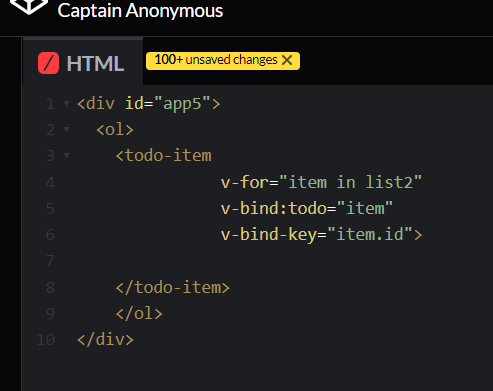
- html에서는 적당한 todo에 해당하는 data를 넘겨주면된다
- 이떄 data는 vue에서 정의한 data를 넘김
- html
<div id="app5">
  <ol>
    <todo-item
               v-for="item in list2"
               v-bind:todo="item"
               v-bind-key="item.id">
    </todo-item>
    </ol>
</div>
- javacript
Vue.component('todo-item', {
  props: ['todo'],
  template : '<li>{{todo.text}}</li>'
})
new Vue({
  el: '#app5',
  data: {
    list2: [
      {
        id: 0,
        text: 'tomato'
      },
      {
        id: 1,
        text: 'banana'
      },
      {
        id: 2,
        text: 'goguma'
      }
    ]
  }
})
- 우리는 기본적인 app과 todo-item으로 앱을 작은 단위로 나눌 수 있었다
- 부모인 todo-item에 영향을 주지 않으면서 todo-item 컴포넌트를 더 복잡하게 만들 수 있습니다
- 컴포넌트는 기호 "-"를 사용해서 커스텀한 것을 표시한다
- 다음과 같은 코드는 구성을 한눈에 알아볼수있다
- 주의) js의 Vue.component코드 부분을 new Vue보다 아래에서 선언하면 출력문이 나오지 않는다
->
to-do list만들기 - component로 만들기 전
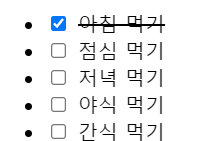
- title과 done이라는 변수를 가지는 list를 만들어준다
- 다음을 코드로 구현해보자
- html
<div id="app">
  <ul>
    <li v-for="item in todos"
        v-bind:key="item.id">
      <input type="checkbox" v-model="item.done">
      <span v-bind:class="{done: item.done}">{{item.text}}</span>
    </li>
  </ul>
</div>
- javascript
new Vue({
  el: '#app',
  data: {
    test : {
      text: 'sss',
      done: true
    },
    todos: [
      {
        id: '1',
        text: '아침 먹기',
        done: true
      },
      {
        id: '2',
        text: '점심 먹기',
        done: false
      },
      {
        id: '3',
        text: '저녁 먹기',
        done: false
      },
      {
        id: '4',
        text: '야식 먹기',
        done: false
      },
      {
        id: '5',
        text: '간식 먹기',
        done: false
      }
    ]
  }
})
component로 만든 후
- vue를 생성하기 이전에 component를 먼저 정의해야한다
- li 태그로 감싸져있는 부분을 component로 만들고 싶다
- 내가 만든 component를 사용할 수 있다. 그런데 사용하려면 props에 해당하는 변수를 넣어주어야하고 그 data는
vue에 정의되어있으므로 v-bind라는 디렉티브가 필요하다
- html
<div id="app">
  <ul>
    <my-cp1 v-for="todo in todos"
            v-bind:key="todo.id"
            v-bind:item="todo">
            </my-cp1>
  </ul>
</div>
- javascript
Vue.component('my-cp1',{
  props: ['item'],
  template: `<li>
      <input type="checkbox" v-model="item.done">
      <span v-bind:class="{done: item.done}">{{item.text}}</span>
    </li>`
})
new Vue({
  el: '#app',
  data: {
    todos: [
      {
        id: '1',
        text: '아침 먹기',
        done: true
      },
      {
        id: '2',
        text: '점심 먹기',
        done: false
      },
      {
        id: '3',
        text: '저녁 먹기',
        done: false
      },
      {
        id: '4',
        text: '야식 먹기',
        done: false
      },
      {
        id: '5',
        text: '간식 먹기',
        done: false
      }
    ]
  }
})
- component이름과 연결할 표현식들을 templates에 적어준다
- 만약 인자로 필요한 변수가 있다면 props에 적어준다
- html에서는 만든 component를 사용하기만 하면 된다. 하지만 이때 item으로 정의한 속성을 넣어주어야하는데
이 변수는 vue에 있는 변수를 넣어줄테니까 "v-bind"를 붙여준다. 또한 vue에있는 list로 반복문을 돌릴테니 "v-for", "v-bind:key"를 사용하여 표현식을 완성해준다
css 헷갈렸던 점
- css
- li안에 있는 span에게만 적용하겠다는 뜻이다.
li span.done {
  text-decoration: line-through;
}
- 모든 span에 적용하겠다는 뜻이다
span.done {
  text-decoration: line-through;
}
출처
https://effectivecode.tistory.com/1205
https://velog.io/@hikoand/Vue.js-Vue.js-%EC%9E%85%EB%AC%B82-v-for-v-bind

안녕하세요!