<?xml version="1.0" encoding="utf-8"?>
<manifest xmlns:android="http://schemas.android.com/apk/res/android"
    xmlns:tools="http://schemas.android.com/tools">

    <uses-permission android:name="android.permission.INTERNET" />

    <!--  단계 1: DIApp 클래스를 android:name 항목으로 연결합니다.-->
    <application
        android:name=".DIApp"
        android:allowBackup="true"
        android:dataExtractionRules="@xml/data_extraction_rules"
        android:fullBackupContent="@xml/backup_rules"
        android:icon="@mipmap/ic_launcher"
        android:label="@string/app_name"
        android:roundIcon="@mipmap/ic_launcher_round"
        android:supportsRtl="true"
        android:theme="@style/Theme.DI"
        tools:targetApi="31">
        <activity
            android:name=".MainActivity"
            android:exported="true"
            android:label="@string/app_name"
            android:theme="@style/Theme.DI">
            <intent-filter>
                <action android:name="android.intent.action.MAIN" />

                <category android:name="android.intent.category.LAUNCHER" />
            </intent-filter>

            <meta-data
                android:name="android.app.lib_name"
                android:value="" />
        </activity>
    </application>

</manifest>
package kr.co.fastcampus.part1.part5_7.di
import com.google.gson.FieldNamingPolicy
import com.google.gson.Gson
import com.google.gson.GsonBuilder
import dagger.Module
import dagger.Provides
import dagger.hilt.InstallIn
import dagger.hilt.components.SingletonComponent
import kr.co.fastcampus.part1.part5_7.service.GithubService
import retrofit2.Converter
import retrofit2.Retrofit
import retrofit2.converter.gson.GsonConverterFactory
import javax.inject.Named
import javax.inject.Singleton
// 단계 4: `AppModules`에 `@Module` 어노테이션과 `@InstallIn(SingletonComponent::class)`
// 어노테이션을 추가합니다.
@InstallIn(SingletonComponent::class)
@Module
class AppModules {
// 단계 5: 아래 프로파이더를 만듭시다.
@Singleton
@Provides
@Named("API_URI")
fun provideWebAPI(): String = "https://api.github.com/"
// JSON <-> 코틀린 객체, 자바 객체 //구글이 만듬
@Singleton
@Provides
fun provideGson(): Gson =
GsonBuilder().setFieldNamingPolicy(FieldNamingPolicy.LOWER_CASE_WITH_UNDERSCORES)
.create()
@Singleton
@Provides
fun provideConverterFactory(
gson: Gson
): Converter.Factory = GsonConverterFactory.create(gson)
@Singleton
@Provides
fun provideRetrofit(
@Named("API_URI") apiUrl: String,
converterFactory: Converter.Factory
): Retrofit = Retrofit.Builder()
.baseUrl(apiUrl)
.addConverterFactory(converterFactory)
.build()
@Singleton
@Provides
fun provideGithubService(
retrofit: Retrofit
): GithubService = retrofit.create(GithubService::class.java)
}package kr.co.fastcampus.part1.part5_7.model
data class Repo(
val id: Long,
val name: String,
val htmlUrl: String,
val url: String,
val gitUrl: String
)package kr.co.fastcampus.part1.part5_7.service
import kr.co.fastcampus.part1.part5_7.model.Repo
import retrofit2.http.GET
import retrofit2.http.Path
interface GithubService {
@GET("users/{user}/repos")
suspend fun listRepos(@Path("user") user: String): List<Repo>
}package kr.co.fastcampus.part1.part5_7.viewmodel
import androidx.compose.runtime.mutableStateListOf
import androidx.lifecycle.ViewModel
import androidx.lifecycle.viewModelScope
import dagger.hilt.android.lifecycle.HiltViewModel
import kotlinx.coroutines.launch
import kr.co.fastcampus.part1.part5_7.model.Repo
import kr.co.fastcampus.part1.part5_7.service.GithubService
import javax.inject.Inject
// 단계 6: @HiltViewModel 어노테이션을 지정합니다.
// 단계 7: 생성자에 @Inject를 붙여줍시다.
@HiltViewModel
class GithubViewModel @Inject constructor(
private val githubService: GithubService
) : ViewModel() {
val repos = mutableStateListOf<Repo>()
fun getRepos() {
repos.clear()
viewModelScope.launch {
val result = githubService.listRepos("FLU0RITE")
repos.addAll(result)
}
}
}package kr.co.fastcampus.part1.part5_7
import android.app.Application
import dagger.hilt.android.HiltAndroidApp
// 단계 2: DIApp을 `@HiltAndroidApp`로 어노테이션합니다.
@HiltAndroidApp
class DIApp : Application()package kr.co.fastcampus.part1.part5_7
import android.os.Bundle
import androidx.activity.ComponentActivity
import androidx.activity.compose.setContent
import androidx.compose.foundation.layout.fillMaxSize
import androidx.compose.foundation.lazy.LazyColumn
import androidx.compose.foundation.lazy.items
import androidx.compose.material.Button
import androidx.compose.material.MaterialTheme
import androidx.compose.material.Surface
import androidx.compose.material.Text
import androidx.compose.runtime.Composable
import androidx.compose.ui.Modifier
import androidx.compose.ui.tooling.preview.Preview
import androidx.lifecycle.viewmodel.compose.viewModel
import dagger.hilt.android.AndroidEntryPoint
import kr.co.fastcampus.part1.part5_7.ui.theme.DITheme
import kr.co.fastcampus.part1.part5_7.viewmodel.GithubViewModel
// 단계 3: Activity에 @AndroidEntryPoint를 넣어줍시다.
@AndroidEntryPoint
class MainActivity : ComponentActivity() {
override fun onCreate(savedInstanceState: Bundle?) {
super.onCreate(savedInstanceState)
setContent {
DITheme {
Surface(
modifier = Modifier.fillMaxSize(),
color = MaterialTheme.colors.background
) {
ReposScreen()
}
}
}
}
}
@Composable
fun ReposScreen(viewModel: GithubViewModel = viewModel()) {
LazyColumn {
item {
Button(onClick = {
viewModel.getRepos()
}) {
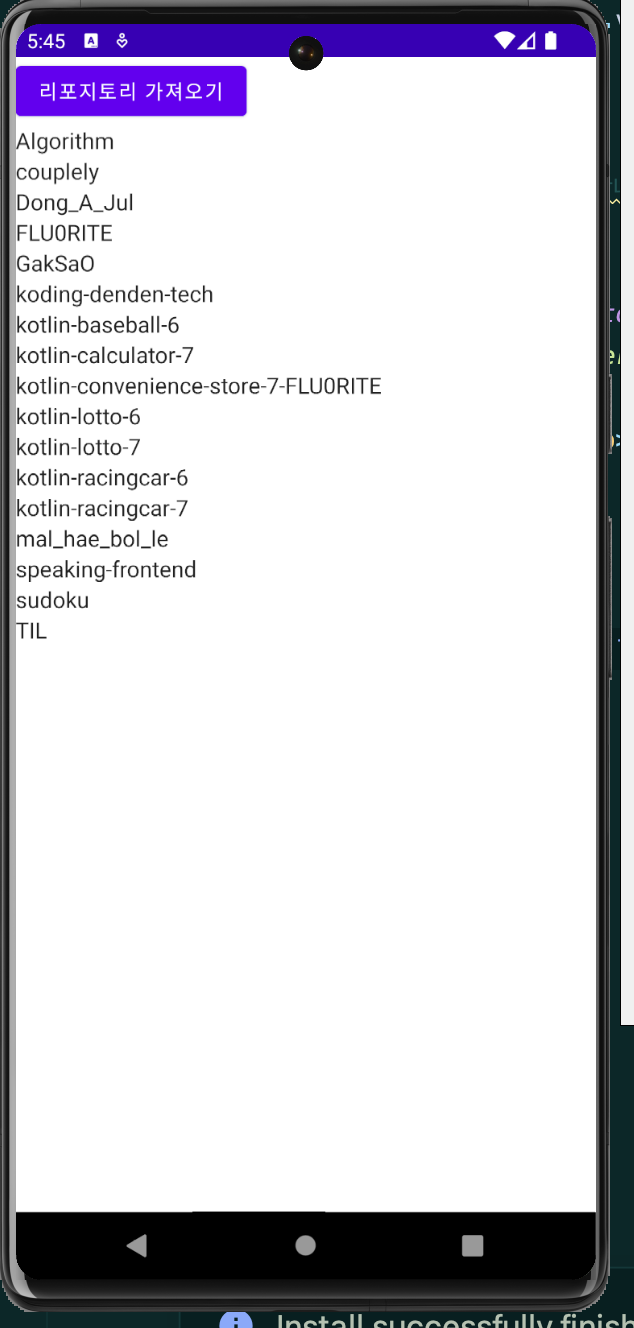
Text("리포지토리 가져오기")
}
}
items(viewModel.repos) {
Text(it.name)
}
}
}
@Preview(showBackground = true)
@Composable
fun DefaultPreview() {
DITheme {
ReposScreen()
}
}buildscript {
ext {
compose_ui_version = '1.1.1'
dagger_version = '2.40.5'
hilt_version = '1.0.0'
}
// 힐트 안드로이드 그래플 플러그인도 추가해야 합니다.
dependencies {
classpath "com.google.dagger:hilt-android-gradle-plugin:$dagger_version"
}
}// Top-level build file where you can add configuration options common to all sub-projects/modules.
plugins {
id 'com.android.application' version '7.4.2' apply false
id 'com.android.library' version '7.4.2' apply false
id 'org.jetbrains.kotlin.android' version '1.6.10' apply false
}
plugins {
    id 'com.android.application'
    id 'org.jetbrains.kotlin.android'
    id 'kotlin-kapt'
    id 'dagger.hilt.android.plugin'
}

android {
    namespace 'kr.co.fastcampus.part1.part5_7'
    compileSdk 32

    defaultConfig {
        applicationId "kr.co.fastcampus.part1.part5_7"
        minSdk 21
        targetSdk 32
        versionCode 1
        versionName "1.0"

        testInstrumentationRunner "androidx.test.runner.AndroidJUnitRunner"
        vectorDrawables {
            useSupportLibrary true
        }
    }

    buildTypes {
        release {
            minifyEnabled false
            proguardFiles getDefaultProguardFile('proguard-android-optimize.txt'), 'proguard-rules.pro'
        }
    }
    compileOptions {
        sourceCompatibility JavaVersion.VERSION_1_8
        targetCompatibility JavaVersion.VERSION_1_8
    }
    kotlinOptions {
        jvmTarget = '1.8'
    }
    buildFeatures {
        compose true
    }
    composeOptions {
        kotlinCompilerExtensionVersion '1.1.1'
    }
    packagingOptions {
        resources {
            excludes += '/META-INF/{AL2.0,LGPL2.1}'
        }
    }
}

dependencies {

    implementation 'androidx.core:core-ktx:1.7.0'
    implementation 'androidx.lifecycle:lifecycle-runtime-ktx:2.3.1'
    implementation 'androidx.activity:activity-compose:1.3.1'
    implementation "androidx.compose.ui:ui:$compose_ui_version"
    implementation "androidx.compose.ui:ui-tooling-preview:$compose_ui_version"
    implementation 'androidx.compose.material:material:1.1.1'

    // Hilt 의존성
    implementation "com.google.dagger:hilt-android:$dagger_version"
    kapt "com.google.dagger:hilt-android-compiler:$dagger_version"
    implementation "androidx.hilt:hilt-navigation-compose:$hilt_version"

    // Retrofit
    implementation "com.squareup.retrofit2:retrofit:2.9.0"
    implementation 'com.squareup.retrofit2:converter-gson:2.9.0'

    // GSON
    implementation 'com.google.code.gson:gson:2.10.1'

    // viewModelScope
    implementation "androidx.lifecycle:lifecycle-viewmodel-ktx:2.5.1"

    testImplementation 'junit:junit:4.13.2'
    androidTestImplementation 'androidx.test.ext:junit:1.1.5'
    androidTestImplementation 'androidx.test.espresso:espresso-core:3.5.1'
    androidTestImplementation "androidx.compose.ui:ui-test-junit4:$compose_ui_version"
    debugImplementation "androidx.compose.ui:ui-tooling:$compose_ui_version"
    debugImplementation "androidx.compose.ui:ui-test-manifest:$compose_ui_version"
}
모두 이루어져라