📃 1) 퀴즈
결과 화면 :

코딩 :
- html
<!DOCTYPE html>
<html lang="en">
<head>
    <meta charset="UTF-8">
    <meta name="viewport" content="width=device-width, initial-scale=1.0">
    <title>Document</title>
    <link rel="stylesheet" href="./css/05_exam_display.css">
</head>
<body>
    <h3>이미지 갤러리</h3>
    <ul>
        <li><img src="./img/cat.jpg" alt="고양이"></li>
        <li><img src="./img/bee.jpg" alt="벌"></li>
        <li><img src="./img/rabit.jpg" alt="토끼"></li>
    </ul>
</body>
</html>
- css
ul {
    /* 배경색 */
    background-color: #f5f7e4;
    /* 외곽선 */
    /* border: 선두께 선스타일 선색상 */
    border: 1px solid #cccccc;
    /* 둥근 사각형(모서리) */
    border-radius: 10px;
    /* 가로 크기 */
    width: 640px;
    /* 안쪽 여백 */
    padding: 30px;
}

li {
    /* 앞에 목록 점 없애기 */
    list-style-type: none;
    /* 바깥여백 - 왼쪽 */
    margin-left: 20px;
    /* display : 가로 배치  */
    display: inline-block;
}
📃 2) 퀴즈
결과 화면 :
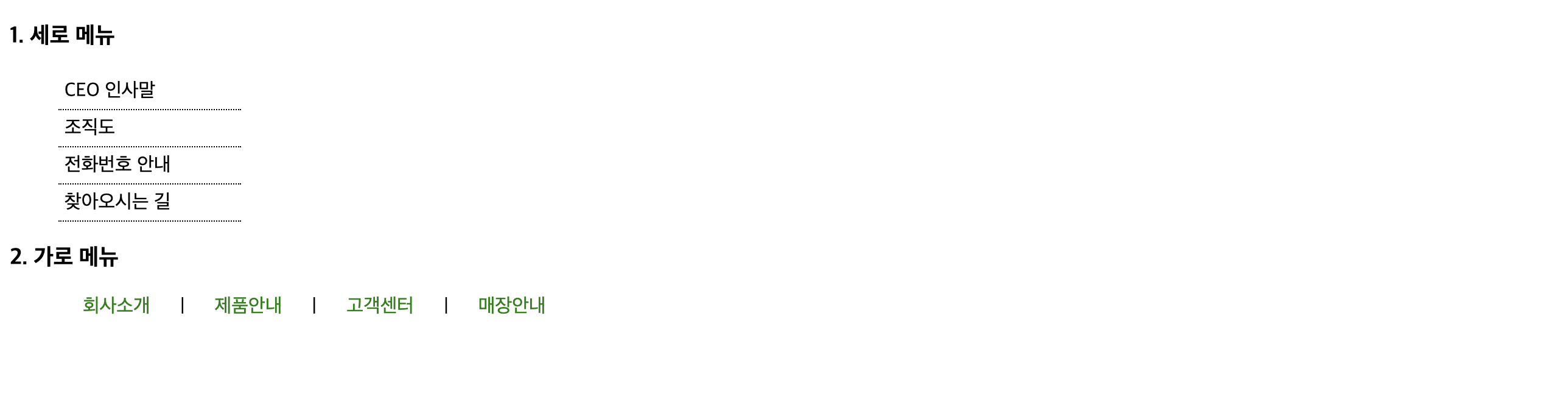
코딩 :
- html
<!-- 06_exam_menu.html -->
<!DOCTYPE html>
<html lang="en">
<head>
    <meta charset="UTF-8">
    <meta http-equiv="X-UA-Compatible" content="IE=edge">
    <meta name="viewport" content="width=device-width, initial-scale=1.0">
    <title>Document</title>
    <link rel="stylesheet" href="./css/06_exam_menu.css">
</head>
<body>
    <h3>1. 세로 메뉴</h3>
    <ul id='v_menu'>
        <li>CEO 인사말</li>
        <li>조직도</li>
        <li>전화번호 안내</li>
        <li>찾아오시는 길</li>
    </ul>

    <h3>2. 가로 메뉴</h3>
    <ul id='h_menu'>
        <li class='menus'>회사소개</li>
        <li>|</li>
        <li class='menus'>제품안내</li>
        <li>|</li>
        <li class='menus'>고객센터</li>
        <li>|</li>
        <li class='menus'>매장안내</li>
    </ul>
    </body>
</html>
- css
li {
    /* 앞에 점 없애기 */
    list-style-type: none;
}

/* 세로 메뉴 디자인 */
#v_menu {
    /* 가로 */
    width: 150px;
}

/* 후손선택자 */
#v_menu li {
    /* 안쪽 여백 */
    padding: 5px;
    /* 외곽선 : 아래 : 선크기 선스타일(점선) 선색상 */
    border-bottom: 1px dotted black;
}

/* 가로 메뉴 디자인 */
/* 후손선택자 */
#h_menu li {
    /* display : 가로배치 */
    display: inline-block;
}

.menus {
    /* 글자색 */
    color: green;
    /* 바깥여백 : 왼쪽/오른쪽 */
    margin-left: 20px;
    margin-right: 20px;
}
📃 3) 퀴즈
결과 화면 :

코딩 :
- html
<!DOCTYPE html>
<html lang="en">
<head>
    <meta charset="UTF-8">
    <meta name="viewport" content="width=device-width, initial-scale=1.0">
    <title>Document</title>
    <link rel="stylesheet" href="./css/08_exam_float.css">
</head>
<body>
    <!-- 힌트 : #image - float:left -->
    <!--       #desc - float:left -->
    <!--       #menu - float:right -->
    <div id="image">
        <img src="./img/foxtail.jpg" alt="강아지풀">
    </div>
    <div id="desc">
        <h3>강아지풀</h3>
        <p>길가나 들에서 자라는 풀로써 꽃은 9월에 피고
            녹색 또는 자주색입니다.
        </p>
    </div>
    <ul id="menu">
        <li>강이지풀</li>
        <li>패랭이풀</li>
        <li>할미꽃</li>
        <li>코스모스</li>
    </ul>
</body>
</html>
- css
/* float 속성 특징 : float 걸린 태그는 떠 있음  */
/*    float 밑에 있는 태그들이 높이가 없다고 가정하여 위로 말려 올라옴(겹침현상) */
/* 여백 초기화 */
* {
  padding: 0;
  margin: 0;
}

li {
  /* 앞에 점에 없애기 */
  list-style-type: none;
}

#image {
  /* 외곽선 : border : 선두께 선스타일 선색상 */
  border: 1px solid red;
  /* 왼쪽 정렬 */
  float: left;
}

#desc {
  /* 가로 */
  width: 300px;
  /* 바깥여백 - 왼쪽 */
  margin-left: 30px;
  /* 외곽선 : border : 선두께 선스타일 선색상 */
  border: 1px solid red;
  /* 왼쪽 정렬 */
  float: left;
}

#menu {
  /* 외곽선 : border : 선두께 선스타일 선색상 */
  border: 1px solid red;
  /* 오른쪽 정렬 */
  float: right;
}
📃 4) 퀴즈
결과 화면 :

코딩 :
- html
<!-- 09_exam_float2.html -->
<!DOCTYPE html>
<html lang="en">
  <head>
    <meta charset="UTF-8" />
    <meta http-equiv="X-UA-Compatible" content="IE=edge" />
    <meta name="viewport" content="width=device-width, initial-scale=1.0" />
    <title>Document</title>
    <link rel="stylesheet" href="./css/09_exam_float2.css">
  </head>
  <body>
    <div id="logo">
      <img src="./img/logo2.png" />
      <!-- <img src="https://i.postimg.cc/yNnSv87p/logo2.png" /> -->
    </div>
    <ul id="menu">
      <li class="item">수목원소개</li>
      <li>|</li>
      <li class="item">방문안내</li>
      <li>|</li>
      <li class="item">고객센터</li>
      <li>|</li>
      <li class="item">공지사항</li>
    </ul>
    <div id="main_image">
      <img src="./img/main.jpg" />
      <!-- <img src="https://i.postimg.cc/76d1nZV8/main.jpg" /> -->
    </div>
  </body>
</html>
- css
li {
  /* 점 없애기 */
  list-style-type: none;
}

/* 수목원 로고 : 왼쪽정렬 */
#logo {
  /* 왼쪽 정렬 */
  float: left;
}

/* 메뉴 : 오른쪽 정렬 */
#menu {
  /* 오른쪽 정렬 */
  float: right;
  /* 글자크기 */
  font-size: 14px;
  /* 바깥여백 - 위쪽 */
  margin-top: 20px;
}
/* 메뉴 - 가로배치 */
#menu li {
  display: inline-block;
}
/* 본문 이미지 : float 효과 제거 */
#main_image {
  /* TODO: float 효과 제거하는 속성 */
  clear: both;
  /* 안쪽 여백 - 위쪽 */
  padding-top: 20px;
}
📃 5) 퀴즈
결과 화면 :

코딩 :
- html
<!-- 12_exam_form_register.html -->
<!DOCTYPE html>
<html lang="en">
<head>
    <meta charset="UTF-8">
    <meta http-equiv="X-UA-Compatible" content="IE=edge">
    <meta name="viewport" content="width=device-width, initial-scale=1.0">
    <title>Document</title>
    <link rel="stylesheet" href="./css/11_exam_form_register.css">
</head>
<body>
  <!-- 힌트 : #container { width: 600px; margin:0 auto } -->
  <!-- 라벨     .field { 그전에 샘플에 속성:값 } -->
  <!-- 입력양식 .input-box { 그전에 샘플에 속성:값 } -->
  <!-- 버튼 (#buttons > li) : 세로배치 -> 가로배치 (display:inline-block) -->
    <div id="container">
      <h1>회원 가입(#container:margin 0 auto)</h1>
      <form action="#" id="register">
        <!-- 입력란 시작 -->
        <ul id="user-info">
          <li>
            <!-- label 클릭하면 input 양식에 포커스가 옴 -->
            <!-- input - required : 필수입력 -->
            <label for="user-id" class="field">아이디</label>
            <input
              type="text"
              id="user-id"
              class="input-box"
              placeholder="영문과 숫자로 입력"
              required
            />
          </li>
          <!-- ctrl + d : 줄복사/블록복사 -->
          <!-- ctrl + y : 줄삭제 -->
          <!-- ctrl + alt + l : 자동 정렬 -->
          <li>
            <!-- 비밀번호 -->
            <!-- 유효성 체크 : 자리수, 필수입력 -->
            <label for="user-pw1" class="field">비밀번호</label>
            <input
              type="password"
              id="user-pw1"
              class="input-box"
              placeholder="8자리 이상 비밀번호 적기"
              minlength="8"
              required
            />
          </li>

          <li>
            <!-- 비밀번호 -->
            <!-- 유효성 체크 : 자리수, 필수입력 -->
            <label for="user-pw2" class="field">비밀번호 확인</label>
            <input
              type="password"
              id="user-pw2"
              class="input-box"
              placeholder="8자리 이상 비밀번호 적기"
              minlength="8"
              required
            />
          </li>

          <li>
            <!-- email -->
            <!-- input type = email -> 유효성체크 -->
            <label for="user-id" class="field">이메일</label>
            <input type="email" id="user-id" class="input-box" required />
          </li>

          <li>
            <!-- 전화번호 입력 -->
            <!-- 숫자입력 : input type="number" -->
            <label for="phone" class="field">전화번호</label>
            <input type="number" id="phone" class="input-box" required />
          </li>
        </ul>
            <!-- 입력란 끝 -->

        <!-- 서브밋/리셋 버튼 시작 -->
        <ul id="buttons">
            <!-- 서브밋 버튼 -->
            <li>
                <button type="submit" class="btn btnBlack">
                    가입하기
                </button>
            </li>
            <!-- 리셋 버튼 -->
            <li>
                <button type="reset" class="btn btnGray">
                    취소
                </button>
            </li>
        </ul>
        <!-- 서브밋/리셋 버튼 끝 -->

      </form>
    </div>
  </body>
</html>
- css
/* 문제 풀이 */
#container {
  /* 가로 */
  width: 600px;
  /* 중앙 정렬 */
  margin: 0 auto;
}

ul {
  /* 목록 점 없애기 */
  list-style-type: none;
}

/* 라벨 디자인 */
.field {
  /* 가로 */
  width: 60px;
  /* margin(축약식2): 상/하 좌/우 */
  margin-right: 15px;
  /* 가로배치 */
  display: inline-block;
  /* 글자 크기 : 세로크기 */
  font-size: 0.9em;
  /* 굵은 글씨 */
  font-weight: bold;
  /* 글자 오른쪽 정렬 */
  text-align: right;
}

/* 입력양식 디자인 */
.input-box {
  /* 가로배치 */
  display: inline-block;
  /* 가로 */
  width: 350px;
  /* 세로 */
  height: 35px;
  /* 안쪽여백 */
  padding: 5px;
  /* 바깥여백(축약식2): 상/하 좌/우 */
  margin: 10px 0;
}
/* 버튼 디자인 */
/* 자식선택자 사용 */
#buttons > li {
  /* 세로 -> 가로 배치 */
  display: inline-block;
}

button {
  /* 가로 */
  width: 250px;
  /* 세로 */
  height: 50px;
  /* 외곽선 */
  border: 1px solid white;
  /* 글자크기 */
  font-size: 0.9em;
  /* 바깥여백 - 오른쪽 */
  margin-right: 10px;
}
📃 6) 퀴즈
결과 화면 :

코딩 :
- html
<!-- 18_exam_menu.html -->
<!DOCTYPE html>
<html lang="en">
<head>
    <meta charset="UTF-8">
    <meta http-equiv="X-UA-Compatible" content="IE=edge">
    <meta name="viewport" content="width=device-width, initial-scale=1.0">
    <title>Document</title>
    <link rel="stylesheet" href="./css/18_exam_menu.css">
</head>
<body>
    <!-- TODO: 힌트 : #logo { float: left; ,margin-top/bottom/left, border 등 } -->
    <!-- TODO: 힌트 : #top { float: right; ,margin-top/right, border 등 } -->
    <!-- TODO: 힌트 : #menu { clear:both; height:40px, font-size:20px, text-align:center } -->
    <!-- TODO:                color, background-color:#443e58, padding-top -->
    <!-- TODO: #menu li { display: inline-block;} (메뉴 가로배치)-->
    <!-- 최상단 메뉴(좌 로고 , 우 소메뉴) 시작-->
    <!-- float 쓰면 공간이 없는것으로 html 간주 -->
    <div id="head">
        <!-- 좌측 로고 이미지 -->
        <div id="logo">
            <img src="./img/logo.png" alt="회사로고">
            <!-- <img src="https://i.postimg.cc/NFn5VQf6/logo.png" alt="회사로고"> -->
        </div>
        <!-- 우측 소메뉴 -->
        <div id="top">
            로그인 | 회원가입 | 공지사항
        </div>
    </div>
    <!-- 최상단 메뉴(좌 로고 , 우 소메뉴) 끝-->

    <!-- 하단 대메뉴 시작 -->
    <ul id="menu">
        <li class="item">HTML</li>
        <li>|</li>
        <li class="item">CSS</li>
        <li>|</li>
        <li class="item">Javascript</li>
        <li>|</li>
        <li class="item">Python</li>
        <li>|</li>
        <li class="item">PHP</li>
        <li>|</li>
        <li class="item">Java</li>
    </ul>
    <!-- 하단 대메뉴 끝 -->

</body>
</html>
- css
/* 문제 풀이 */
/* 여백 초기화 */
* {
  padding: 0;
  margin: 0;
}

/* 목록 점 없애기 */
li {
  list-style-type: none;
}

/* 로고 디자인 */
#logo {
  /* 왼쪽 배치 */
  float: left;
  /* 외곽선 */
  border: 1px solid red;
  /* 바깥여백 - 위 */
  margin-top: 20px;
  /* 바깥여백 - 아래 */
  margin-bottom: 10px;
  /* 바깥여백 - 왼쪽 */
  margin-left: 20px;
}

/* 소메뉴 디자인 */
#top {
  /* 오른쪽 배치 */
  float: right;
  /* 외곽선 */
  border: 1px solid red;
  /* 바깥여백 - 위 */
  margin-top: 30px;
  /* 바깥여백 - 오른쪽 */
  margin-right: 20px;
}

/* 대메뉴 */
#menu {
  /* float 영향 제거 */
  clear: both;
  /* 배경색 */
  background-color: #443e58;
  /* 글자색 */
  color: white;
  /* 글자 중앙 정렬 */
  text-align: center;
  /* 글자 크기 */
  font-size: 20px;
  /* 세로크기 */
  height: 40px;
  /* 안쪽 여백 - 위 */
  padding-top: 15px;
}

/* 세로 -> 가로 배치 */
#menu li {
  display: inline-block;
}

.item {
  /* 바깥여백 - 오른쪽 */
  margin-right: 30px;
  /* 바깥여백 - 왼쪽 */
  margin-left: 30px;
}
📃 7) 퀴즈
결과 화면 :

코딩 :
- html
<!DOCTYPE html>
<html lang="ko">
<head>
  <meta charset="UTF-8">
  <title>상품 소개 페이지</title>
  <link rel="stylesheet" href="./css/23_exam_poster.css">
</head>
<body>
  <!-- TODO: 힌트 : #container { 가로 중앙정렬 , 가로크기} -->
  <!-- TODO: 힌트 : table, th, td { 선긋기, 선사이간격붙이기 } -->
  <!-- TODO: 힌트 : th, td { 안쪽여백 } -->
  <div id="container">
    <video src="medias/salad.mp4" width="700" autoplay muted loop></video>
    <hr>
    <h2>상품 구성</h2>
    <table>
      <caption>선물용과 가정용 상품 구성</caption>
      <colgroup>
        <col style="background-color:#eee;">
        <col>
        <col span="2" style="width:150px">
        <!-- span 속성을 사용해 합치기 전
        <col style="width:150px">
        <col style="width:150px">
        -->
      </colgroup>
      <thead>
        <tr>
          <th>용도</th>
          <th>중량</th>
          <th>갯수</t>
          <th>가격</th>
        </tr>
      </thead>
      <tbody>
        <tr>
          <td rowspan="2">선물용</td>
          <td>3kg</td>
          <td>11~16과</td>
          <td>35,000원</td>
        </tr>
        <tr>
          <td>5kg</td>
          <td>18~26과</td>
          <td>52,000원</td>
        </tr>
        <tr>
          <td rowspan="2">가정용</td>
          <td>3kg</td>
          <td>11~16과</td>
          <td>30,000원</td>
        </tr>
        <tr>
          <td>5kg</td>
          <td>18~26과</td>
          <td>47,000원</td>
        </tr>
      </tbody>
    </table>
  </div>
</body>
</html>
- css
#container {
    /* 중앙 정렬 */
    margin: 0 auto;
    /* 가로 */
    width: 800px;
}

table, th, td {
    /* 외곽선 */
    border: 1px solid #222;
    /* 선사이 간격 붙이기 */
    border-collapse: collapse;
}

th, td {
    /* 안쪽 여백 */
    padding: 10px;
}
IT FullStack 강사