
1) RestTemplate이란
- 사전 지식
- 최근 서비스들은 MSA 주로 채택
1) MSA (마이크로 서비스 아키텍처 )
2) 애플리케이션이 갖는 서비스(기능)가 하나의 비즈니스 범위만 갖는 형태
3) 자신의 서비스(기능) API로 노출하고 다른 서버가 이를 호출해 사용하도록 구성
3-1. 각 서버가 다른 서버의 클라이언트 되는 경우도 많음
4) 다른 서버로 웹 요청 송・수신 돕는 템플릿 :RestTemplate,WebClient
- 최근 서비스들은 MSA 주로 채택
1. RestTemplate
- 스프링에서 HTTP 통신 기능을 손쉽게 사용하도록 설계된 템플릿
- RESTful 원칙 따르는 서비스 생성 가능
- 기본적으로 동기 방식[1]으로 처리됨
- 지원 중단된 상태이므로 WebClient or FeignClient 사용 권장됨
[1] 동기 방식
- 요청 보낸 후 응답(=결과)를 받아야 다음 동작이 이루어지는 방식
- Action -> Reaction -> Next Step
(⇔) 비동기 방식
- 요청 보낸 후 결과와 상관없이 다음 동작이 이루어지는 방식
- Action -> (Next Step) -> Reaction
특징
- HTTP 프로토콜 메서드에 맞는 메서드 제공
- RESTful 형식의 템플릿
- JSON, XML, 문자열 등 다양한 형식의 응답 수신
- 블로킹(Blocking) I/O 기반의 동기 방식
- 타 API 호출시 HTTP 헤더에 다양한 값 설정 가능
a.동작 원리
- RestTemplate에서 RequestEntity를 요청 메세지로 보냄
- ~ 여러 과정 거친 후 외부 API로 요청 보냄
- ~ 받은 데이터 정상이면 HttpMessageConverter 거쳐 자바 객체로 변환해 애플리케이션으로 반환
b.대표적 메서드
잘 정리된 사이트인 이곳을 참고하도록 하자
2) RestTemplate 사용하기
a.서버 프로젝트 생성
- 서로 다른 두 개의 서버 가동시켜 RestTemplate 동작 확인
b.구현하기
클라이언트로부터 요청을 받는 컨트롤러, RestTemplate 활용해 다른 서버에 통신 요청하는 서비스 계층으로 작성
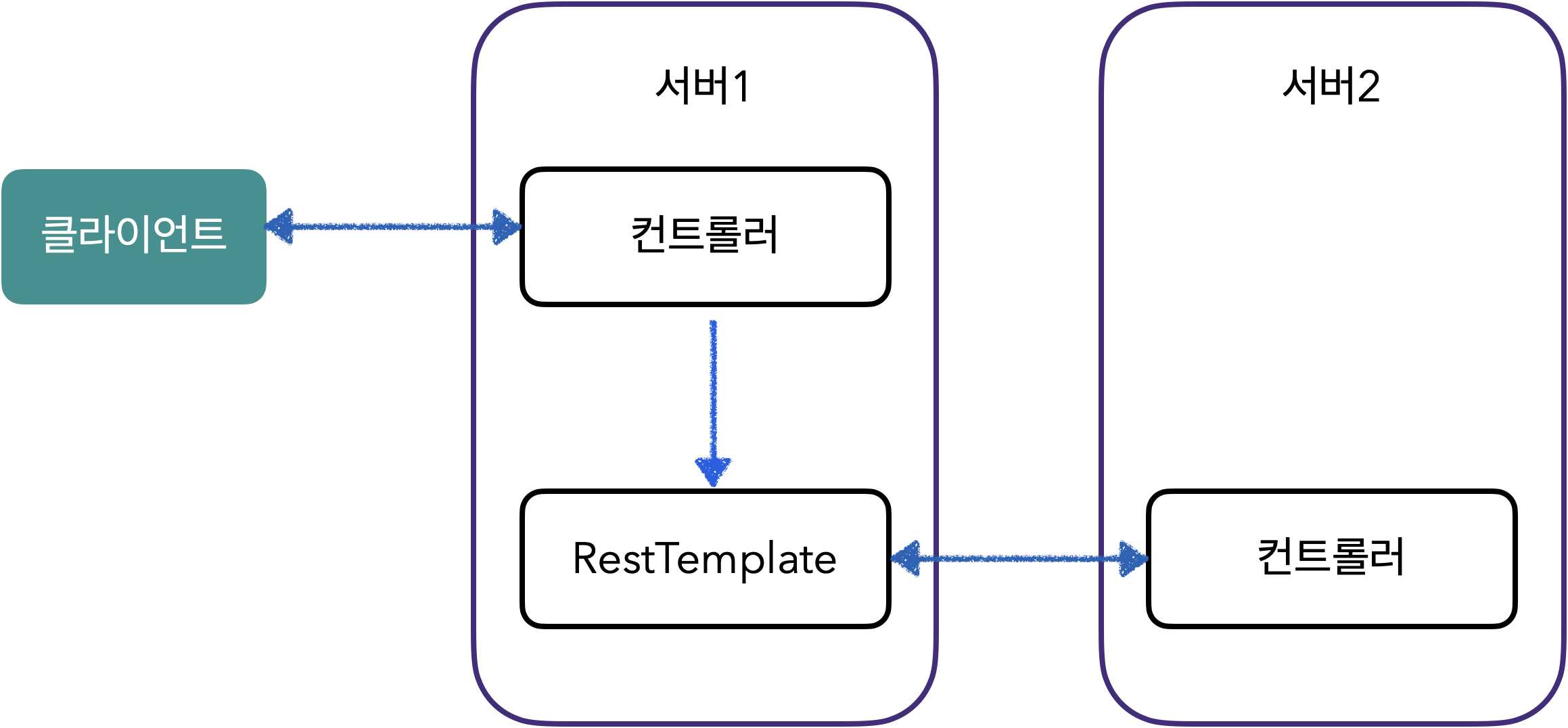
서버 간 통신 도식화
- 앞서 생성한 서버 프로젝트에 요청 날리기 위해 서버의 역할 수행하며 다른 서버로 요청 보내는 클라이언트의 역할도 수행하는 프로젝트 생성
- GET 형식의 RestTemplate 작성(Service)
@Service
public class RestTemplateService{
  public String getName(){ //
    URI uri = UriComponentsBuilder
					    .fromUriString("http://localhost:8888")
					    .path("/api/v1/curd-api")
					    .encode()
					    .build()
					    .toUri();

		RestTemplate restTemplate = new RestTemplate();
		ResponseEntity<String> response = restTemplate.getForEntity(uri, String.class);

		return response.getBody();
  }

	...

	...

}
- UriComponentsBuilder 사용해 RestTemplate 생성하고 사용하는 것이 일반적
- UriComponentsBuilder, 여러 파라미터 연결해 URI 형식으로 만드는 기능 수행
- fromUriString(), 호출부의 URL 입력
- path(), 메서드의 세부 경로 입력
- 위 메서드는 PathVariable이나 파라미터 사용하지 않는 호출 방법
- 그 외 path(), expend() 메서드를 활용한 방법과 queryParam() 메서드를 사용해 파라미터 추가하는 방법이 있음```java UriComponentsBuilder .expend("Flature") or UriComponentsBuilder .queryParam("name", "Flature") ``` - getForEntity(), URI와 응답받는 타입을 매개변수로 사용
- Controller(앞의 service 연결)
@RestController
@RequestMapping("/rest")
@RequiredArgsConstructor
public class RestTemplateController{
  private final RestTemplateService service;

	@GetMapping
	public String getName(){
	  return restTemplateService.getName();
	}


  ...

  @PostMapping
  public ResponseEntity<MemberDTO> postDto(){
    return restTemplateService.postWithParamAndBody();
  }

}
3) WebClient란?
a. 구성
- 리액터 기반으로 동작하는 API
- HTTP 요청을 수행하는 Spring WebFlux 제공하는 클라이언트
- 리액터 기반으로 스레드와 동시성 문제를 벗어나 비동기 형식으로 사용 가능
b. 특징
- 논블로킹(Non-Blocking) I/O 지원
- 리액티브 스트림(Reactive Streams)의 백 프레셔(Back Pressure) 지원
- 적은 하드웨어 리소스로 동시성 지원
- 함수형 API 지원
- 동기/비동기 상호작용 지원
- 스트리밍 지원
4) WebClient 사용하기
a.구현
-
WebClient 생성 방법
- create() 메서드 이용
- builder() 이용
-
WebClient 생성
- Service(Get 메서드 접근)
@Service
public class WebClientService{
  // builder() 활용
  public String getName(){
    WebClient wc = WebClient.builder()
							    .baseUrl("http://localhost:8080")
							    .defaultHeader(HttpHeaders.CONTENT_TYPE, MedidType.APPLICATION_JSON_VALUE)
									.build();

		return wc.get()
					.uri("/api/v1/get-api")
					.retrieve()
					.bodyToMono(String.class)
					.block();
  }


	// create() 활용
	public String getNameWithPathVariable(){
	  WebClient wc = WebClient.create("http://localhost:8080");

		ResponseEntity<String> responseEntity = wc.get()
				.uri(uriBuilder -> uriBuilder.path("/api/v1/get-api/{name}"))
					.build("Flature")
				.retrieve().toEntity(String.class).block();


		return responseEntity.getBody();
	}


}
뚝딱뚝딱