정렬하기
🔢 일차원 배열 활용, 정렬 연습
- 크기가 N인 정수 배열을 생성한다.
- 랜덤 수로 배열을 초기화한다.
- 오름차순/내림차순 정렬한다.
package week4;

import java.util.Scanner;
import java.util.Random;

public class 정렬하기 {
	static Scanner input = new Scanner(System.in);

	public static int [] makeArray(int n) {
		int [] ar = new int[n];
		for(int i=0; i<n; i++) {
			ar[i]=0;
		}
		return ar;
	}

	public static void setArrayRandom(int [] ar, int start, int end) {
		Random r = new Random();
		for(int i=0; i<ar.length; i++) {
			// r.nextInt() -> -21억~21억 이내 정수 리턴
			// r.nextInt(n) -> 0~n미만의 정수 리턴
			ar[i]=r.nextInt(end-start+1)+start;

			// ar[i]=(int)(Math.random()*(end-start+1))+start;
			// Math.random -> 0.0부터 1.0미만의 실수 리턴
		}
	}

	public static void sortArray1(int [] ar) { // bubbleSort
		for(int scan=0; scan<ar.length-1; scan++) { // 0~n-1까지 반복
			for(int i=0; i<ar.length-1-scan; i++) {
				if(ar[i]>ar[i+1]) { // i가 i+1보다 크면 swap
					int temp=ar[i+1];
					ar[i+1]=ar[i];
					ar[i]=temp;
				}
			}
		}
	}

	public static void sortArray2(int [] ar) { // bubbleSort
		for(int scan=0; scan<ar.length-1; scan++) { // 0~n-1까지 반복
			for(int i=0; i<ar.length-1-scan; i++) {
				if(ar[i]<ar[i+1]) { // i가 i+1보다 작으면 swap
					int temp=ar[i+1];
					ar[i+1]=ar[i];
					ar[i]=temp;
				}
			}
		}
	}

	public static void showArray(int [] ar) {
		for(int i=0; i<ar.length; i++) {
			System.out.print(ar[i] + " ");
		}
		System.out.println();
	}

	public static void main(String[] args) {
		System.out.print("배열 크기: ");
		int n = input.nextInt();

		// 배열 생성, 초기화
		int [] arr = makeArray(n);

		// 랜덤수로 초기화
		System.out.print("시작 수: ");
		int s = input.nextInt();
		System.out.print("끝 수: ");
		int e = input.nextInt();
		setArrayRandom(arr, s, e);

		System.out.println();

		System.out.print("sort 전: ");
		showArray(arr);

		sortArray1(arr);
		System.out.print("sort(오름차순): ");
		showArray(arr);

		sortArray2(arr);
		System.out.print("sort(내림차순): ");
		showArray(arr);
	}

}
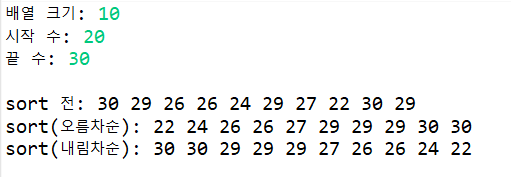
- makeArray -> 크기가 n인 배열을 생성하고 0으로 초기화한다.
- setArrayRandom -> 전달받은 배열을 start와 end 사이의 랜덤한 값으로 초기화한다. 값의 범위는 end-start+1이고, 가장 작은 값이 start가 되도록 +start를 해준다.
- sortArray1, 2 -> 배열 값을 오름차순/내림차순으로 정렬한다. 가장 단순한 정렬인 버블 정렬을 사용한다.
- bubble sort -> 인덱스 0부터 다음 값과 비교하며 원하는 정렬 순서와 다를 경우 두 값을 바꿔준다. 비교를 위해 다음 인덱스가 필요하므로 .length-1까지 탐색한다. 한 번의 탐색을 마치면 가장 큰/작은 값이 배열의 끝으로 이동하므로 -scan으로 탐색 범위를 줄이며 반복한다. -> 두 for문의 반복 범위 설정이 중요하다.
- showArray -> 배열의 값을 출력한다.
- main 메소드에서는 값을 입력 받아 그때그때 필요한 메소드를 출력한다.
소감: 메소드 개수가 많아서 시간이 생각보다 오래 소요되었다. 각각 인자와 리턴값을 생각해야 하는 점이 헷갈렸다. sortArray1을 복사해서 sortArray2를 만드는 등 수정이 용이했다.
극장예약시스템
🍿 실습 목표: 이차원 배열(정방형) 활용
- 10x10 좌석을 만든다.
- 예약, 취소, 좌석보이기 메소드를 만든다.
- 유효한 좌석 범위, 예약 가능한 좌석인지, 취소 가능한 좌석인지에 유의한다.
- 배열 인덱스는 0~9이지만 입력 받는 좌석 번호는 1~10이므로 차이를 반영한다.
package week4;

import java.util.Scanner;

public class 극장예약시스템 {
	static Scanner input = new Scanner(System.in);

	public static void 예약하기(int [][] ar) {
		// 행, 열 입력
		System.out.print("예약할 행을 입력하세요: ");
		int row = input.nextInt();
		System.out.print("예약할 열을 입력하세요: ");
		int col = input.nextInt();

		// 범위 체크
		if(row<1 || row>10 || col<1 || col>10) {
			System.out.println("좌석 범위 밖입니다.");
			return;
		}

		// 빈자리 체크
		if(ar[row-1][col-1]==1) { // 1~10 -> 0~9
			System.out.println("이미 예약된 자리입니다.");
			return;
		}
		else {
			ar[row-1][col-1]=1;
			System.out.println("예약되었습니다.");
		}
	}

	public static void 취소하기(int [][] ar) {
		// 행, 열 입력
				System.out.print("취소할 행을 입력하세요: ");
				int row = input.nextInt();
				System.out.print("취소할 열을 입력하세요: ");
				int col = input.nextInt();

				// 범위 체크
				if(row<1 || row>10 || col<1 || col>10) {
					System.out.println("좌석 범위 밖입니다.");
					return;
				}

				// 예약 여부 체크
				if(ar[row-1][col-1]==0) { // 1~10 -> 0~9
					System.out.println("예약되지 않은 자리입니다.");
					return;
				}
				else {
					ar[row-1][col-1]=0;
					System.out.println("취소되었습니다.");
				}

	}

	public static void 좌석보이기(int [][] ar) {
		for(int i=0; i<ar.length; i++) {
			System.out.printf("[%2d]: ", i+1);
			for(int j=0; j<ar.length; j++) {
				if(ar[i][j]==0) System.out.print("□ ");
				else System.out.print("■ ");
			}
			System.out.println();
		}
	}

	public static void 메뉴보이기() {
		System.out.println();
		System.out.println("=== 메뉴 ===");
		System.out.println("1.좌석보이기 2.예약하기 3.취소하기 ... 0.종료");
		System.out.println("===========");
	}

	public static void welcome() {
		System.out.println("극장 예약 시스템을 시작합니다.");
	}

	public static void main(String[] args) {
		int [][] seat = new int[10][10];

		welcome();
		while(true) {
			메뉴보이기();

			System.out.print("메뉴: ");
			int menu = input.nextInt();

			if(menu==0) break;
			else if(menu==1) 좌석보이기(seat);
			else if(menu==2) 예약하기(seat);
			else if(menu==3) 취소하기(seat);
			else System.out.println("올바른 메뉴를 입력해주세요.");
		}
		System.out.println("극장 예약 시스템을 종료합니다.");
	}
}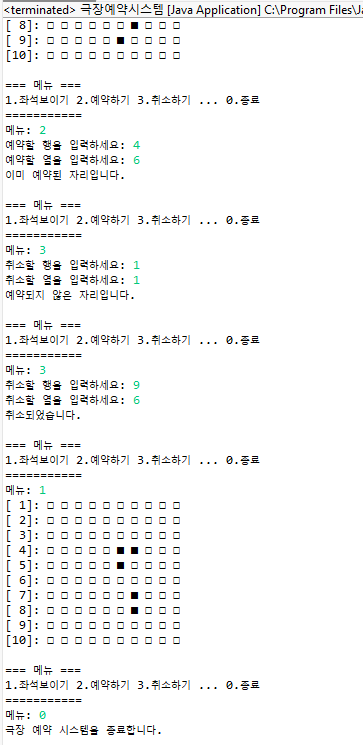
- 예약하기 -> 배열은 전달받아 예약할 좌석을 1로 변경한다. 좌석 범위 밖인 경우와 이미 예약된 좌석인 경우는 예외로 처리한다.
- 취소하기 -> 배열을 전달받아 취소할 좌석을 0으로 변경한다. 좌석 범위 밖인 경우와 예약되지 않은 좌석인 경우는 예외로 처리한다.
- 좌석보이기 -> 배열 값이 0인 경우 □을, 1인 경우 ■을 출력하여 좌석을 표시한다.
- 좌석 번호를 입력받는 예약하기와 취소하기는 각 번호-1을 해서 인덱스로 변환해주어야 한다. 반대로 좌석 번호를 출력하는 좌석보이기는 인덱스를 좌석 번호로 변환하기 위해 +1을 해준다.
- 메인 메소드는 while 루프와 메소드 호출으로 가독성 있게 구현한다.
소감: 11x11짜리 배열을 만들어 인덱스 1~10을 활용해도 편리할 것 같다.
마이빌딩
🏢 실습 목표: 이차원 배열(비정방형) 활용, 배열+조건문+반복문 응용
- N개의 층마다 크기가 다른 M개의 방이 있는 건물을 만든다.
- 입주, 퇴실, 구조 변경 기능을 구현한다.
- 기본 배열은 0으로 초기화하고, 이후 입주 인원을 저장한다.
- 극장예약시스템과 마찬가지로 인덱스는 0~n-1, 출력할 건물 번호는 1~n이며 범위에 유의한다.
- 구조를 변경할 경우 기존 입주자가 있는지 확인한다.
package week4;

import java.util.Scanner;
import java.util.Random;

public class MyBuilding {
	static Scanner input = new Scanner(System.in);

	public static void 메뉴보이기() {
		System.out.println();
		System.out.println("=== !! Welcome to 마이빌딩 !! ===");
		System.out.println("1.빌딩만들기 2.입주하기 3.퇴실하기 4.층리모델링 5.방리모델링 6.빌딩현황보기 7.랜덤입주이벤트 0.종료");
		System.out.println("==============================");
	}

	public static int [][] 빌딩만들기(int [][] ar) { // 새로 할당하는 경우 배열을 리턴해야 함
		System.out.print("층 개수를 입력하세요: ");
		int row=input.nextInt();
		ar = new int[row][];

		for(int i=0; i<row; i++) {
			System.out.printf("%d층의 방 개수를 입력하세요: ", i+1);
			int col=input.nextInt();
			ar[i]=new int[col];
			for(int j=0; j<col; j++) ar[i][j]=0; // 초기화
		}
		return ar;
	}

	public static void 입주하기(int [][] ar) {
		System.out.print("입주할 층을 입력하세요: ");
		int row=input.nextInt();
		System.out.print("입주할 방 번호를 입력하세요: ");
		int col=input.nextInt();

		// 범위 체크
		if(row<1 || row>ar.length || col<1 || col>ar[row-1].length) {
			System.out.println("존재하지 않는 방입니다.");
			return;
		}
		if(ar[row-1][col-1]==0) {
			System.out.print("입주할 인원을 입력하세요: ");
			int num=input.nextInt();
			ar[row-1][col-1]=num;
			System.out.printf(">> %d층 %d호실에 %d명이 입주했습니다.", row, col, num);
		}
		else System.out.println("이미 세입자가 있습니다.");
	}

	public static void 퇴실하기(int [][] ar) {
		System.out.print("퇴실할 층을 입력하세요: ");
		int row=input.nextInt();
		System.out.print("퇴실할 방 번호를 입력하세요: ");
		int col=input.nextInt();

		// 범위 체크
		if(row<1 || row>ar.length || col<1 || col>ar[row-1].length) {
			System.out.println("존재하지 않는 방입니다.");
			return;
		}
		if(ar[row-1][col-1]==0) {
			System.out.println("세입자가 없습니다.");
		}
		else {
			int num=ar[row-1][col-1];
			ar[row-1][col-1]=0;
			System.out.printf(">> %d층 %d호실에 %d명이 퇴실했습니다.", row, col, num);
		}
	}

	public static int [][] 층리모델링(int [][] ar) {
		System.out.print("변경할 층 수를 입력하세요: ");
		int row=input.nextInt();

		if(row>0) { // 층 추가
			int [][] newAr = new int[ar.length+row][];
			for(int i=0; i<newAr.length; i++) {
				if(i<ar.length) {
					newAr[i]=ar[i];
				}
				else {
					System.out.printf("%d층의 방 개수를 입력하세요: ", i+1);
					int col=input.nextInt();
					newAr[i]=new int[col];
					for(int j=0; j<col; j++) newAr[i][j]=0;
				}
			}
			return newAr;
		}
		else if(row<0) { // 층 삭제
			int cnt=0; // 입주자 있는지 확인
			for(int i=ar.length-1; i>ar.length-row-1; i--) {
				for(int j=0; j<ar[i].length; j++) {
					cnt+=ar[i][j];
					if(cnt!=0) break;
				}
				if(cnt!=0) break;
			}

			if(cnt==0) { // 삭제 가능
				int [][] newAr = new int[ar.length-row][]; // 남은 층 복제
				for(int i=0; i<newAr.length; i++) {
					newAr[i]=ar[i];
				}
				return newAr;
			}
			else {
				System.out.println("입주자가 있으므로 변경이 불가능합니다.");
				return ar;
			}
		}

		return ar; // row==0
	}

	public static void 방리모델링(int [][] ar) {
		System.out.print("변경할 층 수를 입력하세요: ");
		int row=input.nextInt();
		System.out.print("변경할 방 수를 입력하세요: ");
		int col=input.nextInt();

		if(col>0) { // 방 추가
			int [] temp = new int[ar[row-1].length+col];
			for(int i=0; i<temp.length; i++) {
				if(i<ar[row-1].length) temp[i]=ar[row-1][i]; // 입주자 그대로
				else temp[i]=0; // 추가한 방
			}
			ar[row-1]=temp;
			return;
		}
		else if(col<0) { // 방 삭제
			int cnt=0; // 입주자 있는지 확인
			for(int i=0; i<ar[row-1].length; i++) {
				cnt+=ar[row-1][i];
				if(cnt!=0) break;
			}

			if(cnt==0) { // 삭제 가능
				int [] temp = new int[ar[row-1].length+col];
				for(int i=0; i<temp.length; i++) {
					temp[i]=ar[row-1][i];
				}
				ar[row-1]=temp;
				return;
			}
			else {
				System.out.println("입주자가 있으므로 변경이 불가능합니다.");
				return;
			}
		}
		return;
	}

	public static void 빌딩현황보기(int [][] ar) {
		System.out.println("=== 빌딩 현황(입주인원) ===");
		for(int i=0; i<ar.length; i++) {
			System.out.printf("%d층: ", i+1);
			for(int j=0; j<ar[i].length; j++)
				System.out.printf("[%d]", ar[i][j]);
			System.out.println();
		}
		System.out.println("======================");
	}

	public static void 랜덤입주이벤트(int [][] ar) {
		Random r = new Random();
		int rand = r.nextInt(2);
		if(rand==1) {
			while(true) {
				int row = r.nextInt(ar.length);
				if(ar[row].length==0) continue; // 방 없음

				int col = r.nextInt(ar[row].length);
				if(ar[row][col]!=0) continue; // 입주자가 있는 방

				int num = r.nextInt(9)+1; // 1~9
				ar[row][col]=num;
				System.out.printf("오늘은 %d층 %d호실에 %d명이 새로 입주했습니다.\n", row+1, col+1, num);
				return;
			}
		}
		else System.out.println("오늘은 입주한 사람이 없습니다.");
	}

	public static void main(String[] args) {
		int [][] building = null;

		while(true) {
			메뉴보이기();
			int menu=input.nextInt();

			if(menu==1) {
				if(building==null) building = 빌딩만들기(building);
				else System.out.println("이미 빌딩이 존재합니다.");
			}
			else if(menu==2) 입주하기(building);
			else if(menu==3) 퇴실하기(building);
			else if(menu==4) building = 층리모델링(building);
			else if(menu==5) 방리모델링(building);
			else if(menu==6) 빌딩현황보기(building);
			else if(menu==7) 랜덤입주이벤트(building);
			else if(menu==0) return;
			else System.out.println("올바른 메뉴를 입력하세요.");
		}
	}
}
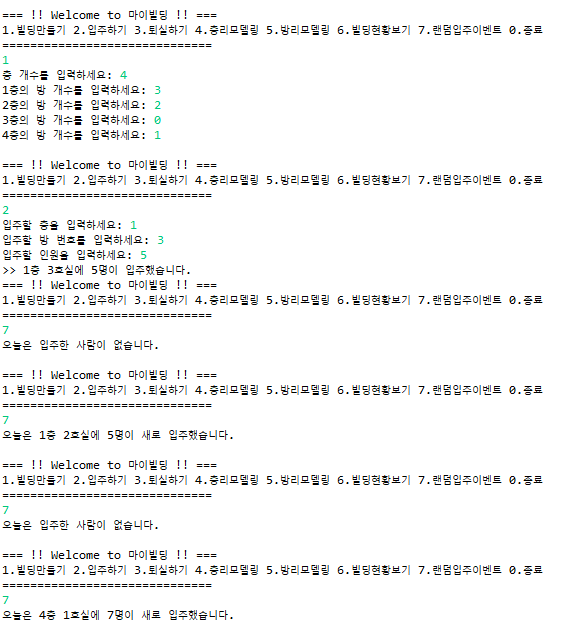
- 빌딩만들기 -> 메소드에서 새로 배열 공간을 할당하는 경우 배열을 다시 리턴해주어야 메인 메소드에 있는 배열에도 적용된다. 리턴하지 않으면 빌딩현황보기에서 오류가 발생한다.
- 입주하기, 퇴실하기 -> 배열 인덱스에 접근하기 전 범위를 확인해야 한다. 처음에 col>ar[row].length로 해서 오류가 있었는데, 인덱스는 row-1으로 설정해주어야 한다.
- if문으로 케이스를 나눌 수 있고, return으로 메소드를 바로 빠져나갈 수 있다.
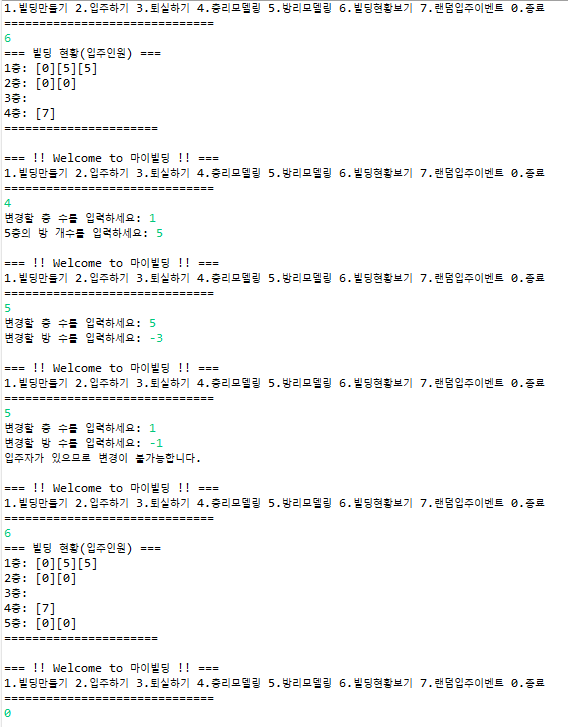
- 층리모델링 -> 변경할 층 수가 양수인 경우와 음수인 경우로 나눈다. 양수(층 추가)이면 새 배열을 만들어 기존 배열을 복사+새 층을 입력받으면 된다. 음수(층 삭제)이면 삭제할 층에 입주자가 있는지 확인한 후 입주자가 없다면 삭제된 배열을 만들어 리턴한다.
- 방리모델링 -> 층리모델링과 같은 방식으로 구현했다. 각 층(일차원 배열)만 탐색하면 돼서 층리모델링보다 코드가 단순하다. ar은 이차원 배열, ar[i]와 temp는 일차원 배열이다.
- 랜덤입주이벤트 -> 정렬하기 실습에서 사용했던 random을 다시 사용했다. 1, 0 50% 확률로 입주 이벤트가 발생하도록 했다. 방 개수가 없는 층에 접근하니 오류가 나서 방이 없는 경우를 continue로 처리하였다. num=r.nextInt(10)으로 입력했더니 0명이 입주하는 경우가 생겨서 (9)+1로 변경했다.
- 메인 메소드에서 0이면 종료하는 코드를 빼먹어서 무한 반복이 되었다. while(true)를 사용할 때는 꼭 탈출문을 만들어야 한다.
소감: 랜덤입주이벤트에서 입주하기 메소드를 호출하려고 했었는데, 인자와 메인 메소드를 수정하다보니 더 복잡해져서 랜덤입주이벤트 안에 새로 작성하였다. 입주하기 메소드를 더 작게 나누면 가능하겠지만 깔끔하지 않아 보인다. 어디까지 메소드를 분리할지가 애매한 것 같다.
이미지 회전
📷 실습 목표: 이차원 배열 좌표 변환(인덱스 이해)
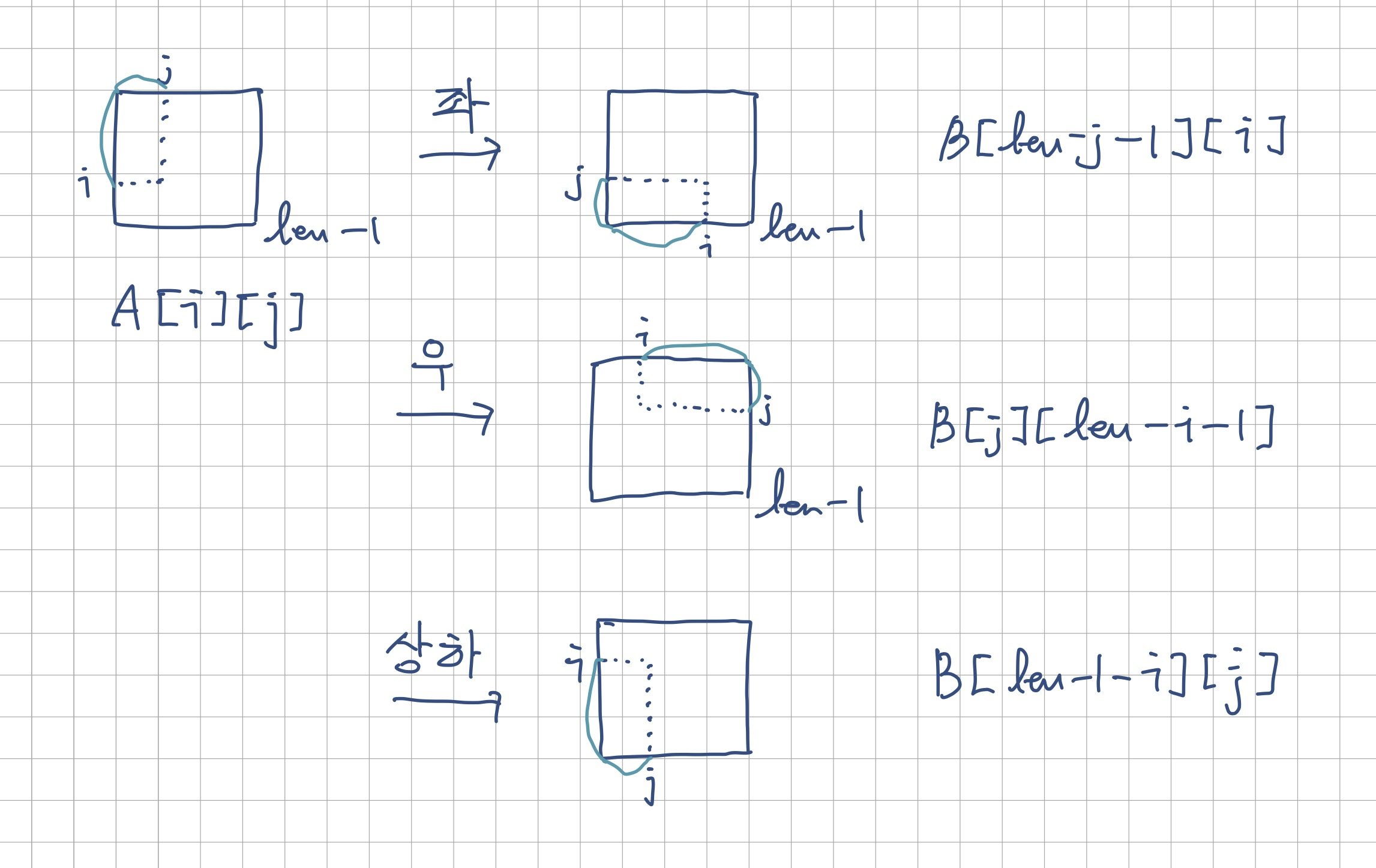
- 이차원 배열의 좌표 변환을 이용하여 이미지를 좌, 우, 상하 회전시킨다.
- 좌표 변환 규칙을 파악하여 인덱스를 설정한다.
package week4;

public class RotateImage {

	public static int [][] rotateLeft(int [][] A) {
		int [][] B = new int[A.length][A[0].length];
		for(int i=0; i<A.length; i++) {
			for(int j=0; j<A[i].length; j++) {
				B[A.length-j-1][i] = A[i][j];
			}
		}
		return B;
	}

	public static int [][] rotateRight(int [][] A) {
		int [][] B = new int[A.length][A[0].length];
		for(int i=0; i<A.length; i++) {
			for(int j=0; j<A[i].length; j++) {
				B[j][A.length-i-1] = A[i][j];
			}
		}
		return B;
	}

	public static int [][] flipDown(int [][] A) {
		int [][] B = new int[A.length][A[0].length];
		for(int i=0; i<A.length; i++) {
			for(int j=0; j<A[i].length; j++) {
				B[A.length-i-1][j] = A[i][j];
			}
		}
		return B;
	}

	public static void showImage(int [][] img) {
		for(int i=0; i<img.length; i++) {
			for(int j=0; j<img[i].length; j++) {
				if(img[i][j]==1) System.out.print("●");
				else System.out.print("○");
			}
			System.out.println();
		}
		System.out.println();
		System.out.println();
	}
	public static void main(String[] args) {
		//스마일배열
		int [][] smile = {
		{ 0 , 0 , 0 , 0 , 0 , 0 , 0 , 0 , 0 , 0 , 0 , 0 , 0 , 0 , 0 } ,
		{ 0 , 0 , 0 , 0 , 0 , 0 , 0 , 0 , 0 , 0 , 0 , 0 , 0 , 0 , 0 } ,
		{ 0 , 0 , 1 , 1 , 1 , 1 , 0 , 0 , 0 , 1 , 1 , 1 , 1 , 0 , 0 } ,
		{ 0 , 1 , 0 , 1 , 0 , 0 , 1 , 0 , 1 , 0 , 1 , 0 , 0 , 1 , 0 } ,
		{ 0 , 1 , 0 , 1 , 0 , 0 , 1 , 0 , 1 , 0 , 1 , 0 , 0 , 1 , 0 } ,
		{ 0 , 0 , 0 , 0 , 0 , 0 , 1 , 0 , 0 , 0 , 0 , 0 , 0 , 0 , 0 } ,
		{ 0 , 0 , 0 , 0 , 0 , 0 , 1 , 0 , 0 , 0 , 0 , 0 , 0 , 0 , 0 } ,
		{ 0 , 0 , 0 , 0 , 0 , 0 , 1 , 0 , 0 , 0 , 0 , 0 , 0 , 0 , 0 } ,
		{ 0 , 0 , 1 , 0 , 0 , 0 , 1 , 0 , 0 , 0 , 0 , 0 , 1 , 0 , 0 } ,
		{ 0 , 0 , 1 , 0 , 0 , 0 , 1 , 1 , 1 , 0 , 0 , 0 , 1 , 0 , 0 } ,
		{ 0 , 0 , 1 , 0 , 0 , 0 , 0 , 0 , 0 , 0 , 0 , 0 , 1 , 0 , 0 } ,
		{ 0 , 0 , 0 , 1 , 0 , 0 , 0 , 0 , 0 , 0 , 0 , 1 , 0 , 0 , 0 } ,
		{ 0 , 0 , 0 , 0 , 1 , 0 , 0 , 0 , 0 , 0 , 1 , 0 , 0 , 0 , 0 } ,
		{ 0 , 0 , 0 , 0 , 0 , 1 , 1 , 1 , 1 , 1 , 0 , 0 , 0 , 0 , 0 } ,
		{ 0 , 0 , 0 , 0 , 0 , 0 , 0 , 0 , 0 , 0 , 0 , 0 , 0 , 0 , 0 }
		};

		//하트배열
		int [][] heart = {
		{0,0,1,1,0,0,0,0,0,1,1,0,0 } ,
		{0, 1,0,0,1,0,0,0,1,0,0,1,0 } ,
		{1,0,0,0,0,1,0,1,0,0,0,0,1 } ,
		{1,0,0,0,0,0,1,0,0,0,0,0,1 } ,
		{1,0,0,0,0,0,0,0,0,0,0,0,1 } ,
		{1,0,0,0,0,0,0,0,0,0,0,0,1 } ,
		{1,0,0,0,0,0,0,0,0,0,0,0,1 } ,
		{0,1,0,0,0,0,0,0,0,0,0,1,0 } ,
		{0,0,1,0,0,0,0,0,0,0,1,0,0 } ,
		{0,0,0,1,0,0,0,0,0,1,0,0,0 } ,
		{0,0,0,0,1,0,0,0,1,0,0,0,0 } ,
		{0,0,0,0,0,1,0,1,0,0,0,0,0 } ,
		{0,0,0,0,0,0,1,0,0,0,0,0,0 }
		};

		showImage(smile);
		showImage(rotateLeft(smile));
		showImage(rotateRight(smile));

		showImage(heart);
		showImage(flipDown(heart));
	}

}
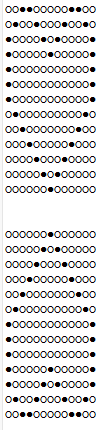
- 원본 배열을 메소드로 전달 -> 메소드에서 회전 후 배열 생성 -> 규칙에 따라 새 배열 채우기 -> 새 배열 리턴
- 회전 규칙
소감: 메소드 마지막줄에서 배열 리턴 대신 A=B;를 하니까 원본 배열에 반영이 안되었다. 메소드에서의 배열을 더 자세히 공부해야 할 것 같다.