해시테이블
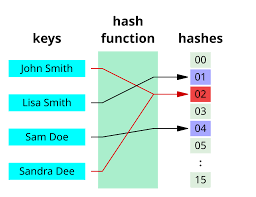
해시함수(Hash Function)
- 임의의 길이의 데이터를 고정된 길이의 데이터로 매핑하는 함수
- 해시 함수 특성
- 압축성 : 다양한 가변 길이의 입력에 대해 고정된 크기의 결과값을 반환하는 성질
- 효율성 : 어떤 입력 값에 대해서도 많은 자원과 시간이 소요되지 않고 처리되는 성질
- 저항성 : 결과값을 바탕으로 입력 값을 찾는 것이 불가능한 성질
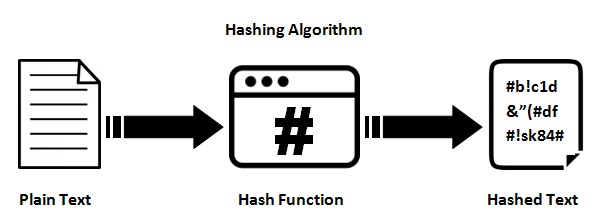
해시테이블(Hash Table)
- Hash 함수를 사용하여 평균 O(1) 시간 복잡도로 특정 값을 신속하게 찾는 자료구조
- 충돌(Collision) 해결 방법
- 해시 함수 변경 : 더 큰 숫자의 공간과 Modulat 산술 값을 이용해 충돌 최소화
- 자료 구조 확장 : Open Addressing Method (선형 조사법, 이중해시), Close Adreesing Method(체이닝)
- 구현 메서드(Method)
// 배열에 대한 크기 지정
const HASH_SIZE = 37;

// Element() : Key, Value 저장을 위한 생성자
function Element(key, value) {
  this.key = key;
  this.value = value;
}

// HashTable() : 생성자
function HashTable() {
  this.table = new Array(HASH_SIZE);
  this.length = 0;
}

// hashCode() : 해시 함수
HashTable.prototype.hashCode = function (key) {
  let hash = 0;
  for (let i = 0; i < key.length; i++) {
    // 누적 저장
    hash += key.charCodeAt(i);
  }

  return hash % HASH_SIZE; // 37이내의 숫자로 변환
};

let ht = new HashTable();
console.log(ht);

console.log(ht.hashCode("Ana"));
console.log(ht.hashCode("Sue"));
console.log(ht.hashCode("Paul"));

------------------------------------------------------------------------
OUTPUT
HashTable { table: [ <37 empty items> ], length: 0 }
13
5
32- 객체 초기화 :
HashTable.clear() - 객체 크기 반환 :
HashTable.size() - 전체 데이터 반환 :
HashTable.getBuffer() - 전체 데이터 출력 :
HashTable.print()
// 배열에 대한 크기 지정
const HASH_SIZE = 37;

// Element() : Key, Value 저장을 위한 생성자
function Element(key, value) {
  this.key = key;
  this.value = value;
}

// HashTable() : 생성자
function HashTable() {
  this.table = new Array(HASH_SIZE);
  this.length = 0;
}

// hashCode() : 해시 함수
HashTable.prototype.hashCode = function (key) {
  let hash = 0;
  for (let i = 0; i < key.length; i++) {
    // 누적 저장
    hash += key.charCodeAt(i);
  }

  return hash % HASH_SIZE; // 인덱스 값으로 사용
};

// clear() : 초기화
HashTable.prototype.clear = function () {
  this.table = new Array(HASH_SIZE);
  this.length = 0;
};

// size() : 크기 변환
HashTable.prototype.size = function () {
  return this.length;
};

// getBuffer() : 데이터 셋 반환
HashTable.prototype.getBuffer = function () {
  let array = [];
  for (let i = 0; i < this.table.length; i++) {
    if (this.table[i]) {
      array.push(this.table[i]);
    }
  }

  return array;
};

// print() : 데이터 셋 출력
HashTable.prototype.print = function () {
  for (let i = 0; i < this.table.length; i++) {
    if (this.table[i]) {
      console.log(i + " -> " + this.table[i].key + " : " + this.table[i].value);
    }
  }
};

let ht = new HashTable();

ht.put("Ana", 172);
ht.put("Sue", 163);
ht.put("Paul", 190);

console.log("");
ht.print();
console.log(ht.getBuffer());

console.log(ht.size());

ht.clear();
console.log(ht);
------------------------------------------------------------------------
OUTPUT
key : Ana -> index : 13
key : Sue -> index : 5
key : Paul -> index : 32

5 -> Sue : 163
13 -> Ana : 172
32 -> Paul : 190
[
  Element { key: 'Sue', value: 163 },
  Element { key: 'Ana', value: 172 },
  Element { key: 'Paul', value: 190 }
]
3
HashTable { table: [ <37 empty items> ], length: 0 }
- 데이터 추가 :
HashTable.put() - 데이터 삭제 :
HashTable.remove() - 데이터 반환 :
HashTable.get()
// 배열에 대한 크기 지정
const HASH_SIZE = 37;

// Element() : Key, Value 저장을 위한 생성자
function Element(key, value) {
  this.key = key;
  this.value = value;
}

// HashTable() : 생성자
function HashTable() {
  this.table = new Array(HASH_SIZE);
  this.length = 0;
}

// hashCode() : 해시 함수
HashTable.prototype.hashCode = function (key) {
  let hash = 0;
  for (let i = 0; i < key.length; i++) {
    // 누적 저장
    hash += key.charCodeAt(i);
  }

  return hash % HASH_SIZE; // 인덱스 값으로 사용
};

// put() : 데이터 추가
HashTable.prototype.put = function (key, value) {
  let index = this.hashCode(key);
  console.log(`key : ${key} -> index : ${index}`);

  // 추가하려는 인덱스에 값이 있을 경우
  if (this.table[index] !== undefined) {
    return false;
  }

  // 값 추가
  this.table[index] = new Element(key, value);
  this.length++;

  return true;
};

// get() : 데이터 조회
HashTable.prototype.get = function (key) {
  return this.table[this.hashCode(key)];
};

// remove() : 데이터 삭제
HashTable.prototype.remove = function (key) {
  let element = this.table[this.hashCode(key)];

  // 값이 있을 경우 삭제
  if (element !== undefined) {
    delete this.table[this.hashCode(key)];
    this.length--;
  }

  return element;
};

let ht = new HashTable();

ht.put("Ana", 172);
ht.put("Sue", 163);
ht.put("Paul", 190);

console.log(ht);

console.log(ht.get("Paul"));
console.log(ht.remove("Paul"));

console.log(ht.get("Paul"));
console.log(ht.remove("Paul"));

console.log(ht);

------------------------------------------------------------------------
OUTPUT
key : Ana -> index : 13
key : Sue -> index : 5
key : Paul -> index : 32 → 각자 해당 인덱스 위치로 이동

HashTable {
  table: [
    <5 empty items>,
    Element { key: 'Sue', value: 163 },
    <7 empty items>,
    Element { key: 'Ana', value: 172 },
    <18 empty items>,
    Element { key: 'Paul', value: 190 },
    <4 empty items>
  ],
  length: 3
}

Element { key: 'Paul', value: 190 }
Element { key: 'Paul', value: 190 }

undefined → Paul 을 지웠으니 undefined로 출력되는게 맞다.
undefined → 지울 Paul이 없으니 undefined로 출력되는게 맞다.

HashTable {
  table: [
    <5 empty items>,
    Element { key: 'Sue', value: 163 },
    <7 empty items>,
    Element { key: 'Ana', value: 172 },
    <23 empty items>
  ],
  length: 2
}
충돌 문제(use djb2)
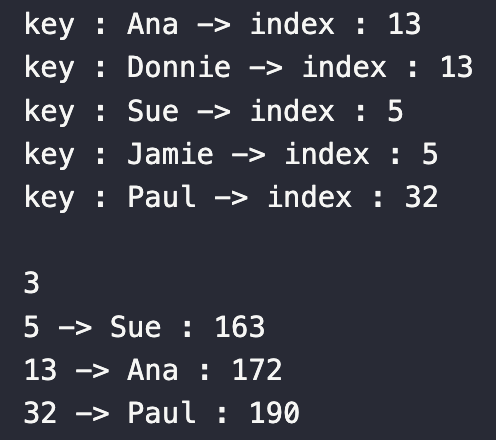
인덱스 값이 중복되어 충돌 발생 → djb2 코드 사용하여 해결
// djb2 hash size
const HASH_SIZE = 1013;

// Element() : Key, Value 저장을 위한 생성자
function Element(key, value) {
  this.key = key;
  this.value = value;
}

// HashTable() : 생성자
function HashTable() {
  this.table = new Array(HASH_SIZE);
  this.length = 0;
}

// hashCode() : 해시 함수
HashTable.prototype.hashCode = function (key) {
  // djb2 hash function
  let hash = 5381; // seed
  for (let i = 0; i < key.length; i++) {
    // 누적 저장
    hash = hash * 33 + key.charCodeAt(i);
  }

  return hash % HASH_SIZE; // 인덱스 값으로 사용
};

let ht = new HashTable();

ht.put("Ana", 172);
ht.put("Donnie", 183);
ht.put("Sue", 163);
ht.put("Jamie", 168);
ht.put("Paul", 190);

console.log("");
console.log(ht.size());
ht.print();

------------------------------------------------------------------------
OUTPUT
key : Ana -> index : 925
key : Donnie -> index : 278
key : Sue -> index : 502
key : Jamie -> index : 962
key : Paul -> index : 54

5
54 -> Paul : 190
278 -> Donnie : 183
502 -> Sue : 163
925 -> Ana : 172
962 -> Jamie : 168
:)