
Torch Serve 란?
TorchServe is a performant, flexible and easy to use tool for serving PyTorch eager mode and torschripted models.
간단히 정리하면 좀 더 쉽게 Pytorch 모델을 서빙하기 위한 Tool 이라고 보면 되겠다.
그 동안 모델 서빙을 위해서는 Flask 를 이용해왔는데, 뭔가 더 쉽다고 하니 어디 한번 찍먹 해 볼까 하는 생각이 들어 시도해 보았다.
먼저 Torch Serve의 모델 구조는 아래와 같다.
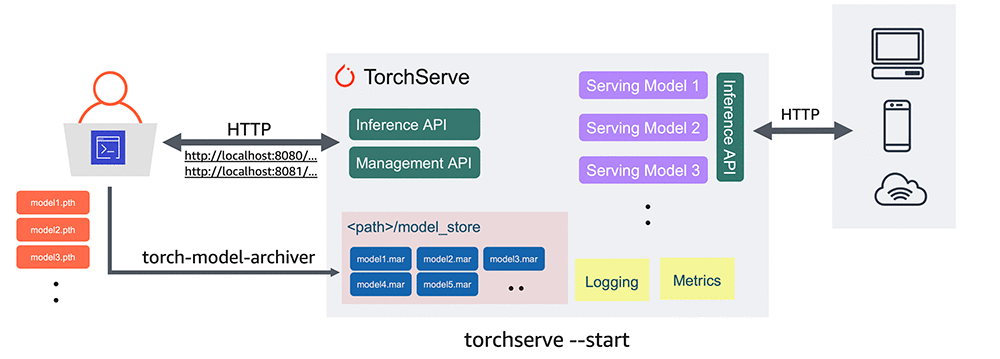
Deploying PyTorch models for inference at scale using TorchServe
사용자는 모델을 mar 형태로 저장해두고 HTTP 방식의 API 요청이 들어오면 각 모델이 추론 결과를 출력해 준다.
이러한 mar 모델을 만들기 위해서는 먼저 Handler를 작성해 주어야 하고, 생성된 모델을 TorchServe에 등록해 주어야 하는 과정을 거친다.
내가 TorchServe를 이용해 Model 서빙을 해 본 경험을 기반으로 서빙을 위해 필요한 과정을 정리하고자 한다.
Pytorch 공식 문서와 구글링을 통해 얻은 지식에 내 경험을 짬뽕해 만든 야매 매뉴얼이므로 착한 개발자는 공식 문서 기반으로 올바른 프로세스를 따르도록 하자.
1. Handler 작성
Handler는 모델이 요청이 들어왔을 때 어떤 작업을 해 줘야 할지 프로세스를 지정해 주는 작업이다.
TorchServe에서 BaseHandler를 상속받아 작성되며, 다음 함수들이 반드시 포함되어야 한다.
- initialize ()
- preprocess ()
- inference ()
- postprocess ()
1-1 initialize()
1-1 먼저 initialize()는 모델의 경로, 사용 GPU 등 속성을 정리해 주는 작업을 진행한다.
아래는 공식 문서에서 소개하는 기본 handler 중 Text Classification에 사용되는 TextHandler의 initialize() 함수이다.
 def initialize(self, context):
        """
        Loads the model and Initializes the necessary artifacts
        """
        super().initialize(context)
        self.initialized = False
        source_vocab = (
            self.manifest["model"]["sourceVocab"]
            if "sourceVocab" in self.manifest["model"]
            else None
        )
        if source_vocab:
            # Backward compatibility
            self.source_vocab = torch.load(source_vocab)
        else:
            self.source_vocab = torch.load(self.get_source_vocab_path(context))
        # Captum initialization
        self.lig = LayerIntegratedGradients(self.model, self.model.embedding)
        self.initialized = True
요건 내가 작성한 initialize() 함수이다.
    def initialize(self, context):
        # load the model
        self.manifest = context.manifest
        properties = context.system_properties
        model_dir = properties.get("model_dir")
        #self.device = torch.device("cuda" if torch.cuda.is_available() else "cpu")
        self.device = "cuda:0"
        self.tokenizer = BertTokenizer.from_pretrained('모델명')

        serialized_file = self.manifest['model']['serializedFile']
        model_pt_path = Path(model_dir) / serialized_file
        if not model_pt_path.exists():
            raise RuntimeError("Missing the model.pt file")
        self.model = ItemLabelTagger.load_from_checkpoint(
            model_pt_path, n_classes=20, MODEL_NAME="모델명")
        self.model.to(self.device)
        self.model.eval()
        self.model.freeze()
        self.initialized = True
tokenizer, device를 결정하고 model을 불러와 device에 올리는 작업을 수행한다.
1-2 Preprocess
Preprocess는 입력받는 형식을 결정하고, 입력받은 데이터를 모델에 넣기 전, 모델이 받을 수 있는 형태로 변환하는 작업을 수행한다.
이 부분에서 조금 헤맸는데, 모델의 공식 예제에서 받는 data[0] 부분이 무엇인지 감이 안 왔다. (Backend를 잘 하시는 분은 금세 해결했을 것 같다.)
일단 공식 문서의 TextClassifier 를 보자
    def preprocess(self, data):
        """Normalizes the input text for PyTorch model using following basic cleanup operations :
            - remove html tags
            - lowercase all text
            - expand contractions [like I'd -> I would, don't -> do not]
            - remove accented characters
            - remove punctuations
        Converts the normalized text to tensor using the source_vocab.
        Args:
            data (str): The input data is in the form of a string
        Returns:
            (Tensor): Text Tensor is returned after perfoming the pre-processing operations
            (str): The raw input is also returned in this function
        """

        # Compat layer: normally the envelope should just return the data
        # directly, but older versions of Torchserve didn't have envelope.
        # Processing only the first input, not handling batch inference

        line = data[0]
        text = line.get("data") or line.get("body")
        # Decode text if not a str but bytes or bytearray
        if isinstance(text, (bytes, bytearray)):
            text = text.decode("utf-8")

        text = self._remove_html_tags(text)
        text = text.lower()
        text = self._expand_contractions(text)
        text = self._remove_accented_characters(text)
        text = self._remove_punctuation(text)
        text = self._tokenize(text)
        text_tensor = torch.as_tensor(
            [self.source_vocab[token] for token in ngrams_iterator(text, self.ngrams)],
            device=self.device,
        )
        return text_tensor, text
data[0] 라는 걸 받은 후에 이걸 처리하는 과정이다.
이 과정에서 저 data가 뭔지 알아내기 위해 고생을 좀 했는데, 먼저 TorchServe를 구동시키면 모든 내용은 logs/ts_log.log 에 저장이 된다.
이 때 log 를 분석해 저 data가 받는 값이 무엇인지 출력하면서 data의 정체를 파악했다.
data=[{body: ---}]
형태로 이루어진 리스트 값이었다!
결국 data[0]는 리스트의 첫번째 값이고, 그 값은 json 혹은 dict 형태로 이루어진 값이구나 라는 걸 깨달았는데, 알아채는데 힘이 걸린 이유는 구동을 시키는 것 부터가 문제였다는 점이다.
Handler 구성에 오류가 있으면 모델이 움직이지 않아서 Input 으로 받은게 뭔지 알수도 없는데, Model 이 오류 난걸 고치려면 Handler 수정-> Mar 생성-> Torchserve-Start 라는 3개 과정을 거치는데, 저 생성과 TorchServe Start 작업이 생각보다 시간이 걸려 헛발질을 많이 했다. (다시 말하지만 Backend 지식이 부족해 이렇다.)
내가 원하는건 csv 파일을 입력받아서 다시 csv 파일을 수정해서 저장하는 모델이였기 때문에 아래와 같이 작성했다.
  def preprocess(self, data):
        print(data)
        self.path = data[0]["body"]["data"]
        self.df = pd.read_csv(self.path)
        self.logger.debug(self.path)
        self.logger.debug(data)
        train_dataset = TitleDataset(self.df)
        train_dataloader = DataLoader(train_dataset, batch_size=32)

        return train_dataloader
이렇게 작성된 모델은 csv 패스를 입력받아 dataframe으로 불러오고 이걸 정의된 dataset으로 생성해 DataLoader 형태로 전달한다.
누구한테? ➡ inference() 한테.
1-3 inference()
inference()는 이름 그대로 추론 기능을 수행하며, torchServe 같은 경우 inference api 요청을 처리할 때 이 함수를 이용한다.
(그런데 추론 요청 api 주소는 predict이다. 🤔)
먼저 공식 Base Handelr 의 코드를 보자
    def inference(self, data, *args, **kwargs):
        """
        The Inference Function is used to make a prediction call on the given input request.
        The user needs to override the inference function to customize it.
        Args:
            data (Torch Tensor): A Torch Tensor is passed to make the Inference Request.
            The shape should match the model input shape.
        Returns:
            Torch Tensor : The Predicted Torch Tensor is returned in this function.
        """
        with torch.no_grad():
            marshalled_data = data.to(self.device)
            results = self.model(marshalled_data, *args, **kwargs)
        return results
data를 device에 올리고 모델로 예측한다. 끝.
다만 모델을 뭘 사용하느냐에 따라 결과가 달라진다.
내가 원하는 결과는 DataFrame 이었고, Input 값으로 Embedding 값이 들어가야 했기 때문에 아래와 같이 수정했다.
    def inference(self, train_dataloader):
        """
        The Inference Function is used to make a prediction call on the given input request.
        The user needs to override the inference function to customize it.
        Args:
            data (Torch Tensor): A Torch Tensor is passed to make the Inference Request.
            The shape should match the model input shape.
        Returns:
            Torch Tensor : The Predicted Torch Tensor is returned in this function.
        """

        result = []
        for step, batch in enumerate(train_dataloader):
            embeddings = self.tokenizer(
                batch,
                add_special_tokens=True,
                max_length=60,
                return_token_type_ids=False,
                padding="max_length",
                truncation=True,
                return_attention_mask=True,
                return_tensors='pt',
            )
            _, test_prediction = self.model(embeddings["input_ids"].to(
                self.device), embeddings["attention_mask"].to(self.device))
            for t in test_prediction:
                result.append(self.label_check(t))

        self.df["Category1"] = result
        return self.df
입력값으로 train_dataloader를 주는데, 이건 이름을 뭐로 붙여도 상관없고,
preprocess()에서 전달해 주는 값이다.
내 경우는 prprocess에서 train_dataloader를 생성해 주기 때문에 헷갈리지 않기 위해 이름을 통일했다.
이제 모델을 사용해 나온 결과를 후처리 해줘야 한다.
1-4 postprocess()
inference 결과는 list일 수도 있고, dict 일수도 있고, tensor일수도 있고.. 사용한 모델에 따라 달라진다.
사용자에게 서빙할 때는 사용자가 원하는 형태로 결과를 전달해 줘야 하기 때문에 이 작업을 postprocess에서 처리한다.
torchserve의 text_classifier 코드를 보자
    def postprocess(self, data):
        """
        The post process function converts the prediction response into a
           Torchserve compatible format
        Args:
            data (Torch Tensor): The data parameter comes from the prediction output
            output_explain (None): Defaults to None.
        Returns:
            (list): Returns the response containing the predictions and explanations
                    (if the Endpoint is hit).It takes the form of a list of dictionary.
        """
        data = F.softmax(data)
        data = data.tolist()
        return map_class_to_label(data, self.mapping)
map_class_to_label() 은 아마 리스트 값을 입력받아 라벨로 맵핑해주는 함수일 것이다.
즉 postprocess의 역할은 모델이 예측한 출력값을 사용자가 원하는 형태로 후처리 해주는 작업이다.
나같은 경우는 csv 파일 입력 -> 입력한 csv에 예측 컬럼 추가 -> csv 파일 저장을 원했는데,
따라서 postporcess()의 역할은 csv 파일 저장이다.
아래는 내 코드이다.
    def postprocess(self, inference_output):

        save_path = self.path[:-4]+"label1_result.csv"
        inference_output.to_csv(save_path)
        return "Finish Prediction"
self.path는 preprocess 에서 입력받은 csv 파일의 경로이다.
간단히 그 csv 파일의 예측 결과 이름을 붙여 다시 저장한다.
1-5 정리
정리해보면 handler는 initialize() -> 데이터 입력 (preprocess())-> 모델 추론 (inference()) -> 데이터 후처리 (postprocess) 의 과정으로 이루어진다.
흐름 자체가 복잡하지 않기 때문에 익숙해 진다면 보다 쉽게 모델 서빙이 가능해 질 것이다.
다만 공식 Tutorial이 jpg 파일을 입력받아 예측하는 모델만 보여주다 보니 input data의 형식을 바꿀 때, 어려운 부분이 있었는데, preprocess에서 data 입력 시 어떤 형식으로 입력받는지만 더 쉽게 판단할 수 있다면 더 쉽게 사용할 수 있을 것 같다.