struct ContentView: View {
	@State var showingSheet = false

    var body: some View {
    	Button(action: {
          _self.showingSheet = true
      }, label: {
          Image(systemName: "camera.circle.fill")
      })
      .actionSheet(isPresented: $showingSheet) {
          ActionSheet(
              title: Text("영수증을 어떻게 추가할까요?"),
                  buttons: [
                      .default(Text("앨범에서 가져오기")) {
                          imagePickerSource = .photoLibrary
                          showImagePicker = true
                      },
                      .default(Text("카메라로 촬영하기")) {
                          imagePickerSource = .camera
                          showImagePicker = true
                      },
                      .cancel(Text("취소"))
                  ]
          )
       }
    }
}- 기존 위와 같이 쓰던 actionSheet는 Deprecated되었으므로 confirmationdialog를 사용하여야 한다
nonisolated
func confirmationDialog<A, M, T>(
    _ titleKey: LocalizedStringKey,
    isPresented: Binding<Bool>,
    titleVisibility: Visibility = .automatic,
    presenting data: T?,
    @ViewBuilder actions: (T) -> A,
    @ViewBuilder message: (T) -> M
) -> some View where A : View, M : View- 기본구조는 다음과 같다
titleKey
대화 상자의 제목을 설명하는 현지화된 문자열에 대한 키입니다.
isPresented
대화 상자를 표시할지 여부를 결정하는 부울 값에 대한 바인딩입니다. 사용자가 대화 상자의 기본 작업 버튼을 누르거나 탭하면 시스템은 이 값을 로 설정하고 false대화 상자를 닫습니다.
titleVisibility
대화 상자 제목의 표시 여부입니다. 기본값은 .입니다 .Visibility.automatic
data
확인 대화 상자에 대한 선택적 진실 소스입니다. 시스템은 수정자의 클로저에 내용을 전달합니다. 이 데이터를 사용하여 시스템에서 사용자에게 표시하는 확인 대화 상자의 필드를 채웁니다.
actions
현재 사용 가능한 데이터를 바탕으로 대화 상자의 동작을 반환하는 뷰 빌더입니다.
message
현재 사용 가능한 데이터를 기반으로 대화에 대한 메시지를 반환하는 뷰 빌더입니다.
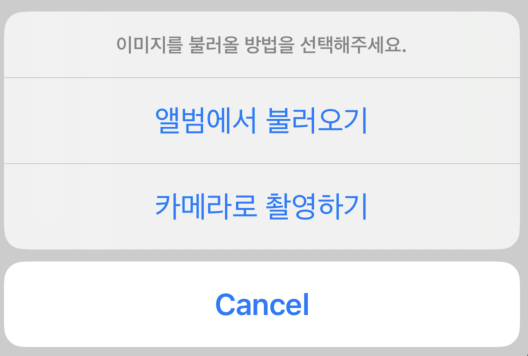
이제 위의 actionSheet와 같게 사용하면 다음과 같다
struct ContentView: View {
    @State private var isConfirming = false
    @State private var dialogDetail: FileDetails?

    var body: some View {
      Button(action: {
          dialogDetail = FileDetails(
              name: "앨범에서 불러오기", fileType: .png)
          isConfirming = true
      }, label: {
          Image(systemName: "camera.circle.fill")
      })
      .confirmationDialog(
          "제목",
          isPresented: $isConfirming,
          presenting: dialogDetail
      ) { detail in
          Button {
              // Handle import action.
          } label: {
              Text("앨범에서 불러오기")
          }
          Button {
              // Handle import action.
          } label: {
              Text("카메라로 촬영하기")
          }
          Button("Cancel", role: .cancel) {
              dialogDetail = nil
          }
      } message: { detail in
          Text(
              "이미지를 불러올 방법을 선택해주세요.")
         }
	}
}