
📌 배경
Tailwind CSS v4는 이전 버전과 달리 tailwind.config.js 파일 없이도,
CSS 파일 안에서 색상, 폰트, 유틸리티 등을 직접 정의할 수 있도록 개편되었습니다.
하지만 아직까지 많은 블로그나 튜토리얼, 심지어 ChatGPT조차도 v3 기준의 예시가 대부분이라
v4 방식이 필요했던 저에겐 큰 도움이 되지 않았습니다.
그래서 제가 프로젝트를 하며 직접 적용한 경험을 바탕으로, 실전에서 바로 쓸 수 있는 방법을 정리해봤습니다!!
🧩 1. TailwindCSS import
기존 v3에서는 아래와 같이 각각의 계층별로 따로 불러와야 했습니다.
@import "tailwindcss/base";
@import "tailwindcss/components";
@import "tailwindcss/utilities";
하지만 Tailwind v4부터는 한 줄로 import가 가능합니다.
@import "tailwindcss";저는 index.css (또는 global.css) 최상단에 이렇게 작성했습니다.
🎨 2. Custom Color 설정
대부분의 프로젝트에서는 디자이너가 제공한 디자인 시스템 컬러를 사용하게 되죠.
Tailwind에서 제공하는 기본 색상이 아닌 경우, @theme 안에 원하는 색상 변수를 등록해 사용할 수 있습니다.
@theme {
  --color-red: #FD7563;
  --color-green-100: #BBEFDA;
  --color-green-200: #52D38A;
  --color-green-300: #44D496;
}
기본 색상 값을 비워서 초기화하고 싶다면 아래와 같이 작성합니다.
@theme {
  --color-*: initial;
  ...
}
✅ 적용 예시
정의한 색상은 클래스명으로 바로 사용 가능합니다.
<p className={`text-red`}> 마이페이지 </p>👉 --color-red → text-red
Tailwind v4는 변수 기반 컬러를 자동으로 text-, bg- 등의 클래스로 변환해줍니다.

🖋️ 3. Custom Font 설정
폰트는 url로 가져오거나 직접 폰트 파일을 다운로드 받아 src/assets/font 폴더 안에 폰트 파일들을 넣는 방법이 있는데 저는 후자로 구현하였습니다.
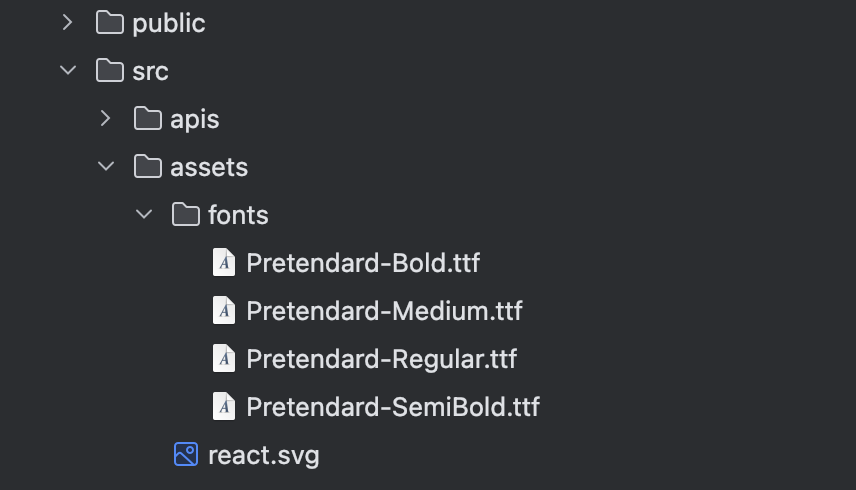
1) 폰트 파일 준비
저는 Pretendard의 Regular, Medium, SemiBold, Bold 버전을 사용했기 때문에 .ttf 파일 4개를 /src/assets/fonts 폴더에 넣었습니다.
💡 폰트 포맷은 여러 가지가 있으며, 웹에 가장 적합한 것은 woff2입니다. 다만 개발 초기에는 ttf만으로도 충분히 적용 가능합니다.
🔤 주요 폰트 포맷 종류
| 형식 | 확장자 | format() 값 | 설명 |
|---|---|---|---|
| TrueType | .ttf | 'truetype' | 오래된 표준, 대부분의 브라우저 지원 |
| OpenType | .otf | 'opentype' | 더 정교한 글꼴 기능 지원 |
| WOFF | .woff | 'woff' | 웹 전용으로 압축된 포맷, 많이 사용됨 |
| WOFF2 | .woff2 | 'woff2' | WOFF보다 더 높은 압축률, 최신 브라우저용 |
| Embedded OpenType | .eot | 'embedded-opentype' | 주로 구형 IE용 |
| SVG Fonts | .svg | 'svg' | iOS 옛날 버전에서만 사용, 현재는 거의 안 씀 |
2) 폰트 등록
이제 CSS에 @font-face를 통해 직접 폰트를 불러옵니다.
저는 아래처럼 index.css에 작성했습니다.
@font-face {
  font-family: 'PretendardRegular';
  font-style: normal;
  font-weight: 400;
  src: url('../src/assets/fonts/Pretendard-Regular.ttf') format('truetype');
}

@font-face {
  font-family: 'PretendardMedium';
  font-style: normal;
  font-weight: 500;
  src: url('../src/assets/fonts/Pretendard-Medium.ttf') format('truetype');
}

@font-face {
  font-family: 'PretendardSemiBold';
  font-style: normal;
  font-weight: 600;
  src: url('../src/assets/fonts/Pretendard-SemiBold.ttf') format('truetype');
}

@font-face {
  font-family: 'PretendardBold';
  font-style: normal;
  font-weight: 700;
  src: url('../src/assets/fonts/Pretendard-Bold.ttf') format('truetype');
}
✅ @font-face 속성 설명 정리
| 속성 | 설명 |
|---|---|
| font-family | 폰트의 이름을 정의하는 부분입니다. Tailwind나 CSS에서 이 이름으로 폰트를 참조하게 됩니다. 예: 'Pretendard' |
| font-style | 폰트의 스타일을 지정합니다. normal은 기본, italic은 기울어진 이탤릭체입니다. |
| font-weight | 폰트의 두께를 지정합니다. 보통 400(Regular), 500(Medium), 600(SemiBold), 700(Bold) 등이 사용됩니다. |
| src | 폰트 파일의 경로와 형식을 지정합니다. |
| format() | 폰트 파일의 형식을 명시합니다. 브라우저 최적화를 위해 작성하는 것이 좋습니다. 예: 'truetype', 'woff', 'woff2' 등 |
📌 참고: format()은 생략 가능하지만, 명시해주는 것이 브라우저 호환성과 성능에 더 좋습니다.
3) 폰트를 유틸리티 클래스로 등록
Tailwind v4에서는 @layer utilities 안에 커스텀 클래스를 정의할 수 있습니다.
@layer utilities {
  .font-head02-bold-20 {
    font-family: 'PretendardBold', sans-serif;
    font-size: 2rem;
    font-weight: 700;
    line-height: normal;
    letter-spacing: -0.6px;
  }

  .font-body01-regular-14 {
    font-family: 'PretendardRegular', sans-serif;
    font-size: 1.4rem;
    font-weight: 400;
    letter-spacing: -0.6px;
    line-height: normal;
  }
}
✅ 적용 예시
<header className={`flex justify-between font-head02-bold-20 p-4`}>
    <p onClick={goMyPage} className={`text-red`}>
      마이페이지
	</p>
	<p onClick={goLoginPage}>로그인</p>
</header>
결론
Tailwind v4에서는 더 이상 tailwind.config.js 없이도, CSS 파일만으로 색상과 폰트를 자유롭게 커스텀할 수 있습니다.
이 방식은 디자이너가 제공하는 시스템 디자인을 빠르게 반영하거나,프론트 단에서 손쉽게 테마 변경이 필요할 때도 매우 유용합니다.😊
✍️ 정리하면
| 항목 | 적용 방법 |
|---|---|
| Tailwind 불러오기 | @import "tailwindcss" 한 줄 |
| 색상 설정 | @theme { --color-* }로 설정, text-*, bg-* 클래스 사용 가능 |
| 폰트 불러오기 | @font-face로 직접 등록 (.ttf, .woff 등) |
| 폰트 유틸리티 | @layer utilities 안에 클래스 직접 정의 |