
Git squash & merge 실습 복기
😎 20250227 git squash & merge 과정을 복습해보자
1. goorm-practice/squash-test-repo clone
Desktop/frontend/exercise 폴더에 위 레포를 클론해오자.
git clone https://github.com/groom-practice/squash-test-repo.git2. branch 생성
git switch -c 최가은
git switch -c test-squash
코드라인 1번을 이용해 최가은 이라는 브랜치를 생성하고, 2번을 이용해 test-squash 라는 브랜치를 생성했다.
3. 변경사항 생성
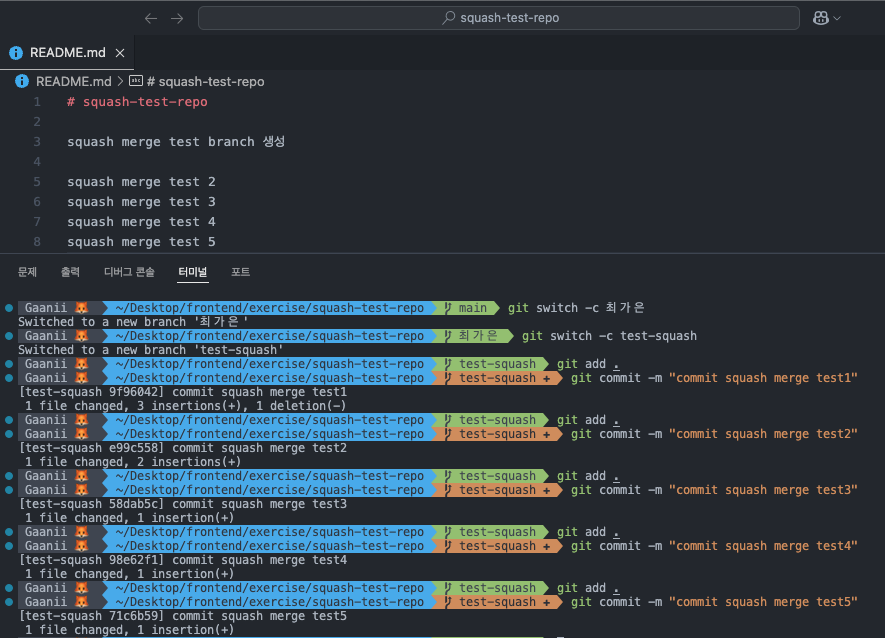
test-squash 브랜치에서 다섯개의 변경사항을 만들어 각각 commit 해줬다.
4. squash and merge 시작 !
git switch 최가은
git add .
git commit -m "최가은 브랜치서 커밋할거유 ~"
git merge --squash test-squash
위 코드를 따라 작성하면 충돌이 발생한다. 나는 “두 변경 사항 모두 수락”을 눌렀다.
이후 다시 add → commit→ push 해주기 !
이때 commit 메시지를 "squash merge 완료"라고 해줬다.
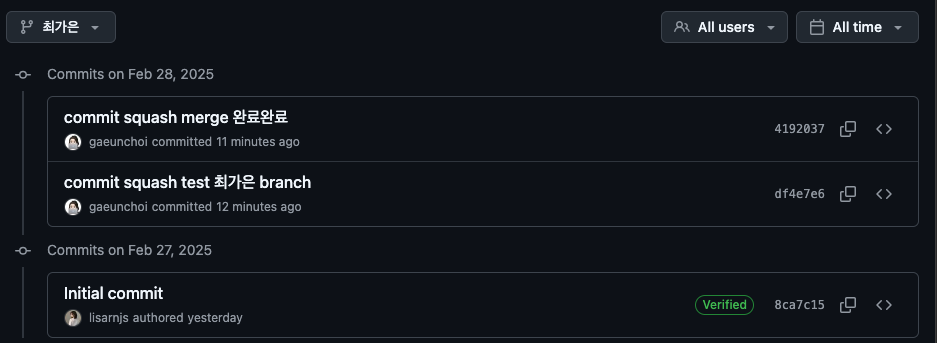
5개의 commit이 squash merge로 하나의 commit이 되는 모습을 볼 수 있다.
