
Chapter 1에서는 용어를 배운다!
📌 Chapter 1: introduction
🧐 Chapter goal
-
Get "feel," "big picture," introduction to terminology
- more depth, detail later in course
-
Approach:
- use
Internetas example
- use
Internet: 여러 가지로 부를 수 있다. 애칭?packet switching network= TCP/IP network= Internet
🧐 Overview/roadmap
What is the Internet?
What is a protocol?
Network edge: hosts, access, networkNetwork core: packet/circuit switching, internet structurePerformance: Loss, Delay, ThroughputProtocol layer, service models
Basix network security
Internet history
📌 What is the Internet?
🧐 What's the Internet: "nuts and bolts" view
👩🏻💻 Billions of connected computing devices:
hosts= end systems- running network
appsat Internet's "edge" <-L4(socket), L5
👩🏻💻 Communication links <- L1: Physical Layer, NIC(Network Interface Card)의 성능을 알아야
- fiber, copper, radio, satellite
- transmission rate:
bandwidth(bps) <- 내가 쓰는 Link의 capacity
같은 말, 단위는
bpstransmission rate= bandwidth= Link capacity이를 알아야 application을 생성해서 generate하거나 playing 할 때의 주고 받는 속도를 파악할 수 있다.
👩🏻💻 packet switches: forward packets(chunks of data)
routers(WAN) and (L2: Link Layer)switches(LAN)
L3 switch도 있다. Virtual LAN을 support하기 위해 사용된다. switch에 router의 기능을 넣은 것으로 생각하면 되는데, WAN으로 뻗어나가며 사용하는 router와는 당연히 다르다. 오로지 local에서만 사용할 수 있다.
👩🏻💻 Networks: collection of devices, routers, links: managed by an organization
organization: 소유주
ISP(Internet Service Provider)NSP(Network Service Provider)ISP는 서비스(소프트웨어)를 제공하고, NSP는 장비(인프라)를 제공한다고 보면 된다. 우리나라에서는 ISP = NSP다. ex) KT
👩🏻💻 Internet: "network of networks"
- Interconnected ISPs
👩🏻💻 protocols control sending, receiving of messages
- e.g., HTTPS(Web), streaming videon, Skype(L5)/, TCP(L4)/, IP(L3)/, WiFi, 4G, Ethernet(L2)
계층별로 다양한 software 모듈이 있고, 각각이 서로 inter
👩🏻💻 Internet standards <- L3 이상
- RFC: Request for comments <- IETF에서 processing 하는 문서(표준에 대해 정의한)
- IETF: Internet Engineering Task Force
IEEE(L2): 미국 표준ITU-T(L2): 유럽 표준
🧐 The Internet: a service view
👩🏻💻 infrastructure that provides services to applications:
- Web, VolP, email, games, e-commerce, social nets, ...
ingrastructure
HW, SW가 미리 갖추어진 것을 사자. 여기저기 흩어져있는 사용자와 어플리케이션을 어떻게 모을 수 있을까? 인터넷에 가입 시키면 된다.
👩🏻💻 provides programming interface to apps
- hooks that allow sending and receiving app programs to "connect" to Internet
- provides service options, analogous to postal service
programming interface
= socket interface(a set of rules)사용자는 실사용하는 어플리케이션 외에 core network에 대해서는 전혀 몰라도 된다. 물론 서비스 제공자는 socket을 알아야 서비스를 제공할 수 있다. application도 socket 하나는 알아야 된다는 말이다.
service options(3가지)
왜이리 느려
delay화면이 깨져
loss플레이가 안돼
throughput
🧐 "Fun" Internet-connected devices
👩🏻💻 5G는 무거워서 IOT를 못했다.
시사점: 새로운 서비스를 만들 떄는 하드웨어를 생각해야 한다.
이에 IOT를 support하기 위해서 LPWAN(Low Power Wide Area Network) 등이 등장했다.
📌 What is a protocol?
🧐 What's a protocol?
👩🏻💻 human protocols:
- Introductions
- specific messages sent
- specific actions taken when messages received, or other events
human protocols are
2-way handshake(1) A--Hi-->B(2) A<--Hi--B(1), (2)만 거치면 상호 소통 가능(통신할 준비 완료, Ready)
👩🏻💻 network protocols:
- machines rather than humans
- all communication activity in Internet governed by protocols
network protocols
3-way handshake(1) com--TCP connection request-->server(2) com<--TCP connection response--server(3) com--HTTP method + TCP ACK(piggy backed)-->serverserver가 ready 되었다는 것을 com이 받았는지 모르니까 하나 더 받아서 확인해야 함.
즉, com은 (1)을 보내고 (2)를 받아 ready 전달, server는 (2)를 보내고 (3)을 받아 ready 전달이라고 보면 된다.
👩🏻💻 protocols difine format, order of messages sent and received among network entities, and actions taken on message transmission, receipt
network entities
S/W modules at the same layer in remote machine같은 PC에 있는 것이 아니라 여기저기 떨어져 있다는 말. 바로 옆 기기끼리의 통신일수도 있고, end-to-end 통신(edge에 있는 두 소프트웨어)일수도 있다.
📌 Network edge: hosts, access, network
🧐 A closer look at Internet structure
👩🏻💻 Network edge:
- Hosts: clients and servers
- Servers: often in data centers
Servers
in early 2000,
server farm등장(on-premise: 인터넷이 아니라 내 지붕 밑에 두는 것)돈이 되겠는데 -> 이 서버들을 network로 묶어놔 보자! ->
data centers등장 =a network of servers
👩🏻💻 Access networks
- The network that physically connects and end system(host) to the first router(edge router) on a path from the end system(src node, sender) to any other distant end system(dest, receiver)
- wired, wireless communication links
Access networks
network 내에서 첫 번째로 만나는 edge router까지의 path를 말한다.
👩🏻💻 Network core:
- interconnected routers
- network of networks
WAN tech
packet switchingcircuit switching
🧐 Access networks
👩🏻💻 Q: How to connect end systems to edge router?
- residential access nets
- institutional access networks(school, company)
- mobile access networks(WiFi, 4G/5G)
👩🏻💻 What to look for:
- transmission rate(bits per second) of access network?
- shared or dedicated access among users?
🧐 Access network: digital subscriber line(DSL)
👩🏻💻 DSL : 오직 나만! 우리집만 쓰는 회선
- use
existingtelephone line to central office DSLAM- data over DSL phone line goes to Internet
- voice over DSL phone line goes to telephone net
- 3.5~16 Mbps dedicated upstream transmission rate
- 24~52 Mbps dedicated downstream transmission rate
(다운로드 속도가 훨씬 높다)
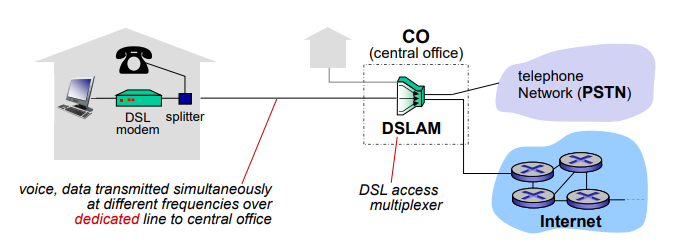
- CO(Central Office): 전화국의 첫 번째 단에 있는 muliplexer
- DSLAM에 이어진 line은 나 혼자 쓰는 line이다.(다른 집은 다른 line을 쓴다.)
- Line: voice, data transmitted simultaneously at different frequencies over dedicated line to central office
Dial-up access
PC 통신 - 56 kbpsDSL 이전에는 전화와 컴퓨터 통신이 line을 공유했기 때문에 동시에 사용할 수 없었다. DSL에는 voice(bidirectional), data(unidirectional 두 개)이 지나갈 수 있는 line이 총 세 개 있어서 동시 사용이 가능해졌다.
transmission rate
거리에 민감하다SLA(Service Level Agreement)에도 영향을 받는다ADSL 1.0 - 8 Mbps
ADSL 1.0 - 16 Mbps
VDSL - 52 Mbps
🧐 Access network: cable-based access
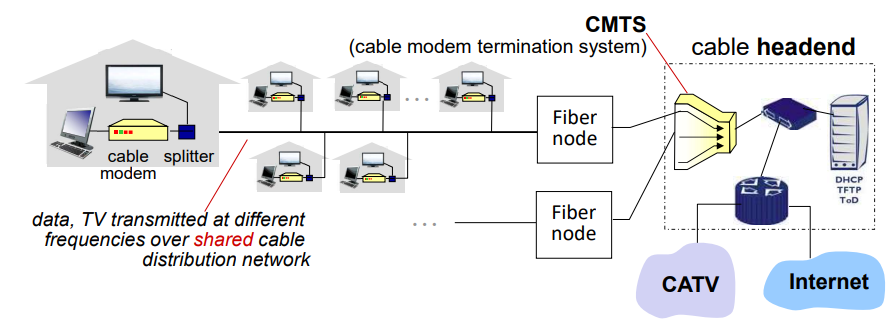
👩🏻💻 HFC: Hybrid Riber + Coax
- asymmetric: up to 40 Mbps ~ 1.2 Gbps downstream transmission rate, 30 ~ 100 Mbps upstream transmission rate
👩🏻💻 network of cable, fiber attaches homes to ISP router
- homes
share access networkto cable headend - unlike DSL, which has dedicated access to central office
🧐 Access network: fiber to the home(FTTH)
👩🏻💻 FTTH: Fiber To The Home
- Provides an optical fiber path from the CO directly to the home.
- Potentially provide Internet access rates in the gigabits per second range.
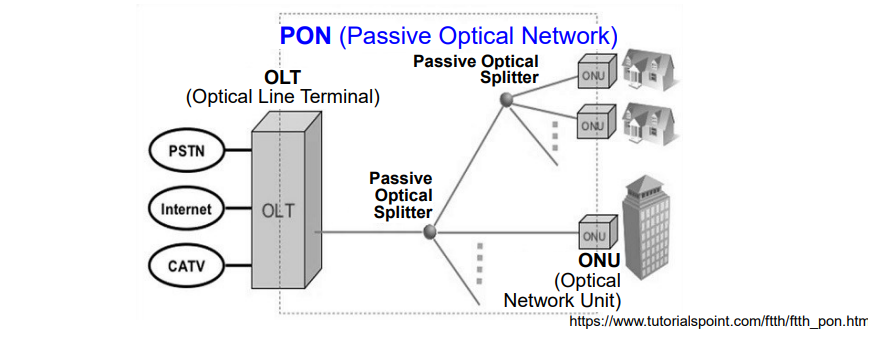
👩🏻💻 Two optical-distribution network(ODN) architecture
- Active Optical Network(AON) - switched Ethernet
- Passive Optical Network(PON) - passive Splitter
Fiber To The Building(FTTB, 광랜서비스)
광케이블은 쉽게 부서지기 때문에 사실상 집 안까지 연결하는 경우는 드물다. 보통은 아파트의 관리사무소나 아파트 동까지만 광케이블을 연결하고, 말단은 Ethernet LAN으로 연결한다.
Optical-distribution network(ODN)
- Passive Optical Network(PON): 전기를 안먹는다. 광케이블 익스텐션. Point-to-Multipoint로 연결되어 있다(shared). speed를 share하여 느리다. 하지만 관리를 안해도 된다. 전기가 끊어져도 상관없고 땅에 묻어도 상관없다.
- Active Optical Network(AON): 빠르다. Point-to-Point로 연결되어 있다(dedicated).
🧐 Access network: 5G fixed wireless
👩🏻💻 5G for FWA(Fixed Wireless Access)
- Significantly lower rollout costs, and lower OPEX.
- Used as a wqy to expand the edges of their current service footprints with a reliable, cost-effective approach.
- offers up to Gpbs broadband experiece, helping operators provide fiber-like broadband services.
🧐 Access network: home network
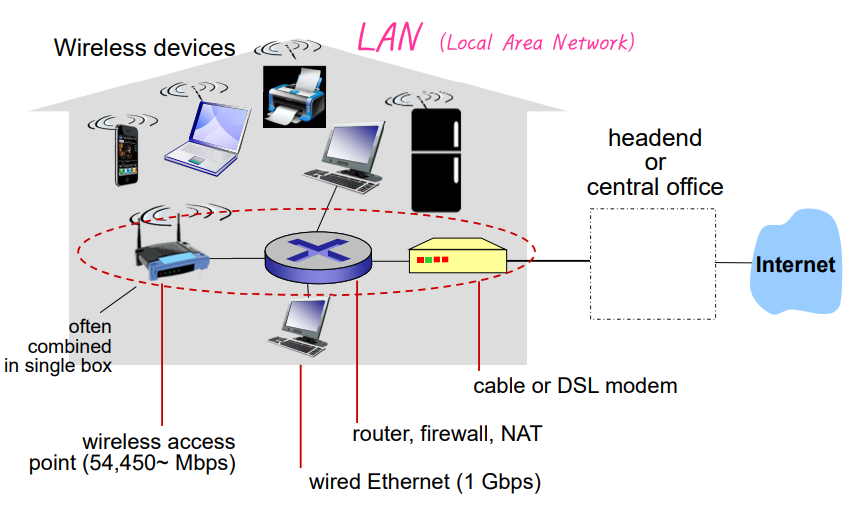
👩🏻💻 LAN: Local Area Network
- 집에 라우터가 있다: 여러 개의 네트워크를 구성했다. 장비가 여러 개이다.
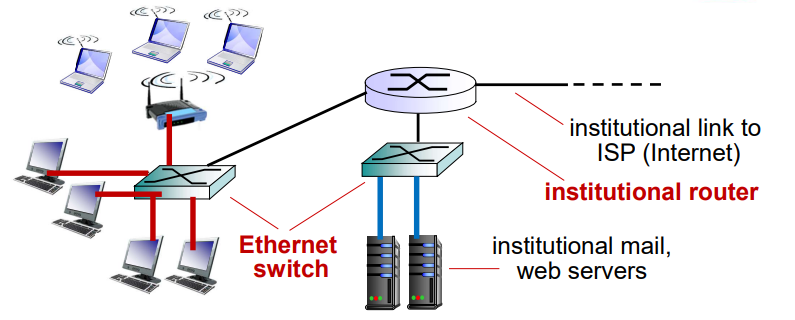
🧐 Enterprise access network(Ethernet)
- typically used in companies, universities, etc.
- mix of wired, wireless link technologies, connecting a mix of switches and routers
- Ethernet(wired access)
- Fast Ethernet(FE) 10/100 Mbps
- Gigabit Ethernet(GE) 1/10/100/1000 Gbps
- WiFi(wireless access points)
- Ethernet(wired access)
POP
알아두기.
🧐 Wireless access networks - indoor
- shared wireless access network connects end system to router - via base station aka "access point"
👩🏻💻 Wireless local area networks(WLANs)
- typically within or around building(~100 ft)
- WiFi: IEEE 802.11
- Bands값이 작을수록 직진성이 작다.
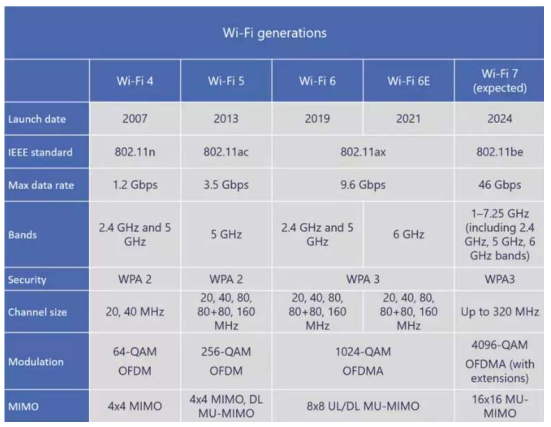
표준과 실제 모델 간에는 속도 차이가 있다.
🧐 Wireless access networks - outdoor
👩🏻💻 wide-area wireless access
- provided by telco (cellular) operator, 10's km
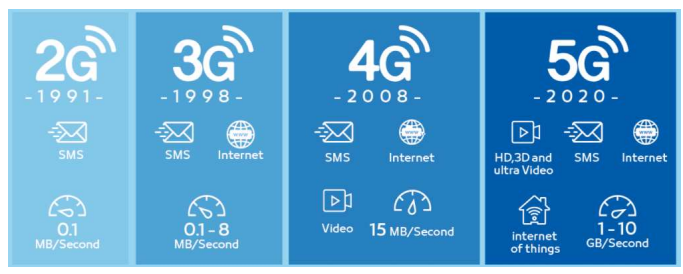
2G 3G 4G 5G 6G 64kbps 144k~2Mbps 100M~1Gbps 1~10Gbps Tbps no Internet slow Internet fast Internet 체감 다운로드 속도 800Mbps UAM(저궤도위성, 양자컴퓨팅으로 최적화) 답문 서비스 화상통화(진짜 인터넷망은 아님) streaming VR, AR, IOT(잘안됨) 자율주행 2G는 2021.06 한국에서 사장된 기술이다.
Latency
메모리가 다음 명령 처리까지 걸리는 시간4G - 10ms
5G - 1ms
6G - 0.1ms(기대)
6G에서 완전 자율주행을 할 수 있을 것이라 기대 중
🧐 Host: sends packets of data
👩🏻💻 host sending function:
- takes application message
- breaks into smaller chunks, known as
packets, of lengthLbits - transmits packet into access network at
transmission rate R
👩🏻💻 One large msg is brocken down multiple small pkts. Why short pkts instead of a long msg?
- multiple access in shared LAN reducing maximum latency.
- Delivery efficiency in Core Network.
a. Retx efficiency
b. Parallel delivery of a msg in routers on the end-to-end path
-> Each path is individually(서로 다른 메시지인 것처럼 개별적으로) delivered to the same dest. via (maybe) different path.
-> In-order delivery cannot be guaranteed.
📌 Network core: packet/circuit switching, internet structure