
Function
- function은 어떤 코드를 캡슐화 해서 계속 반복해서 사용할 수 있도록 한 것
ex) 노래 반복 재생
function 선언과 실행
function 함수명() { //function 선언
  실행코드;
}
함수명(); //function 실행
function 만들기
//function 안에 미리 data 넣은 경우
function plus() {
  console.log(2 + 2);
}
plus(); //4
variable명은 아무거나 상관없고, variable의 순서에 따라 argument가 차례로 부여된다. 그래서 ⭐순서⭐가 매우 중요하다.
// function 밖에서 data를 넣음
function plus(firstNumber, secondNumber) {
  console.log(firstNumber + secondNumber);
}
function divide(a, b) {
  console.log(a / b);
}
plus(8, 60);
divide(98, 20);

//console.log(firstNumber, secondNumber)처럼 function의 body외에서 argument 사용할 수 없다. ❌ 'not defined'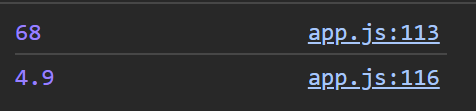
firstNumber, secondNumber는 function의 body('{}'로 둘러싸인 부분) 안에서만 사용 가능하고, function 밖에서는 접근할 수 없다. 마찬가지로 a, b는 divide function 안에서만 사용 가능하다.
코드 예시 1
//sayHello 안에 argument가 없음
function sayHello() {
    console.log("Hello my name is C");
}

sayHello("gata");
sayHello("sarang");
코드 예시 2
// argument 있음
function sayHello(nameOfPerson, age) {
    console.log("Hello my name is " + nameOfPerson + " and I'm " + age + " years old");
}
sayHello("gata", 27);
sayHello("sarang", 2);- sayHello Function은 2개의 arguments를 갖는다.
- argument는 하나만이 아닌 여러 개가 존재할 수 있다.
- function의 값은 function 안에서만 존재한다.
- argument인 nameOfPerson는 "gata", "sarang"를 age는 27, 2를 받았다.

코드 예시 3
// 변수를 선언해도 실행버튼에 변수가 없으면 결과는 undefined
function plus(a,b) {
    console.log(a,b);
}
plus(); //undefined undefined
function이 object 안에 있을 때
const player = {
    name: "Gata",
    sayHello: function (otherPersonsName) {
        console.log("Hello " + otherPersonsName + " nice to meet you")
    },
};

player.sayHello("Lucas");
간단한 계산기 만들기
const calculator = {
    plus: function (a, b) {
        console.log(a + b);
    },
    minus: function (a, b) {
        console.log(a - b);
    },
    times: function (a, b) {
        console.log(a * b);
    },
    divide: function (a, b) {
        console.log(a / b);
    },
    power: function (a, b) {
        console.log(a ** b);
    }
};

calculator.plus(7,2); //9
calculator.minus(10,2); //8
calculator.times(2,3); //6
calculator.divide(9,3); //3
calculator.power(3,3); //27
또다른 예시
const person = {
  name: ["Bob", "Smith"],
  age: 32,
  gender: "male",
  interests: ["music", "skiing"],
  bio: function () {
    alert(
      this.name[0] +
        " " +
        this.name[1] +
        " is " +
        this.age +
        " years old. He likes " +
        this.interests[0] +
        " and " +
        this.interests[1] +
        ".",
    );
  },
  greeting: function () {
    alert("Hi! I'm " + this.name[0] + ".");
  },
};
object(객체) - person
property(속성) - name, age, gender, interestes, bio, greeting
function(매서드) - function()

개발은 즐거워🪇