컴포넌트 개요
- 같은 컬럼 내 순서 이동 / 다른 컬럼으로 이동을 수정하기 버튼으로만 하는 건 UX적으로 한계가 있었음
- 따라서 마우스로 직관적으로 옮기는 Drag & Drop 기능이 필수
왜 Drag & Drop인가?
- 행동-결과의 직관성: 버튼/모달보다 훨씬 빠르게 재배치 가능
- 맥락 보존: 이동 중에도 카드/컬럼의 주변 맥락이 눈에 들어옴
- 오류 예방: 잘못 놓으면 즉시 되돌리기 쉬움(낙관적 업데이트 + 롤백)
라이브러리 선택: hello-pangea/dnd
- react-beautiful-dnd의 유지보수 포크
- React 18 대응 + 버그 픽스 지속 반영
- 키보드 접근성과 정교한 드래그 상태 관리 제공
핵심 컴포넌트
- DragDropContext: DnD 전체를 감싸고 onDragEnd로 최종 이동을 처리
- Droppable: 놓일 수 있는 영역(컬럼)
- Draggable: 끌 수 있는 대상(카드)
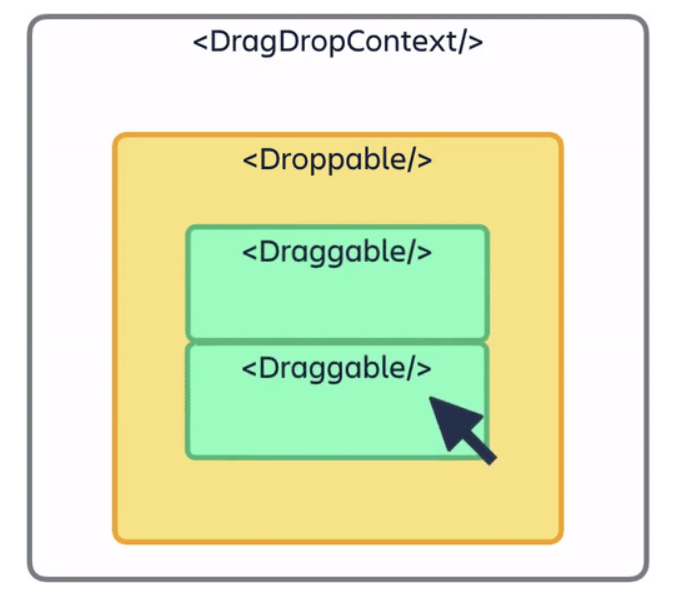
핵심 코드 정리
DragDropContext – 이동의 “최종 승인자”
- 드래그가 끝날 때 단 한 번만 상태 변경
- 서버 반영/롤백도 이 시점에 실행 → 데이터 일관성 유지
<DragDropContext onDragEnd={onDragEnd}>
  {/* 여러 컬럼(Droppable)과 그 안의 카드(Draggable) */}
</DragDropContext>
Droppable – 컬럼이 “그릇”이 된다
- droppableId : 이동 계산 기준
- placeholder : 드래그 중 레이아웃 유지
- isDraggingOver : 시각적 피드백 제공(테두리, 배경색 등)
<Droppable droppableId={`column-${columnId}`} type="CARD" ignoreContainerClipping>
  {(provided, snapshot) => (
    <div ref={provided.innerRef} {...provided.droppableProps}
         className={snapshot.isDraggingOver ? "드랍 가능 시 스타일" : ""}>
      {/* Draggable 카드들 */}
      {provided.placeholder}
    </div>
  )}
</Droppable>
Draggable – 카드가 “이동체”가 된다
- draggableId : 전역 유니크(보통 prefix 붙임)
- index : 컬럼내 순서
- 드래그 중 스타일은 transform 중심 → GPU 합성 단계에서 부드럽게 이동
<Draggable draggableId={`card-${id}`} index={idx} key={id}>
  {(provided, snapshot) => (
    <div ref={provided.innerRef}
         {...provided.draggableProps}
         {...provided.dragHandleProps}
         className={snapshot.isDragging ? "살짝 커짐/그림자" : ""}>
      <ColumnDetailCard cardId={id} ... />
    </div>
  )}
</Draggable>
상태 관리 연결: Zustand와의 결합
- 전역 상태는
cardsByDashboard처럼 대시보드별/컬럼별 카드 배열로 관리 - 모든 이동은 onDragEnd에서만 처리 (SSOT, Single Source of Truth)로 처리
 const parseDroppableId = (droppableId: string) =>
    Number(droppableId.replace("column-", ""));

 const reorder = <T,>(
    list: T[],
    startIndex: number,
    endIndex: number
  ): T[] => {
    const result = Array.from(list);
    const [removed] = result.splice(startIndex, 1);
    result.splice(endIndex, 0, removed);
    return result;
  };

// OnDragEnd
const onDragEnd = useCallback(async (result: DropResult) => {
  const { destination, source, draggableId } = result;
  if (!destination) return;

  const sourceColumnId = parseDroppableId(source.droppableId);
  const destColumnId   = parseDroppableId(destination.droppableId);
  const cardId         = Number(draggableId.replace("card-", ""));

  const sourceList = Array.from(cardsByDashboard[sourceColumnId] ?? []);
  const destList   = sourceColumnId === destColumnId
    ? sourceList
    : Array.from(cardsByDashboard[destColumnId] ?? []);

  // 1) 같은 컬럼 내 순서 변경
  if (sourceColumnId === destColumnId) {
    const newOrdered = reorder(sourceList, source.index, destination.index);
    setCardList(dashboardIdNum, sourceColumnId, newOrdered, newOrdered.length);
    return;
  }

  // 2) 다른 컬럼으로 이동 — 낙관적 업데이트
  const prevSource = [...sourceList];
  const prevDest   = [...destList];

  const [moved]   = sourceList.splice(source.index, 1);
  const movedCard = { ...moved, columnId: destColumnId };
  destList.splice(destination.index, 0, movedCard);

  setCardList(dashboardIdNum, sourceColumnId, sourceList, sourceList.length);
  setCardList(dashboardIdNum, destColumnId,   destList,   destList.length);

  // 서버 반영 + 실패 롤백
  try {
   const payload: BaseCardType = {
          assigneeUserId: movedCard.assignee.id,
          columnId: destColumnId,
          title: movedCard.title,
          description: movedCard.description,
          dueDate: movedCard.dueDate,
          tags: movedCard.tags,
          imageUrl: movedCard.imageUrl ?? null,
        };
   await putCard({ id: cardId, ...payload });
  } catch {
    addToast("이동 저장 중 오류가 발생했습니다.");
    setCardList(dashboardIdNum, sourceColumnId, prevSource, prevSource.length);
    setCardList(dashboardIdNum, destColumnId,   prevDest,   prevDest.length);
  }
}, [cardsByDashboard, dashboardIdNum, setCardList, addToast]);- 일관성 : 이동 로직은 한 곳에서만
- 낙관적 업데이트 : 즉각 반응성 확보
- 롤백 준비 : 사용자 신뢰성↑
단일 진실(Single Source of Truth, SSOT)이란?
- 데이터의 원본은 오직 한 곳에만 존재해야 한다는 원칙
- 같은 데이터를 여러 곳에서 중복 관리하면 불일치가 쉽게 발생
단일 진실이 없는 경우
- cards, column1, column2가 따로 놀아 불일치 발생
const [cards, setCards] = useState([...]);
const [column1, setColumn1] = useState([...]);
const [column2, setColumn2] = useState([...]);
단일 진실을 지키는 경우
- cardsByDashboard 한 곳에서만 관리
// "cardsByDashboard" 한 곳에서만 관리
const cardsByDashboard = {
  column1: [...],
  column2: [...],
};
Drag & Drop에서 SSOT를 쓰는 이유
- 여러 곳에서 상태를 건드리면 순서 꼬임/데이터 불일치 발생
- onDragEnd라는 단 하나의 타이밍에서만 상태를 갱신해야 안정적
- 따라서:
- 일관성 유지
- 실패 시 롤백 가능

프론트엔드