개요
최근 Mongodb 도입을 하게되어 기본적인 연동을 하게 되었습니다. 연동하고 서비스하던 와중 발생한 이슈가 있었는데 해당 부분에 대해 간단하게 글로 남기고자 합니다.
Spring Boot에서 Mongodb 연동 방법
어플리케이션에서 MongoDB를 연동할 때는 일반적으로 의존성을 주입한 후, 해당 의존성에서 제공하는 연동 규칙에 따라 적절한 설정을 구성하여 연동을 진행합니다.
일반적인 설정 방식은 아래와 같습니다.
1. connectionString 방식
yaml 파일에 mongodb connection 정보를 입력하여 연동하는 방식입니다. mongodb의 경우 connectionString에 접속 정보 뿐만 아니라 다양한 옵션을 추가로 설정할 수 있습니다.
spring:
  data:
    mongodb:
      uri: 'mongodb://test:test123@10.0.0.1:27100,10.0.0.2:27100,10.0.0.3:27100/test_db?authSource=admin&maxConnecting=3'
      database: test_db
다음과 같이 queryString 방식으로 mongodb에서 제공중인 여러 설정을 connectionString 정보에 담으면 연동간 설정 정보가 추가됩니다.
2. 직접 클래스에 설정하는 방식
ConnectionString에 설정 정보를 전부 입력해 관리할 수 있으나 딥하게 사용하거나 여러 옵션을 세부 조정하는 경우 ConnectionString 수정에 있어 되려 불편함을 느낄 수 있습니다.
이런 경우 의존성에 정의된 클래스 정보를 직접 정의하여 옵션을 추가합니다.
@EnableMongoRepositories(basePackages = ["com.test"])
@Configuration
class MongoDbConfig(
    private val mongodbConfigProperties: MongodbConfigProperties,
    private val registry: ObservationRegistry,
) : AbstractMongoClientConfiguration() {
    override fun getDatabaseName(): String = mongodbConfigProperties.database

    override fun configureConverters(converterConfigurationAdapter: MongoCustomConversions.MongoConverterConfigurationAdapter) {
        converterConfigurationAdapter.registerConverters(listOf(ZonedDateTimeReadConverter(), ZonedDateTimeWriteConverter()))
        super.configureConverters(converterConfigurationAdapter)
    }

    override fun autoIndexCreation(): Boolean = true

    override fun configureClientSettings(builder: MongoClientSettings.Builder) {
        builder
            .applyConnectionString(ConnectionString(mongodbConfigProperties.uri))
            .applyToConnectionPoolSettings { builder: ConnectionPoolSettings.Builder ->
                builder.maxConnectionIdleTime(mongodbConfigProperties.maxConnectionIdleTime, TimeUnit.MILLISECONDS)
                builder.maxConnectionLifeTime(mongodbConfigProperties.maxConnectionLifeTime, TimeUnit.MILLISECONDS)
                builder.maxSize(mongodbConfigProperties.maxPoolSize)
                builder.minSize(mongodbConfigProperties.minPoolSize)
                builder.maxConnecting(mongodbConfigProperties.maxConnecting)
            }.contextProvider(ContextProviderFactory.create(registry))
            .addCommandListener(MongoObservationCommandListener(registry))
    }
}
AbstractMongoClientConfiguration을 직접 정의하여 다양한 설정 정보를 커스텀하여 사용합니다.
문제 상황
우선 간단하게 연동하여 사용하고 추후 이슈가 있을 경우 점진적으로 개선하고자 간단하게 spring-boot-starter-data-mongodb 의존성을 주입하고 connectionString을 활용하여 접속 설정을 진행하였습니다.
이 때, 일부 설정 정보를 조정하고자 mongodb docs의 connectionString 옵션을 확인하였습니다.
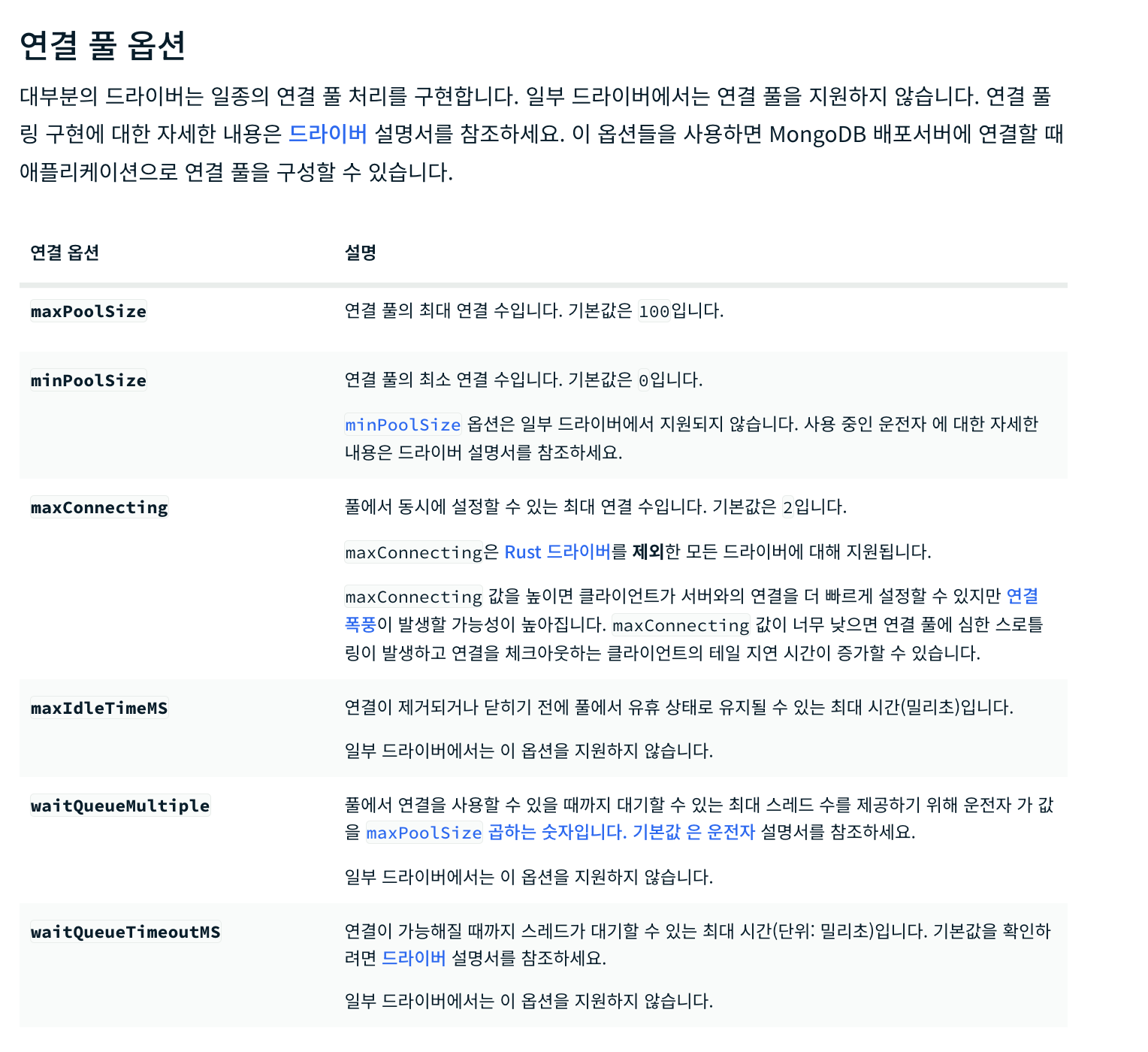
다음 옵션을 활용해서 ConnectionString을 정의하였고 어플리케이션은 정상적으로 실행됐기 때문에 잘 설정됐구나 하고 가볍게 넘겼습니다.
하지만... 이슈가 생겨 디버깅을 해보니 일부 설정 정보만 반영되고 설정이 하나도 안된걸 알 수 있었습니다.
해결
ConnectionString을 파싱하여 옵션별로 설정되는 부분이 있을거라고 추측해 mongodb 의존성에서 구현한 부분을 디버깅하였습니다.
ConnectionString.java
private void translateOptions(Map<String, List<String>> optionsMap) {
        boolean tlsInsecureSet = false;
        boolean tlsAllowInvalidHostnamesSet = false;
        Iterator var4 = GENERAL_OPTIONS_KEYS.iterator();

        while(var4.hasNext()) {
            String key = (String)var4.next();
            String value = this.getLastValue(optionsMap, key);
            if (value != null) {
                switch (key) {
                    case "maxpoolsize":
                        this.maxConnectionPoolSize = this.parseInteger(value, "maxpoolsize");
                        break;
                    case "minpoolsize":
                        this.minConnectionPoolSize = this.parseInteger(value, "minpoolsize");
                        break;
                    case "maxidletimems":
                        this.maxConnectionIdleTime = this.parseInteger(value, "maxidletimems");
                        break;
                    case "maxlifetimems":
                        this.maxConnectionLifeTime = this.parseInteger(value, "maxlifetimems");
                        break;
                    case "maxconnecting":
                        this.maxConnecting = this.parseInteger(value, "maxConnecting");
                        break;
                    case "waitqueuetimeoutms":
                        this.maxWaitTime = this.parseInteger(value, "waitqueuetimeoutms");
                        break;
                    case "connecttimeoutms":
                        this.connectTimeout = this.parseInteger(value, "connecttimeoutms");
                        break;
                    case "sockettimeoutms":
                        this.socketTimeout = this.parseInteger(value, "sockettimeoutms");
                        break;
                    case "proxyhost":
                        this.proxyHost = value;
                        break;
                    case "proxyport":
                        this.proxyPort = this.parseInteger(value, "proxyPort");
                        break;
                    case "proxyusername":
                        this.proxyUsername = value;
                        break;
                    case "proxypassword":
                        this.proxyPassword = value;
                        break;
                    case "tlsallowinvalidhostnames":
                        this.sslInvalidHostnameAllowed = this.parseBoolean(value, "tlsAllowInvalidHostnames");
                        tlsAllowInvalidHostnamesSet = true;
                        break;
                    case "sslinvalidhostnameallowed":
                        this.sslInvalidHostnameAllowed = this.parseBoolean(value, "sslinvalidhostnameallowed");
                        tlsAllowInvalidHostnamesSet = true;
                        break;
                    case "tlsinsecure":
                        this.sslInvalidHostnameAllowed = this.parseBoolean(value, "tlsinsecure");
                        tlsInsecureSet = true;
                        break;
                    case "ssl":
                        this.initializeSslEnabled("ssl", value);
                        break;
                    case "tls":
                        this.initializeSslEnabled("tls", value);
                        break;
                    case "replicaset":
                        this.requiredReplicaSetName = value;
                        break;
                    case "readconcernlevel":
                        this.readConcern = new ReadConcern(ReadConcernLevel.fromString(value));
                        break;
                    case "serverselectiontimeoutms":
                        this.serverSelectionTimeout = this.parseInteger(value, "serverselectiontimeoutms");
                        break;
                    case "localthresholdms":
                        this.localThreshold = this.parseInteger(value, "localthresholdms");
                        break;
                    case "heartbeatfrequencyms":
                        this.heartbeatFrequency = this.parseInteger(value, "heartbeatfrequencyms");
                        break;
                    case "appname":
                        this.applicationName = value;
                        break;
                    case "retrywrites":
                        this.retryWrites = this.parseBoolean(value, "retrywrites");
                        break;
                    case "retryreads":
                        this.retryReads = this.parseBoolean(value, "retryreads");
                        break;
                    case "uuidrepresentation":
                        this.uuidRepresentation = this.createUuidRepresentation(value);
                        break;
                    case "directconnection":
                        this.directConnection = this.parseBoolean(value, "directconnection");
                        break;
                    case "loadbalanced":
                        this.loadBalanced = this.parseBoolean(value, "loadbalanced");
                        break;
                    case "srvmaxhosts":
                        this.srvMaxHosts = this.parseInteger(value, "srvmaxhosts");
                        if (this.srvMaxHosts < 0) {
                            throw new IllegalArgumentException("srvMaxHosts must be >= 0");
                        }
                        break;
                    case "srvservicename":
                        this.srvServiceName = value;
                }
            }
        }

        if (tlsInsecureSet && tlsAllowInvalidHostnamesSet) {
            throw new IllegalArgumentException("tlsAllowInvalidHostnames or sslInvalidHostnameAllowed set along with tlsInsecure is not allowed");
        } else {
            this.writeConcern = this.createWriteConcern(optionsMap);
            this.readPreference = this.createReadPreference(optionsMap);
            this.compressorList = this.createCompressors(optionsMap);
        }
    }
어떤 문제인지 보이시나요?
문제점
- mongodb manual 가이드와 의존성에서의 설정 파싱 정보의 네이밍 컨벤션이 상이합니다.
- 설정 정보는 전부 소문자, 메뉴얼은 CamelCase
- 소문자로 설정해야 하나 일부 정보는 설정 오류 에러 메세지에 CacmelCase로 노출됩니다.
- 에러메세지를 보고 설정정보를 수정해도 동일한 오류가 발생하지 않을까요?
해결 방법
환경별로 세부적으로 설정 정보를 다르게 관리하고 이러한 문제점을 고려하지 않기 위해서 기존 ConnectionString 정보를 클래스에서 직접 설정되도록 로직을 변경하여 이슈를 해결하였습니다.
앞서 보여드린 2. 직접 클래스에 설정하는 방식 예시와 같이 로직을 추가하게 되었습니다.
결론
이런 세세한 부분은 개인적으로는 설정 정보 파싱간 자동으로 lowerCase로 변경되거나 적어도 에러메세지에 노출되는 key값을 option 정보와 일치시키는게 좋지 않을까라는 의문을 가졌습니다.
물론 문서랑 일치하는게 가장 이상적이긴 한데... 잘 모르겠네요
다른 분들도 디버깅을 통해 설정 정보가 정상적으로 적용되는지 확인해보시는 것을 권장드립니다.