C# 소개, 개발 환경 설정(1-1)
- C# 언어와 .NET 프레임워크에 대해 이해하자.
- Visual Studio를 사용해서 C#프로젝트를 생성하는 방법에 대해 알아보자.
- Hello World를 작성하고 실행하는 방법에 대해 알아보자.
- 자동 완성 기능과 보조 기능을 사용해 프로그래밍 효율성을 높이는 방법을 알아보자.
C# 언어와 .NET 프레임워크에 대해 이해하기
- C#
- 객체 지향 프로그래밍 언어. 안전하고 형식이 분명한 강력한 형식 시스템
- 강력한 형식 시스템과 가비지 컬렉션 기능을 제공한다.
- 강력한 형식 시스템이란 변수나 객체의 자료형이 미리 정의되어 있어 데이터 타입이 안전성과 정확성을 보장하는 시스템이다.
- 가비지 컬렉션 기능은 동적 할당된 메모리를 자동으로 회수해주는 기능. C#에서는 개발자가 메모리를 직접 할당하고 해제하는 대신 .NET 프레임워크에서 가비지 수집기가 자동으로 메모리를 해제해준다.
- .NET 프레임워크
- Microsoft에서 개발한 프로그래밍 플랫폼
- 다양한 언어를 지원하며, 개발자가 손쉽게 애플리케이션을 개발할 수 있도록 도와준다.
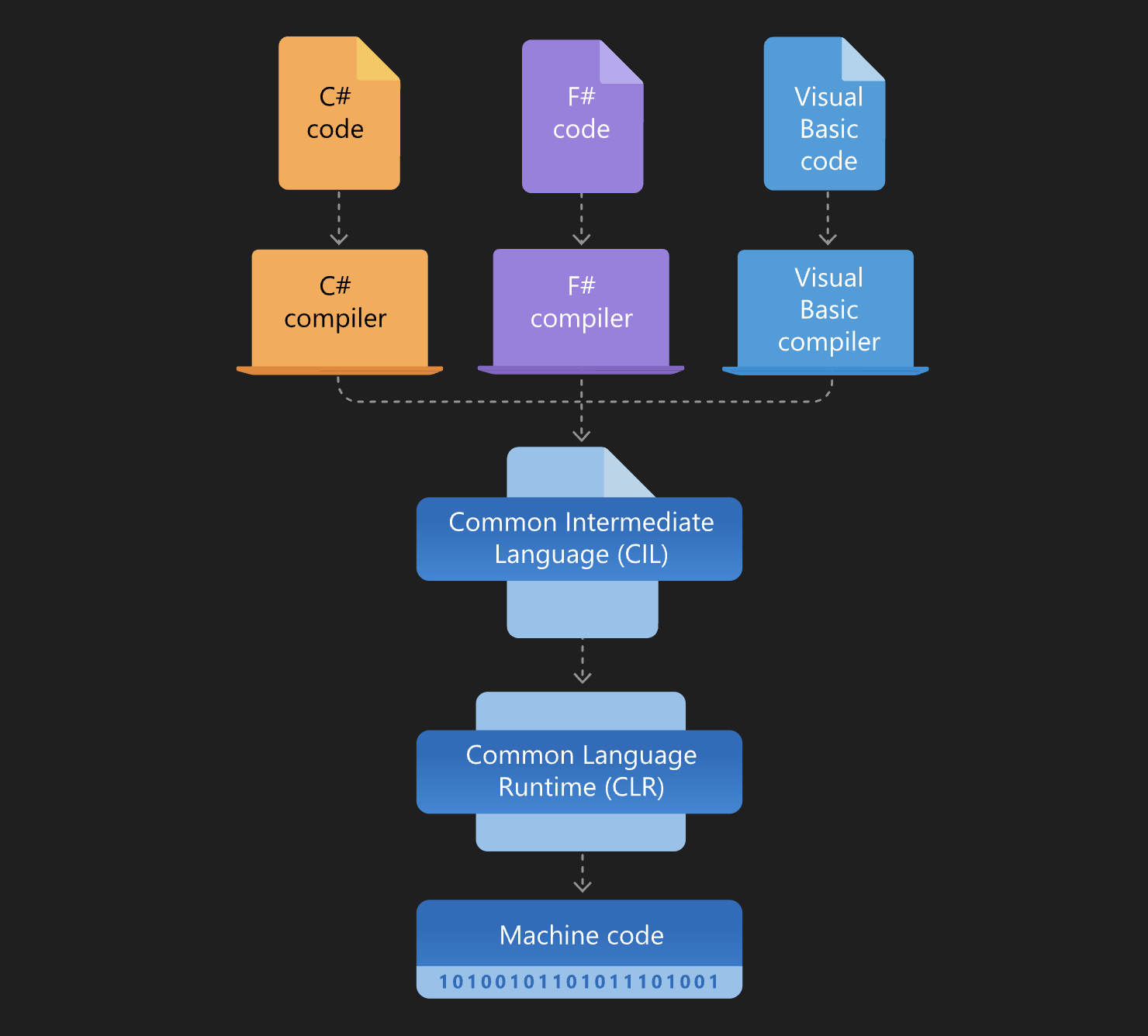
- 프로그래머가 애플리케이션을 개발하게 되면 각각의 언어를 가지고서 컴파일을 진행한다. 쉽게 말해 중간 언어라는 것이 생성 됨 (위 CIL)
- 그럼 맥이나 윈도우 iOS 안드로이드 등 각각의 플랫폼들에서 자기한테 맞는 방식으로 또 다시 변환을 해서 사용을 하는 거라고 생각하면 된다.
프로그램을 빌드하고 실행하는 방법 학습
- 빌드하기
- 나는 Visual Studio 대신 Rider를 썼다.
- 빌드 > 솔루션 빌드를 눌러주면 출력 창이 표시됨
- 실행하기
- 플레이 버튼(디버그 x)을 누르면 Hello, World!가 출력된 걸 볼 수 있다.
- 콘솔 애플리케이션인 경우, 콘솔 창이 열리고 프로그램이 실행된다.
자동 완성 기능과 보조 기능을 사용해 프로그래밍 효율성 높이기
- 클래스, 메서드, 변수 등의 이름을 입력할 때 일부를 입력하고, Tab 키를 눌러 나머지를 자동 완성
- Console.WriteLine을 작성할 때, Console.까지 입력하고 Tab 키를 누르면 자동으로 WriteLine이 완성된다.
- 메서드나 변수를 입력하는 도중에 Ctrl + Space를 눌러 IntelliSense를 호출하면, 해당 메서드나 변수에 대한 정보와 예제를 볼 수 있다.(맥은 command + I)
- 코드 템플릿을 사용해 코드를 더 빠르게 작성 가능
- 예를 들어 for문을 작성할 때, for 키워드를 입력하고 두 번 Tab키를 누르면 for문의 기본적인 코드 템플릿이 자동으로 생성된다.
// Tab 키를 누르면 자동으로 코드가 완성된다.
Console.WriteLine("C#");

// Ctrl + Space를 눌러 IntelliSense를 호출하면 해당 메서드나 변수에 대한 정보와 예제를 볼 수 있다.
Console.WriteLine("Study");

// 코드 템플릿을 이용해 코드를 더 빠르게 작성한다.
// e.g. for문을 작성할 때, for 키워드를 입력하고, 두 번 Tab키를 누르면 for문의 기본적인 코드 탬플릿이 자동 생성된다.
for (int i = 0; i < UPPER; i++){}
프로그래밍 기본 요소(1-2)
Hello World 기본 코드 구조 확인
// Hello World.cs
using System;

namespace HelloWorld
{
  class program
  {
    static void Main(string[] args)
    {
      Console.WriteLine("Hello World!");
    }
  }
}- using System은 namespace를 사용하기 위한 코드.
- namespace는 클래스들의 묶음, 내지는 어떤 기능들의 묶음이라고 보면 된다.
- 그래서 using System;을 해줌으로써, System 안의 namespace 안 기능들을 사용하겠다고 선언해 준 것. 그리하여 대표적으로 사용할 수 있는 코드는 Console.WriteLine.
- class program안에 있는 Main 메서드는 프로그램을 시작했을 때 가장 처음으로 호출되는 메서드. 그래서 메인 메서드 하나는 꼭 필수적으로 포함되어 있어야 함
- 이걸 프로젝트를 만들어서 Hello World!를 출력해 보면 코드가 조금 다르다.
namespace ConsoleApp2;

class Program
{
    static void Main(string[] args)
    {
        Console.WriteLine("Hello, World!");
    }
}- 보이는 것처럼 using 없이 Hello World를 출력하고 있다.
- 원래는 using이 있어야 하지만 프로젝트의 속성을 눌러보면 전역 using이라고 해서 주로 사용이 되는 애들에 대해서는 이미 IDE가 포함을 시켜놨다.
- 그래서 System, System Colletions Genetic, System IO, Lipq, .Net Http, Threading 등을 이미 포함을 시켜놨기 때문에 실제 코드에서는 using이 없는 상태로 보이는 것. 실제론 있기 때문에 괜찮다.
프로그램 결과를 출력해서 확인해보기
- C#에서 콘솔을 출력할 때는 Console.WriteLine(value)이라는 메서드를 사용함
- WriteLine은 하나의 value값을 전달 받는다. value는 출력할 값. 문자열, 숫자, 변수, 연산식 등 어떤 값이든 사용 가능. 엔터(줄바꿈)까지 쳐줌 굿
Console.WriteLine("Hello World!");
Console.WriteLine("My Name is Kero");

Console.WriteLine(10);
Console.WriteLine(3.141592);
Console.WriteLine(3 + 3);- 위 코드를 프로그램에 넣어보자.
- F5를 눌러 출력해 보면 3+3은 연산의 결과인 6으로 변환이 돼서 6을 출력하게 됨
Console.Write("Hello! ");
Console.Write("We are Learning ");
Console.WriteLine("at TeamSparta");- Console.Write 메서드는 Console.WriteLine과 다르게 문자열을 다음 줄로 바꿔서 출력하지 않는다.
- 출력해보면 Hello! We are Learning at TeamSparta라고 보임
이스케이프 시퀀스(Escape Sequence)
-
문자열 내 특수한 문자를 포함시키기 위해 사용되는 특별한 문자 조합
이스케이프 시퀀스 설명 \'작은따옴표(') 삽입 \"큰따옴표(") 삽입 \\역슬래시() 삽입 \n새 줄(줄바꿈) 삽입 \r현재 줄 맨 앞으로 이동 \t탭 삽입 \b백스페이스 삽입
Console.WriteLine("Hello\nWorld");
// 출력결과
// Hello
// World

Console.WriteLine("Name\tAge");
Console.WriteLine("Kero\t30");
Console.WriteLine("Young\t25");
// 출력결과
// Name    Age
// Kero    30
// Young   25

Console.WriteLine("We learn \"C# Programming\"");
// 출력결과
// The book is called "C# Programming"

Console.WriteLine("He said, \'Hello\' to me.");
// 출력결과
// He said, 'Hello' to me.

Console.WriteLine("C:\\MyDocuments\\Project\\");
// 출력결과
// C:\MyDocuments\Project\
주석(Comments)
- 주석이란 코드에다가 메모를 해 놓는 것. 코드의 설명이나 개발자간의 의사소통을 위해 사용됨
- // : 한 줄 주석. 해당 줄 끝까지 주석 처리됨
- /* */ : 여러 줄 주석. 시작과 끝을 명시하여 주석 처리됨.
- 주의할 점
- 주석은 코드를 대체하지 않는다. 보충하는 역할 정도로만 쓰자.
- 주석의 내용은 명확해야 한다. 코드의 작동 방식이나 의도를 명확하게 설명하자.
- 주석은 업데이트 되어야 한다. 코드가 변경되면 주석도 변경하자.
- 주석은 필요한 경우에만 사용한다. 불필요한 주석은 코드를 복잡하게 만든다.
변수와 자료형1(1-3)
- C#에서 사용되는 기본 자료형에 대한 이해
- 변수를 선언하고 초기화하는 방법 이해
- var 키워드를 사용해 변수를 선언하는 방법 이해
- 명시적/암시적 형변환을 사용하는 방법을 이해
기본 자료형(Data Type)
| 자료형 | .NET 데이타 타입 | 크기 (바이트) | 범위 |
|---|---|---|---|
| sbyte | System.SByte | 1 | -128 ~ 127 |
| byte | System.Byte | 1 | 0 ~ 255 |
| short | System.Int16 | 2 | -32,768 ~ 32,767 |
| ushort | System.UInt16 | 2 | 0 ~ 65,535 |
| int | System.Int32 | 4 | -2,147,483,648 ~ 2,147,483,647 |
| uint | System.UInt32 | 4 | 0 ~ 4,294,967,295 |
| long | System.Int64 | 8 | -9,223,372,036,854,775,808 ~ 9,223,372,036,854,775,807 |
| ulong | System.UInt64 | 8 | 0 ~ 18,446,744,073,709,551,615 |
| float | System.Single | 4 | ±1.5 × 10^-45 ~ ±3.4 × 10^38 |
| double | System.Double | 8 | ±5.0 × 10^-324 ~ ±1.7 × 10^308 |
| decimal | System.Decimal | 16 | ±1.0 × 10^-28 ~ ±7.9 × 10^28 |
| char | System.Char | 2 | 유니코드 문자 |
| string | System.String | 유니코드 문자열 | |
| bool | System.Boolean | 1 | true 또는 false |
- 자료형의 크기, 표현 범위, 부호 여부 등의 특성에 따라 세분화된 자료형으로 구분됨
- 예를 들어, C#에서 정수형 자료형으로는 sbyte, byte, short, ushort, int, uint, long, ulong이 있고, 각각의 자료형은 메모리의 크기와 표현 범위가 다르다.
- 유저의 번호를 저장할 때 127명 이하일 때는 sbyte 자료형 사용 가능. 하지만 128명 부터는 저장 불가. 이때 음수의 번호를 사용 안 할 거라면 byte 자료형으로 선언함으로써 255번까지 저장 가능
변수를 세분화해서 사용하는 이유
- 메모리의 효율적인 사용
- 세분화 된 자료형을 사용하면, 해당 자료형이 필요한 크기만큼의 메모리를 할당해 메모리의 효율적인 사용이 가능해짐
- 정확한 데이터 표현
- 세분화 된 자료형을 사용하면, 데이터의 특성에 따라 정확한 표현이 가능해짐.
e.g. 부동소수점 자료형인 float과 double은 소수점 이하 자릿수가 다르며, 각각의 자료형은 다른 범위의 값까지 표현 가능함
- 세분화 된 자료형을 사용하면, 데이터의 특성에 따라 정확한 표현이 가능해짐.
- 타입 안정성
- 세분화 된 자료형을 사용하면, 코드의 타입 안정성을 유지할 수 있음.
e.g. 정수형 자료형을 byte를 사용하면 해당 자료형이 가질 수 있는 값의 범위를 벗어날 경우 오류가 발생하므로 코드의 안정성을 보장할 수 있다.
- 세분화 된 자료형을 사용하면, 코드의 타입 안정성을 유지할 수 있음.
리터럴(Literal)의 종류와 예시
- 리터럴: 프로그래밍에서 직접 사용되는 상수값. 소스 코드에 직접 기록되어 있는 값
- C#에서 리터럴은 컴파일러에 의해 상수 값으로 처리되며, 변수나 상수에 할당되거나 연산에 사용
- 정수형 리터럴
- 10 (int)
- 0x10 (16진수 int)
- 0b10 (2진수 int)
- 10L (long)
- 10UL (unsigned long)
- 부동소수점형 리터럴
- 3.14 (double)
- 3.14f (float)
- 3.14m (decimal)
- 문자형 리터럴
- 'A' (char)
- '\n' (개행 문자)
- '\u0022' (유니코드 문자)
- 문자열 리터럴
- "Hello, World!" (string)
- "문자열 내 "따옴표" 사용하기"
- @"문자열 내 개행 문자
사용하기"
int num = 10;
float f = 3.14f;
char c = 'A';
string str = "Hello, World!";

int num1 = 0x10;
int num2 = 0b1010;
long num3 = 100000000000000L;
변수 선언 방법
- 변수 선언은 자료형 + 변수 이름으로 할 수 있다.
int num;- int 자료형의 변수를 선언하는 방법
int num1, num2, num3;- 한번에 변수 여러 개를 선언하는 방법. 1, 2, 3 전부 정수형 변수로 선언된다.
변수 초기화 방법
- 변수를 선언한 후에는 변수를 초기화하여 값을 저장해야 함
- 할당 받은 공간을 활용하기 위해서 특정한 값을 대입하거나 초기화를 해줘야 함
- 변수 이름 = 값 으로 변수를 초기화 할 수 있다.
int num;     // 변수 선언
num = 10; // 변수 초기화- 이렇게 변수의 값을 넣어준다. (초기화)
int num = 10; // 변수 선언과 초기화를 한 번에 수행- 위처럼 변수 선언과 초기화를 동시에 할 수도 있다.
int num1, num2, num3 = 10; (X, 이럼 num3만 10으로 초기화 됨)

num1 = num2 = num3 = 10; (O)- 한번에 여러 개의 변수를 초기화 할 수도 있다.
변수명
- 변수 이름은 규칙을 지켜서 만들어 주는 게 좋다.
-
키워드
- C#에서 이미 사용한다고 예약해 놓은 문자들. 그래서 변수, 메서드, 클래스 등의 이름으로 사용할 수 없다.
abstract  as  base  bool  break  byte  case  catch  char checked  class  const
 continue decimal  default  delegate  do double  else  enum  event  explicit
 extern  false  finally fixed  float  for  foreach  goto  if  implicit  in  int
 interface  internal  is  lock long  namespace  new  null  object  operator  out
 override  params  private  protected  public readonly  ref  return  sbyte  sealed
 short  sizeof  stackalloc  static  string  struct  switch this  throw  true  try
 typeof  uint  ulong  unchecked  unsafe  ushort  using  virtual  void volatile  while
- C#에서 이미 사용한다고 예약해 놓은 문자들. 그래서 변수, 메서드, 클래스 등의 이름으로 사용할 수 없다.
-
식별자(Identifiers)
-
식별자: 변수, 메서드, 클래스, 인터페이스 등에 사용되는 이름을 말함. 키워드와 동일하게 사용할 수 없다.
-
식별자를 사용할 때에는 다음과 같은 규칙을 따라야 한다.
- 첫 문자는 알파벳, 언더바(_)가 올 수 있다.
- 두 번째 문자부터는 알파벳, 언더바, 숫자가 올 수 있다.
- 대소문자를 구분한다.
- 키워드와 같은 이름으로 사용할 수 없다.
// 좋은 예시
int playerScore;
string playerName;
float itemPrice;

// 나쁜 예시 (중요 의미 있는 변수명 짓기)
int x1;  // 변수명이 의미를 알기 어려움
string a; // 변수명이 명확하지 않음

// 오류 예시
int 1stNumber;  // 변수명은 숫자로 시작할 수 없음
string my-name; // 변수명에 하이픈(-)을 사용할 수 없음
float total$;   // 변수명에 특수문자($)를 사용할 수 없음
-
-
코드 컨벤션(Code convention)
-
개발자들 사이에서 약속된 코드 작성 규칙으로, 코드의 가독성을 높이고 유지 보수를 쉽게 하기 위해 사용됨. 코드 컨벤션은 프로그래밍 언어마다 다를 수 있으며, 다음 규칙을 따라야 함
-
식별자 표기법
- PascalCase: 클래스, 메서드, 프로퍼티 이름 등에 사용됨. 첫 글자는 대문자로 시작, 이후 단어 첫 글자도 대문자로 표기
(e.g. ClassName, MethoName, PropertyName) - camelCase: 변수, 매개변수, 로컬 변수 이름 등에 사용됨. 첫 글자는 소문자로 시작, 이후 단어 첫 글자는 대문자로 표기
(e.g. variableName, parameterName, lacalVariableName) - 대문자 약어: 예외적으로 전체 글자가 모두 대문자인 식별자도 있음.
(e.g. ID, HTTP, FTP)
- PascalCase: 클래스, 메서드, 프로퍼티 이름 등에 사용됨. 첫 글자는 대문자로 시작, 이후 단어 첫 글자도 대문자로 표기
-
들여쓰기
- Tab 또는 Space 4칸을 사용해 코드 블록을 들여쓴다.
-
중괄호 위치
- 중괄호는 항상 새로운 줄에서 시작한다.
-
빈 줄 사용
- 관련 없는 코드 사이에는 빈 줄을 사용해 구분
- 메서드, 클래스 등의 블록 사이에는 두 줄을 띄어씀.
-
주석
- // 한 줄 주석을 사용
- / **/ 여러 줄 주석을 사용할 때는 /를 다음 줄에서 시작하고, /를 새로운 줄에서 끝내도록 한다.
-
-
일반적인 코드 컨벤션
class MyClass
{
    // 필드는 camelCase 표기법을 사용합니다.
    private int myField;

    // 프로퍼티는 PascalCase 표기법을 사용합니다.
    public int MyProperty { get; set; }

    // 메서드는 PascalCase 표기법을 사용합니다.
    public void MyMethod()
    {
        if (true)
        {
            // 중괄호는 새로운 줄에서 시작합니다.
        }

        // 코드 블록은 탭(tab) 또는 스페이스(space) 4칸으로 들여씁니다.

        // 관련 없는 코드 사이에는 빈 줄을 사용하여 구분합니다.
                // 블록 사이에는 두 줄을 띄어씁니다.

            /*
            여러 줄 주석을 사용할 때는
             / * 를 새로운 줄에서 시작하고,
             * / 를 새로운 줄에서 끝내도록 합니다.
            */

            // 한 줄 주석은 이렇게 사용합니다.
            int a = 10; // 코드 끝에도 한 줄 주석을 사용할 수 있습니다.
        }
}
명시적 및 암시적 형변환
- 형변환: C#에서는 자료형이 다른 변수 간에 값을 할당하거나 연산을 수행할 수 있다. 이때 자료형이 다른 변수 간에 값을 할당하거나 연산을 수행하려면 명시적 형변환 또는 암시적 형변환을 해줘야 한다.
1. 명시적 형변환
int num1 = 10;
long num2 = (long)num1; // int를 long으로 명시적 형변환- 위와 같이 (자료형) 형식으로 수행할 수 있다.
2. 암시적 형변환
byte num1 = 10;
int num2 = num1; // byte형에서 int형으로 암시적 형변환-
1) 작은 데이터 타입에서 더 큰 데이터 타입으로 대입하는 경우
-
byte, short, char 등 작은 데이터 타입에서 int, long, float 등 더 큰 데이터 타입으로 대입할 때 암시적 형변환이 발생
float result = 1; // 1은 int형 리터럴 값이지만 float형으로 암시적 형변환 -
2) 리터럴 값이 대입되는 경우
-
C# 컴파일러는 리터럴 값의 데이터 타입을 판별하여 변수에 암시적으로 형변환 함
int num1 = 10; float num2 = 3.14f; float result = num1 + num2; // int형과 float형의 덧셈에서 float형으로 암시적 형변환 -
3) 정수형과 부동소수점형 간의 연산을 수행하는 경우
-
정수형과 부동소수점형의 연산 결과는 부동소수점형으로 변환됨
-
더 큰 형태를 따라간다고 생각하면 된다.
-
암시적 형변환은 프로그래머가 직접 형변환 코드를 작성하지 않아도 돼서 코드를 간결하게 작성할 수 있다. 하지만 암시적 형변환이 발생하는 경우 데이터 타입을 신중하게 고려해서 코드를 작성해야 한다.
변수와 자료형2(1-4)
Console.ReadLine을 이용한 입력
1) Console.ReadLine
- C#에서 콘솔 입력을 받을 때는 Console.ReadLine 메서드를 사용. ReadLine 메서드는 사용자가 입력한 값을 문자열로 반환한다.
Console.Write("Enter your name: ");
string name = Console.ReadLine();
Console.WriteLine("Hello, {0}!", name);- 위 코드를 출력해 보면, Enter your name: 문장 끝에서 커서가 깜빡거리고 있다.
- 거기에 kero라고 입력하면, 이 문자열이 ReadLine으로 건너가고, ReadLine이 name에 대입을 시켜 줄 것이다.
- 그 다음 줄인 WriteLine("Hello, {0}!", name)에서 {0}은 name이 들어간다. 뒤에 것을 하나씩 대칭해서 넣어주는데 0번째에 있는 걸 쓴다는 뜻
- Enter your name: kero
Hello, kero!
출력을 하면 이렇게 표시된다. - 여기서 ReadLine은 콘솔 창에서 입력을 받아오는데, 항상 string 값으로 돌려준다는 걸 잘 체크하자. ReadLine 메서드는 사용하자 입력한 값을 문자열로 반환하므로, 숫자나 논리값을 입력받을 때에는 적절한 형변환을 해줘야 한다.
2. Split / 한줄에 여러 값 입력받기
-
사용자로부터 여러 개의 값을 한 줄에 입력받고 싶을 때에는 Console.ReadLine 메서드를 사용해 입력받은 값을 문자열로 받은 후, string.Split 메서드를 사용하여 문자열을 나누어서 처리할 수 있다.
-
사용자로부터 공백으로 구분된 두 개의 정수를 입력받아 더하는 코드를 작성해 보자. (다중 입력 기초)
        Console.Write("Enter two numbers: ");
        string input = Console.ReadLine();    // "10 20"과 같은 문자열을 입력받음

        string[] numbers = input.Split(' ');  // 문자열을 공백으로 구분하여 배열로 만듦
        int num1 = int.Parse(numbers[0]);     // 첫 번째 값을 정수로 변환하여 저장
        int num2 = int.Parse(numbers[1]);     // 두 번째 값을 정수로 변환하여 저장

        int sum = num1 + num2;                // 두 수를 더하여 결과를 계산

Console.WriteLine("The sum of {0} and {1} is {2}.", num1, num2, sum);- 출력하면 Enter two numbers: 깜빡깜빡
- 여기에다 10 20 이라 써보자. 10 20 이라는 숫자는 없으니까 이걸 숫자로 바꿀 수는 없음. 그러니까 10과 / 20으로 분리를 해줘야 함
- 그래서 지금 이 상태로 엔터를 하게 되면 이 ReadLine은 말 그대로 10과 20 이렇게 입력을 가져온다.
- 이때 string 문자열에 들어있는 기능 중에 spilt이라는 애가 있다. 특정한 구분자 값으로 문자열을 나눠주는 기능.
        string[] numbers = input.Split(' ');  // 문자열을 공백으로 구분하여 배열로 만듦
// { "10", "20" }- input.Split(' ') -> input에다가 spilt 띄어쓰기로 구분해줘라. 그러면 띄어쓰기로 값을 구분해서 들어있는 값을 "10", "20"으로 나눠줌.
- string[]은 배열을 의미. 10 하나 20 하나의 배열이 만들어진 것. { "10", "20" }
        int num1 = int.Parse(numbers[0]);     // 첫 번째 값을 정수로 변환하여 저장
int num2 = int.Parse(numbers[1]); // 두 번째 값을 정수로 변환하여 저장- 이 배열의 숫자들은 번호로 부른다. 그래서 10은 0번, 20은 1번. 그래서 아래 numbers[0]은 10, numbers[1]은 20이 들어가는 것
- 그런데 형변환은 데이터 타입을 변경하는 것. 지금은 숫자처럼 생긴 문자를 실제 정수로 바꾸는 거기 때문에 형변환하고는 다름.
- 그래서 우리는 변하고자 하는 자료형한테 요청을 해야 함. numbers[0]에는 10이라는 문자가 들어 있는데 이걸 정수로 바꾸고 싶어서 정수의 기능 중 하나인 Parse를 쓴다. (int.Parse)
- Parse 메서드는 문자열을 다른 데이터 타입으로 변환하는 것. 정수형으로 보여지는 문자를 실제 정수로 바꿔준다. (형변환이랑은 다른 것)
- 만약 실수라서 float이 필요하다면 float.Parse 이렇게 해서 실수형처럼 보이는 문자열을 실수형으로 바꿔주는 것도 가능하다.\
        int sum = num1 + num2;                // 두 수를 더하여 결과를 계산

Console.WriteLine("The sum of {0} and {1} is {2}.", num1, num2, sum);- 그리하여 num1과 num2를 더해 sum을 만들어 줬고, 앞에 {0}, {1}, {2}로 형태를 정해준다.
- 그러면 순서대로 num1은 {0}에, num2는 {1}에, sum은 {2}에 들어가게 된다.
- Enter two numbers: 10 20
The sum of 10 and 20 is 30.
출력하면 이렇게 보인다.
var 키워드 사용법
- 매직 키워드라고도 부름
- var 키워드를 사용해 변수를 선언하면 변수의 자료형이 컴파일러에 의해 자동으로 결정됨. 즉 초기화해주는 값에 따라서 자료형이 자동으로 변한다는 것
var num = 10;         // int 자료형으로 결정됨
var name = "kero";   // string 자료형으로 결정됨
var pi = 3.141592; // double 자료형으로 결정됨- 이렇게 var 키워드를 사용해 변수를 선언할 수 있다. (편한데??)
- 하 지 만. . 이 var 키워드에 적응을 해버리면 자료형을 구분해서 쓰는 것의 연습이 안되기 때문에 익숙해지기 전까지는 var 키워드를 추천하지 않음
- 다른 사람의 코드에서 어떤 변수의 자료형이 불확실할 때 이 var 키워드를 사용하면 좋다.
연산자와 문자열 처리(1-5)
- 산술, 관계, 논리 연산자의 사용법 이해
- 복합 대입 연산자와 증감 연산자를 활용하는 방법 이해
- 문자열 처리 기능과 문자열 메서드의 사용법 이해
산술, 관계, 논리 연산자 사용법
-
산술 연산자
-
숫자를 대상으로 사용됨
연산자 설명 + 덧셈 - 뺄셈 * 곱셈 / 나눗셈 % 나머지
-
-
관계 연산자
-
두 값을 비교하여 참(true) 또는 거짓(flase) 값을 반환함
연산자 설명 == 같음 != 다름 > 큼 < 작음 >= 크거나 같음 <= 작거나 같음
-
-
논리 연산자
-
참(true) 또는 거짓(flase) 값을 대상으로 사용됨
연산자 설명 && 논리곱(AND) II 논리합(OR) ! 논리부정(NOT)
-
-
산술 연산자부터 실습해 보자. 연산을 위해 피연산자 두 개를 만들어 주자.
class Program
{
    static void Main(string[] args)
    {
        int num1 = 20, num2 = 10;
    }
}
static void Main(string[] args)
{
Console.WriteLine("산술연산자");
int num1 = 20, num2 = 10;
Console.WriteLine(num1 + num2);
Console.WriteLine(num1 - num2);
Console.WriteLine(num1 / num2);
Console.WriteLine(num1 * num2);
Console.WriteLine(num1 % num2);
}- 산술 연산자를 입력 후 실행해 보면 산술 결과가 표시됨
		Console.WriteLine("관계연산자");

        Console.WriteLine(num1 == num2);
        Console.WriteLine(num1 != num2);
        Console.WriteLine(num1 > num2);
        Console.WriteLine(num1 < num2);
        Console.WriteLine(num1 >= num2);
Console.WriteLine(num1 <= num2);- 다음은 관계 연산자
- = 기호가 항상 오른쪽에 붙는 규칙이 있다.
- 실행해 보면 False, True, True, False, True, False 표시됨
        Console.WriteLine("논리연산자");

int num3 = 15;- 여기서 추가적으로 논리 연산자가 나온다. AND, OR, NOT
- 먼저 15라는 특정한 값을 만들어 보자. (num3)
- 조건. 15라고 하는 값이 0보다 크면서 20보다 작냐, 즉 0과 20 사이에 있냐고 물어보고 싶다.
        Console.WriteLine("논리연산자");

        int num3 = 15;
// 0 <= num3 <= 20- 그러나 해당 주석처럼 표현할 수가 없기 때문에, 앞부분 한 번 뒷부분 한 번 이렇게 처리해 줘야 한다.
        Console.WriteLine("논리연산자");

        int num3 = 15;
        // 0 <= num3 <= 20
Console.WriteLine(0 <= num3 && num3 <= 20);- num3이 0보다 크거나 같냐? 그리고(&&) num3이 20보다 작거나 같냐?
- 이렇게 해주면 num3이 0에서 20 사이에 들어가는 값으로 처리가 될 것
        Console.WriteLine("논리연산자");

        int num3 = 15;
        // 0 <= num3 <= 20
Console.WriteLine(0 > num3 || num3 > 20);- 이렇게 해주면 num3이 0보다 작냐? 또는 20보다 크냐? 즉 num3이 0과 20 사이에 포함되지 않으면.
        Console.WriteLine("논리연산자");

        int num3 = 15;
        // 0 <= num3 <= 20
        Console.WriteLine(0 <= num3 && num3 <= 20); // 0 과 20 사이에 포함되면
Console.WriteLine(0 > num3 || num3 > 20); // 0 ~ 20 사이에 포함되지 않으면- 이렇게 정리할 수 있겠다.
        Console.WriteLine("논리연산자");

        int num3 = 15;
        // 0 <= num3 <= 20
        Console.WriteLine(0 <= num3 && num3 <= 20); // 0 과 20 사이에 포함되면

        Console.WriteLine(0 > num3 || num3 > 20);   // 0 ~ 20 사이에 포함되지 않으면
Console.WriteLine( !(0 <= num3 && num3 <= 20) ); // 0 ~ 20 사이에 포함되지 않으면- 그리고 OR을 이거보다 쉽게 만들 수 있는 방법이 또 있다.
0과 20 사이에 포함되는 게 onsole.WriteLine(0 <= num3 && num3 <= 20).
그럼 '0과 20 사이에 포함되어 있지 않다면'은 OR가 된다. 즉 느낌표(논리 부정)를 붙이면 됨 - 따라서 맨 아래 두 줄은 동일한 코드가 된다. 실행해 보면 True, False, False
비트 연산자
- 비트 단위로 데이터를 조작하고 이진수 연산을 해보자.
- 비트 연산자는 이진수로 처리하는 것. 데이터의 비트(bit) 단위로 연산을 수행하는 연산자
| 연산자 | 설명 |
|---|---|
| & (AND) | 두 비트 값이 모두 1일 때 1을 반환 |
| I (OR) | 두 비트 값 중 하나라도 1일 때 1을 반환 |
| ^ (XOR) | 두 비트 값이 서로 다를 때 1을 반환 |
| ~ (NOT) | 비트 값의 보수(complement)를 반환 |
| << (왼쪽 시프트) | 비트를 왼쪽으로 이동 |
| >> (오른쪽 시프트) | 비트를 오른쪽으로 이동 |
int a = 0b1100; // 12 (2진수)
int b = 0b1010; // 10 (2진수)

int and = a & b; // 0b1000 (8)
int or = a | b; // 0b1110 (14)
int xor = a ^ b; // 0b0110 (6)

int c = 0b1011; // 11 (2진수)
int leftShift = c << 2; // 0b101100 (44)
int rightShift = c >> 1; // 0b0101 (5)

int d = 0b1100; // 12 (2진수)
int bit3 = (d >> 2) & 0b1; // 1 (3번째 비트)
d |= 0b1000; // 0b1100 | 0b1000 = 0b1100 (12)
복합 대입 연산자와 증감 연산자 활용
-
변수를 더 편리하게 조작하고 값을 증감시킬 수 있다.
(코드를 빨리, 간결하게 사용 가능) -
복합 대입 연산자
-
C#에서는 변수에 값을 할당하는 대입 연산자(=) 외에도 다양한 복합 대입 연산자를 제공
-
변수에 연산을 수행한 결과를 저장하는 연산자
연산자 예시 설명 += x += y; x = x + y; x에 y를 더해 넣는다 -= x -= y; x = x - y; *= x *= y; x = x * y; /= x /= y; x = x / y; %= x %= y; x = x % y;
-
-
증감 연산자
-
변수의 값을 1 증가시키거나 감소시키는 연산자
-
피연산자의 앞에 붙냐 뒤에 붙냐의 차이로 전위형과 후위형이 나뉨.
-
++x; -> x를 더하고 사용함. x++; -> 세미콜론 끝난 다음에 ++ 진행함
연산자 설명 ++ 1 증가 -- 1 감소
-
연산자 우선순위
-
연산자 우선순위는 수식 내에서 연산자가 수행되는 순서를 결정함
-
연산자 우선순위에 따라 연산의 결과가 달라질 수 있기 때문에 중요
-
C#의 주요 연산자 우선순위
높은 우선순위의 연산자가 먼저 수행됨
아래는 C#에서 주로 사용되는 연산자들의 우선순위를 나열한 것.- 괄호 (): 괄호로 감싸진 부분은 가장 높은 우선순위로 먼저 계산
- 단항 연산자: 단항 연산자들(++, --, +, -, ! 등)은 괄호 다음으로 높은 우선순위를 가짐
- 산술 연산자: 산술 연산자들(*, /, %, +, -)은 단항 연산자보다 우선순위가 낮음
- 시프트 연산자: 시프트 연산자(<<, >>)는 산술 연산자보다 우선순위가 낮음
- 관계 연산자: 관계 연산자들(<, >, <=, >=, ==, !=)은 시프트 연산자보다 우선순위가 낮음
- 논리 연산자: 논리 연산자들(&&, ||)은 관계 연산자보다 우선순위가 낮음
- 할당 연산자: 할당 연산자들(=, +=, -=, *=, /= 등)은 논리 연산자보다 우선순위가 낮음
문자열 처리 기능 및 메서드
- 문자열 생성
string str1 = "Hello, World!"; // 리터럴 문자열 사용
string str2 = new string('H', 5); // 문자 'H'를 5개로 구성된 문자열 생성- 큰따옴표로 문자열 리터럴을 만들어 주면 됨
- 아니면 new string으로 해서 특정 문자를 반복해서 만든다거나, 특정 문자열로 string을 만든다거나 하는 코드들을 작성할 수 있다.
- 연결
string str1 = "Hello";
string str2 = "World";
string str3 = str1 + " " + str2;- str1과 str2를 이어줄 때 + 를 사용함
- 근데 이것보다는 추후에 나올 포맷팅이 더 많이 사용됨
- 분할
string str = "Hello, World!";
string[] words = str.Split(',');- str 문자열을 쉼표로 구분하여 분할한 문자열 배열 words를 생성함
- 검색
string str = "Hello, World!";
int index = str.IndexOf("World");- 특정한 문자의 시작 위치를 가져옴
- World니까 첫 글자 W, 그럼 7번째니까 7이라는 값이 나온다.
- 대체
string str = "Hello, World!";
string newStr = str.Replace("World", "Universe");- 찾고자 하는 단어를 다른 단어로 치환함
- 변환
string str = "123";
int num = int.Parse(str);- 문자열을 숫자로 변환
- 숫자로 구성된 문자열을 Parse를 통해 숫자로 바꿔줌
int num = 123;
string str = num.ToString();- 숫자를 문자열로 변환
- 정수형 숫자 num을 ToString을 사용해 문자열로 변환한 후 str 변수에 저장
- 비교
string str1 = "Hello";
string str2 = "World";
bool isEqual = str1 == str2;- 문자열 값 비교
- str1 문자열과 str2 문자열을 비교한 후, isEqual 변수에 그 결과를 저장함(= false)
string str1 = "Apple";
string str2 = "Banana";
int compare = string.Compare(str1, str2);- 문자열 대소 비교
- str1 문자열과 str2 문자열을 대소 비교한 후, compare 변수에 그 결과를 저장한다.
- 둘중 어떤 게 더 큰지 작은지를 비교하냐. 문자열들은 항상 사전식 비교를 한다. 사전에 더 뒤에 나올수록 더 높은거라고 보면 됨.
- compare 변수는 0보다 작으면 str1이 str2보다 작고, 0이면 str1과 str2가 같으며, 0보다 크면 str1이 str2보다 크다.
- A가 B보다 작으니 음수가 나오게 됨. (둘이 B로 같으면 0이 나옴)
- 포맷팅
string name = "John";
int age = 30;
string message = string.Format("My name is {0} and I'm {1} years old.", name, age);- 문자열 형식화
- string의 Format을 이용해서 아까 전에 했던 것처럼 {0}, {1} 여기에 뒷 문자열들을 대입시켜서 사용할 수 있다.
string name = "John";
int age = 30;
string message = $"My name is {name} and I'm {age} years old.";- 문자열 보간
- 아니면 앞에 달러($) 표시를 붙여서 중괄호에다가 변수, 상수, 수식 같은 것들을 사용할 수 있게 해 줄 수도 있다.
실습
        string str1 = "Hello, World!";
        string str2 = new string('h', 5);

        string str3 = str1 + " " + str2;
        Console.WriteLine(str3);

// 출력: Hello, World! hhhhh- 문자열 생성과 연결 사용. 근데 이렇게 하면 두 번 문자를 만드는 거기 때문에 좀 무거움. 그래서 비추천
        string[] str4 = str1.Split(',');
        Console.WriteLine(str4[0]);
Console.WriteLine(str4[1]);- 이렇게 Split을 활용해 쉼표를 분할해 주고, 배열을 만들어 준 다음 str4를 [0]과 [1]로 나눠주면
Hello
World!
이렇게 출력된다.
        int index = str1.IndexOf("World");
Console.WriteLine(index);- Index를 써서 World를 검색하면 7번이 출력된다. Hello, World!에서 W가 7번째에 있기 때문
        string newstr = str1.Replace("World", "Universe");
        Console.WriteLine(newstr);
Console.WriteLine(str1);- Replace를 이용해 World를 Universe로 대체했다.
- newstr은 Hello, Universe!로, str1은 Hello, World!로 출력됐다.
- Replace의 기능이 가져와서 대치한 새로운 문자열을 만드는 거라는 걸 체크해 볼 수 있다.
        string str5 = "123";
        int num = int.Parse(str5);
        Console.WriteLine(num);

// 출력: 123- Parse를 사용해 문자열을 숫자로 변환
        string str5 = "123";
        int num = int.Parse(str5);
        Console.WriteLine(num);

        num += 10;

        Console.WriteLine(num.ToString());

        // 출력: 123
// 출력: 133- 추가로 num에 10을 더해주고 ToString으로 출력해 보면 문자 133이 출력됨
Console.WriteLine(str1 == str2);- == 를 통해 비교해 보면 당연히 다른 문자니 false가 나옴
Console.WriteLine(string.Compare(str1, str2));- Compare를 통해 비교해 보면 -1이 나옴
- str1은 Hello, World!, str2는 hhhhh. 소문자가 훨씬 값이 큼
- 이 값을 처리할 때 컴퓨터가 야스키코드로 정수값을 문자로 치환해서 쓰는데 일반적으로 대문자의 알파벳보다 소문자의 알파벳이 훨씬 더 값이 크다.
- 그래서 이 뒤에 있는 str2가 값이 더 크게 나와서 -1이 나온 것
- Compare 비교는 '앞에 거 - 뒤에 거' 라고 생각하자.
        string name = "John";
        int age = 30;
        string message = string.Format("My name is {0} and i'm {1} years old.", name, age);
Console.WriteLine(message);- 포맷팅. Console.WriteLine도 똑같은 코드를 작성함. 기본적으로 포맷을 받는 애들이 이런 식으로 처리함
- 출력해 보면 My name is John and i'm 30 years old. 존과 30이 순서대로 출력된 걸 볼 수 있다.
        string name = "John";
        int age = 30;
        message = $"My name is {name} and I'm {age} years old.";
Console.WriteLine(message);- $를 사용해도 역시 동일한 문장이 출력된다.
- 이렇게 두 가지 방법으로 포맷팅을 사용할 수 있는데 둘 중 편한 걸 쓰면 된다.
Tip
- 연산자들의 우선순위는 연산자가 수행되는 순서를 결정한다.
- 연산자 우선순위는 수학에서 사용하는 연산자 우선순위와 유사하며, 괄호를 사용해 우선순위를 변경할 수 있다.
- 연산자를 사용할 때에는 연산자 우선순위를 항상 고려하여 코드를 작성하는 것이 중요하다.