가상 SNS App 만들기
프로젝트 notion 및 git 만들기
노션 다루는법도 이제 몇번 해봤다고 조금 다양한 기능을 사용하는 법을 알게 되었다. 또한 팀 git도 마찬가지다.
하지만 github와 android studio 연결하는 방법을 체화했다고 생각했던건 오판이었다.. ㅎ
중간에 방법이 헷갈려서 매니저님이 정리해주신 git 연동법 notion을 참고 했다 :)
참조 => https://magical-puppy-b7f.notion.site/Android-Studio-GitHub-d95cf046b15445348d997d245417ab2b
1차 팀회의
와이어 프레임 작성
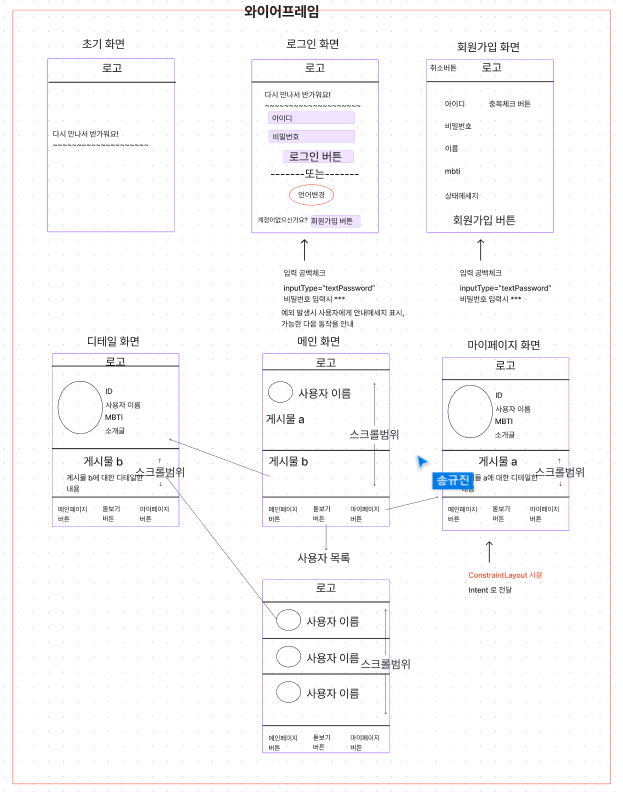
먼저 기능적인 부분을 나누기 전에 와이어 프레임을 통한 전체적인 큰 틀을 잡기 위해 와이어프레임을 작성했다. 베이스는 트위터 앱을 오마주 하기로 하였다.
- 초기화면(StartActivity)로 시작
- 로그인화면(LoginActivity)로 전환
- 로그인 화면에서 회원가입 버튼을 누를 시 회원가입(SigiupActivity)로 전환
- 회원가입화면에서 중복체크 기능, 공백확인기능, 회원가입 버튼 누를시 finish()를 이용하여 로그인 화면으로 복귀 및 입력된 정보 Extra로 전달
- 받아온 정보와 입력된 정보 비교 후 일치 할 경우 로그인 버튼을 이용하여 메인화면(MainActicity)로 이동
- 메인화면에서는 게시물 스크롤 가능 게시물 선택시 디테일 화면(DetailActivity)로 이동 or 내정보 선택시 마이페이지화면(MypageActivity)로 이동, 혹은 돋보기 버튼 클릭 시 사용자 목록 페이지(UserListActivity)로 이동
- 디테일화면 and 마이페이지화면에서는 회원가입 시 입력 받은 정보를 바탕으로 채워짐
- 사용자 목록 페이지 또한 회원가입 시 입력받은 데이터 클래스 리스트를 바탕으로 채워짐
2차 팀회의
팀원 5명 개개인 마다 프로그래밍에 대한 실력적인 부분이 다르기 때문에 이를 기능 구현 분담할 때 고려하는 방법이 어떤게 있을까 하다가 상대적으로 자신이 없어 하시는 분들이 먼저 선택하는 방법을 제안드렸는데 나쁘지 않았던것 같았다. (온전히 제 생각이지만, 어려운 파트를 나중에 맡으시면 부담이 될 것같아서 스스로 생각하시기에 편하게 할 수 있는 부분을 선택하시는게 어떨까 싶었다)
와이어프레임을 작성 한뒤 같은 팀원 한분의 의견에 따라, 로그인 화면과 회원가입 화면을 먼저 각 2분 3분씩 맡아서 첫날에 완성시킨 뒤 차후 일을 진행하자고 하는 것으로 진행하였다.
로그인 화면 담당 : 장재용, 이호식
회원가입화면 담당 : 박승윤, 송규진, 전지성
로그인화면 만들기
개인과제에서 더 나아가는 부분이 없었기 때문에 후딱 만들 수 있었다.
<?xml version="1.0" encoding="utf-8"?>
<androidx.constraintlayout.widget.ConstraintLayout xmlns:android="http://schemas.android.com/apk/res/android"
    xmlns:app="http://schemas.android.com/apk/res-auto"
    xmlns:tools="http://schemas.android.com/tools"
    android:layout_width="match_parent"
    android:layout_height="match_parent"
    tools:context=".LoginActivity">

    <androidx.appcompat.widget.Toolbar
        android:id="@+id/toolbar"
        android:layout_width="match_parent"
        android:layout_height="?attr/actionBarSize"
        android:background="?attr/colorPrimary"
        app:layout_constraintTop_toTopOf="parent"
        app:title="My Toolbar"
        app:titleTextColor="@android:color/white" />

    <TextView
        android:id="@+id/state1"
        android:layout_width="wrap_content"
        android:layout_height="wrap_content"

        android:layout_marginTop="176dp"

        android:text="다시 만나서 반가워요! 최신 소식을 보려면 로그인 하세요."
        android:textSize="34sp"
        android:textStyle="bold"

        app:layout_constraintStart_toStartOf="parent"
        app:layout_constraintTop_toBottomOf="@+id/toolbar" />

    <TextView
        android:id="@+id/pwtext"
        android:layout_width="wrap_content"
        android:layout_height="wrap_content"

        android:layout_marginStart="120dp"
        android:layout_marginTop="4dp"
        android:text="비밀번호"
        app:layout_constraintStart_toStartOf="parent"
        app:layout_constraintTop_toBottomOf="@+id/idEditText" />

    <EditText
        android:id="@+id/pwEditText"
        android:layout_width="wrap_content"
        android:layout_height="wrap_content"

        android:layout_marginTop="4dp"
        android:hint="비밀번호를 입력하세요"

        android:inputType="textPassword"
        app:layout_constraintStart_toStartOf="@+id/pwtext"
        app:layout_constraintTop_toBottomOf="@+id/pwtext" />

    <TextView
        android:id="@+id/idText"
        android:layout_width="wrap_content"
        android:layout_height="wrap_content"

        android:layout_marginStart="120dp"
        android:layout_marginTop="8dp"
        android:text="아이디"
        app:layout_constraintStart_toStartOf="parent"
        app:layout_constraintTop_toBottomOf="@+id/state1" />

    <Button
        android:id="@+id/loginBtn"
        android:layout_width="wrap_content"
        android:layout_height="wrap_content"


        android:layout_marginTop="5dp"
        android:onClick="onButtonSignup"

        android:text="로그인"
        app:layout_constraintEnd_toEndOf="parent"
        app:layout_constraintHorizontal_bias="0.501"
        app:layout_constraintStart_toStartOf="parent"
        app:layout_constraintTop_toBottomOf="@+id/pwEditText" />

    <EditText
        android:id="@+id/idEditText"
        android:layout_width="wrap_content"
        android:layout_height="wrap_content"

        android:hint="아이디를 입력하세요    "
        android:inputType="text"

        app:layout_constraintStart_toStartOf="@+id/idText"
        tools:layout_editor_absoluteY="364dp" />

    <TextView
        android:id="@+id/orText"
        android:layout_width="0dp"
        android:layout_height="wrap_content"

        android:layout_marginTop="208dp"
        android:gravity="center"

        android:text="----------------------또는----------------"
        app:layout_constraintEnd_toEndOf="parent"
        app:layout_constraintHorizontal_bias="0.0"
        app:layout_constraintStart_toStartOf="parent"
        app:layout_constraintTop_toBottomOf="@+id/state1" />

    <Button
        android:id="@+id/transBtn"
        android:layout_width="wrap_content"
        android:layout_height="wrap_content"


        android:layout_marginTop="80dp"

        android:onClick="onButtonTrans"
        android:text="English"
        app:layout_constraintEnd_toEndOf="parent"
        app:layout_constraintStart_toStartOf="parent"
        app:layout_constraintTop_toBottomOf="@+id/pwEditText" />

    <TextView
        android:id="@+id/exText"
        android:layout_width="0dp"
        android:layout_height="wrap_content"

        android:layout_marginStart="16dp"

        android:layout_marginBottom="16dp"
        android:gravity="center"
        android:text="계정이 없으신가요?"
        app:layout_constraintBottom_toBottomOf="parent"
        app:layout_constraintStart_toStartOf="parent" />

    <Button
        android:id="@+id/siginupBtn"
        android:layout_width="wrap_content"
        android:layout_height="wrap_content"


        android:onClick="onButtonTrans"
        android:text="회원가입"
        app:layout_constraintBottom_toBottomOf="@+id/exText"
        app:layout_constraintTop_toTopOf="@+id/exText"
        tools:layout_editor_absoluteX="140dp" />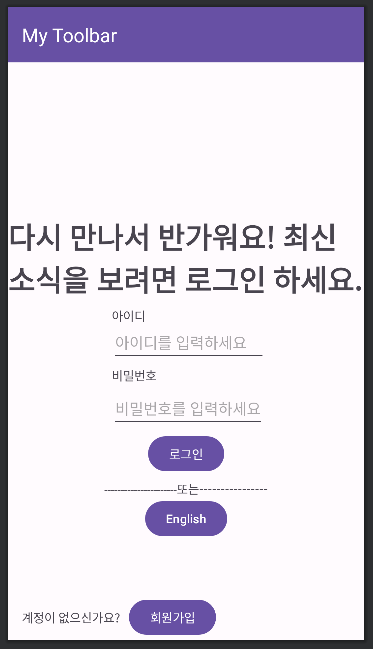
개인적으로는 깔끔하게 잘 만들었다고 생각해봤는데 재용님 결과물과 비교해보니 조금 많이 촌스러워 보였다..ㅠ 디자인적인 요소의 중요성을 다시한번 느끼게 되었다..
3차 팀회의
로그인 페이지와 회원가입 페이지 각 두개를 마무리하고 모여서 서로 코드 리뷰와 피드백을 통해 코드를 다듬는 시간을 가졌다. 여기서 재용님이 시간이 남는다고 시작 화면을 추가로 만들어 오셨는데 다들 너무 마음에 든다고 했다... 재용님 나이스..!!
첫째날 임에도 불구하고 시작, 로그인, 회원가입 페이지 이렇게, 총 7개 Activity중 3개나 완성 시키는 기염을 토했다. 진행이 빠른것도 좋고 팀원들의 분위기나 추진력이 너무 좋다고 생각 한 하루였다.
문제점 및 트러블 슈팅
- 익숙해졌다고 생각했던 git 다루는 법
- App 만들 시 디자인 적인 요소를 너무 경시 했다는 점
사실 단순하다. git은 수시로 반복하고, 평소에도 사용하면서 익숙해지고 체화됬다고 느꼈을 때 다시 한번 또 보고, 프로젝트 할 때만 사용하는것이 아니라 평소에도 연습할때 사용하면서 익숙해지는 수밖에 없다.
디자인적인 요소.. 사실 정말 중요하게 생각해본적은 없다. 매번 그냥 코드 기능적인 부분만 완벽하면 됬지 무슨 디자인까지 챙길여유가 어디있냐..라고생각했었는데 같은 화면을 구성하는데 재용님의 결과물을 보는 순간, 같은 코드를 사용햇지만 추가적인 몇가지 요소만으로 화면의 퀄리티나 사용자가 니즈를 충족시키려면 저 정도는 해야겠구나 라는 생각이 들었다.
느낀점
아무리 생각해도 멀었다.. 어느순간 자신감이 생겼다가도 푹 꺼지고 반복되는 느낌 ㅎㅎㅎ 하지만 그렇다고 좌절한다거나 그런건 아니다. 그저 갈길이 멀다고 생각했을 뿐 앞으로 좀더 팀원들에게 좋은 자극을 받아서 더 나아가도록 노력해야겠다 :)