데이터베이스_MySQL
관계형데이터베이스 (RDBMS)
-> Oracle (큰 기업에서 많이 사용, 유료)
-> SQL
-> DB2
-> MySQL (Oracle에서 제공, 오픈소스라서 누구나 사용가능, 가장 널리 사용되고 있는 관계형데이터베이스 관리 시스템)
설치링크 : https://dev.mysql.com/downloads/installer/
-> PostgreSQL
-> SQLite
[데이터베이스 구조]
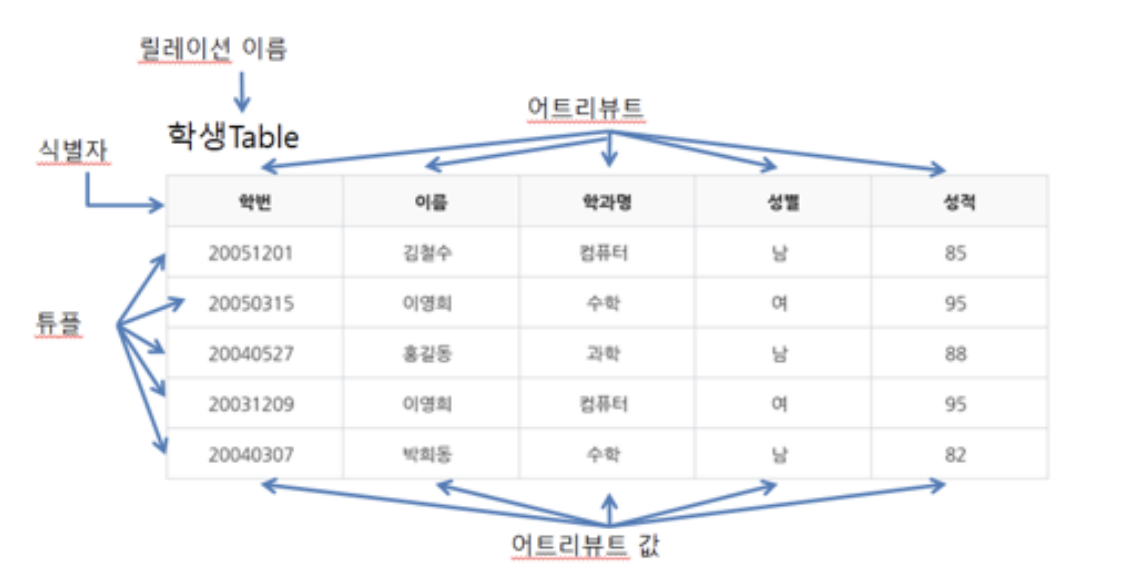
하나의 표처럼 생각하면 됨
열( Column, Attribute 속성, 식별자 )
행 (Record, Tuple 튜플 하나하나의 정보)
테이블 (Table, Relation 전체의 이름)
키
-
기본기( Primary Key) : 특정 튜플(행)을 유일하게 구별할 수 있는 속성,
-> 변경될 수 있는 값은 PK로 두지 말기
-> null값 불가
-> 중복 갑 불가
(ex: 학번..) -
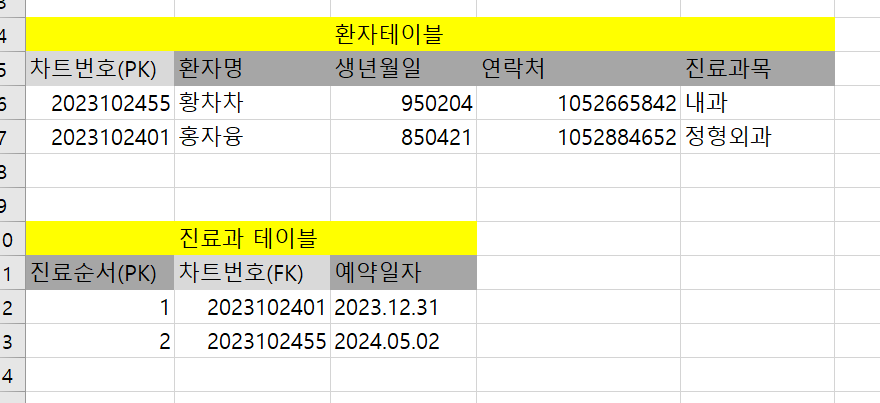
외래키 : 어떤 기본키를 참조하는 속성
-> 기본키에 있는 값만 외래키에 넣을 수 있음
-> NULL값과 중복값 허용
-> 기본키 값이 변경되면 외래키 값도 변경
-> 하나의 테이블에 있는 열에 다른 테이블의 기본키 값을 참조하는 형태
-> 두 개 이상의 테이블을 연결, 데이터 간에 일관성과 무결성 유지할 수 있게끔->관계형성 : 외래키를 사용해 한 테이블과 다른 테이블 사이에 관계 형성 -> "병원 진료과", "환자" 테이블 간에 환자차트번호 라는 외래키를 사용하여 진료과와 해당 환자의 한 정보를 연결 가능 -> 참조 무결성 : 외래키 제약 조건을 설정해서 데이터 일관성과 무결성을 유지가능, 제약 조건은 외래키값이 참조하는 기본키 값과 일치해야 됨
mysql 설치시 prompt 창에
->
cd C:\Program Files\MySQL\MySQL Server 8.0\bin
-> mysql -u root -p
-> mysql종료 원하면 quit
cdm 창과 workbench에
workbench에서
show databases;
"ctrl+enter" 눌러야 창이 뜸
mysql(dbms) > 여러 개의 database
1개의 database 안에는 여러 개의 table
js 에서 식별자 이름 지정할 때 : camelCase
sql문에서 식별자 이름 지정할 때 : snakecase 소문자_언더바
데이터 타입을 이름으로 정하지 말기
mysql에서는 작은 따옴표''가 기본
#데이터타입 :
- 선택(문자만) : enum('','')
- 숫자형 : INT 정수형
FLOAT 소수점 - 문자형 : VARCHAR(N) 가변길이 문자형
ex) varchar(10) 10글자까지 저장하겠다. 만약 5글자를 입력할 경우, 5글자에 대한 공간만 차지함
: CHAR(N) 고정길이 문자형 (예: 전화번호 형태 010-0000-0000)
ex) char(10) 10글자까지 저장하겠다. 만약 5글자를 입력할 경우, 10글자에 대한 공간 차지함
: MEDIUMTEXT 긴문자형 쓸 때 (예 : 블로그 작성) - 날짜형 : DATE
DATETIME
CREATE 문 : 생성
- 데이터베이스 생성
(한글지정)
CREATE DATABASE db_name DEFAULT CHARACTER SET utf8mb4 DEFAULT COLLATE utf8mb4_unicode_ci;
해당 데이터베이터 사용시 : use db_name
- 테이블 생성
show databases;
use sesac_test;
CREATE TABLE user(
id varchar(10) primary key not null,
password varchar(20) not null,
age int unsigned
);
CREATE TABLE customer
(
custid CHAR(10) NOT NULL PRIMARY KEY,
custname VARCHAR(10) NOT NULL,
addr CHAR(10) NOT NULL,
phone CHAR(11),
birth DATE
);
CREATE TABLE orders
(
orderid INT AUTOINCREMENT NOT NULL PRIMARY KEY,
custid CHAR(10) NOT NULL,
prodname CHAR(6) NOT NULL,
price INT NOT NULL,
amount SMALLINT NOT NULL,
FOREIGN KEY (custid) REFERENCES customer(custid) on delete cascade_
);
외래키 넣을 때
foreign key (키 값) references 테이블명 (키 값)
on delete cascade : 자식테이블에서 값을 삭제하면 부모키에서도 삭제시킬 수 있음
-- 테이블을 조회하는 명령어 (데이터베이스가 선택이 되어 있어야 함.)show tables;
ALTER 문 : 속성변경
- 속성 추가 add
ALTER TABLE user ADD gender enum('여자','남자');
--select * from user;
-
기존 속성 삭제 drop column
ALTER TABLE user DROP COLUMN age;
--select * from user; -
기존 속성 수정 modify
ALTER TABLE user MODIFY gender varchar(2) not null;-- 속성 값 수정 UPDATE 문
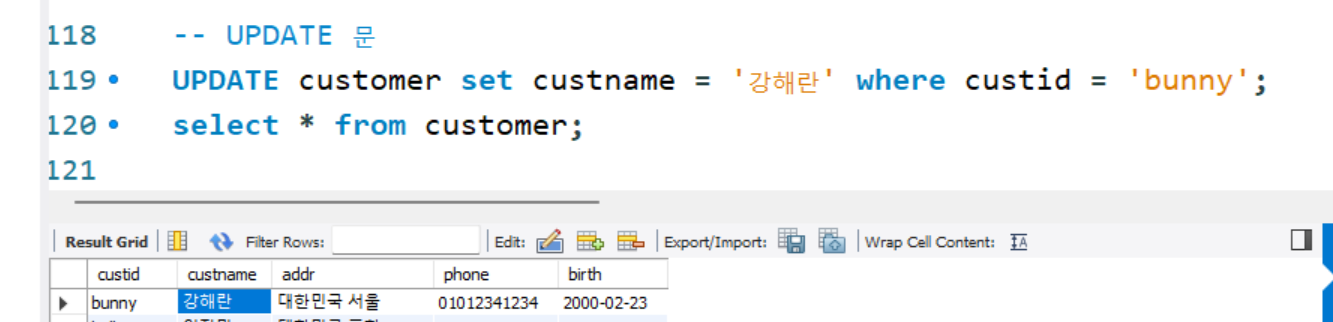
UPDATE customer set custname = '강해란' where custid = 'bunny';
테이블 삭제시
DROP TABLE 테이블명
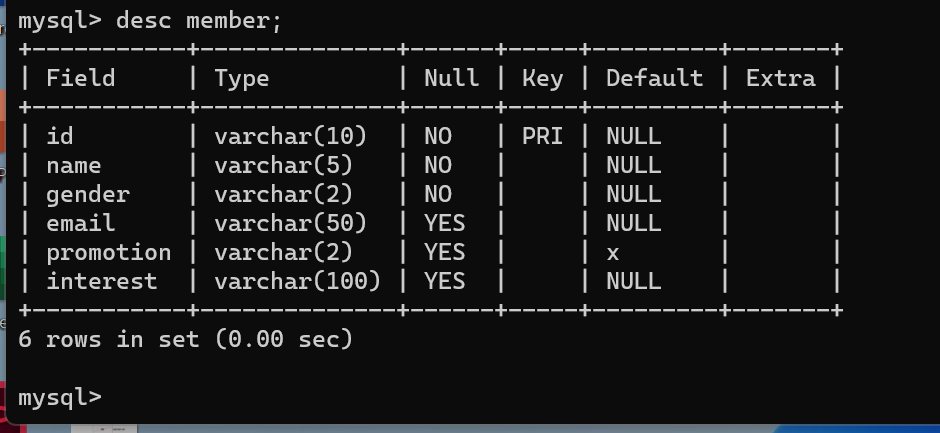
table의 속성들을 보려면 desc 테이블명 입력!!
DML (Data Manipulation Language)
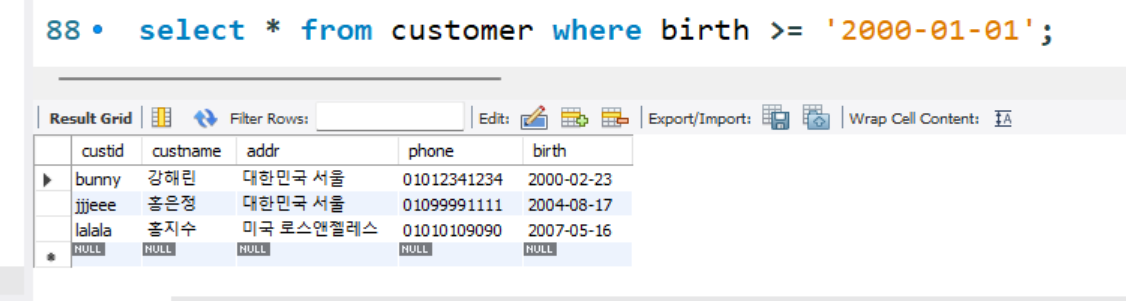
- select (데이터 조회) : user라는 테이블의 모든 값을 조회하겠다.
select [속성...] from [테이블이름]where [조건]]
!
-
insert (데이터 추가)
-
update
-
delete
delete from customer where custid = 'wow123';
-- 오류발생이유 : wow123 값을 foreign 키로 참조하고 있는 데이터가 orders 테이블에 있기 때문에 삭제할 수 없음delete from orders where custid = 'wow123';
select * from orders;
ORDER BY 정렬
- 기본값은 프라이머리키 기준
select from customer ORDER BY custname ASC;
select from customer where addr like '%대한민국%' ORDER BY custname DESC;
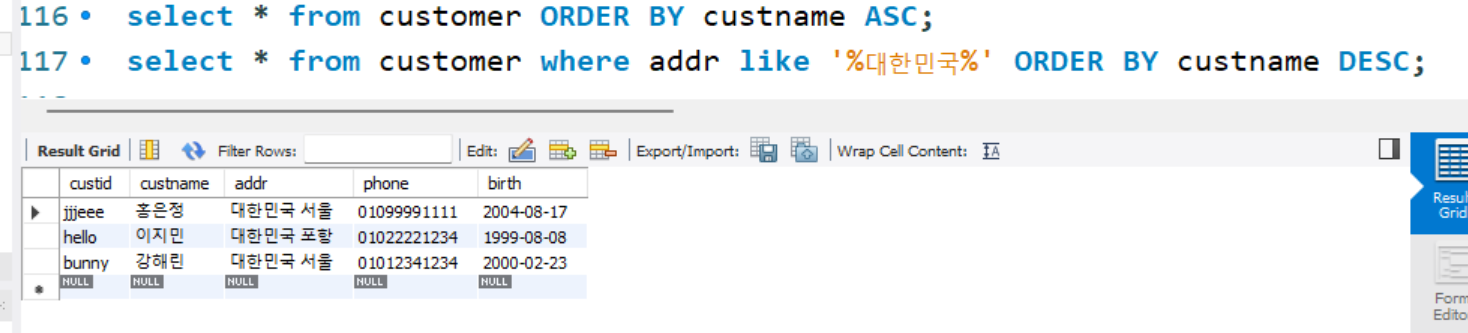
위의 값 중 제일 위에 있는 값만 가져올 때 LIMIT를 주면 됨
select * from customer where addr like '%대한민국%' ORDER BY custname DESC LIMIT 1;

DISTINCT 중복데이터 제거
LIMIT : 출력 개수 제한
집계함수
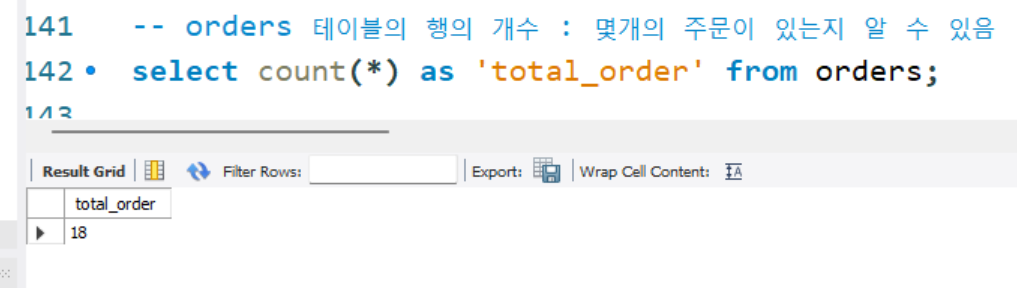
-- orders 테이블의 행의 개수 : 몇개의 주문이 있는지 알 수 있음
select count(*) as 'total_order' from orders;
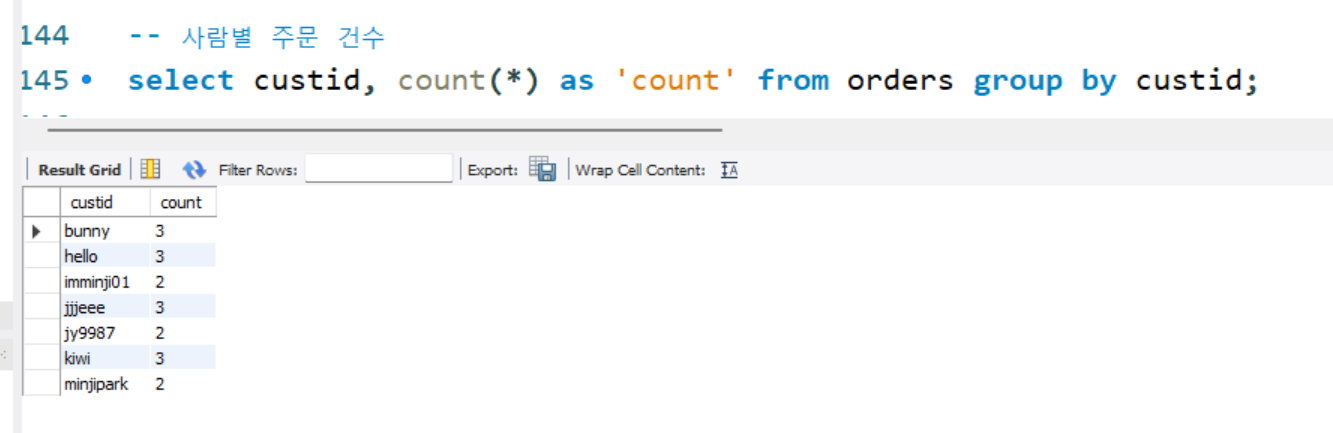
-- 사람별 주문 건수
select custid, count(*) as 'count' from orders group by custid;
-- 사람별로 구매한 상품의 개수 sum()
select custid, sum(amount) as 'total_amount' from orders group by custid;
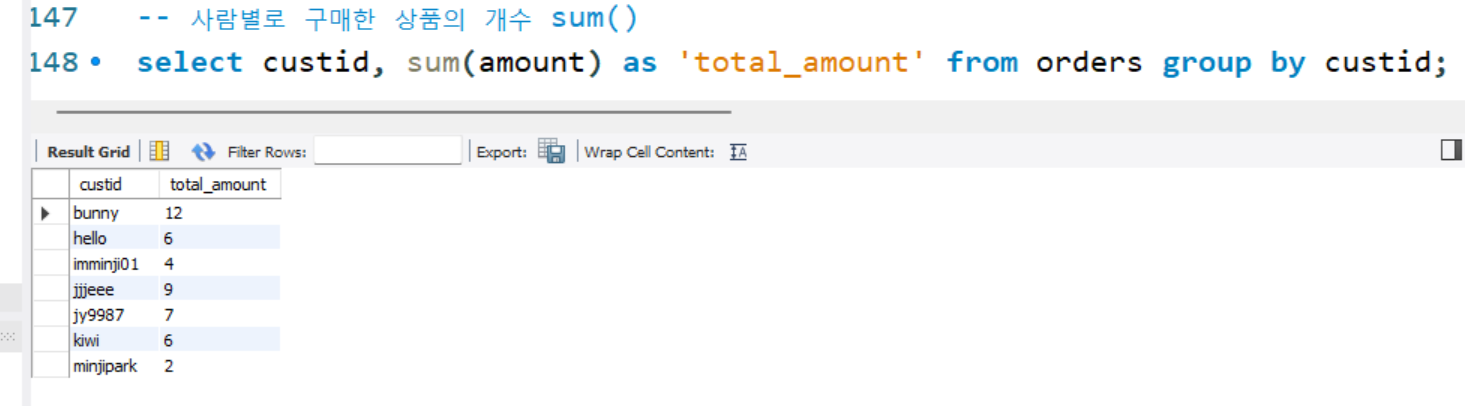
-- 사람별로 구매한 상품의 개수를 조회하는데, 구매한 상품의 개수가 5개 이상인 경우만 조회 having()
select custid, sum(amount) as 'total_amount' from orders group by custid having sum(amount>=5);

-- 사람별로 결제한 금액
select custid, sum(amount * price) as 'total_amount' from orders group by custid;
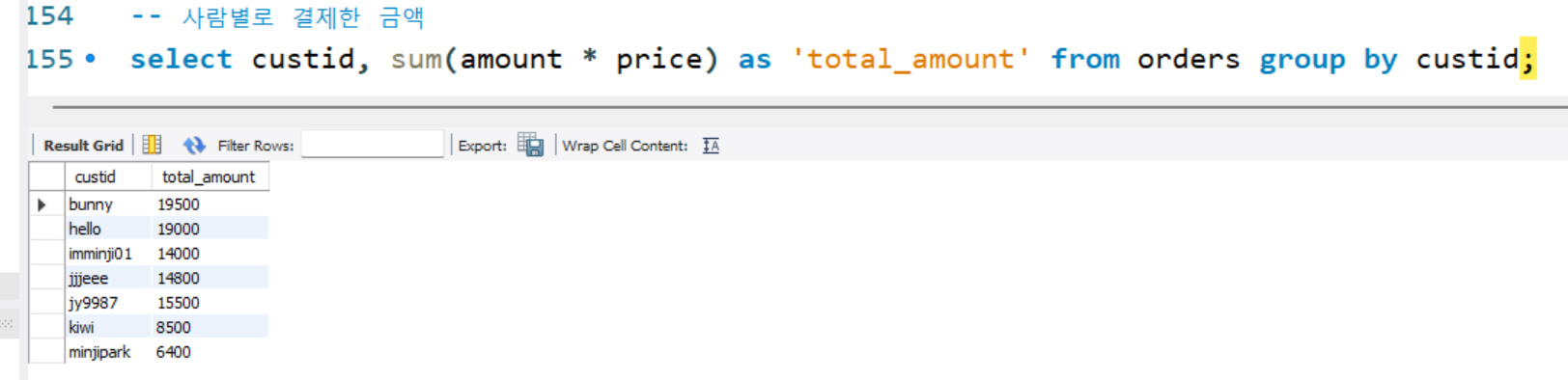
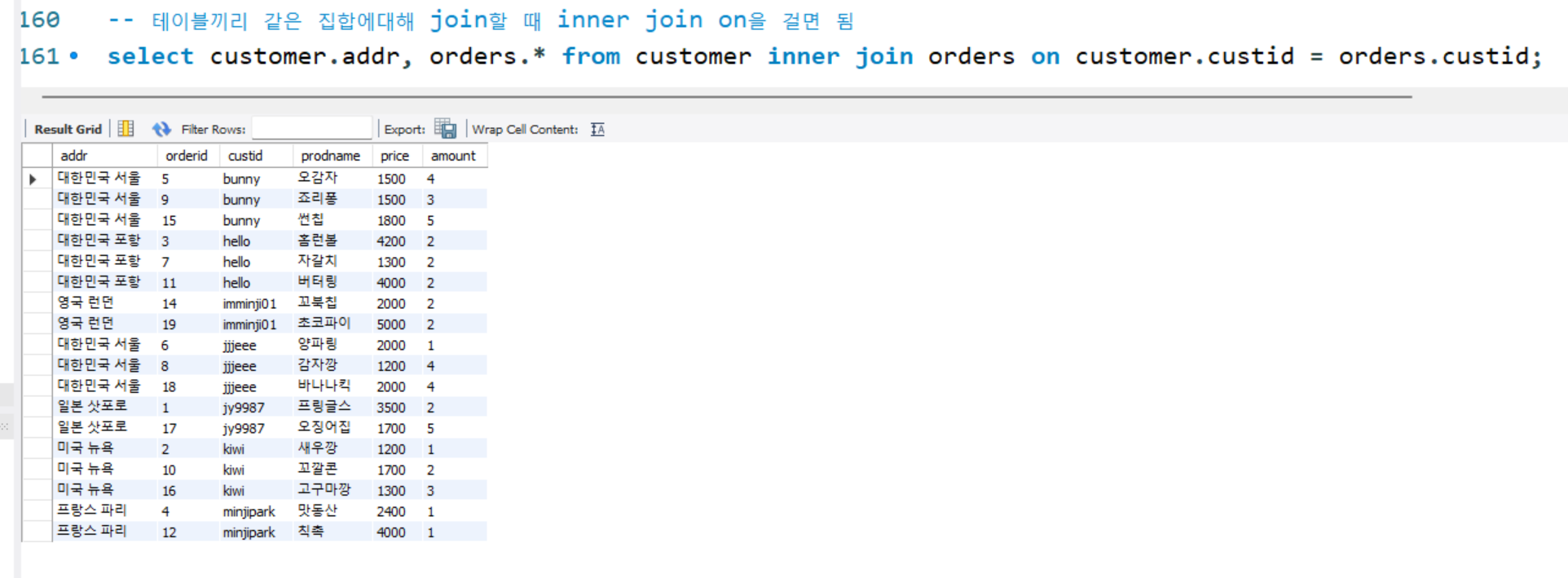
-- 테이블끼리 같은 집합에대해 join할 때 inner join on을 걸면 됨
-- CUSTOMER, ORDERS 를 INNER JOIN : 주문별로 배송지를 알고 싶어서;
select customer.addr, orders.* from customer inner join orders on customer.custid = orders.custid;
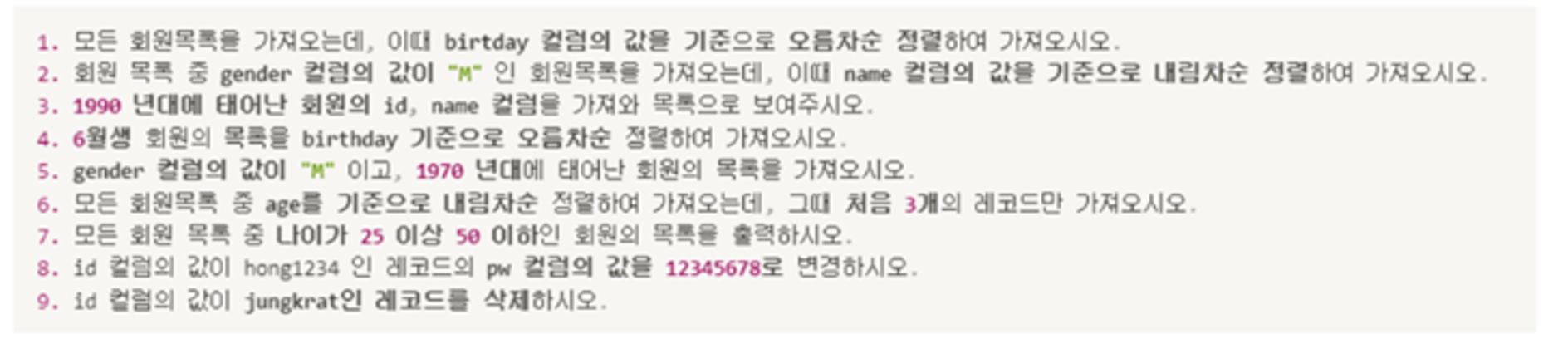
[종합실습]
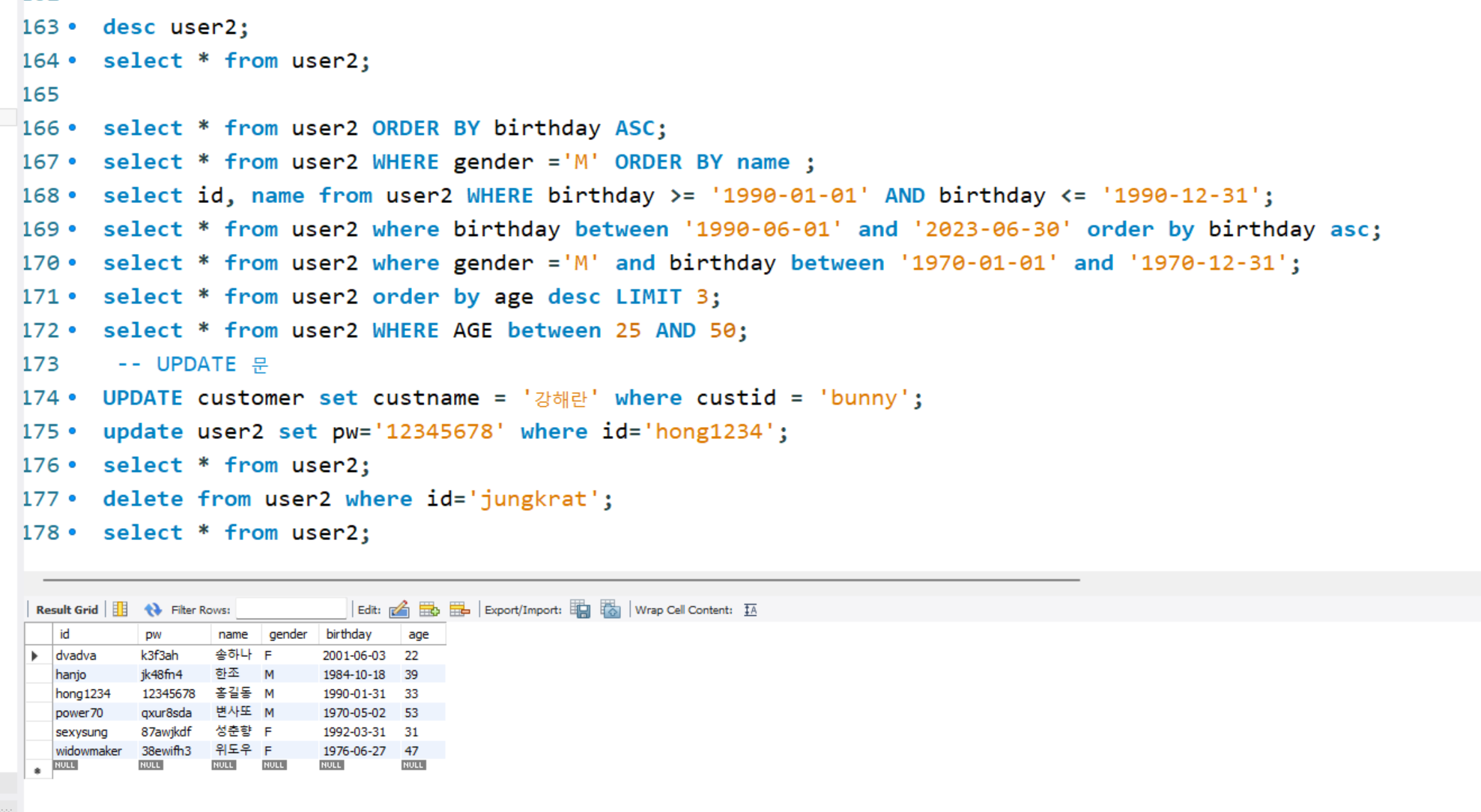
desc user2;
select * from user2;
select from user2 ORDER BY birthday ASC;
select from user2 WHERE gender ='M' ORDER BY name ;
select id, name from user2 WHERE birthday >= '1990-01-01' AND birthday <= '1990-12-31';
select from user2 where birthday between '1990-06-01' and '2023-06-30' order by birthday asc;
select from user2 where gender ='M' and birthday between '1970-01-01' and '1970-12-31';
select from user2 order by age desc LIMIT 3;
select from user2 WHERE AGE between 25 AND 50;
-- UPDATE 문
UPDATE customer set custname = '강해란' where custid = 'bunny';
update user2 set pw='12345678' where id='hong1234';
select from user2;
delete from user2 where id='jungkrat';
select from user2;
