useContext 는 컴포넌트에서
context를 읽고 구독할 수 있는 React Hook입니다.
💫Context란?
- 리액트에서 전역적으로 데이터를 관리하고 전달하는 시스템
Context가 필요한 상황
전역상태 관리
- 로그인 상태, 테마 설정, 언어 설정 등과 같은 애플리케이션의 전역 데이터를 관리하는 데 유용
Props Drilling 문제 해결
- 보통 리액트에서 부모컴포넌트가 자식컴포넌트로 데이터를 전달할때 Props로 전달한다.
- 컴포넌트간의 거리가 멀어질수록 코드가 복잡해진다.
- Props drilling 상황을 초래할 수 있다.
<Grandparent props={something}>
  <Parant props={something}>
    <Child props={something}>
      <Grandchild props={something}>
  	  </Grandchild>
  	</Child>
  </Parant>
</Grandparent>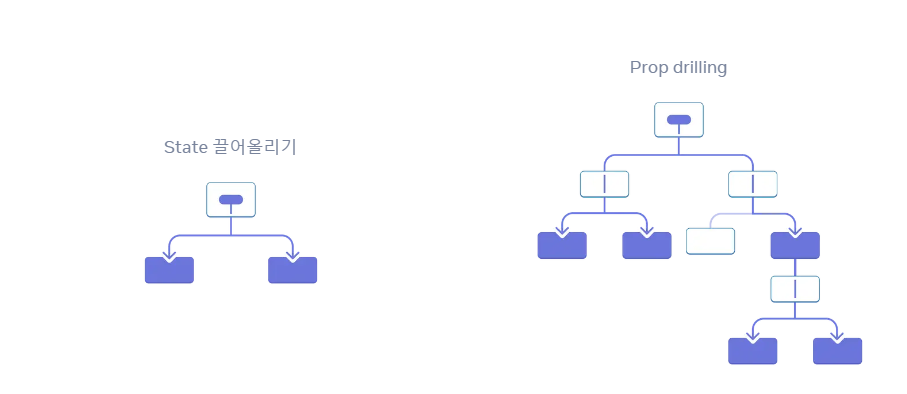
- 데이터를 사용할 트리 안에서 props를 전달하는 대신 context를 사용할 수 있다.
Context 사용해보기
1. Context 만들기
import { createContext } from 'react';

const MyContext = createContext();
2. Context 사용하기
function MyComponent() {
  const { value, setValue } = useContext(MyContext);

  return (
    <div>
      <p>{value}</p>
      <button onClick={() => setValue("Bye")}>Change Value</button>
    </div>
  );
}
3. Context 제공
function MyProvider() {
  const [value, setValue] = useState("Hello");

  return (
    <MyContext.Provider value={{ value, setValue }}>
      <MyComponent />
    </MyContext.Provider>
  );
}
간단한 다크모드 예시
// App.js
import { useState } from 'react';
import { ThemeContext } from './ThemeContext';
import Section from './Section';
import { SunIcon, MoonIcon } from '@heroicons/react/24/solid';

const App = () => {
  const [theme, setTheme] = useState("light");

  return (
    <ThemeContext.Provider value={theme}>
      <Section  />
      <button onClick={() => setTheme(theme === 'light' ? 'dark' : 'light')}>
        {
          theme === 'light' ?
          <MoonIcon className='w-10' /> : <SunIcon className='w-10' />
        }
      </button>
    </ThemeContext.Provider>
  )
}
export default App;


// theme.js
import { createContext } from 'react';

export const ThemeContext = createContext('light');


// section.jsx
import { useContext } from 'react';
import { ThemeContext } from './ThemeContext';

const Section = () => {
    const theme = useContext(ThemeContext);

    return (
        <section className={`${theme === "light" ? 'bg-white text-black' : 'bg-black text-white' }`}>
            <h1>Hello</h1>
        </section>
    )
};
export default Section;

참고
https://ko.react.dev/reference/react/useContext
📢useContext 사용시 주의사항
- useContext를 함수 컴포넌트 내부에서 사용할 때는 항상 컴포넌트 재활용이 어려워진다.
- useContext 가 선언돼 있으면 Provider에 의존성을 가지고 있는 셈이 되므로 아무데서나 재활용하기에는 어려운 컴포넌트가 된다.
- 즉, useContext가 있는 컴포넌트는 그 순간부터 눈으로는 직접 보이지도 않을 수 있는 Provider와 의존성을 갖게 되는 셈이다.
이런 상황을 방지하려면
- useContext를 사용하는 컴포넌트를 최대한 작게 하거나 혹은 재사용되지 않을 만한 컴포넌트에서 사용해야한다.
- 모든 콘텍스트를 최상위 루트 컴포넌트에 넣는것은 어떨까?
- 에러는 줄 수 있지만 리액트 관점에서는 현명하지 않다.
- 콘텍스트가 많아질수록 루트 컴포넌트는 더 많은 콘텍스트로 둘러싸일 것
- 해당 props를 다수의 컴포넌트에서 사용할 수 있게끔 해야 하므로 불필요하게 리소스가 낭비된다.
- 따라서 컨택스트가 미치는 범위는 필요한 환경에서 최대한 좁게 만들어야한다.
useContext는 상태를 관리를 위한 리액트 API가 아니다.
- 상태를 주입해 주는 API
- 상태를 전달하는 데 더 중점을 둔다.
- 상태 관리 라이브러리가 되기 위해서는 최소한 다음 두 가지 조건을 만족해야 한다.
- 어떠한 상태를 기반으로 다른 상태를 만들어 낼 수 있어야 한다.
- 필요에 따라 이런한 상태 변화를 최적화할 수 있어야 한다.
참고

못해도 그냥 합니다