오늘은 순위를 나타내는 법을 Rank 함수를 통해 알아보겠다.
순위화 ( Rank 함수 사용하지 않을 경우)
- 각 학생의 평점을 보여주는 student_grades(ID, GPA) 라는 뷰를 가정하고, 각 학생의 평점을 기준으로 GPA 대신 순위를 보여주는 질의를 작성하라.
select ID,
       ( 1 + ( select count (*) from student_grades B where B.GPA > A.GPA) ) as s_rank
// count 함수를 이용해 순위를 나타냄 : 나보다 높은 학생 수 + 1 = 등수
// e.g 만약, 내가 1등일 경우, B.GPA > A.GPA 를 만족하는 B.GPA 가 존재하지 않음. 즉, 0+1 해서 1등
from studnet_grades A
order by s_rank;
순위화 ( Rank 함수 사용)
- rank 함수 를 order by 명세 를 사용하여 순위화를 수행하시오.
select ID, rank() over (order by GPA desc) as s_rank
from student_grades
위의 코드에서는 GPA를 내림차순으로 정렬하며 RANK 함수를 사용하였다.
그러나 정렬된 순서가 아니다.
정렬된 순서대로 결과물을 얻기 위해선 Order by 절을 사용해야한다.
select ID, rank() over (order by GPA desc) as s_rank
from student_grades
order by s_rank
윈도우(window)
- rank() 가 적용되는 특정 행의 집합을 의미
- rank()를 윈도우 함수라고 부름
- 윈도우 함수는 group by 절과 함께 사용하는 집계 함수와는 다르게 입력 받은 행의 집합을 '집약'하지 않음.
- 윈도우 함수는 JOIN, WHERE, GROUP BY, HAVING 다음 그리고 Order by 절 이전에 실행.
partition by 를 이용한 분할된 릴레이션에서의 순위화
- 뷰 student_grades 처럼 정의되지만 학과명을 포함하는 dept_grades(ID, dept_name, GPA) 라는 뷰를 가정.
- 학과별 학생의 평점 순위를 구하시오
select ID, dept_name,
       rank() over (partition by dept_name order by GPA desc) as dept_rank
// dept_name으로 릴레이션을 분할
// 그 후 분할 된 릴레이션 안에서 GPA 내림차순으로 정렬
from dept_grades
order by dept_name, dept_rank;
기타 순위화 함수
- percent_rank : 백분위 순위
- cume_dist: cumulative distribution 의 약자로, 누적 분포
- row_number 행 번호
- null first : 널 값이 순서상 '처음' 오도록
- null last: 널 값이 순서상 '마지막'에 오도록
ntile(n) 순위화 함수
- 정렬된 튜플들을 입력 받아, 같은 수의 튜플을 가지는 n개의 버킷으로 나눈다.
- 백분위수 기반으 히스토그램을 구축하는데 유용
- 평점에 기반을 두어 각 학생을 네 개의 분할로 나누는 질의를 구하라
select ID,
       ntile(4) over (order by GPA desc) as quartile
from student_grades;
Rank 함수 중간 요약
- Partition by 절은 결과 집합의 행을 rank()함수가 적용될 각각이 파티션으로 나누다
- 그 후, order by 절은 각각의 파티션에 분배된 행을 정렬시킨다.
윈도우 함수 sum
- 윈도우 함수는 튜플의 범위에 대한 집계 함수를 계산하는데 유용하다.
- e.g) 동향 분석, 범위에 대한 집계
select date, sum(value) over
// 여기서 sum 은 group by 가 아니라 윈도우에 대하여 적용되는 윈도우 함수
       (order by date betwwen rows 1 preceding and 1 following)
// 현재 행 기준 앞 1행, 뒤 1행 포함 범위 지정
from sales
기타 윈도우 정의 예
-
between rows unbounded preceding and current
첫번째 행부터 현재 행 까지 -
rows unbounded preceding
첫번째 행부터 현재 행 까지 -
range between 10 preceding and current row
현재 행 값 -10 에서 현재 값 사이의 값 있는 모든 행. -
range 를 사용하면 row를 사용할 때와 달리, sort 속성의 값이 같은 모든 행을 대상으로 하는 것을 의미
-
e.g)
("a", 1000) , ("b", 700), ("b", 700), ("c", 300) 의 튜플이 있을 때,
range between 1 preceding and 1 following row 를 사용하면
("a", 1000) , ("b", 700), ("c", 300)
row betwwen 1 preceding and 1 following row 사용하면
("a", 1000) , ("b", 700), ("b", 700)
데이터 분석 및 OLAP
-
OLAP: 온라인 분석 처리
Online Analytical Processing
: 대용량의 데이터를 거의 실시간으로 응답(지연을 무시할 수 있을 정도로 작음) -
OLTP: 온라인 트랜젝션 처리
Online Transaction Processing
: select, insert, update, delete 등 데이터의 입력, 저장, 반환에 초점을 둠.
: 저장된 데이터(데이터 웨어하우스)를 잘 분석할 수 있도록 하는 것에 초점 -
다차원 데이터(multidimensional data)
- 측정 속성(measure attribute)
어떤 가치를 정량적으로 측정하고 집계하기 위한 속성
e.g) 판매된 품목 수와 품목 가격
- 차원 속성(dimension attribute)
측정 속성과 측정 속성의 요약을 그룹화하고 표현하기 위한 차원 속성
e.g) 품목 식별자, 품목이 판매된 날짜, 품목 판매 위치, 품목 구매 고객
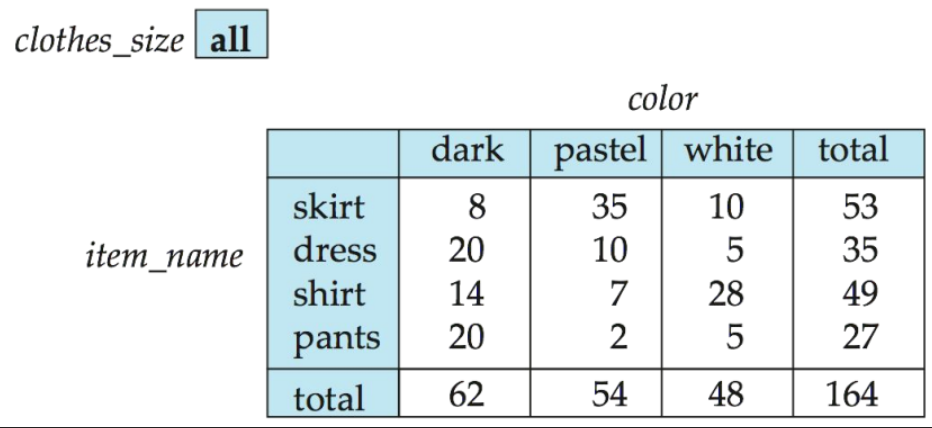
크로스탭(cross-tab) 또는 피벗 테이블(pivot table)
- 차원 속성 중 하나(item_name)에 대한 값이 행 머리글을 형성
- 다른 차원 속성(color)의 값은 열 머리글을 형성
- 다른 차원 속성(clothes_size)는 맨 위에 나열
- 개별 셀의 값은 셀을 지정하는 측정 속성(quantity)의 집계값
롤업 연산
- 나열된 속성의 각 전위(prefix) 속성에 대해 그룹 생성
select item_name, color, sum(quantity) as quantity
from sales
group by rollup (item_name, color)
// 이 경우 group by rollup 절은 3개의 그룹 형성
{
( item_name, color ),
( item_name, ),
( )
}// 위 질의의 결과는 union 연산을 사용하는 다음 질의와 같음
( select item_name, color, sum(quantity) as quantity
from sales
group by item_name, color )
union
( select item_name, null as color , sum(quantity) as quantity
from sales
group by item_name )
union
( select null as item_name, null as color, sum(quantity) as quantity
from sales
)큐브 연산
- 나열된 속성의 모든 부분집합으로 구성된 많은 수의 그룹을 생성
select item_name, color, clothes_size, sum(quantity)
from sales
group by cube(item_name, color, clothes_size)
위 코드는 다음 8개의 그룹을 생성
{
(item_name, color, clothes_size),
(item_name, color),
(item_naem, clothes_size),
(item_name),
(color, clothes_size),
(color),
(clothes_size),
()
}
// 롤업에서 처럼 각 그룹에 없는 속성에 대해서는 null 값을 포함하여 결과를 생성하고,
// 각 그룹에 대해 생성된 결과들의 합집합을 구하면 같은 질의문 만들 수 있음
확장 집계
select item_name, color, clothes_size, sum(quantity)
from sales
group by rollup(item_name), rollup(color, clothes_size)
// 6개 그룹 생성
// 1번과 2번은 같은 의미
1.
{
(item_name),
(),
x
(color, clothes_size),
(color, ),
()
}
// *--------------------------------* //
2.
{
(item_name, color, clothes_size),
(item_name, color),
(item_name),
(color, clothes_size),
(color)
()
}- 특정 그룹핑(grouping) 리스트만 명세 가능
group by grouping sets ((color, clothes_size), (clothes_size, item_name))
// 2그룹만 얻는다.- 일반적인 null 과 롤업/큐브에 의해 생성되는 null 을 구분하기 위해 grouping() 함수를 사용할 수 있다.
- 값이 all 을 나타내는 null 이면 1을 반환하고 다른 모든 경우에는 0을 반환한다.
select item_name, color, clothes_size, sum(quantity),
   grouping(item_name) as item_name_flag
   grouping(color) as color_flag
   grouping(clothes_size) as size_flag
from sales
group by cube(item_name, color, clothes_size)