MYSQL REGEXP 활용하기
해커랭크의 'Weather Observation Station 8'을 통해 REGEXP의 장점과 사용법을 알아보자
Weather Observation Station 8
- Query the list of CITY names from STATION which have vowels (i.e., a, e, i, o, and u) as both their first and last characters. Your result cannot contain duplicates.
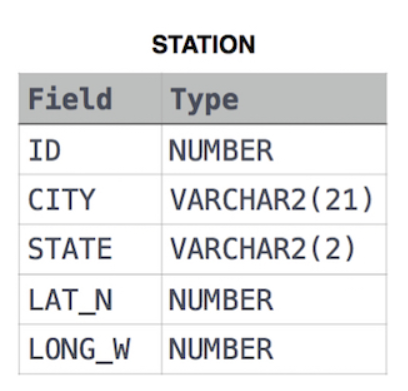
이 문제를 REGEXP 없이 풀면 아래처럼 풀어야 한다.
SELECT DISTINCT city
FROM station
WHERE (city LIKE 'a%'
	or city like 'e%'
	or city like 'i%'
	or city like 'o%'
	or city like 'u%')
AND (city like '%a'
	or city like '%e'
	or city like '%i'
	or city like '%o'
	or city like '%u')
LIKE와 와일드카드 %을 활용하여 aeiou로 시작하는 단어이자 aeiou로 끝나는 단어를 불러온다.
MYSQL 와일드카드
%: 0개 이상의 문자에 해당함
→ 'de%' : delete, delicate, dedicate ... etc._: 한 문자에 해당함
→ 'ti_' : tip, tib, tie ... etc.
출처: https://www.w3schools.com/mysql/mysql_wildcards.asp
이 문제를 REGEXP로 풀면 아래와 같이 간단해진다.
SELECT DISTINCT city
FROM station
WHERE city REGEXP '^[aeiou].*[aeiou]$'
WHERE절에 REGEXP를 쓰려는 column을 쓰고 REGEXP 다음 ''안에 정규표현식을 기재하면 된다.
'^[aeiou].*[aeiou]$'를 풀어보면 아래와 같다.
^: 다음으로 오는 문자들로 시작하는 단어[]: 괄호 안의 단어 중 아무거나.*: 0이상 아무 숫자 또는 글자$: 앞에 오는 문자로 끝나는 단어
따라서, [aeiou]중에 아무 문자로 시작하고 [aeiou] 중 아무 문자로 끝나는 단어를 간단하게 찾을 수 있다.
다른 정규식 표현들
.: any character except newline\w\d\s: word, digit, whitespace\W\D\S: not word, digit, whitespace[abc]: any of a, b, or c[^abc]: not a, b, or c[a-g]: character between a & g^abc$: start / end of the string\b\B: word, not-word boundarya* a+ a?: 0 or more, 1 or more, 0 or 1a{5} a{2,}: exactly five, two or morea{1,3}: between one & threea+?a{2,}?: match as few as possibleab|cd: match ab or cd
출처 : https://regexr.com/
