
기본부터 정리
프론트엔드 기본부터 차근차근
1. 목록 태그 (비순서형, 순서형, 정의형)
- ul(unordered list), li(list item), ol(ordered list), dl(definition list), dd(definition description) / buliet(불릿)
<strong>내가 좋아하는 과일</strong>
<ul>
	<li>사과</li>
	<li>바나나</li>
	<li>메로</li>
</ul>

<strong>오늘 할일</strong>
<ol>
  <li>아침먹기</li>
  <li>점심먹기</li>
  <li>간식먹기</li>
  <li>저녁먹기</li>
  <li>야식먹기</li>
</ol>
중요⭐️
ul,ol리스트 형태의 자식은li태그만 입력 가능하다.
ul은 type="square" "circle" "disc" 속성을 가질 수 있다.
ol 역시 “1” “a” “A” “i” “I” type 속성을 가지고 있다.
<!-- 정의형 ?? -->
    <dl>
      <dt>HTML</dt>
      <dd>
        HTML은 Hyper Text Markup Language의 약자로 웹 문서의 구조를 설계하기
        위한 목적으로 개발된 언어입니다.
      </dd>
      <dt>CSS</dt>
      <dd>CSS는 Casecading Style Sheet</dd>
    </dl>
2. 링크(a)
- href - > 연결 경로 주소**
HTML = Hyper Text Markup Language - target - >
”_blank”… < - 새창 열림
상황에 따라 선택해야함
document.referrer< - 링크 이동전 도메인을 알 수 있음,
막는 법 속성rel="noreferrer"추가 < - 보안적으로 👍
window.opener< - 보안에 취약 특히 구 브라우저
막는 법 속성rel="noopener"추가 < - 보안적으로 👍
<a href="#" target="_blank" rel="noopener noreferrer">이름</a>3. 이미지 태그(img)
- 상대적 경로
1-1. ./ - > 현재 폴더(생략 가능)
1-2. ../ - > 상위 폴더 - 절대 경로
- 대체 텍스트(
alt)
이미지 링크 (img + a)
    <a href="https://www.google.com">
    	<img
          src="https://upload.wikimedia.org/wikipedia/commons/thumb/2/2f/Google_2015_logo.svg/368px-Google_2015_logo.svg.png"
          alt="구글 로고"
        />
    </a>
4. 폼(form) 폼 관련 요소 (상호 작용 요소) / 입력창 / 버튼
-
form 태그 - > 폼의 시작을 의미하는 태그
1-1. - > 네트워크 통신, HTTP(프로토콜) / Method -
input 태그 - > 입력 요소 ( 한 줄 입력 요소)
2-1. type = text | password | tel | number | url | search | email | checkbox | radio | file |button|image| hidden | date | datetime-local | month | week | time | range | color |submit|reset -
여러줄 입력 요소 - > textarea < - 컨텐츠가 있는 요소로 만들어야 함
<textarea />X,<textarea>컨텐츠</textarea>O -
button 태그 - > 버튼 type(submit | button | reset)
⚠️ form 안에 form - X, form 안에
submit,reset버튼은 한개씩, form 입력 요소들은 무조건 form 안에 있어야한다.
    <form action="api" method="">
    			<!-- 명시적인 방법-->
          <label for="uid">아이디</label>
          <input type="email" id="uid" />

          <!-- 암묵적인 방법-->
          <label>비밀번호: <input type="password" /></label>

          <!-- 암시적 + 명시적 방법-->
          <label for="pw">비밀번호: <input type="password" id="pw" /></label>
</form>-
폼 요소를 그룹 짓고 싶다? - >
fieldset< -legend태그와 함께 사용된다. -
select요소
6-1.option요소는 value값이 있어야 하며 그룹으로 나눌때는optgroup로 구분할 수 있다.label="value"속성으로 정의 내릴 수 있다.
6-2.select요소는size요소로 노출값을 지정할 수 있고,multiple속성으로 다중 선택을 할 수 있지만 ㄷ다중선택은 보통 checkbox를 사용한다.6-3.
option에selected속성으로 미리 선택해 놓을 수 있고selected가 다수일 경우 마지막 요소가 select 됨
     <form action="" method="">
          <fieldset>
            <legend>기본 정보</legend>
            <label for="uid">
              아이디
              <input type="text" id="uid" />
            </label>
            <label for="pwd">
              비밀번호
              <input type="text" id="pwd" />
            </label>
            <label for="pwd-confirm">
              비밀번호 확인
              <input type="text" id="pwd-confirm" />
            </label>
          </fieldset>

          <fieldset>
            <legend>선택 정보</legend>
            <label for="name">
              이름
              <input type="text" id="name" />
            </label>
            <label for="area">
              주소
              <select id="area" size="3" multiple>
                <optgroup label="서울시">
                  <option value="강북" selected>강북</option>
                  <option value="중랑">중랑</option>
                  <option value="은평">은평</option>
                </optgroup>
                <optgroup label="경기도">
                  <option value="성남">성남</option>
                  <option value="판교">판교</option>
                  <option value="금광">금광</option>
                </optgroup>
              </select>
            </label>
          </fieldset>
</form>- form 인풋들 속성들
7-1. 공통 속성
7-1-1. disabled - > 비활성화
7-1-2. readonlt - > 읽기 전용 / disabled와 의미론적 차이
7-1-3. maxlength - > input의 최대 갯수 (한글과 일본어는 타이핑시에는 4자리까지는 허용되 언포커싱되면 length에 맞게 변경 됨)
7-1-4. selected, checked… 등
5. 표(table)
- 열(column)과 행(row)
- 필수태그
2-1. table 태그
2-2. tr - > table row(행)
2-3. th(table header), td(table data) - > 열(column)
2-4. 병합 (rowspan, colspan) → 데이터의 방향에서 가장 가까운 요소 기준
2-5. caption < -표의 제목 / 가리고 싶으면 CSS 처리 허나 display: ‘none’ 은 안됨 / position: absolute; top: -999999px
2-6. thead(table header), tbody(table body), tfoot(table footer)
2-7. col, colgroup
      <table border="1">
          <col style="width: 80px" />
          <col style="width: 100px" />
          <col style="width: 50px" />
          <col style="width: 200px" />
          <caption>
            음료 가격표
          </caption>
          <thead>
            <tr>
              <th>번호</th>
              <th>상품명</th>
              <th>수량</th>
              <th>가격</th>
            </tr>
          </thead>
          <tbody>
            <tr>
              <td>1</td>
              <td>콜라</td>
              <td>1개</td>
              <td>1,500원</td>
            </tr>
            <tr>
              <td>2</td>
              <td>사이다</td>
              <td>1개</td>
              <td rowspan="2">1,000원</td>
            </tr>
            <tr>
              <td>3</td>
              <td>환타</td>
              <td>1개</td>
            </tr>
          </tbody>
          <tfoot>
            <tr>
              <td>총 금액</td>
              <td colspan="3" align="right">3,500원</td>
            </tr>
          </tfoot>
        </table>
⚠️ th 에는 scope로 영향을 주는 col를 추가해주면 좋음 < - scope = col | row | colgroup | rowgroup
     <table>
          <caption>
            2024년 성적표
          </caption>
          <thead>
            <tr>
              <th scope="col">구분</th>
              <th scope="col">중간고사</th>
              <th scope="col">기말고사</th>
            </tr>
          </thead>
          <tbody>
            <tr>
              <th scope="row">전공</th>
              <td>A+</td>
              <td>B+</td>
            </tr>
            <tr>
              <th scope="row">교양</th>
              <td>A+</td>
              <td>C+</td>
            </tr>
          </tbody>
        </table>
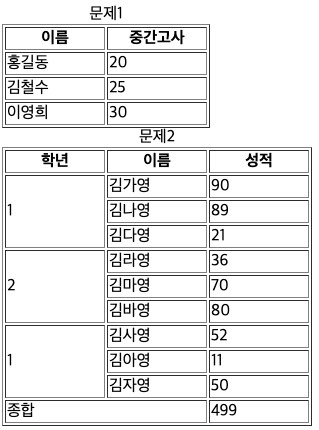
웹 접근성이란? 모든 사람이 공평하게 웹을 경험하게 하라(like 홍익인간)