TIL - 2025.03.06
오늘 배운 것 개요
오늘은 Java에서 REST API를 활용하여 GitHub 레포지토리 목록을 조회하는 프로그래밍을 연습하였다.
이를 통해 API 요청, JSON 데이터 처리, 외부 라이브러리 활용법을 학습 하였다.
알고리즘 풀이를 진행하며 간단한 오류를 만났고, 원인을 파악하고 해결하였다.
1. 학습 내용
GitHub REST API를 사용하여 내 레포지토리 가져오기
-
GitHub에서는 공식 REST API를 제공하며, 이를 활용하면 프로그래밍적으로 내 레포지토리를 조회할 수 있다.
- GitHub REST API를 호출하여 내 레포지토리 목록 가져오기
- JSON 데이터를 파싱하여 레포지토리 이름과 URL 출력
- 설정 파일(config.json)을 활용하여 GitHub 계정 정보를 분리
API 요청을 처리 GitHubAPI.java
import java.io.*;
import java.net.HttpURLConnection;
import java.net.URL;

public class GitHubAPI {
    private static final String githubUrl = "https://api.github.com/users/"; //깃 허브 API
    private static final String githubName = "***"; //깃 허브 이름

    public static String repositoriesFetch() {
        try{
            URL url = new URL(githubUrl + githubName+ "/repos");
            HttpURLConnection conn = (HttpURLConnection) url.openConnection();
            conn.setRequestMethod("GET");
            conn.setRequestProperty("Accept", "application/vnd.github.v3+json");

            BufferedReader in = new BufferedReader(new InputStreamReader(conn.getInputStream()));
            String inputLine;
            StringBuilder response = new StringBuilder();
            while ((inputLine = in.readLine()) != null) {
                response.append(inputLine);
            }
            in.close();
            return response.toString();
        }catch (Exception e) {
            e.printStackTrace();
            return null;
        }
    }
}HttpURLConnection을 사용하여 GitHub API에 GET 요청BufferedReader를 활용해 JSON 응답을 읽고StringBuilder에 저장
JSON 데이터를 파싱 JsonParser.java
import org.json.JSONArray;
import org.json.JSONObject;

public class JsonParser {
    public static void parseAndPrintRepositories(String json) {
        JSONArray repoArray = new JSONArray(json);

        System.out.println("\n내 GitHub 레포지토리 목록:");
        for (int i = 0; i < repoArray.length(); i++) {
            JSONObject repo = repoArray.getJSONObject(i);
            String name = repo.getString("name");
            String url = repo.getString("html_url");
            System.out.println(name + " - " + url);
        }
    }
}JSONArray를 활용해 JSON 데이터 배열을 처리getString("name")을 사용해 레포지토리 이름,getString("html_url")로 URL 가져오기
프로그램 실행 담당 Main.java
public class Main {
    public static void main(String[] args) {
        System.out.println("GitHub에서 내 레포지토리 목록 가져오는 중...");

        String repoJson = GitHubAPI.fetchRepositories();

        if (repoJson != null) {
            JsonParser.parseAndPrintRepositories(repoJson);
        } else {
            System.out.println("데이터를 불러오지 못했습니다.");
        }
    }
}GitHubAPI.fetchRepositories()를 실행하여 API 요청- JSON 데이터를
JsonParser.parseAndPrintRepositories(json)을 통해 출력
결과
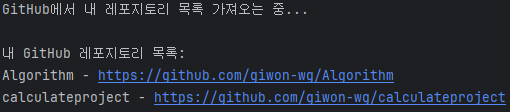
- Java에서 REST API를 활용하는 방법 (
HttpURLConnection) - GitHub REST API를 사용하여 내 레포지토리 목록 가져오기
- JSON 데이터를
org.json.JSONArray와JSONObject로 처리하는 방법 - 설정 파일(
config.json)을 활용하여 사용자 정보를 안전하게 관리하는 방법
3. 알고리즘 문제 풀이
콜라츠 추측
- 626331을 연산할때 -1일 아닌 488로 출력되는 문제
class Solution {
    public int solution(int num) {
        int answer = 0;

        while(num != 1){
            if(num % 2 ==0){
                num /= 2;
            } else {
                num = (num*3) +1;
            }
            answer++;

            if(answer >= 500){
                return -1;
            }
        }


        return answer;
    }
}- 626331을
int로 입력받았을때 연산 중 오버플로우 의심 int의 최대값 =2,147,483,647- 626331 콜라츠 수열의 104번째 값 =
3,209,903,638
class Solution {
    public int solution(int num) {
        int answer = 0;
        long number = num;

        while(number != 1){
            if(number % 2 ==0){
                number /= 2;
            } else {
                number = (number * 3) + 1;
            }
            answer++;

            if(answer >= 500){
                return -1;
            }
        }

        return answer;
    }
}int로 입력 받은 값을long으로 변경하여 해결
4. 오늘 느낀 점 & 개선할 부분
- API 요청을 직접 구현하면서 네트워크 프로그래밍의 기본 개념
- JSON 데이터를 다루는 방법 학습
- 하드코딩 없이
config.json을 활용하는 방식이 유지보수에 더 유리
OkHttp라이브러리를 사용방법 학습필요- GitHub의 특정 레포지토리 커밋 내역 조회 기능 추가
- JSON 데이터 저장 및 파일로 내보내는 기능 추가

노력하고 있다니까요?