properties vs yml
| 항목 | properties | yml |
|---|---|---|
| 문법 | 단순 key=value | 구조화된 계층형 |
| 가독성 | 낮음 | 높음 |
| 실수 가능성 | 적음 | 들여쓰기 실수 주의 필요 |
| 최근 추세 | 감소 중 | Spring 공식 권장 |
| 항목 | .yml 예시 | .properties 예시 |
|---|---|---|
| 계층 구조 표현 | 들여쓰기 (: 사용) | .으로 연결된 키로 표현 |
| 가독성 | 설정이 많을수록 보기 편함 | 길어지고 복잡해짐 |
| 에러 가능성 | 들여쓰기 오류 가능 | 오타나 중복 키 가능성 있음 |
| 실제 쓰는 상황 | 대규모 프로젝트, 구조화된 설정에 강함 | 간단하거나 오래된 프로젝트와 호환에 유리함 |
yml 기본 세팅
spring:
  datasource:
    url: jdbc:mysql://localhost:3306/yourDb
    username: username
    password: password
    driver-class-name: com.mysql.cj.jdbc.Driver

  jpa:
    hibernate:
      ddl-auto: update
    show-sql: true
    properties:
      hibernate:
        format_sql: true

server:
  port: 8080

jwt:
  secret:
    key: secretKey
properties 기본 세팅
spring.datasource.url=jdbc:mysql://localhost:3306/yourDb
spring.datasource.username=username
spring.datasource.password=password
spring.datasource.driver-class-name=com.mysql.cj.jdbc.Driver

spring.jpa.hibernate.ddl-auto=update
spring.jpa.show-sql=true
spring.jpa.properties.hibernate.format_sql=true

server.port=8080

jwt.secret.key=secretKey
properties 코드블럭 문법 하이라이딩 하실 수 있는 분...?
개별 프로젝트
Lv. 0
0. 프로젝트 기본 설정
1. application.yml
spring:
  datasource:
    url: jdbc:mysql://localhost:3306/${MYSQL_NAME}?useSSL=${SSL}&allowPublicKeyRetrieval=${ALLOWPUBLICKEYRETRIEVAL}
    username: ${MYSQL_USERNAME}
    password: ${MYSQL_PASSWORD}
    driver-class-name: com.mysql.cj.jdbc.Driver

  jpa:
    hibernate:
      ddl-auto: update
    show-sql: true
    properties:
      hibernate:
        format_sql: true

server:
  port: 8080

jwt:
  secret:
    key: ${SECRET_KEY}
2. 환경변수파일(.env)
#MYSQL 설정
MYSQL_NAME=
SSL=false
ALLOWPUBLICKEYRETRIEVAL=true

MYSQL_USERNAME=root
MYSQL_PASSWORD=

#JWT
SECRET_KEY=
Lv. 1
1. 코드 개선 퀴즈 - @Transactional의 이해
    @PostMapping("/todos")
    public ResponseEntity<TodoSaveResponse> saveTodo(
            @Auth AuthUser authUser,
            @Valid @RequestBody TodoSaveRequest todoSaveRequest
    ) {
        return ResponseEntity.ok(todoService.saveTodo(authUser, todoSaveRequest));
    }
해당 API 호출 시 에러 발생
jakarta.servlet.ServletException: Request processing failed: org.springframework.orm.jpa.JpaSystemException: could not execute statement [Connection is read-only. Queries leading to data modification are not allowed] [insert into todos (contents,created_at,modified_at,title,user_id,weather) values (?,?,?,?,?,?)]
-
에러 내용
DB 커넥션이 읽기 전용(read-only) 상태인데, 쓰기 작업 시도 -
에러 예상
Service클래스 전체가@Transactional(readOnly = true)로 되어 있거나,saveTodo메서드가@Transactional(readOnly = true)일 것으로 예상 -
확인 결과
TodoService클래스 전체에@Transactional(readOnly = true)걸려있음을 확인 -
개선
방법 1 : 클래스에 걸려있는readOnly = true삭제
방법 2 : 클래스 설정보다 메서드 설정을 우선한다는 점에서 메서드 위에@Transactional명시 (기본값 : false)
2. 코드 추가 퀴즈 - JWT의 이해
토큰안에 nickname값 넣기
-
User Entity에 컬럼 추가
private String nickname; -
Entity 내부 메서드 수정
public User(String email, String password, UserRole userRole, String nickname) {
        this.email = email;
        this.password = password;
        this.userRole = userRole;
        this.nickname = nickname; // <- 추가
    }

    private User(Long id, String email, UserRole userRole, String nickname) {
        this.id = id;
        this.email = email;
        this.userRole = userRole;
        this.nickname = nickname; // <- 추가
    }

    public static User fromAuthUser(AuthUser authUser) {
        return new User(authUser.getId(), authUser.getEmail(), authUser.getUserRole(), authUser.getNickname()); // <- 추가
}- 회원가입 Request에 nickname 추가
@NotBlank
private String nickname; // <- 추가domain.auth.service.AuthService수정
public SignupResponse signup(SignupRequest signupRequest) {

        if (userRepository.existsByEmail(signupRequest.getEmail())) {
            throw new InvalidRequestException("이미 존재하는 이메일입니다.");
        }

        String encodedPassword = passwordEncoder.encode(signupRequest.getPassword());

        UserRole userRole = UserRole.of(signupRequest.getUserRole());

        User newUser = new User(
                signupRequest.getEmail(),
                encodedPassword,
                userRole,
                signupRequest.getNickname() // <- 추가
        );
        User savedUser = userRepository.save(newUser);

        String bearerToken = jwtUtil.createToken(savedUser.getId(), savedUser.getEmail(), userRole, savedUser.getNickname()); // <- 추가

        return new SignupResponse(bearerToken);
    }

    public SigninResponse signin(SigninRequest signinRequest) {
        User user = userRepository.findByEmail(signinRequest.getEmail()).orElseThrow(
                () -> new InvalidRequestException("가입되지 않은 유저입니다."));

        // 로그인 시 이메일과 비밀번호가 일치하지 않을 경우 401을 반환합니다.
        if (!passwordEncoder.matches(signinRequest.getPassword(), user.getPassword())) {
            throw new AuthException("잘못된 비밀번호입니다.");
        }

        String bearerToken = jwtUtil.createToken(user.getId(), user.getEmail(), user.getUserRole(), user.getNickname()); // <- 추가

        return new SigninResponse(bearerToken);
}config.AuthUserArgumentResolver수정
 // JwtFilter 에서 set 한 userId, email, userRole, nickname 값을 가져옴
        Long userId = (Long) request.getAttribute("userId");
        String email = (String) request.getAttribute("email");
        UserRole userRole = UserRole.of((String) request.getAttribute("userRole"));
        String nickname = (String) request.getAttribute("nickname"); // <- 추가

return new AuthUser(userId, email, userRole, nickname); // <- 추가JwtUtill수정
 public String createToken(Long userId, String email, UserRole userRole, String nickname) {
        Date date = new Date();

        return BEARER_PREFIX +
                Jwts.builder()
                        .setSubject(String.valueOf(userId))
                        .claim("email", email)
                        .claim("userRole", userRole)
                        .claim("nickname", nickname) // <- 추가
                        .setExpiration(new Date(date.getTime() + TOKEN_TIME))
                        .setIssuedAt(date) // 발급일
                        .signWith(key, signatureAlgorithm) // 암호화 알고리즘
                        .compact();
    }
3. 코드 개선 퀴즈 - JPA의 이해
- JPQL을 사용하여 목표 달성
    @Query("""
        SELECT t
        FROM Todo t LEFT JOIN FETCH t.user u
        WHERE (:weather IS NULL OR t.weather = :weather)
            AND (:start IS NULL OR t.modifiedAt >= :start)
            AND (:end IS NULL OR t.modifiedAt <= :end)
        ORDER BY t.modifiedAt DESC
    """)
    Page<Todo> searchTodos(
        Pageable pageable,
        @Param("weather") String weather,
        @Param("start") String start,
        @Param("end") String end
        );
SELECT t
FROM Todo t LEFT JOIN FETCH t.user u
WHERE (:weather IS NULL OR t.weather = :weather)
AND (:start IS NULL OR t.modifiedAt >= :start)
AND (:end IS NULL OR t.modifiedAt <= :end)
ORDER BY t.modifiedAt DESC1. 문제점
fetch join과page<Todo>같이 쓸 수 있는가?
- 이유
fetch join은 JPA가 내부적으로 중복 row를 만듬@OneToMany,@ManyToOne관계에서fetch join을 쓰면 SQL 쿼리 상에서 중복된 row가 만들어짐- 이럴 경우 JPA는 하나의
Todo를 복수 row로 인식해서 메모리에서 중복 제거를 시도
그 결과 Todo 여러 개가 리턴될 수 있음
- 근본적 이유
- JPA가 페이징을 위해 count query를 자동 생성하는데,
fetch join은 count 쿼리에 적합하지 않음 - fetch join은 row 수를 늘려버리기 때문에 정확한 페이징 깨짐
-
요약 ->
fetch join을 왜 쓰는가? : N+1문제를 해결하기 위해
N+1은 왜 생기는가? : 한개의 엔티티를 검색할때 여기에 연결된 엔티티가 여러개 라서! -
그래서 그게 왜 문제 인가?
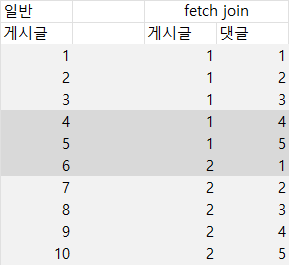
위 그림과 같은 상황에서
각각page처리를 하여 한 페이지에 3개 묶음 씩 해서 2페이지 보여주세요 라고 한다면?
일반 경우 게시글 4, 5, 6 을 출력
fetch join의 경우 게시글 1의 댓글 4, 5 와 게시글 2의 댓글 1 출력
2. 해결법
fetch join+List<T>-> 전체 조회에 적합, 페이징 Xfetch join+Page<T> + countQuery직접 명시 -> 복잡하지만 안정적Page<T>+ 지연 로딩(LAZY) -> 일반적으로 사용
3. 코드작성
- TodoRepository 작성
@Query(value = """
SELECT t
FROM Todo t LEFT JOIN FETCH t.user u
WHERE (:weather IS NULL OR t.weather = :weather)
AND (:start IS NULL OR t.modifiedAt >= :start)
AND (:end IS NULL OR t.modifiedAt <= :end)
ORDER BY t.modifiedAt DESC
""",
countQuery = """
SELECT COUNT(t)
FROM Todo t
WHERE (:weather IS NULL OR t.weather = :weather)
AND (:start IS NULL OR t.modifiedAt >= :start)
AND (:end IS NULL OR t.modifiedAt <= :end)
"""
)
Page<Todo> searchTodos(
Pageable pageable,
@Param("weather") String weather,
@Param("start") LocalDateTime start,
@Param("end") LocalDateTime end
);- TodoService 작성
public Page<TodoResponse> searchTodos(int page, int size, String weather, LocalDateTime start, LocalDateTime end) {
        Pageable pageable = PageRequest.of(page - 1, size);

        Page<Todo> todos = todoRepository.searchTodos(pageable, weather, start, end);

        return todos.map(todo -> new TodoResponse(
            todo.getId(),
            todo.getTitle(),
            todo.getContents(),
            todo.getWeather(),
            new UserResponse(todo.getUser().getId(), todo.getUser().getEmail()),
            todo.getCreatedAt(),
            todo.getModifiedAt()
        ));
}- TodoController 작성
@GetMapping("/todos/search")
    public ResponseEntity<Page<TodoResponse>> searchTodos(
        @RequestParam(defaultValue = "1") int page,
        @RequestParam(defaultValue = "10") int size,
        @RequestParam(required = false) String weather,
        @RequestParam(required = false) String start,
        @RequestParam(required = false) String end
    ) {
        LocalDateTime startDateTime = (start != null) ? LocalDateTime.parse(start) : null;
        LocalDateTime endDateTime = (end != null) ? LocalDateTime.parse(end) : null;
        return ResponseEntity.ok(todoService.searchTodos(page, size, weather, startDateTime, endDateTime));
    }
4. 테스트 코드 퀴즈 - 컨트롤러 테스트의 이해
todo_단건_조회_시_todo가_존재하지_않아_예외가_발생한다() 테스트가 성공적으로 작동할 수 있게 코드 수정
mockMvc.perform(get("/todos/{todoId}", todoId))
                .andExpect(status().isOk())
                .andExpect(jsonPath("$.status").value(HttpStatus.OK.name()))
                .andExpect(jsonPath("$.code").value(HttpStatus.OK.value()))
.andExpect(jsonPath("$.message").value("Todo not found"));- 예외 처리임에도 기대값을
OK로 설정
mockMvc.perform(get("/todos/{todoId}", todoId))
                .andExpect(status().isBadRequest())
                .andExpect(jsonPath("$.status").value(HttpStatus.BAD_REQUEST.name()))
                .andExpect(jsonPath("$.code").value(HttpStatus.BAD_REQUEST.value()))
.andExpect(jsonPath("$.message").value("Todo not found"));- 기대값을
BAD_REQUEST로 수정
5. 코드 개선 퀴즈 - AOP의 이해
특정 클래스의 메소드가 실행 전 동작하게 수정 필요
1. 기존 코드
@After("execution(* org.example.expert.domain.user.controller.UserController.getUser(..))")
    public void logAfterChangeUserRole(JoinPoint joinPoint) {
        String userId = String.valueOf(request.getAttribute("userId"));
        String requestUrl = request.getRequestURI();
        LocalDateTime requestTime = LocalDateTime.now();

        log.info("Admin Access Log - User ID: {}, Request Time: {}, Request URL: {}, Method: {}",
                userId, requestTime, requestUrl, joinPoint.getSignature().getName());
}- 수정 코드
@Before("execution(* org.example.expert.domain.user.controller.UserController.getUser(..))")
    public void logAfterChangeUserRole(JoinPoint joinPoint) {
        String userId = String.valueOf(request.getAttribute("userId"));
        String requestUrl = request.getRequestURI();
        LocalDateTime requestTime = LocalDateTime.now();

        log.info("Admin Access Log - User ID: {}, Request Time: {}, Request URL: {}, Method: {}",
                userId, requestTime, requestUrl, joinPoint.getSignature().getName());
}- 어노테이션 교체
@After->@Before
Lv. 2
1. JPA - Cascade
- 할 일을 새로 저장할 시, 할 일을 생성한 유저는 담당자로 자동 등록
기존 코드
@OneToMany(mappedBy = "todo")
    private List<Manager> managers = new ArrayList<>();
수정 코드
@OneToMany(mappedBy = "todo", cascade = CascadeType.ALL, orphanRemoval = true)
private List<Manager> managers = new ArrayList<>();OneToMany: Todo 1개가 Manager 여러 개를 가질 수 있음.(1:N 관계)mappedBy = "todo": 양방향 매핑 기준. Manager 쪽의todo필드가 주인cascade = CascadeType.ALL:Todo저장/삭제 시, 관련된Manager도 자동으로 저장/삭제orphanRemoval = true:Todo.managers리스트에서 제거된Manager는 DB에서도 삭제todo.getManagers().remove(manager);선언시 DB에서 삭제
2. N + 1
- 댓글 조회 시 N+1문제 발생
Hibernate:
    select
        c1_0.id,
        c1_0.contents,
        c1_0.created_at,
        c1_0.modified_at,
        c1_0.todo_id,
        c1_0.user_id
    from
        comments c1_0
    where
        c1_0.todo_id=?
Hibernate:
    select
        u1_0.id,
        u1_0.created_at,
        u1_0.email,
        u1_0.modified_at,
        u1_0.nickname,
        u1_0.password,
        u1_0.user_role
    from
        users u1_0
    where
        u1_0.id=?
Hibernate:
    select
        u1_0.id,
        u1_0.created_at,
        u1_0.email,
        u1_0.modified_at,
        u1_0.nickname,
        u1_0.password,
        u1_0.user_role
    from
        users u1_0
    where
        u1_0.id=?
Hibernate:
    select
        u1_0.id,
        u1_0.created_at,
        u1_0.email,
        u1_0.modified_at,
        u1_0.nickname,
        u1_0.password,
        u1_0.user_role
    from
        users u1_0
    where
u1_0.id=?- 게시글에 댓글을 단 ID를 한번씩 조회함.
1. CommentRepository 코드 수정 필요
@Query("SELECT c FROM Comment c JOIN c.user WHERE c.todo.id = :todoId")
List<Comment> findByTodoIdWithUser(@Param("todoId") Long todoId);JOIN만 사용함을 확인 할 수 있음
->USER가 여전히 지연(LAZY) 로딩 대상JOIN FETCH으로 변경 하여 N + 1 문제 해결
@Query("SELECT c FROM Comment c JOIN FETCH c.user WHERE c.todo.id = :todoId")
    List<Comment> findByTodoIdWithUser(@Param("todoId") Long todoId);
3. QueryDSL
QueryDSL 란?
QueryDSL은 Java 기반 ORM(Query DSL: Domain Specific Language) 중 하나로, 타입 안정성 있는 SQL-like 쿼리를 자바 코드로 작성할 수 있도록 도와주는 프레임워크
왜 쓰는가?
기존 JPQL이나 native query는 문자열 기반이라 컴파일 타임에 에러를 잡을 수 없지만, QueryDSL은 자바 코드로 쿼리를 작성함으로 오타나 잘못된 필드를 컴파일 타임에 체크 가능
사용 전 설정
build.gradle에 의존성 추가
plugins {
    id 'java'
    id 'org.springframework.boot' version '3.3.3'
    id 'io.spring.dependency-management' version '1.1.6'
    id 'idea'
}

group = 'org.example'
version = '0.0.1-SNAPSHOT'

java {
    toolchain {
        languageVersion = JavaLanguageVersion.of(17)
    }
}

def querydslDir = "$buildDir/generated/querydsl"

sourceSets {
    main {
        java {
            srcDirs += querydslDir
        }
    }
}

idea {
    module {
        generatedSourceDirs += file(querydslDir)
    }
}

configurations {
    compileOnly {
        extendsFrom annotationProcessor
    }
}

repositories {
    mavenCentral()
}

dependencies {
    // Spring Boot
    implementation 'org.springframework.boot:spring-boot-starter-web'
    implementation 'org.springframework.boot:spring-boot-starter-validation'
    implementation 'org.springframework.boot:spring-boot-starter-data-jpa'
    implementation 'org.springframework.boot:spring-boot-starter-security'

    // QueryDSL
    implementation 'com.querydsl:querydsl-jpa:5.0.0:jakarta'
    annotationProcessor 'com.querydsl:querydsl-apt:5.0.0:jakarta'
    annotationProcessor 'jakarta.persistence:jakarta.persistence-api:3.1.0'
    annotationProcessor 'jakarta.annotation:jakarta.annotation-api:2.1.1'
    implementation 'jakarta.persistence:jakarta.persistence-api:3.1.0'

    // Lombok
    compileOnly 'org.projectlombok:lombok'
    annotationProcessor 'org.projectlombok:lombok'

    // Database
    runtimeOnly 'com.h2database:h2'
    runtimeOnly 'com.mysql:mysql-connector-j'

    // JWT
    compileOnly 'io.jsonwebtoken:jjwt-api:0.11.5'
    runtimeOnly 'io.jsonwebtoken:jjwt-impl:0.11.5'
    runtimeOnly 'io.jsonwebtoken:jjwt-jackson:0.11.5'

    // Test
    testImplementation 'org.springframework.boot:spring-boot-starter-test'
    testRuntimeOnly 'org.junit.platform:junit-platform-launcher'
}

tasks.named('test') {
    useJUnitPlatform()
}

tasks.withType(JavaCompile) {
    options.annotationProcessorGeneratedSourcesDirectory = file(querydslDir)
    options.compilerArgs += "-XprintRounds"
    options.compilerArgs += "-XprintProcessorInfo"
}
- Gradle 이 설치 되어 있어야 한다. 만약 없다면
터미널에 아래 문구를 순차적으로 입력하여 설치 진행
- Set-ExecutionPolicy RemoteSigned -Scope CurrentUser
- irm get.scoop.sh | iex
- scoop install gradle
- gradle -v // 버전 체크
- gradle wrapper // 실행
- 설치를 완료 했다면 터미널에
./gradlew clean build // H2 등 DB 설정 필요 없으면 실패
./gradlew clean build -x test // 테스트 스킵 빌딩만 함
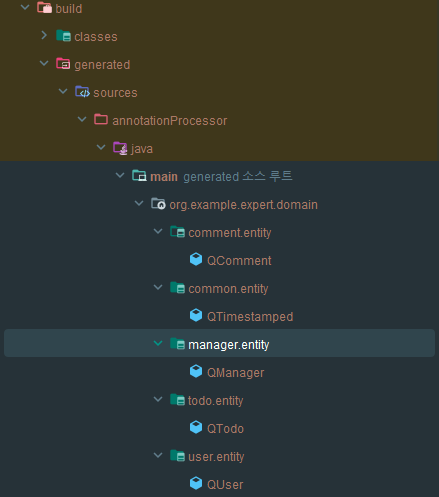
Qentity 가 생겼다면 성공!
QueryDslConfig 설계
@Configuration
public class QueryDslConfig {

	@Bean
	public JPAQueryFactory jpaQueryFactory(EntityManager entityManager) {
		return new JPAQueryFactory(entityManager);
	}
}
변경 대상 - TodoRepository.findByIdWithUser
@Query("SELECT t FROM Todo t " +
            "LEFT JOIN t.user " +
            "WHERE t.id = :todoId")
    Optional<Todo> findByIdWithUser(@Param("todoId") Long todoId);
QueryDSL 변경 후
위 코드 -> 주석 처리
public interface TodoRepository extends JpaRepository<Todo, Long>, TodoQueryRepository {TodoQueryRepository-> 추가
public interface TodoQueryRepository {
	Optional<Todo> findByIdWithUser(Long todoId);
}- 클래스 추가
@RequiredArgsConstructor
public class TodoQueryRepositoryImpl implements TodoQueryRepository {

	private final JPAQueryFactory queryFactory;

	@Override
	public Optional<Todo> findByIdWithUser(Long todoId) {
		QTodo todo = QTodo.todo;
		QUser user = QUser.user;

		return Optional.ofNullable(
			queryFactory
				.selectFrom(todo)
				.leftJoin(todo.user, user).fetchJoin()
				.where(todo.id.eq(todoId))
				.fetchOne()
		);
	}
}TodoQueryRepositoryImpl클래스 추가

오늘도 대단하십니다