https://velog.io/@jskim/Airflow-개발환경-셋팅하기-on-Docker
이 분의 블로그를 많이 참고하였습니다! 감사합니다 :)
DB연결(maria, PostgreSQL)
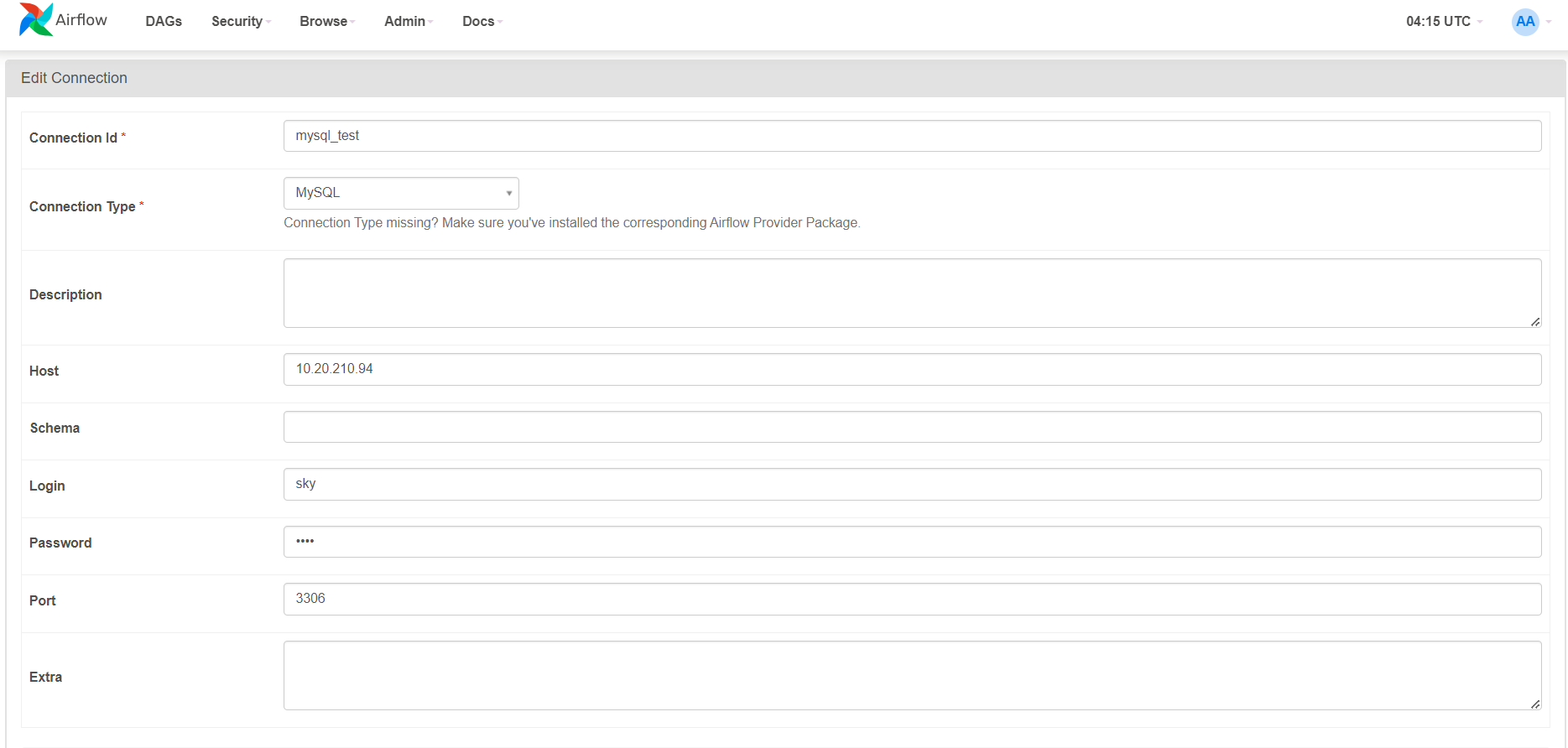
에어플로우에서 로컬 mysql 연결
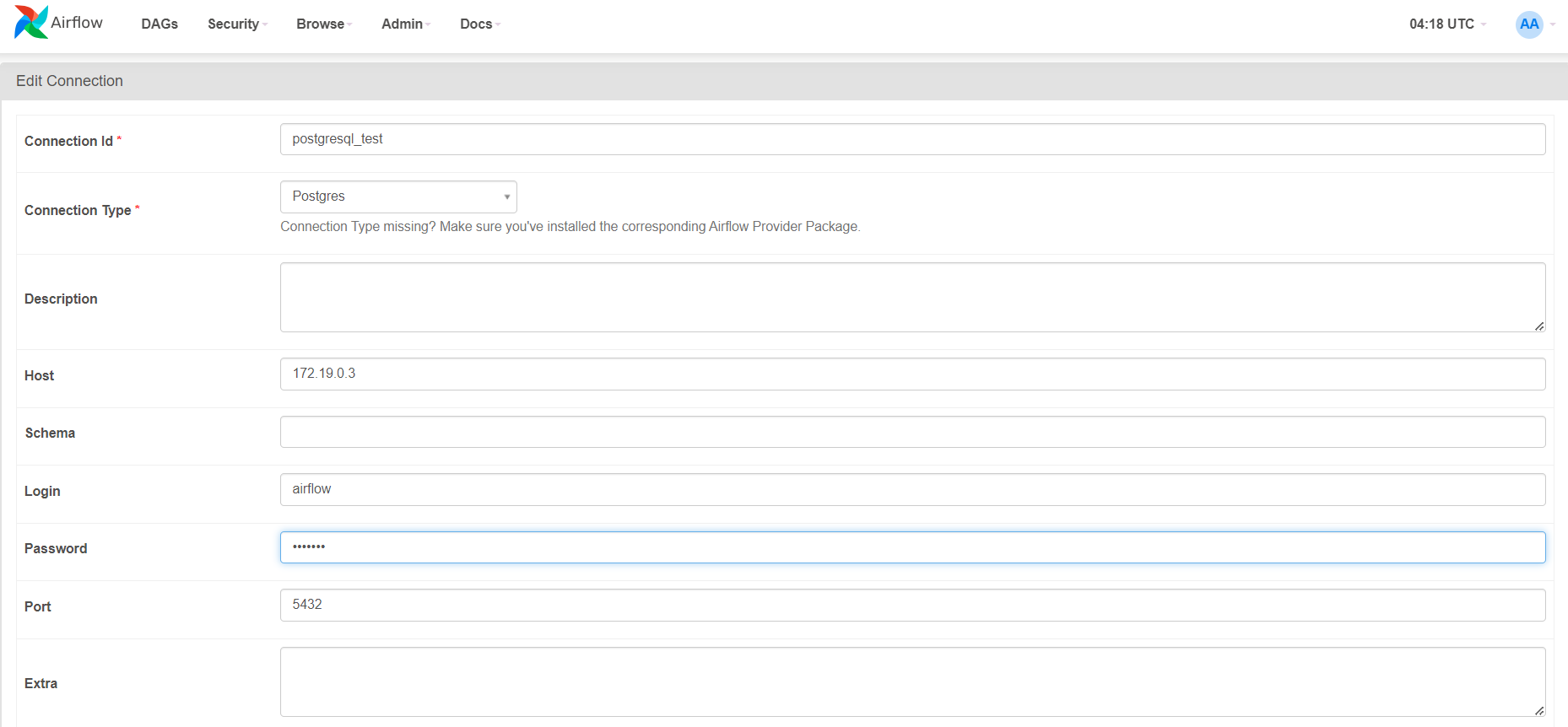
에어플로우에서 docker postgresql 연결
MariaDB연결
docker에서 mysql library설치
pip3 install apache-airflow-providers-mysql이러다 에러가 떠서 찾아보니 mysqlclient 버전 이슈로
pip3 install mysqlclient==1.4.6
으로 하니까 됐다,,,
from datetime import datetime, timedelta
from email.policy import default
from textwrap import dedent

from airflow import DAG
from airflow.providers.mysql.operators.mysql import MySqlOperator

default_args = {
    'depends_on_past': False,
    'retires': 1,
    'retry_delay': timedelta(minutes=5)
}

sql_create_table = """
    CREATE TABLE `employees` (
        `employeeNumber` int(11) NOT NULL,
        `lastName` varchar(50) NOT NULL,
        `firstName` varchar(50) NOT NULL,
        `extension` varchar(10) NOT NULL,
        `email` varchar(100) NOT NULL,
        `officeCode` varchar(10) NOT NULL,
        `reportsTo` int(11) DEFAULT NULL,
        `jobTitle` varchar(50) NOT NULL,
    PRIMARY KEY (`employeeNumber`)
    );
"""

sql_insert_data = """
    insert  into `employees`(`employeeNumber`,`lastName`,`firstName`,`extension`,`email`,`officeCode`,`reportsTo`,`jobTitle`) values
        (1002,'Murphy','Diane','x5800','dmurphy@classicmodelcars.com','1',NULL,'President'),
        (1056,'Patterson','Mary','x4611','mpatterso@classicmodelcars.com','1',1002,'VP Sales'),
        (1076,'Firrelli','Jeff','x9273','jfirrelli@classicmodelcars.com','1',1002,'VP Marketing'),
        (1088,'Patterson','William','x4871','wpatterson@classicmodelcars.com','6',1056,'Sales Manager (APAC)'),
        (1102,'Bondur','Gerard','x5408','gbondur@classicmodelcars.com','4',1056,'Sale Manager (EMEA)'),
        (1143,'Bow','Anthony','x5428','abow@classicmodelcars.com','1',1056,'Sales Manager (NA)'),
        (1165,'Jennings','Leslie','x3291','ljennings@classicmodelcars.com','1',1143,'Sales Rep'),
        (1166,'Thompson','Leslie','x4065','lthompson@classicmodelcars.com','1',1143,'Sales Rep'),
        (1188,'Firrelli','Julie','x2173','jfirrelli@classicmodelcars.com','2',1143,'Sales Rep'),
        (1216,'Patterson','Steve','x4334','spatterson@classicmodelcars.com','2',1143,'Sales Rep'),
        (1286,'Tseng','Foon Yue','x2248','ftseng@classicmodelcars.com','3',1143,'Sales Rep'),
        (1323,'Vanauf','George','x4102','gvanauf@classicmodelcars.com','3',1143,'Sales Rep'),
        (1337,'Bondur','Loui','x6493','lbondur@classicmodelcars.com','4',1102,'Sales Rep'),
        (1370,'Hernandez','Gerard','x2028','ghernande@classicmodelcars.com','4',1102,'Sales Rep'),
        (1401,'Castillo','Pamela','x2759','pcastillo@classicmodelcars.com','4',1102,'Sales Rep'),
        (1501,'Bott','Larry','x2311','lbott@classicmodelcars.com','7',1102,'Sales Rep'),
        (1504,'Jones','Barry','x102','bjones@classicmodelcars.com','7',1102,'Sales Rep'),
        (1611,'Fixter','Andy','x101','afixter@classicmodelcars.com','6',1088,'Sales Rep'),
        (1612,'Marsh','Peter','x102','pmarsh@classicmodelcars.com','6',1088,'Sales Rep'),
        (1619,'King','Tom','x103','tking@classicmodelcars.com','6',1088,'Sales Rep'),
        (1621,'Nishi','Mami','x101','mnishi@classicmodelcars.com','5',1056,'Sales Rep'),
        (1625,'Kato','Yoshimi','x102','ykato@classicmodelcars.com','5',1621,'Sales Rep'),
        (1702,'Gerard','Martin','x2312','mgerard@classicmodelcars.com','4',1102,'Sales Rep');
"""

with DAG(
    'connect_to_local_mysql',
    default_args = default_args,
    description = """
        1) create 'employees' table in local mysqld
        2) insert data to 'employees' table
    """,
    schedule_interval = '@daily',
    start_date = datetime(2024, 1, 1),
    catchup = False,
    tags = ['mysql', 'local', 'test', 'employees']
) as dag:
    t1 = MySqlOperator(
        task_id="create_employees_table",
        mysql_conn_id="mysql_test",
        sql=sql_create_table,
        database = "example"
    )

    t2 = MySqlOperator(
        task_id="insert_employees_data",
        mysql_conn_id="mysql_test",
        sql=sql_insert_data,
         database = "example"
    )
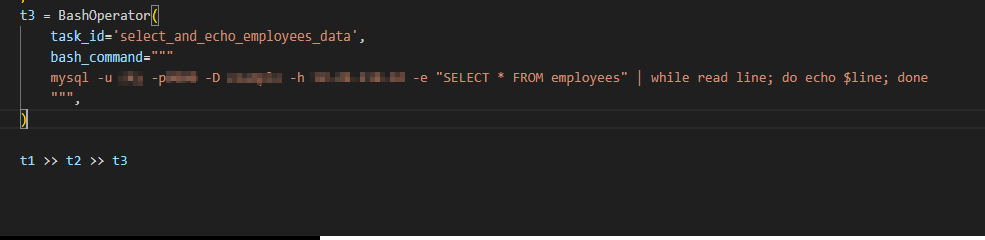
database 추가해주고 나머진 한번 그대로 해봤다. database는 connection할 때 schma에 추가해도 된다.
bashOperator
그러고 bashoperator로 hello sky를 출력하는 것도 테스트로 해봤다
from airflow import DAG
from airflow.operators.bash_operator import BashOperator
from datetime import datetime

# DAG 정의
dag = DAG(
    'hello_sky_dag',
    description='Prints "Hello, sky" using BashOperator',
    schedule_interval=None,  # DAG는 수동으로 트리거됨
    start_date=datetime(2024, 1, 1),  # DAG 실행의 시작일
    catchup=False  # 이전 실행을 캐치업하지 않음
)

# BashOperator를 사용하여 "Hello, sky"를 출력하는 task 정의
print_hello = BashOperator(
    task_id='print_hello',
    bash_command='echo "Hello, sky"',
    dag=dag
)

print_current_time = BashOperator(
    task_id='print_current_time',
    bash_command='echo "Current time: $(date)"',
    dag=dag
)

print_execution_time = BashOperator(
    task_id='print_execution_time',
    bash_command='echo "Execution time: {{ execution_date }}"',
    dag=dag
)

# task 간의 의존성 설정
print_hello >> print_current_time >> print_execution_time
hello sky 만 출력하는 단일 task이후에 현 시간과 트리거 작동 시간을 출력하는 것도 추가해봤다.
PostgreSQL test
postgresql도 테이블을 만들고 데이터를 삽입했다.
from datetime import datetime, timedelta
from airflow import DAG
from airflow.providers.postgres.operators.postgres import PostgresOperator
from airflow.providers.postgres.hooks.postgres import PostgresHook

default_args = {
    'owner': 'airflow',
    'depends_on_past': False,
    'retries': 1,
    'retry_delay': timedelta(minutes=5),
}

with DAG(
    'connect_to_local_postgresql',
    default_args=default_args,
    description='Create and insert data into PostgreSQL table',
    schedule_interval=timedelta(days=1),
    start_date=datetime(2024, 1, 1),
    catchup=False,
) as dag:

    create_table_sql = """
    CREATE TABLE IF NOT EXISTS test_table (
        id SERIAL PRIMARY KEY,
        name VARCHAR(100),
        age INT
    )
    """

    insert_data_sql = """
    INSERT INTO test_table (name, age) VALUES
    ('John', 30),
    ('Alice', 25),
    ('Bob', 35)
    """

    t1 = PostgresOperator(
        task_id='create_table',
        sql=create_table_sql,
        postgres_conn_id='postgres_test',
        autocommit=True
    )

    t2 = PostgresOperator(
        task_id='insert_data',
        sql=insert_data_sql,
        postgres_conn_id='postgres_test',
        autocommit=True
    )

    t1 >> t2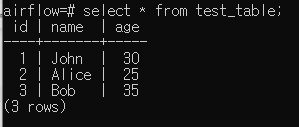
데이터가 잘 들어왔다.
이렇게 postgre sql까지 해보았다.
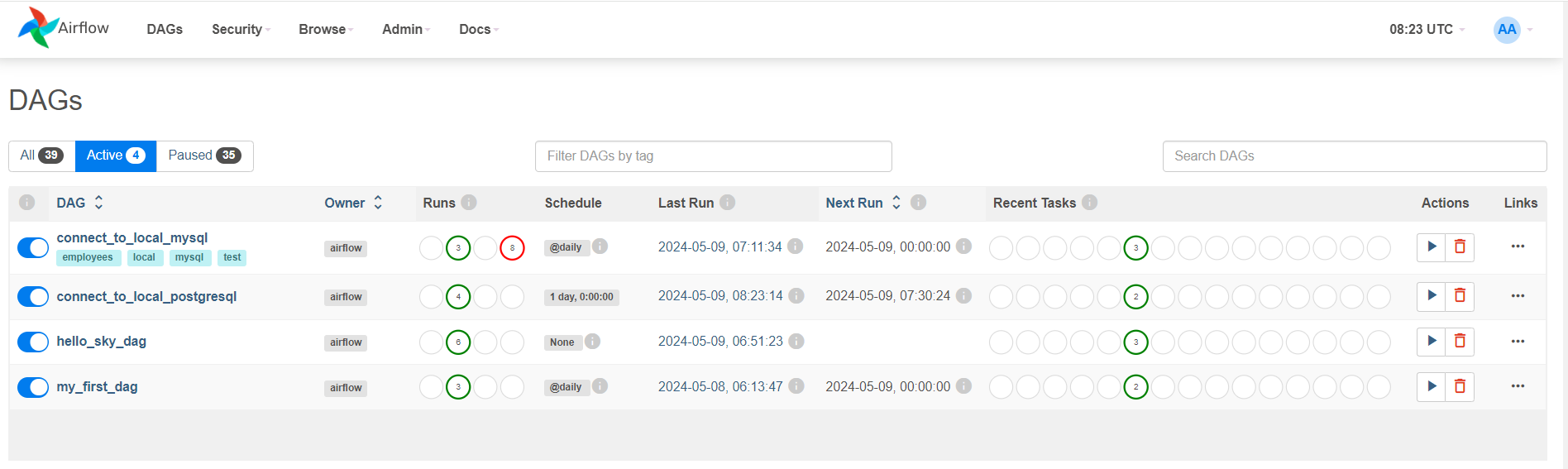
오늘 작성한 flow파일들이다.
다음엔 좀 더 디테일하게 해봐야겠다.

하늘하늘한 하늘