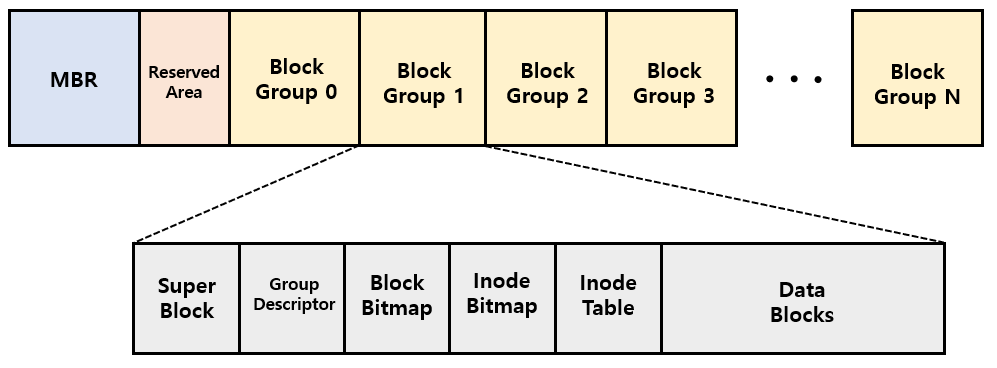
🌠 목표
처음 목표는 안드로이드 환경에서 파일 포렌식을 하기 위함이었다.
삭제된 파일을 직접 복구해보며 파일 시스템에 대한 이해도를 높이고, 툴을 만들게 된다면 성취감도 들고 1석2조라 생각했다.
하지만 역시 포렌식의 여정은 길고도 험난했다.
struct ext4_inode {
	__le16	i_mode;		/* File mode */
	__le16	i_uid;		/* Low 16 bits of Owner Uid */
	__le32	i_size_lo;	/* Size in bytes */
	__le32	i_atime;	/* Access time */
	__le32	i_ctime;	/* Inode Change time */
	__le32	i_mtime;	/* Modification time */
	__le32	i_dtime;	/* Deletion Time */
	__le16	i_gid;		/* Low 16 bits of Group Id */
	__le16	i_links_count;	/* Links count */
	__le32	i_blocks_lo;	/* Blocks count */
	__le32	i_flags;	/* File flags */
	union {
		struct {
			__le32  l_i_version;
		} linux1;
		struct {
			__u32  h_i_translator;
		} hurd1;
		struct {
			__u32  m_i_reserved1;
		} masix1;
	} osd1;				/* OS dependent 1 */
	__le32	i_block[EXT4_N_BLOCKS];/* Pointers to blocks */
	__le32	i_generation;	/* File version (for NFS) */
	__le32	i_file_acl_lo;	/* File ACL */
	__le32	i_size_high;
	__le32	i_obso_faddr;	/* Obsoleted fragment address */
	union {
		struct {
			__le16	l_i_blocks_high; /* were l_i_reserved1 */
			__le16	l_i_file_acl_high;
			__le16	l_i_uid_high;	/* these 2 fields */
			__le16	l_i_gid_high;	/* were reserved2[0] */
			__le16	l_i_checksum_lo;/* crc32c(uuid+inum+inode) LE */
			__le16	l_i_reserved;
		} linux2;
		struct {
			__le16	h_i_reserved1;	/* Obsoleted fragment number/size which are removed in ext4 */
			__u16	h_i_mode_high;
			__u16	h_i_uid_high;
			__u16	h_i_gid_high;
			__u32	h_i_author;
		} hurd2;
		struct {
			__le16	h_i_reserved1;	/* Obsoleted fragment number/size which are removed in ext4 */
			__le16	m_i_file_acl_high;
			__u32	m_i_reserved2[2];
		} masix2;
	} osd2;				/* OS dependent 2 */
	__le16	i_extra_isize;
	__le16	i_checksum_hi;	/* crc32c(uuid+inum+inode) BE */
	__le32  i_ctime_extra;  /* extra Change time      (nsec << 2 | epoch) */
	__le32  i_mtime_extra;  /* extra Modification time(nsec << 2 | epoch) */
	__le32  i_atime_extra;  /* extra Access time      (nsec << 2 | epoch) */
	__le32  i_crtime;       /* File Creation time */
	__le32  i_crtime_extra; /* extra FileCreationtime (nsec << 2 | epoch) */
	__le32  i_version_hi;	/* high 32 bits for 64-bit version */
	__le32	i_projid;	/* Project ID */
};
https://github.com/torvalds/linux/blob/master/fs/ext4/ext4.h#L791
🔼 실제 리눅스 커널 코드. inode 구조체.
le는 little endian. 16은 16비트. 즉, 2바이트. 그럼 32는?
Ext4에서 파일이 어떻게 저장될까?
알아보자.
먼저 마운트 된 디스크에 파일을 쓴다.
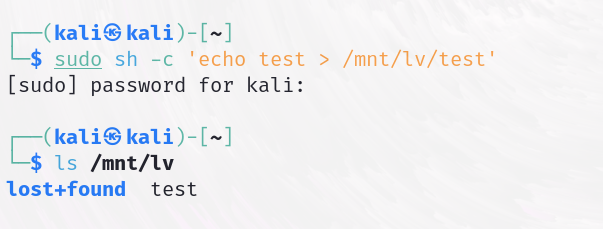
stat 명령어로 inode를 확인한다.
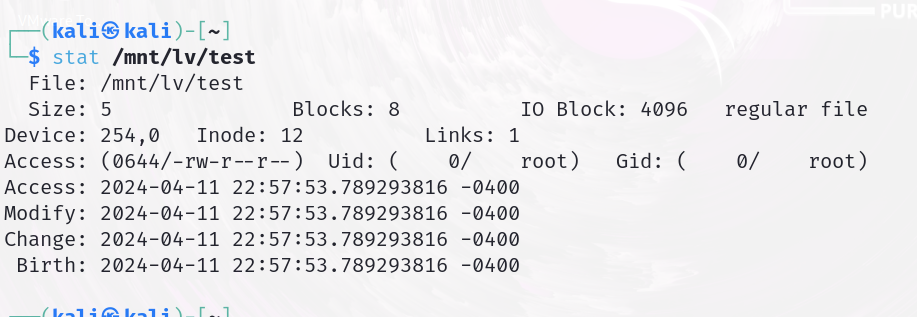
inode는 12번이다.
해당 inode는 몇번 블록 그룹에 있는지 찾는다.
┌──(kali㉿kali)-[~]
└─$ sudo fsstat /dev/mapper/vg-lv
...

METADATA INFORMATION
--------------------------------------------
Inode Range: 1 - 65281
Root Directory: 2
Free Inodes: 65269
Inode Size: 256


CONTENT INFORMATION
--------------------------------------------
Block Groups Per Flex Group: 16
Block Range: 0 - 261119
Block Size: 4096
Free Blocks: 252277

BLOCK GROUP INFORMATION
--------------------------------------------
Number of Block Groups: 8
Inodes per group: 8160
Blocks per group: 32768

(중략)
정리해보면
inode: 256 byte
block size: 4096 byte
블록 그룹당 inode 8160개
블록 그룹 0의 inode 범위는 1~8160이다.
우리가 생성한 test 파일은 12번이었으니 블록그룹 0에 우리의 파일 inode가 존재할 것이다.
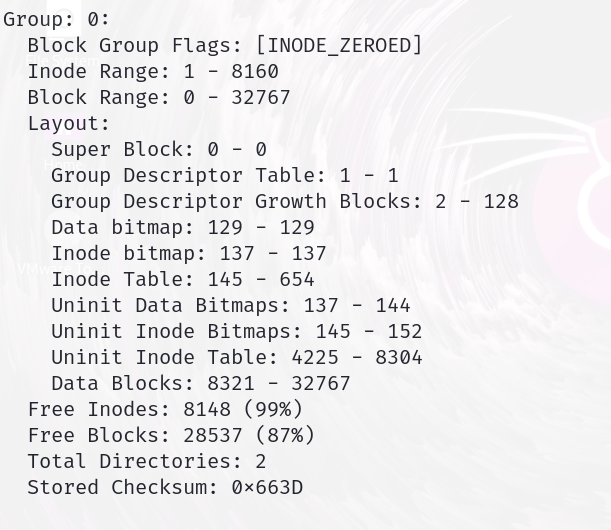
그리고 1블록은 4Kib이고 inode는 256byte인데
블록당 들어가는 inode를 계산해보면 4096/256 = 16개인것을 알 수 있다.
또한 블록그룹 0에는 510개의 inode블록이 들어있는데
inode table을 보면 알 수 있다.
inode table은 inode가 존재하는 블록 list이다.
654-145=509(+1)마지막 인덱스 포함
그럼 우리의 inode는 어느 블록, 어느 인덱스에 있는지 찾아야 하는데
공식은 inode index - 첫번째 inode range이다.
이 경우에는 12-1=11번째 inode이다.
또한, 11/16(inode per block) = 0번째 블록
즉 블록그룹 0에 있는, 0번째 블록에 존재하는, inode 중에 11번째 inode에 test 파일의 inode가 저장돼 있다.
확인해보자.
┌──(kali㉿kali)-[~]
└─$ sudo blkcat /dev/mapper/vg-lv 145 > blk-145
[sudo] password for kali:

┌──(kali㉿kali)-[~]
└─$ hexedit blk-145
11번째 inode는 256*11=2816 hex로 0xB00이다. inode의 4~7 byte section이 파일 길이 부분인데, 0x00000005 인것을 볼 수 있다. test 파일의 길이이다.
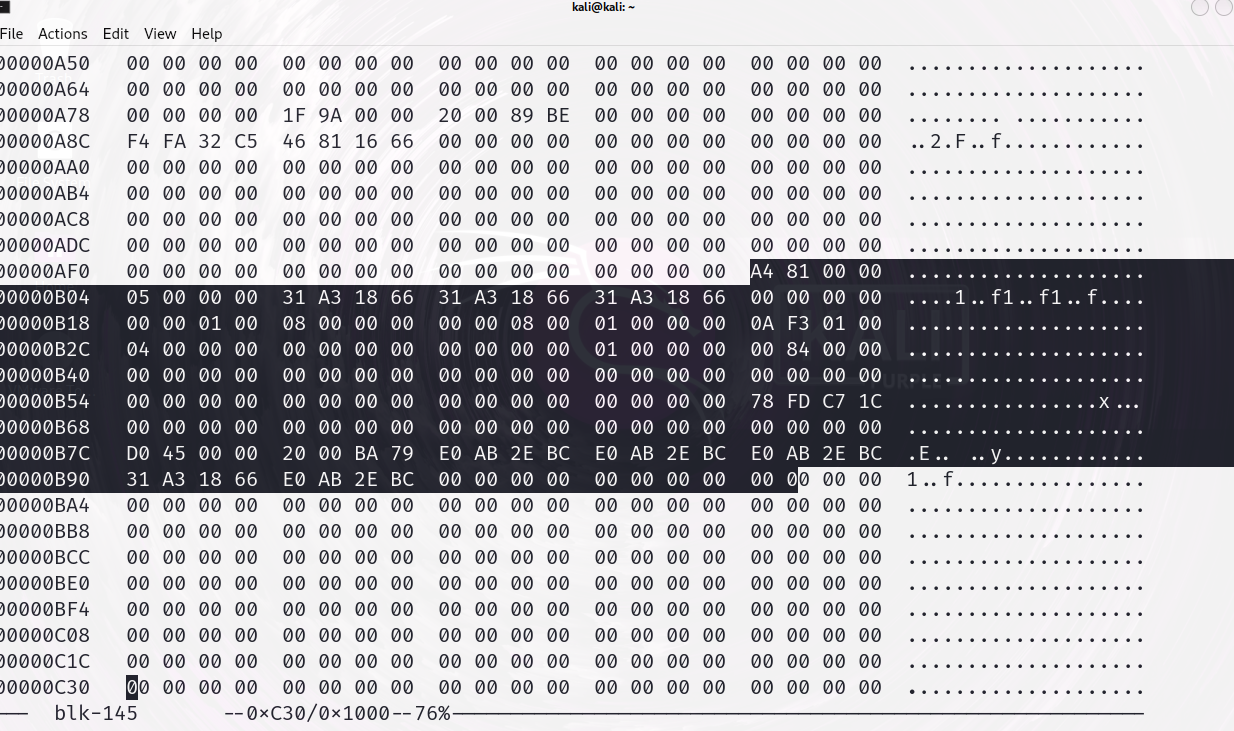
더 보기 쉽도록 이것을 가공해보자
┌──(kali㉿kali)-[~]
└─$ sudo dd if=blk-145 of=inode-2816 bs=1 count=256 skip=2816
256+0 records in
256+0 records out
256 bytes copied, 0.0019004 s, 135 kB/s
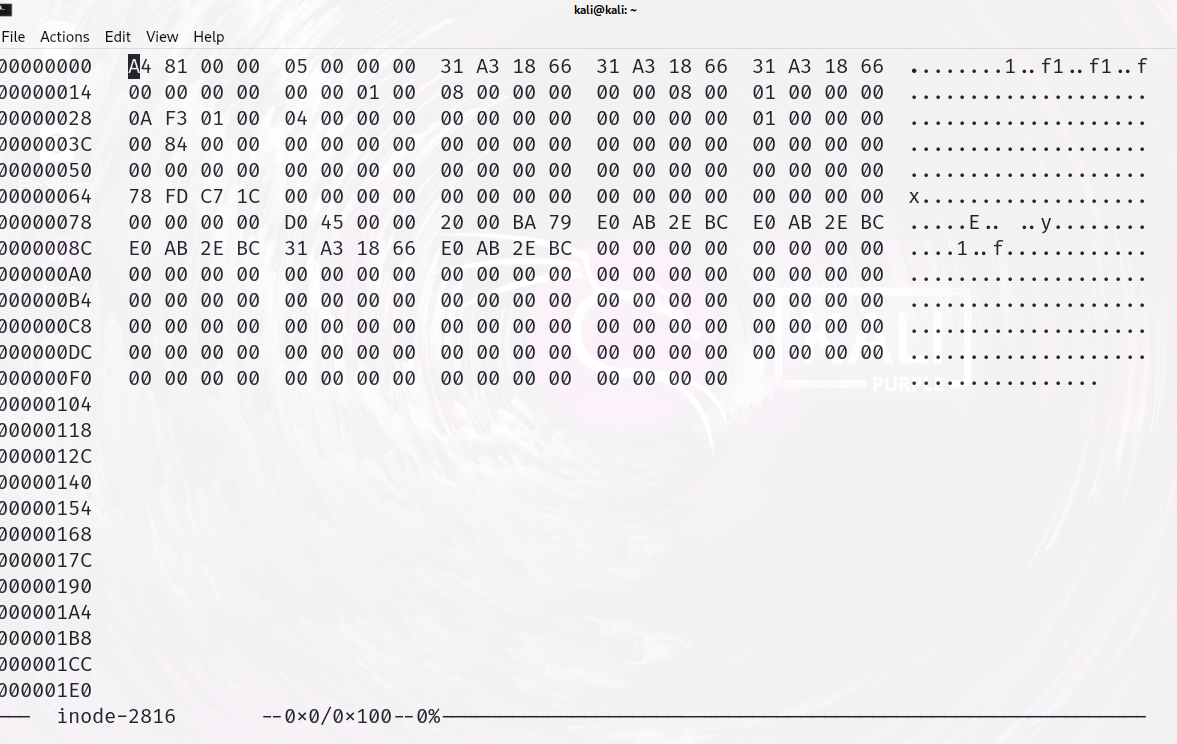
다른건 일단 생략하고 test 내용이 들어있는 주소를 찾아야 한다.
0x3A~0x3F까지 physical block address가 들어있다.
이 section은 48비트 이기 때문에 3A 3B 2바이트를 따로 상위 2바이트를 먼저 적는다. 0000. 그다음 32비트를 적는다. 00008400
합치면 0x000000008400 10진수로 33792
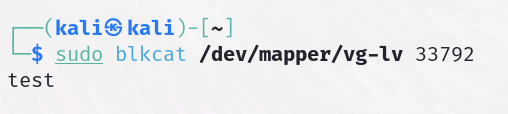
디스크 주소로 test 파일의 내용을 출력했다.
파일이 삭제되면 어떤 변화가 있을까?
파일이 삭제될 때, 파일 시스템의 변화를 알 수 있다면 Ext4 환경에서도 파일 복구가 가능할 것이다.
파일을 삭제하고 디스크를 hex dump 떠서 비교해보았다.
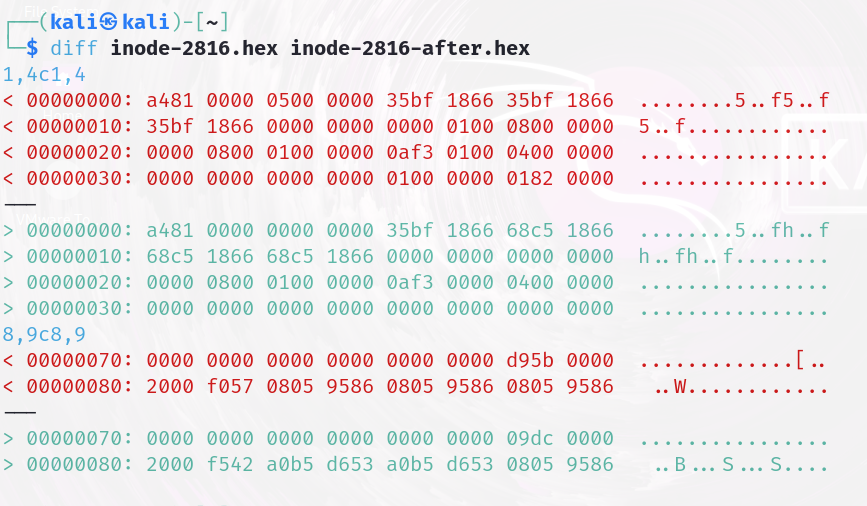
- 00 라인 : 파일 길이가 5 -> 0으로 변경, CTIME이 변경되었다.
before CTIME: 2024-04-12 04:57:25
after CTIME: 2024-04-12 05:23:52-
10라인 : 마찬가지로
MTIME,DTIME변경,i_links_count,block_lo변경되었다.
i_links_count: 파일을 가리키는 링크 수
block_lo: 파일이 차지하는 블록 수💡
before에서block_lo가8이었던 이유: 파일 시스템 최소 단위512바이트에서 곱하기8을 해야 현재 블록 단위인4096바이트가 나오기 때문이다.test 파일은
4096byte를 차지하고 있던 것으로 해석된다. -
20라인 :
Number of extents1 -> 0
Number of blocks in extent1 -> 0
Lower 32 bits of physical block address0x00008201 -> 0 -
70라인:
i_ctime_extra변경
결국 제일 중요한 block address값이 0으로 변경되었다.
파일 복구를 위한 과제가 남았다..
- 어떻게 block address를 복구 해야 하는지
- File Carving 기법으로 복구
다음 게시물은 File Carving 기법을 연구해서 파일 복구를 진행해보겠다.
[Reference]
https://behonestar.tistory.com/9
https://ddongwon.tistory.com/66