먼저 프로필을 알아낸다
.\volatility_2.6_win64_standalone.exe -f '.\MemoryDump(SuNiNaTaS)' imageinfo
Volatility Foundation Volatility Framework 2.6
INFO    : volatility.debug    : Determining profile based on KDBG search...
          Suggested Profile(s) : Win7SP1x86_23418, Win7SP0x86, Win7SP1x86
                     AS Layer1 : IA32PagedMemoryPae (Kernel AS)
                     AS Layer2 : FileAddressSpace (C:\Users\yu375\Downloads\volatility_2.6_win64_standalone\volatility_2.6_win64_standalone\MemoryDump(SuNiNaTaS))
                      PAE type : PAE
                           DTB : 0x185000L
                          KDBG : 0x82f6cc28L
          Number of Processors : 1
     Image Type (Service Pack) : 1
                KPCR for CPU 0 : 0x82f6dc00L
             KUSER_SHARED_DATA : 0xffdf0000L
           Image date and time : 2016-05-24 09:47:40 UTC+0000
     Image local date and time : 2016-05-24 18:47:40 +0900
.\volatility_2.6_win64_standalone.exe '.\MemoryDump(SuNiNaTaS)' --profile Win7SP1x86 netscan
프로필을 적어준다.
...
0x3f270450         TCPv4    192.168.197.138:139            0.0.0.0:0            LISTENING        4        System
0x3f430b70         TCPv4    192.168.197.138:49168          216.58.197.132:80    ESTABLISHED      -1
0x3f7854b8         TCPv4    192.168.197.138:49164          211.233.62.122:80    ESTABLISHED      -1
0x3f78bd68         TCPv4    192.168.197.138:49179          59.18.34.167:443     ESTABLISHED      -1
0x3f7deb30         TCPv4    192.168.197.138:49184          114.108.157.50:80    ESTABLISHED      -1
0x3fc5f998         TCPv4    192.168.197.138:49178          59.18.34.167:443     ESTABLISHED      -1
0x3fc6d638         TCPv4    192.168.197.138:49172          172.217.25.67:443    ESTABLISHED      -1
0x3fc77df8         TCPv4    192.168.197.138:49176          172.217.25.67:443    ESTABLISHED      -1
0x3fc84348         TCPv4    192.168.197.138:49169          216.58.197.132:80    ESTABLISHED      -1
0x3fc86008         TCPv4    192.168.197.138:49175                 59.18.44.226:443     ESTABLISHED      -1
0x3fc9fbe8         TCPv4    192.168.197.138:49181          59.18.44.226:443     ESTABLISHED      -1

...(중략)
192.168.197.138이 김장군의 IP이다.
.\volatility_2.6_win64_standalone.exe -f '.\MemoryDump(SuNiNaTaS)' --profile Win7SP1x86 pstree
실행한 프로세스 목록이 나온다.
.\volatility_2.6_win64_standalone.exe -f '.\MemoryDump(SuNiNaTaS)' --profile Win7SP1x86 pstree | findstr cmd
여기서 findstr 명령어로 cmd만 목록으로 볼 수 있다.
Volatility Foundation Volatility Framework 2.6
. 0x85d72bc0:cmd.exe                                 1256   1408      1     22 2016-05-24 09:41:57 UTC+0000
그럼 cmd에서 무슨 명령어를 쳤는지 Araboza
PS C:\Users\yu375\Downloads\volatility_2.6_win64_standalone\volatility_2.6_win64_standalone> .\volatility_2.6_win64_standalone.exe -f '.\MemoryDump(SuNiNaTaS)' --profile Win7SP1x86 cmdscan
Volatility Foundation Volatility Framework 2.6
**************************************************
CommandProcess: conhost.exe Pid: 2920
CommandHistory: 0x2b8328 Application: cmd.exe Flags: Allocated, Reset
CommandCount: 3 LastAdded: 2 LastDisplayed: 2
FirstCommand: 0 CommandCountMax: 50
ProcessHandle: 0x5c
Cmd #0 @ 0x2ad590: notepad C:\Users\training\Desktop\SecreetDocumen7.txt
Cmd #1 @ 0x2a3348: nc
Cmd #2 @ 0x2a30b8: netstat -na
Cmd #33 @ 0xfdddc797: ?????????
**************************************************
CommandProcess: conhost.exe Pid: 1980
CommandHistory: 0x107700 Application: DumpIt.exe Flags: Allocated
CommandCount: 0 LastAdded: -1 LastDisplayed: -1
FirstCommand: 0 CommandCountMax: 50
ProcessHandle: 0x5c
Cmd #33 @ 0xfdddc797: ?????????
PS C:\Users\yu375\Downloads\volatility_2.6_win64_standalone\volatility_2.6_win64_standalone>
SecreetDocumen7.txt 수상한 파일이 보인다
.\volatility_2.6_win64_standalone.exe -f '.\MemoryDump(SuNiNaTaS)' --profile Win7SP1x86 filescan > filelist.txt
어떤 파일이 메모리에 있었는지 뽑아보면 SecreetDocumen7.txt 단서가 있을 것이다.
filelist.txt에서 SecreetDocumen7.txt을 찾아보면 있을 것이다.
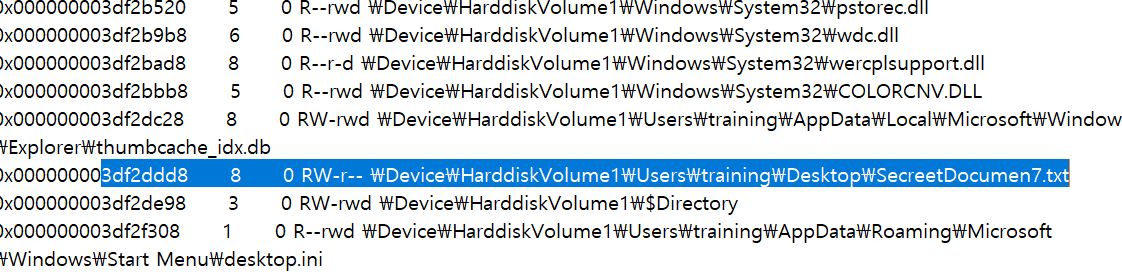
메모리 주소를 보면 3df2ddd8이다.
PS C:\Users\yu375\Downloads\volatility_2.6_win64_standalone\volatility_2.6_win64_standalone> .\volatility_2.6_win64_standalone.exe '.\MemoryDump(SuNiNaTaS)' --profile Win7SP1x86 dumpfiles -Q 3df2ddd8 -D ./
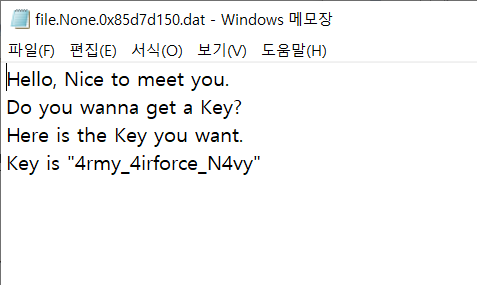
따라서 다음 문자열의 md5 해시값을 생성하면 문제를 해결할 수 있다.
192.168.197.138SecreetDocumen7.txt4rmy_4irforce_N4vy