🎧 0. 오늘의 추천곡
금요일 밤에 맞는 노래입니다.
🖊 1. 안드로이드 심화 과제 수행
오늘은 과제를 수행했습니다.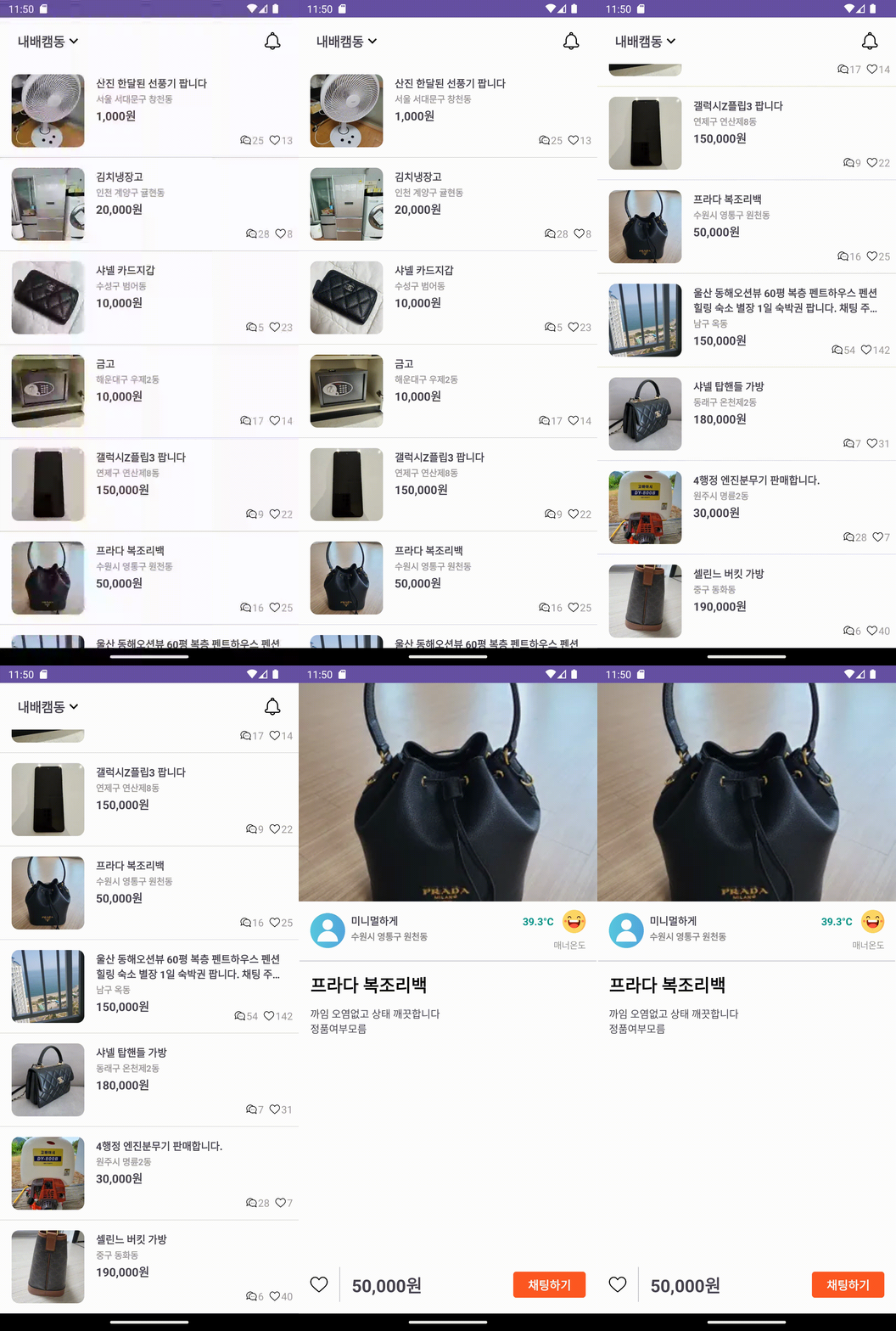
저는 마음에 듭니다. 오늘은 이거에 대부분의 시간을 할애했습니다.
📕 2. 안드로이드 개발반 심화 강의
어제 정리하지 못한 내용을 마저 적어보겠습니다.
val manager = getSystemService(NOTIFICATION_SERVICE) as NotificationManager

        val builder: NotificationCompat.Builder
        if (Build.VERSION.SDK_INT >= Build.VERSION_CODES.O) {
            val channelId = "one-channel"
            val channelName = "My Channel One"
            val channel = NotificationChannel(
                channelId,
                channelName,
                NotificationManager.IMPORTANCE_DEFAULT
            ).apply {
                description = "My Channel One Description"
                setShowBadge(true)
                val uri: Uri = RingtoneManager.getDefaultUri(RingtoneManager.TYPE_NOTIFICATION)
                val audioAttributes = AudioAttributes.Builder()
                    .setContentType(AudioAttributes.CONTENT_TYPE_SONIFICATION)
                    .setUsage(AudioAttributes.USAGE_ALARM)
                    .build()
                setSound(uri, audioAttributes)
                enableVibration(true)
            }

            manager.createNotificationChannel(channel)
            builder = NotificationCompat.Builder(this, channelId)
        } else {
            builder = NotificationCompat.Builder(this)
        }

        val bitmap = BitmapFactory.decodeResource(resources, R.drawable.ic_launcher_background)
        val intent = Intent(this, NotifyScreenActivity::class.java)
        // New Task 는 새 태스크 생성, 그 태스크의 루트로 액티비티를 시작.
        // Clear Task는 태스크 비우고, 액티비티 제거
        // 3개 태스크 확인하는 메소드
        intent.flags = Intent.FLAG_ACTIVITY_NEW_TASK or Intent.FLAG_ACTIVITY_CLEAR_TASK
        val pendingIntent = PendingIntent.getActivity(
            this,
            0,
            intent,
            //
            PendingIntent.FLAG_UPDATE_CURRENT or PendingIntent.FLAG_IMMUTABLE
        )

        builder.run {
            setSmallIcon(R.mipmap.ic_launcher)
            setWhen(System.currentTimeMillis())
            setContentTitle("새로운 알림입니다.")
            setContentText("알림이 잘 보이시나요")
            setStyle(NotificationCompat.BigTextStyle()
                .bigText("이것은 컨텍스트 샘플입니다. 아주 긴 텍스트....은으능느은ㅁ앙ㅂ자압은믕ㅂ자입ㅈ;ㅇㅂㅈ야ㅐㅂㅈㅇ러다ㅣ라ㅡㅇ자ㅓㅂ우ㅡㅏㅓㅂ어ㅏ북ㄹ뱌ㅏㅓㅜㅇ래ㅣㅂ정래ㅑㅂㅈ"))
            setLargeIcon(bitmap)
//            setStyle(NotificationCompat.BigPictureStyle()
//                .bigPicture(bitmap)
//                .bigLargeIcon(null)
//            )
            addAction(R.mipmap.ic_launcher, "Action", pendingIntent)
        }

        manager.notify(11, builder.build())
오늘 다룰 내용은 알림을 보내는 방법입니다.
val manager = getSystemService(NOTIFICATION_SERVICE) as NotificationManager먼저, getSystemService(NOTIFICATION_SERVICE) as NotificationManger 로 매니저를 만들어줍니다.
val builder: NotificationCompat.Builder그리고, NotificationCompat.Builder 로 빌더도 만들어줍니다.
if (Build.VERSION.SDK_INT >= Build.VERSION_CODES.O) {
            val channelId = "one-channel"
            val channelName = "My Channel One"
            val channel = NotificationChannel(
                channelId,
                channelName,
                NotificationManager.IMPORTANCE_DEFAULT
            ).apply {
                description = "My Channel One Description"
                setShowBadge(true)
                val uri: Uri = RingtoneManager.getDefaultUri(RingtoneManager.TYPE_NOTIFICATION)
                val audioAttributes = AudioAttributes.Builder()
                    .setContentType(AudioAttributes.CONTENT_TYPE_SONIFICATION)
                    .setUsage(AudioAttributes.USAGE_ALARM)
                    .build()
                setSound(uri, audioAttributes)
                enableVibration(true)
            }

            manager.createNotificationChannel(channel)
            builder = NotificationCompat.Builder(this, channelId)
        }
이후, 버전이 오레오 이상이면, 채널을 설정해줘야 합니다.
val channel = NotificationChannel(
                channelId,
                channelName,
                NotificationManager.IMPORTANCE_DEFAULT
            )
id, 이름, 중요도를 설정해줍니다.
.apply {
                description = "My Channel One Description"
                setShowBadge(true)
                val uri: Uri = RingtoneManager.getDefaultUri(RingtoneManager.TYPE_NOTIFICATION)
                val audioAttributes = AudioAttributes.Builder()
                    .setContentType(AudioAttributes.CONTENT_TYPE_SONIFICATION)
                    .setUsage(AudioAttributes.USAGE_ALARM)
                    .build()
                setSound(uri, audioAttributes)
                enableVibration(true)
            }
이후, 채널에 설정, 뱃지 여부, 알림음 설정을 해줄 수 있습니다.
val bitmap = BitmapFactory.decodeResource(resources, R.drawable.ic_launcher_background)
        val intent = Intent(this, NotifyScreenActivity::class.java)
        // New Task 는 새 태스크 생성, 그 태스크의 루트로 액티비티를 시작.
        // Clear Task는 태스크 비우고, 액티비티 제거
        // 3개 태스크 확인하는 메소드
        intent.flags = Intent.FLAG_ACTIVITY_NEW_TASK or Intent.FLAG_ACTIVITY_CLEAR_TASK
        val pendingIntent = PendingIntent.getActivity(
            this,
            0,
            intent,
            //
            PendingIntent.FLAG_UPDATE_CURRENT or PendingIntent.FLAG_IMMUTABLE
        )
그리고, 아이콘과 클릭 시 이동 가능한 인텐트를 설정할 수 있습니다.
builder.run {
            setSmallIcon(R.mipmap.ic_launcher)
            setWhen(System.currentTimeMillis())
            setContentTitle("새로운 알림입니다.")
            setContentText("알림이 잘 보이시나요")
            setStyle(NotificationCompat.BigTextStyle()
                .bigText("이것은 컨텍스트 샘플입니다. 아주 긴 텍스트....은으능느은ㅁ앙ㅂ자압은믕ㅂ자입ㅈ;ㅇㅂㅈ야ㅐㅂㅈㅇ러다ㅣ라ㅡㅇ자ㅓㅂ우ㅡㅏㅓㅂ어ㅏ북ㄹ뱌ㅏㅓㅜㅇ래ㅣㅂ정래ㅑㅂㅈ"))
            setLargeIcon(bitmap)
//            setStyle(NotificationCompat.BigPictureStyle()
//                .bigPicture(bitmap)
//                .bigLargeIcon(null)
//            )
            addAction(R.mipmap.ic_launcher, "Action", pendingIntent)
        }

        manager.notify(11, builder.build())
마지막으로, builder에 작은 아이콘(setSmallIcon)과 알림 도착 시간(setWhen), 제목(setContentTitle), 메시지(setContentText)를 설정할 수 있습니다.
또한, style을 설정해, 사진(setStyle(NotificationCompat.BigPictureStyle())이나,
긴 글(setStyle(NotificationCompat.BigTextStyle().bigText)을 추가할 수도 있습니다.
🎯 3. 끝
금요일이 마무리됐습니다.
내일도 이어서 공부하겠습니다.
끝.

여기는 블로그