-
서버 이중화
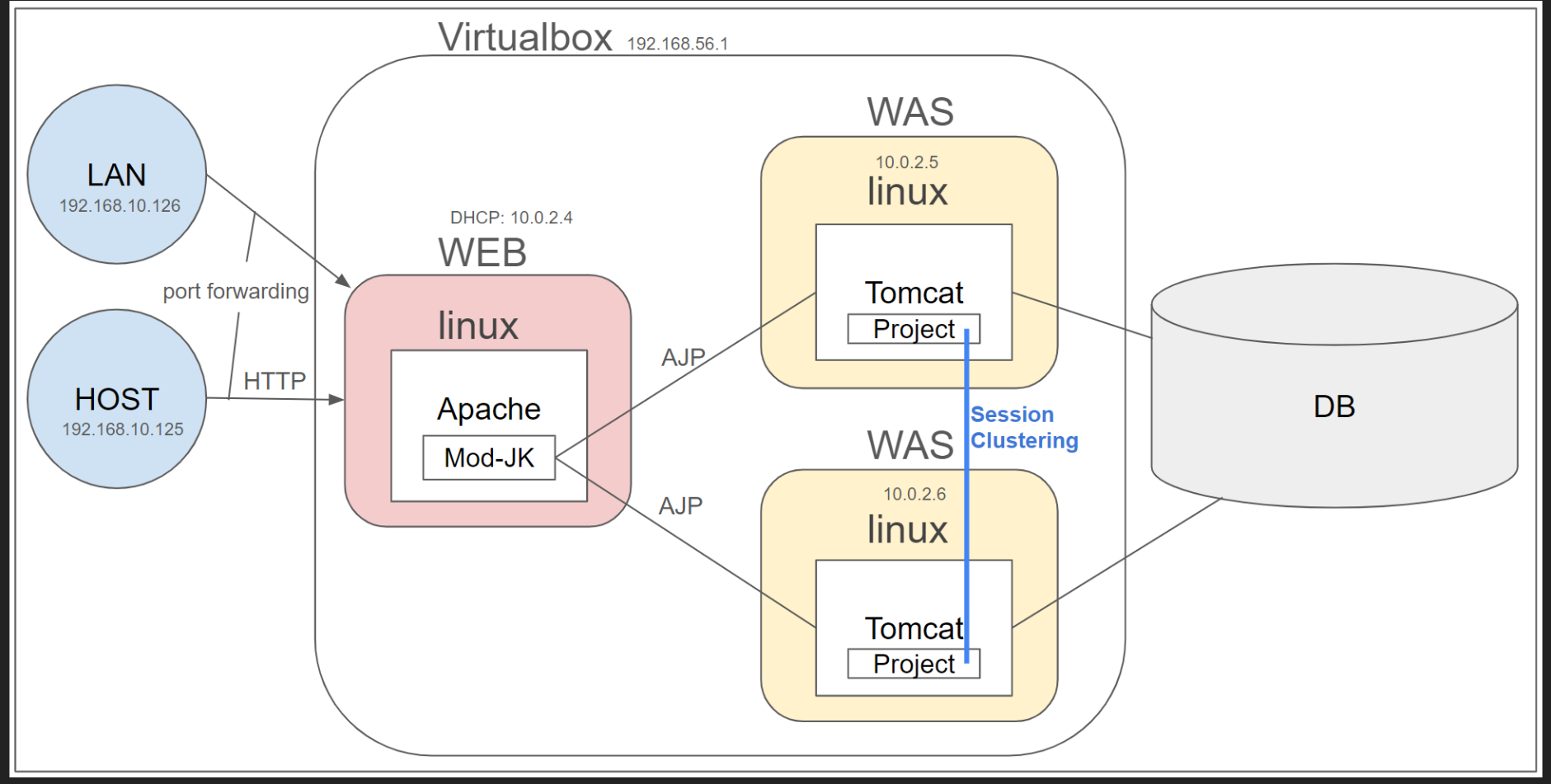
-
정적파일, 동적 파일 요청 분리
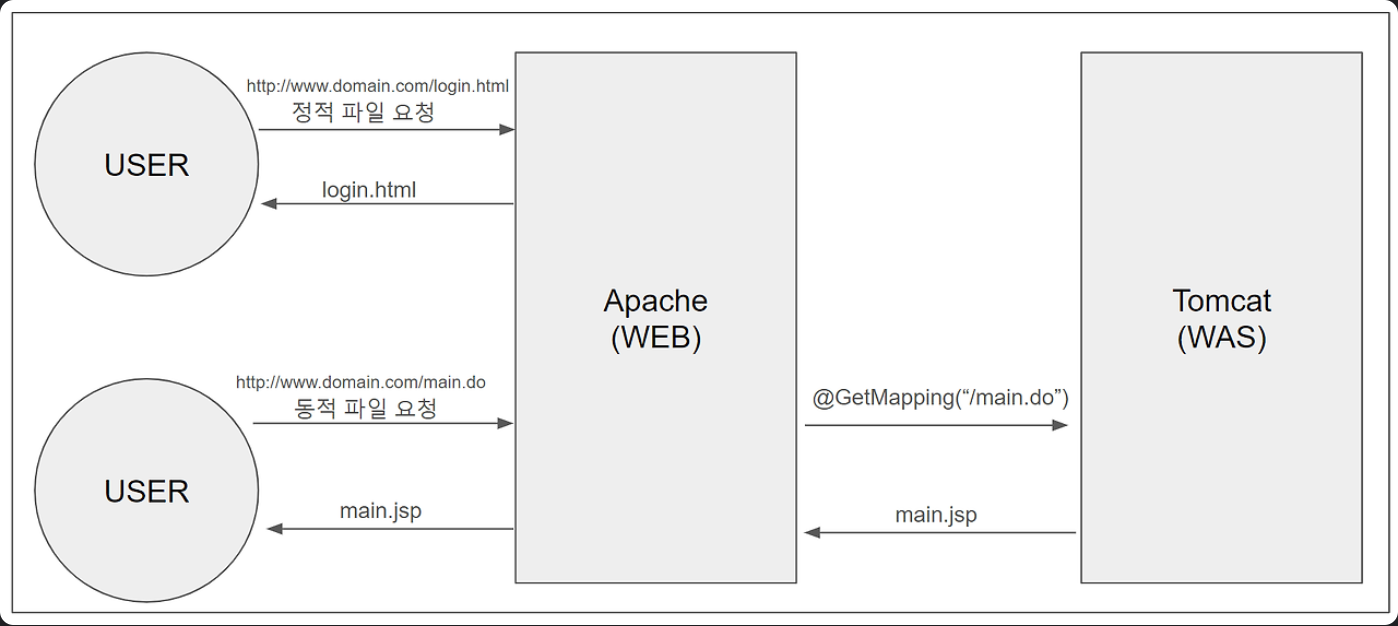
-
tomcat-server.xml 파일
- appBase

1. 먼저 Apache HTTP Server에 mod_jk 모듈이 필요:
# mod_jk 설치 확인
ls -l /apache/modules/mod_jk.so

# 없다면 설치
`sudo dnf install mod_jk`
2. Apache 설정 파일 (workers.properties, uriworkermap.properties)수정:
2.1. workers.properties
# Apache 설정 디렉토리에 workers.properties 파일 생성
sudo vi /apache/apache24/conf/workers.propertiesworker.wlb.type=lb
# 로밸용 워커 2개
worker.wlb.balance_workers=portal11, portal21
worker.list=wlb
# node configure
worker.template.type=ajp13
worker.template.socket_timeout=300
worker.template.socket_keepalive=ture
worker.template.recovery_options=7
worker.template.ping_mode=A
worker.template.ping_timeout=10000
worker.template.connection_pool_size=500
worker.template.connection_pool_minsize=300
worker.template.connection_pool_timeout=60
# Node Configure START
worker.portal11.reference=worker.template
# 도착지 포트(WAS의 ajp 포트 0)
worker.portal11.port=8009
worker.portal11.host=172.20.10.7(<span type=color:red>{WAS IP}</span>)
worker.portal11.lbfactor=1
#worker.portal21.reference=worker.template
#worker.portal21.port=8009
#worker.portal21.host=192.168.56.201
#worker.portal21.lbfactor=1
# Session Cluster Configure
#worker.wlb.method=Session
#worker.wlb.sticky_session=True
workers.properties 파일에서 worker.portal11.host=172.20.10.7({WAS IP}) 로 지정해줘야지, apache가 tomcat에 접근할 수 있음
3.2. uriworkermap.properties
/*.jsp=wlb
/*.do=wlb
3. Apache HTTP Server의 설정 파일(mod_jk.conf) 수정:
3.1. mod_jk.conf
sudo vi /apache/conf.d/mod_jk.conf

# mod_jk 모듈 로드
LoadModule jk_module modules/mod_jk.so

JKShmFile /ap_log/jk/shm/mod_jk.shm

JKLogLevel info
JKMountFile conf/uriworkermap.properties
JKWorkersFile conf/workers.properties
4. Tomcat server.xml에서 AJP 커넥터 설정 확인:Tomcat 유저로 실행
vi /tomcat/domains/portal11/conf/server.xml
<!-- 이 부분이 있는지 확인하고, 없다면 추가 -->
<Connector protocol="AJP/1.3"
           port="8009"
           address="0.0.0.0"
           secretRequired="false"
           redirectPort="8443" />
5. 권한 설정:
# Apache와 Tomcat 사용자 간의 통신을 위한 권한 설정
sudo chmod 755 /tomcat/domains/portal11/webapps
sudo chmod 644 /tomcat/domains/portal11/webapps/test.jsp

# SELinux 설정 (필요한 경우)
sudo setsebool -P httpd_can_network_connect=on
6. 서비스 재시작:
# Apache 재시작
sudo systemctl restart httpd

# Tomcat 재시작
/tomcat/apache-tomcat-8.5.93/bin/shutdown.sh
/tomcat/apache-tomcat-8.5.93/bin/startup.sh
7. 이후 테스트:
http://[VM-IP]/test.jsp