
회사 프로젝트에 투입되면서 친해져야 할 요소들이 생겼다. 바로 표와 각종 인풋 요소들..!
학원에서 html 개념에 대해 배울 때 <table> 은 잘 안쓴다며 대충 훑기만 했었는데, 입사해보니 웬 걸? 데이터 기반 프로젝트들이 대부분이라 <table> 너무 필요하잖아?
갑자기 짜려고 하면 약간의 긴장감이 생기는데다, 프로젝트에 진짜 생각지도 못한 구조로 짜여있을 때가 있어서 (table 속에 또 table이 있었음..) 총정리를 해본다.
개념 다지기
🔹 table을 구성하는 구조
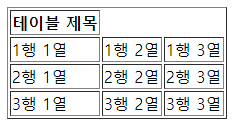
| 태그 | 설명 |
|---|---|
<table> | 테이블을 생성하는 가장 상위 태그 |
<caption> | 테이블의 제목을 정의, 보통 내용을 설명하는 용로로 사용됨. |
<colgroup>, <col> | 열을 그룹화하는 태그. 열에 대한 스타일을 지정함. |
<thead>, <tbody>, <tfoot> | 테이블의 헤더, 본문, 바닥글을 정의하는 태그 |
<th> | 테이블의 헤더 셀을 정의하는 태그. 주로 열의 제목 혹은 행의 제목으로 활용되며 굵게 표시되고 중앙 정렬됨 |
<tr> | 테이블의 행을 정의하는 태그 |
<td> | 테이블의 데이터 셀. 열을 정의하는 태그 |
🔹 table의 기본 속성
css로 스타일링할 수도 있지만 table 고유의 속성으로 html에서 지정하는 것도 가능
| 속성 | 설명 |
|---|---|
| border | 테두리를 설정 (숫자가 높을수록 두꺼워짐) |
| bordercolor | 테두리의 색상 |
| width | 표 가로 크기 |
| height | 표 세로 크기 |
| align | 표 텍스트 정렬 방식 |
| bgcolor | 표의 배경색 |
| colspan | 표 열(가로) 합치기 |
| rowspan | 표 행(세로) 합치기 |
🔹 css속성, border-collaps
| border-collaps | 설명 |
|---|---|
| separate | 표의 테두리와 셀(td)의 테두리 사이에 간격을 둔다. |
| collapse | 표의 테두리와 셀(td)의 테두리 사이의 간격을 없앰. 즉, 겹치는 부분은 한 줄로 나타낸다. |
| initial | 기본값으로 설정한다. |
| inherit | 부모 요소의 속성값을 상속받는다. |
🔹 css속성,table-layout
| table-layout | 행(row)과 열(column)로 구성된 테이블의 셀(cell)에 블록요소를 집어넣어 보여주는 방법을 정의 |
|---|---|
| auto (기본값) | 자동으로 테이블 배열 기능을 사용. 너비는 셀 안의 고정적으로 가장 넓은 콘텐트에 의해 정해진다. |
| fixed | 고정된 테이블 배열 기능을 사용. 수평 레이아웃은 셀 안의 콘텐츠가 아니라 테이블의 너비와 컬럼의 너비에 의해 결정된다. |
🔹 예시
예시1) 기본 구조
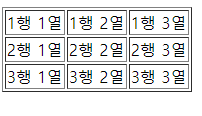
<table border="1">
	<tr>
		<td>1행 1열</td>
		<td>1행 2열</td>
		<td>1행 3열</td>
	</tr>
  <tr>
		<td>2행 1열</td>
		<td>2행 2열</td>
		<td>2행 3열</td>
	</tr>
	<tr>
		<td>3행 1열</td>
		<td>3행 2열</td>
		<td>3행 3열</td>
	</tr>
</table>
예시2) 기본 구조
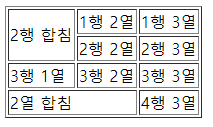
<table border="1">
	<tr>
		<td rowspan="2"> 2행 합침</td>
		<td>1행 2열</td>
		<td>1행 3열</td>
	</tr>
	<tr>
		<td>2행 2열</td>
		<td>2행 3열</td>
	</tr>
	<tr>
		<td>3행 1열</td>
		<td>3행 2열</td>
		<td>3행 3열</td>
	</tr>
	<tr>
		<td colspan="2">2열 합침</td>
		<td>4행 3열</td>
	</tr>
</table>
예시3) 실무에서 사용한 결과물
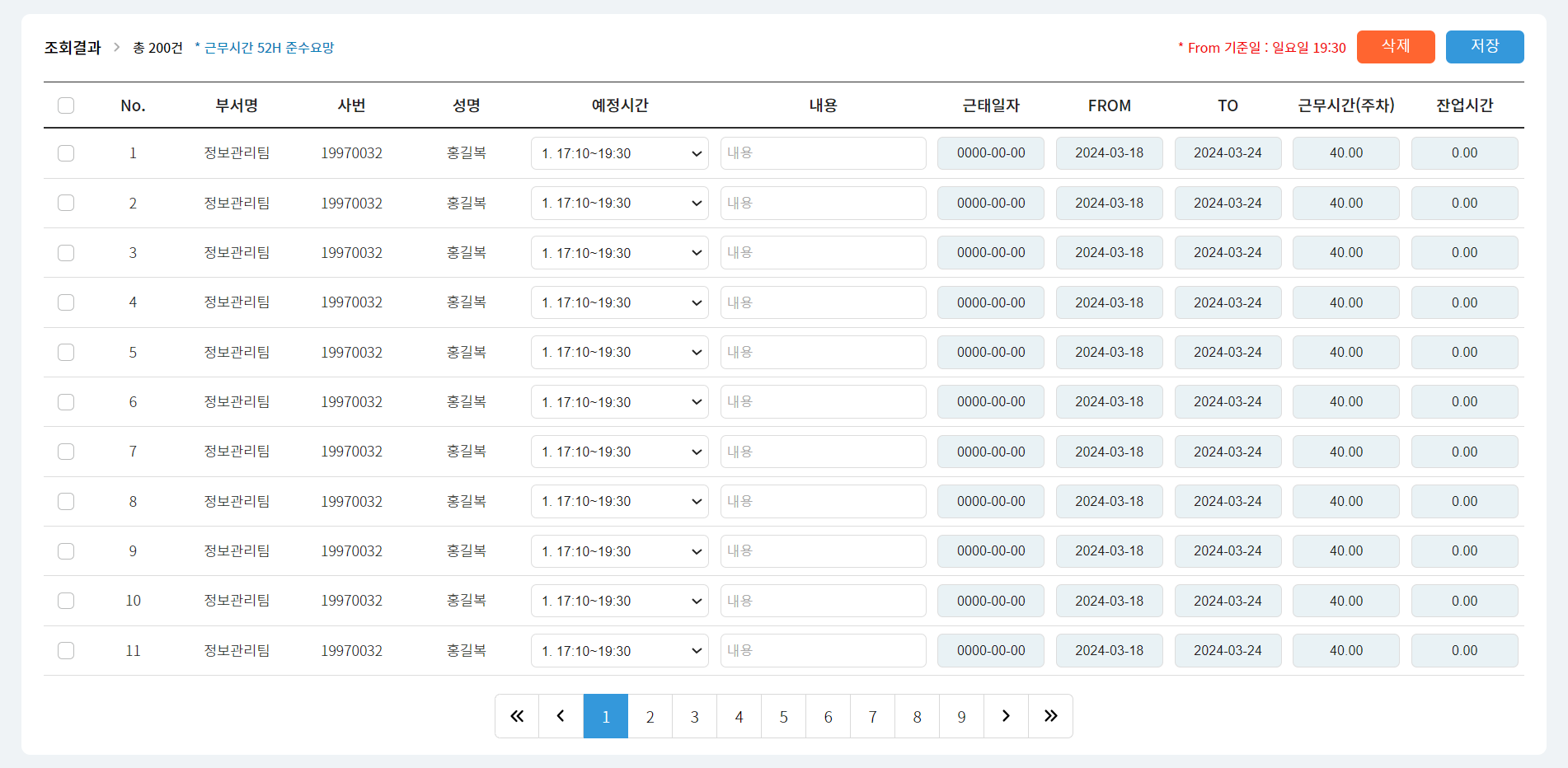
<table>
	<colgroup>
		<col width="3%">
		<col width="80px">
		<col width="8%">
		<col width="100px">
		<col width="8%">
		<col width="170px">
		<col width="auto">
		<col width="8%">
		<col width="8%">
		<col width="8%">
		<col width="8%">
		<col width="8%">
	</colgroup>
	<thead>
		<th><input type="checkbox" id="chkAll"><label for="chkAll"></label></tg>
	  <th>No.</th>
	  <th>부서명</th>
	  <th>사번</th>
	  <th>성명</th>
	  <th>예정시간</th>
	  <th>내용</th>
	  <th>근태일자</th>
	  <th>FROM</th>
	  <th>TO</th>
	  <th>근무시간(주차)</th>
	  <th>잔업시간</th>
	</thead>
	<tbody>
		<tr>
	    <td><input type="checkbox" id="chk1"><label for="chk1"></label></td>
      <td>1</td>
      <td>정보관리팀</td>
      <td>19970032</td>
      <td>홍길복</td>
      <td>
	      <select name="" id=""><option value="1">1. 17:10~19:30</option></select>
      </td>
      <td><input type="text" placeholder="내용"></td>
      <td><input type="text" placeholder="0000-00-00" disabled></td>
      <td><input type="text" placeholder="2024-03-18" disabled></td>
      <td><input type="text" placeholder="2024-03-24" disabled></td>
      <td><input type="text" placeholder="40.00" disabled></td>
      <td><input type="text" placeholder="0.00" disabled></td>
    </tr>
	</tbody>
</table>
예시4) 실무에서 사용한 결과물
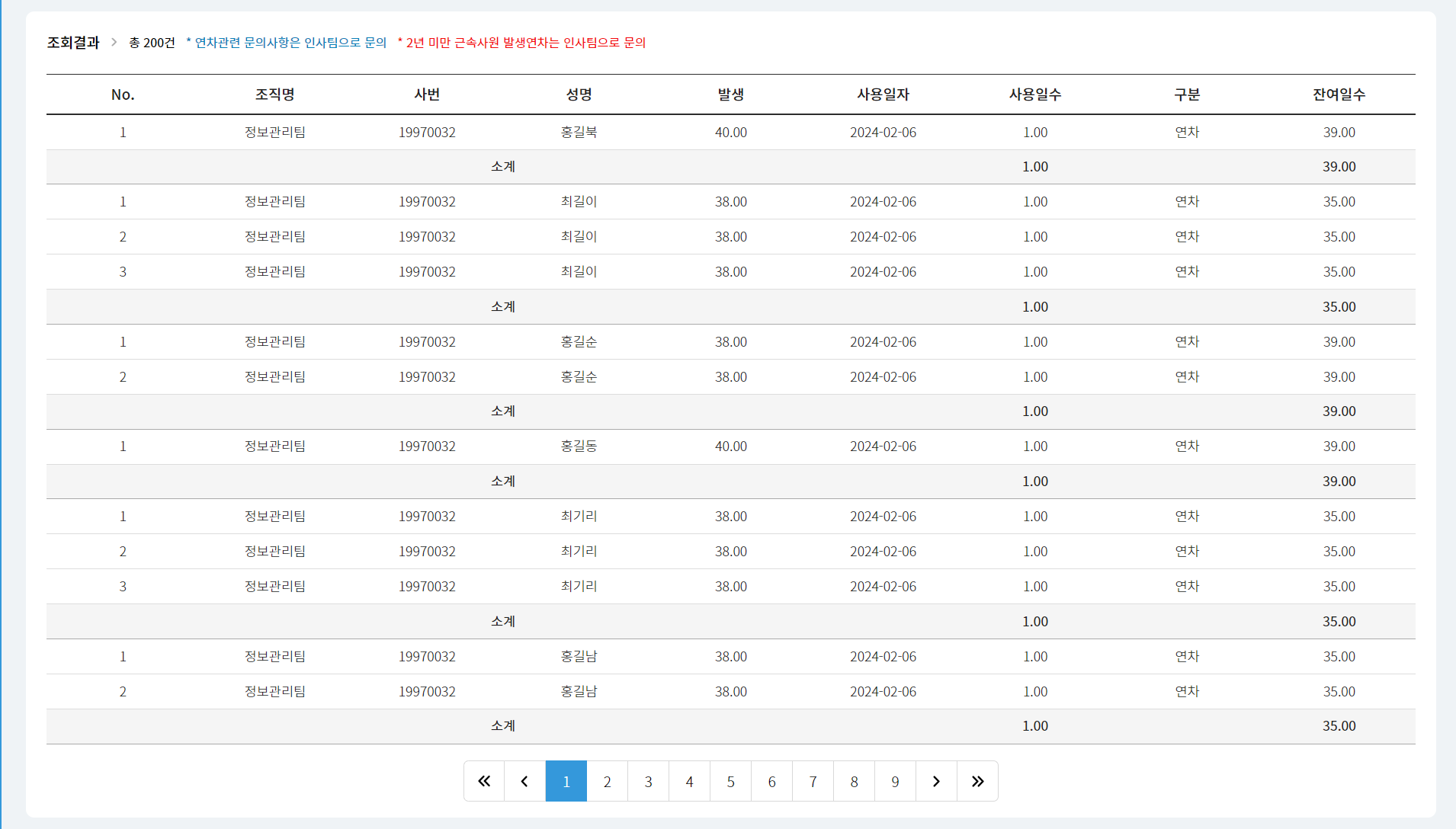
<table>
	<colgroup>..</colgroup>
	<thead>
		<th>No.</th>
		<th>조직명</th>
		<th>사번</th>
		<th>성명</th>
		<th>발생</th>
		<th>사용일자</th>
		<th>사용일수</th>
		<th>구분</th>
		<th>잔여일수</th>
	</thead>
	<tbody>
		<tr>
			<td>1</td>
			<td>정보관리팀</td>
			<td>19970032</td>
			<td>홍길북</td>
			<td>40.00</td>
			<td>2024-02-06</td>
			<td>1.00</td>
			<td>연차</td>
			<td>39.00</td>
		</tr>
		<tr class="result">
			<td colspan="6">소계</td>
			<td>1.00</td>
			<td></td>
			<td>39.00</td>
		</tr>
	</tbody>
</table>
예시5) 실무에서 사용한 결과물 -
<tr>안에<th>,<td>가 같이 있음

<table>
	<colgroup>
		<col width="8%">
		<col>
		<col width="8%">
		<col>
		<col width="8%">
		<col>
		<col width="8%">
		<col>
	</colgroup>
	<tbody>
		<!-- 1-1행 Start-->
		<tr>
			<th rowspan="2">관리번호</th>
			<td rowspan="2"><input type="text"></td>
			<th rowspan="2">테스트일자</th>
			<td rowspan="2"><input type="text"></td>
			<th>작성부서</th>
			<td><input type="text"></td>
			<th>작성자</th>
			<td><input type="text"></td>
		</tr>
		<!-- 1-2행 Start-->
		<tr>
			<th>테스트 지역</th>
			<td><select><option></option></select></td>
			<th>동행자</th>
			<td><input type="text"></td>
		</tr>
		<!-- 2행 Start-->
		<tr>
			<th>업체코드</th>
			<td><input type="text"></td>
			<th>* 업체명</th>
			<td><div></div></td>
			<th>* 가공품명</th>
			<td><input type="text"></td>
			<th>* 산업군</th>
			<td><select><option></option></select></td>
		</tr>
	</tbody>
</table>
스타일링하며 겪은 어려움
🔹 border-spacing
- 이 속성을 주었을 때 문제점은 tr 단위의 스타일링이 적용되지 않았음
- 또 셀 하나당 여백이 주어져 table 외곽 여백 또한 생겨버리는데, 외곽만 따로 조정하는 방법은 없어서 나같은경우 table에 따로 margin을 주었다.
table {
  border-collapse: separate; /*border-spacing값이 적용되려면 주어야 하는 속성 */
  border-spacing: 0 10px; /*좌우 상하*/
  margin: 0 -10px; /*외곽 마진값 조정으로 여백 조절함*/
}
🔹 tr에는 적용되지 않는 css
- 위의 방법말고 tr과 td에 margin 값을 주면 되겠거니 적용하니 tr에는 값이 먹지 않아서 당황스러웠다. 베스트는 셀단위의 스타일링을 해야하는 것
/* thead border-radius가 필요한 경우 */
tr th:first-child {border-radius: 5px 0 0 5px;}
tr th:last-child {border-radius: 0 5px 5px 0;}

/* tr에 padding이 필요한 경우 */
tr th {padding: 12px 2px;}
tr td {padding: 7px 5px;}

/* tr 짝수에 스타일링이 필요한 경우 */
tr:nth-of-type(even) td {backgroun-color: #ccc;}

/* 이렇게 지정하면 border은 tr로 스타일링 가능 그렇지만 padding 값은 여전히 먹지 않는다.*/
table {table-layout: fixed;}
tr {border-bottom: 1px solid #999;}
🔹 반응형 적용
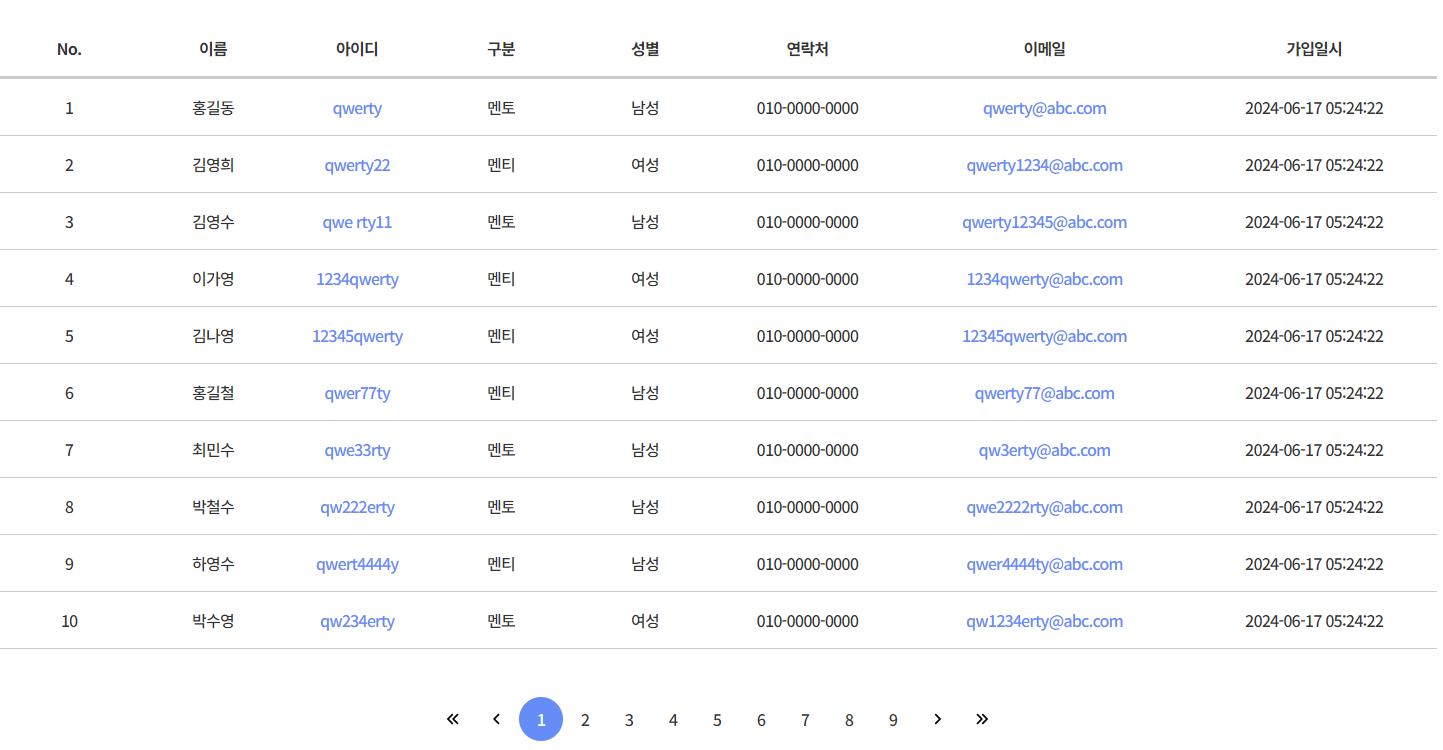
이를테면 이 레이아웃은 모바일에선 항목 몇가지가 사라져야했는데,
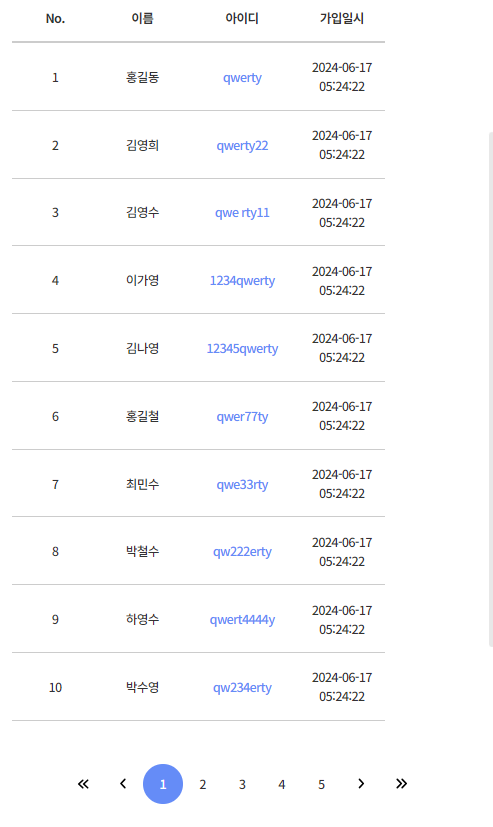
해당항목에 td에 display: none; 을 적용하니 여백이 그대로 남아있었다.
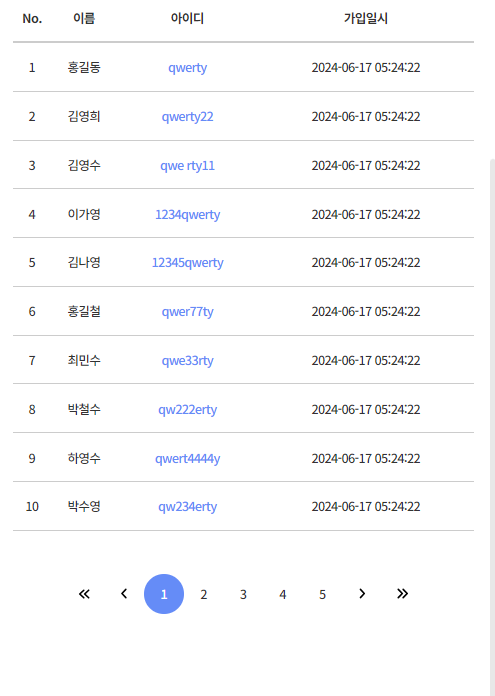
설마 하는 마음으로 colgroup의 col을 display: none; 처리했더니 잘 적용되었음.
table {
	colgroup col {
		&:nth-of-type(4), &:nth-of-type(5), &:nth-of-type(6), &:nth-of-type(7) {display: none;}
	}
	thead tr th {
		&:nth-of-type(4), &:nth-of-type(5), &:nth-of-type(6), &:nth-of-type(7) {display: none;}
	}
	tbody tr td {
		&:nth-of-type(4), &:nth-of-type(5), &:nth-of-type(6), &:nth-of-type(7) {display: none;}
	}
}
📌 참고한 글
HTML table 총정리, CSS 테이블 꾸미기, table-layout 속성

공부 기록장