노트북을 2개 사용하고있는데, 하나의 노트북에서 푸시에서 어려움이 있어 간단히 정리하고자 한다.
- 문제상황은 아래와 같다.
[jimo@localhost ~/jimo/github/LeetCode]$ sudo git push origin main
Username for 'https://github.com': choijiwoong
Password for 'https://choijiwoong@github.com':
remote: Support for password authentication was removed on August 13, 2021.
remote: Please see https://docs.github.com/get-started/getting-started-with-git/about-remote-repositories#cloning-with-https-urls for information on currently recommended modes of authentication.
fatal: Authentication failed for 'https://github.com/choijiwoong/LeetCode.git/'
비밀번호 로그인을 없애고 Token방식으로 바꾸었는데, 여러 토큰 충돌도 있었고.. 무엇보다 토큰 권한 설정에서 어려움을 겼었다.
문제 원인은 새로 발급한 토큰에 아무 권한 설정을 안해둔 것이라 403오류가 발생한 것이었다.
권한 설정을 완료하면 아래와 같은 화면이어야 git push가 가능했다.
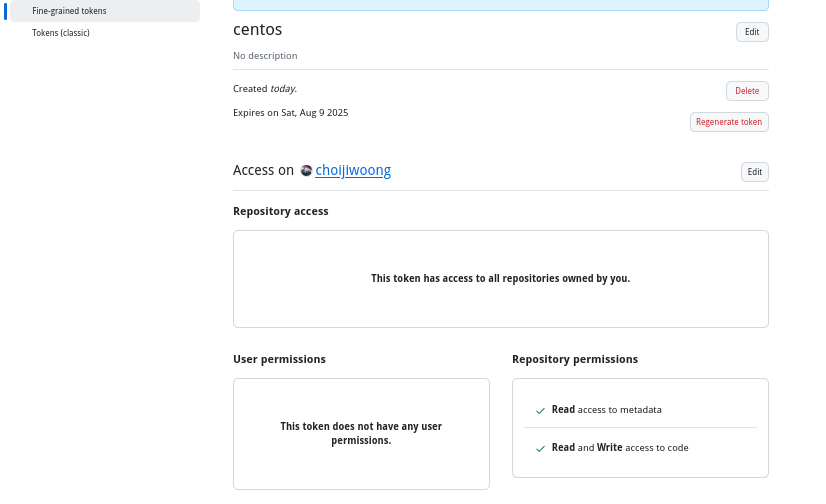
git token은 한번 발급하면 재확인할 수 없기에 재발급하거나 바로바로 생성 후 사용해야만 한다.
권한 설정 방법은 우선 Repository access에서 Public repositories가 아닌 "All repositories"를 선택해야한다. 위 공개 레포는 아래 설명을 읽어보면 Read-Only이기에 무조건 "All repositories"로 설정해야한다.
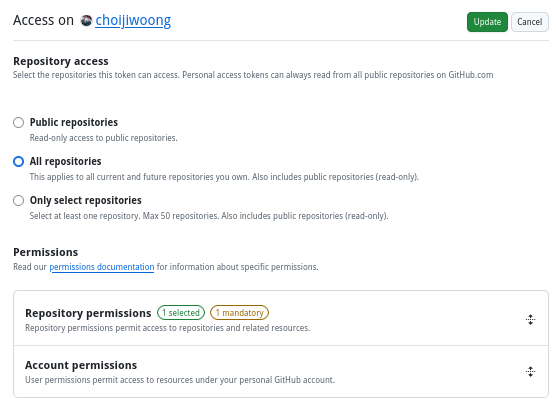
그 후 Repository permissions에서 Contents항목을 설정해주면 된다. 보다시피 "Repository contents, commits, branches, downloads, releases, and merges"에 대한 권한 설정이다.
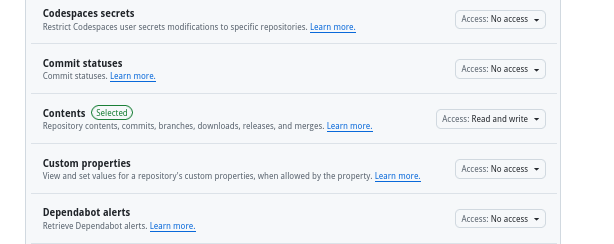
위 권한설정 이후 token을 재발급 받고, 맨위 문제 상황에서 password대신 token을 입력하면 해결된다.
새로운 문제.. root 커밋..?
이게 모시람..
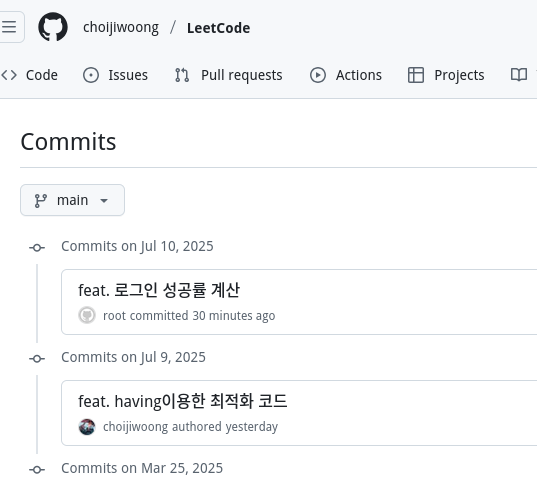
내 커밋으로 쳐주질 않는다..ㅋㅋ 뭐지 1커밋 목표로 푸는 leetcode였는데..
새로 클론 후 시도해보니 commit과정에서 문제가 발생했었음을 알 수 있었다.
[jimo@localhost ~/jimo/github/LeetCode]$ sudo git status
현재 브랜치 main
브랜치가 'origin/main'에 맞게 업데이트된 상태입니다.

커밋할 변경 사항:
  (use "git restore --staged <file>..." to unstage)
	수정함:        SQL50/1934. Confirmation Rate.sql

[jimo@localhost ~/jimo/github/LeetCode]$ sudo git commit -m "debug. 푸시테스트"
[main 71fa8b3] debug. 푸시테스트
 Committer: root <root@localhost.localdomain>
이름과 전자메일 주소를 사용자 이름과 호스트 이름을 이용해서 자동으로
설정했습니다. 이 정보가 맞는지 확인하십시오. 이 메시지를 보지 않으려면 정보를
명시적으로 설정하십시오. 다음 명령어를 실행하고 편집기의 안내에 따라 설정
파일을 편집하십시오:

    git config --global --edit

이렇게 한 다음, 이 커밋에 사용한 신원 정보를 다음과 같이 해서 바꿀 수 있습니다:

    git commit --amend --reset-author

 1 file changed, 1 insertion(+), 1 deletion(-)
이전에 여러 작업으로 git 설정이 초기화되며 사용자 이름 정보를 가지고 있지 않았고, 그로 인해 centos에서 사용중인(sudo) id인 root로 커밋을 진행했던 것이다. 이 때 푸시할 경우 TOKEN에서 content권한이 허용되어 있기 때문에 그냥 푸시가 root로 성공된 것이다.
이를 해결하기 위해 설명해주는 대로 사용자 이름을 설정해주자.
[jimo@localhost ~/jimo/github/LeetCode]$ git config --global user.name "choijiwoong"
[jimo@localhost ~/jimo/github/LeetCode]$ git config --global user.email "gogogi313@naver.com"
그 뒤에도 문제가 발생했는데.. 현재 디렉토리가 홈 디렉에 락이 걸려있는 폴더라 sudo가 필요했었다. 고로 아예 그 밖으로 나와있는 github폴더를 새로 만들고 clone하여 sudo 없이 git 작업이 가능하게 하자.
다시 token을 재발급하자.. 그리고 기존의 git credential을 삭제하자.
[jimo@localhost ~/github/LeetCode]$ git commit -m "debug. 푸시 테스트"
[main 656628f] debug. 푸시 테스트
 1 file changed, 1 insertion(+), 1 deletion(-)
[jimo@localhost ~/github/LeetCode]$ git push origin main
remote: Permission to choijiwoong/LeetCode.git denied to choijiwoong.
fatal: unable to access 'https://github.com/choijiwoong/LeetCode.git/': The requested URL returned error: 403
[jimo@localhost ~/github/LeetCode]$ git credential-cache exit
[jimo@localhost ~/github/LeetCode]$ rm ~/.git-credentials
[jimo@localhost ~/github/LeetCode]$ git config --global --unset credential.helper
[jimo@localhost ~/github/LeetCode]$ git push origin main
Username for 'https://github.com': choijiwoong
Password for 'https://choijiwoong@github.com':
오브젝트 나열하는 중: 7, 완료.
오브젝트 개수 세는 중: 100% (7/7), 완료.
Delta compression using up to 4 threads
오브젝트 압축하는 중: 100% (4/4), 완료.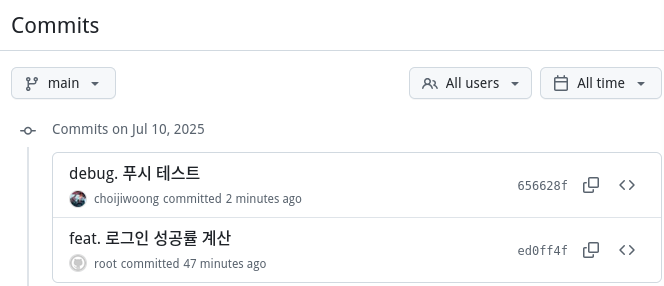
드디어 정상적으로 choijiwoong 커밋이 푸시된 것을 확인할 수 있었다.