ROS 기본정리
대학원 졸업 후 FW만 짜다가.. 이대로면 평생 ROS2는 까먹을것같아서 한번 정리해보았다.
유튜브, ROS2 Jazzy 공식홈페이지 등을 참고하였음.
1. 개발환경 구축
1.1 python
ubuntu 24.04는 시스템 파이썬은 배포판이 책임지고 관리하도록 바뀌었기때문에, 기본 python환경에서 pip install <module> 이 막혀있음.
때문에, venv를 만들고 해당 환경 내에서 모듈을 설치하는것이 권장되며, 아래와 같이 python 환경을 구축하는것이 권장됨
python3 -m venv ~/venvs/ros
source ~/venvs/ros/bin/activate
pip3 install --upgrade pip
jupyter notebook 실행방법은 아래와같음.
pip install jupyter
cd /path/to/your/ws
jupyyer notebook
1.2 ROS2 Jazzy
ROS2 Jazzy버전의 경우 ubuntu24.04와 호환되는 ROS2 버전으로, 아래 링크를 따라하면 쉽게 설치할 수 있다.
https://docs.ros.org/en/jazzy/Installation.html
Demo
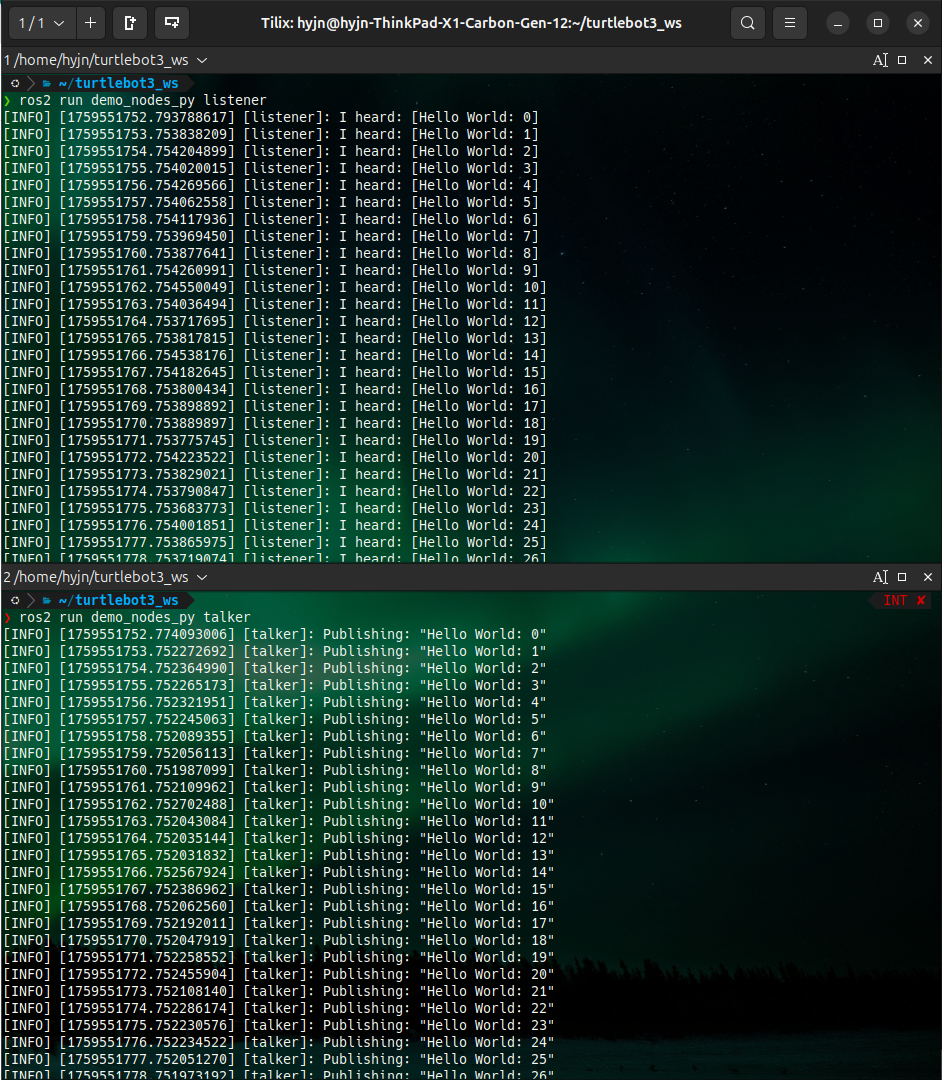
잘 설치되었는지 확인하기 위해, 2개의 터미널에서 아래와 같이 실행하면 listener노드가 talker노드의 토픽을 subscribe하는것을 볼 수 있다.
1.2.1 terminal 1
source /opt/ros/jazzy/setup.zsh
ros2 run demo_nodes_py listener
1.2.2 terminal 2
source /opt/ros/jazzy/setup.zsh
ros2 run demo_nodes_py talker
1.2.3 demo result
1.3 zshrc 설정
나의 경우 bash 가 아니라 zsh를 사용하기때문에 .bashrc가 아닌, .zshrc를 ROS2 환경에 맞게 수정했다.
alias ros_domain="export ROS_DOMAIN_ID=13; echo \"ROS_DOMAIN_ID=13\""
alias ros2comp='autoload -U bashcompinit && bashcompinit && eval "$(register-python-argcomplete ros2)"'
alias rosjazzy="source /opt/ros/jazzy/setup.zsh; ros_domain; echo \"ros2 jazzy is activated\";ros2comp"
- alias ros_domain="export ROS_DOMAIN_ID=13; echo \"ROS_DOMAIN_ID=13\""
ROS_DOMAIN_ID를 기본 설정함. 도메인 ID가 같아야만, 같은 네트워크에 물린 PC / Robot끼리 서로 통신할 수 있다. 실습때에는 본인만의 ID를 사용하는것이 권장됨. - alias ros2comp='autoload -U bashcompinit && bashcompinit && eval "$(register-python-argcomplete ros2)"'
- ros2 의 명령어가 자동완성이 되지 않길래 추가한 alias임. 위 실행하면, ros2 의 명령어들이 tab을 통해 자동완성됨(zsh유저 한정) - alias rosjazzy="source /opt/ros/jazzy/setup.zsh; ros_domain; echo \"ros2 jazzy is activated\";ros2comp"
- ROS2 Jazzy 버전의 setup 파일을 실행. ROS2사용에 필요한 설정 및 환경변수를 불러오며, 나의경우ROS_DOMAIN_ID설정 및 auto completion관련 설정도 추가해뒀음.
참고: zsh에서 ros 명령어 자동완성 안될때.
sudo apt install python3-argcomplete
# 아래 줄을 .zshrc에 복붙해두거나, alias로 잡아들것.
autoload -U bashcompinit
bashcompinit
eval "$(register-python-argcomplete ros2)"
2. turtlesim을 이용한 node, topic, action, service 사용
2.1 node, topic, service, action 용어 / 개념 정리
2.1.1 node
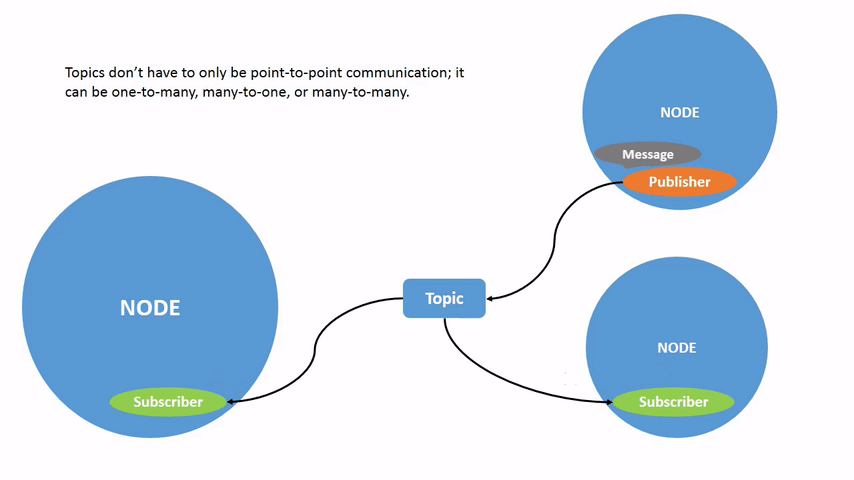
- node: ROS에서 실행가능한 최소의 단위를 의미함.
2.1.2 topic
- topic: 불특정 다수의 노드에 데이터를 broad casting할 수 있는 노드간 통신 방법. 센서데이터, 현재 로봇의 pose등을 실시간으로 전송하는데에 사용됨.
2.1.3 service
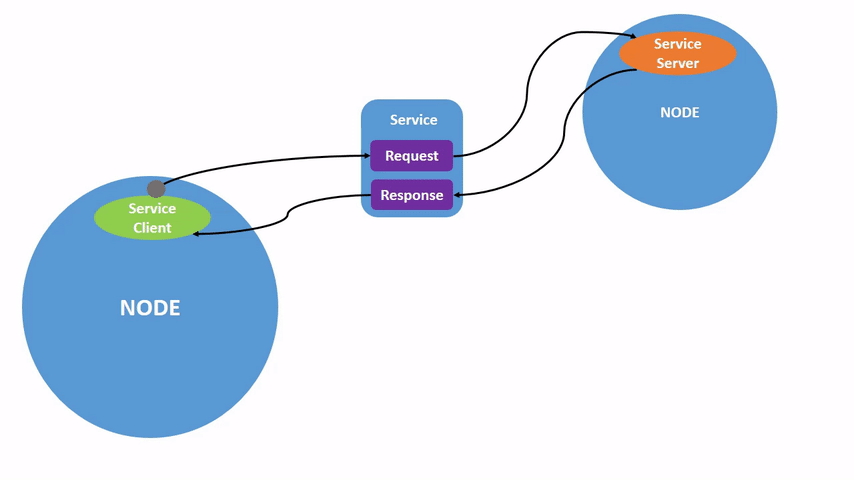
- service: service client / service server로 정의되며, client가 server에 어떤 요청 / 응답을 받을 수 있는 노드간 통신방법. 요청 한번에 응답 한번으로 이뤄짐.
2.1.4 action
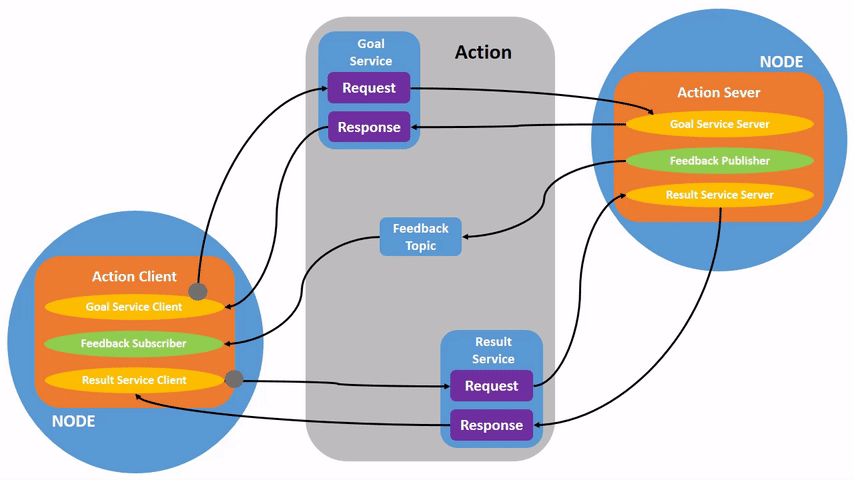
- action: action client / action server로 정의되며, client 가 server에 요청하는것은 service와 유사하나, action의 경우 요청이 완료될때까지 feedback을 server로부터 받을 수 있음.(service + topic과 유사함.)
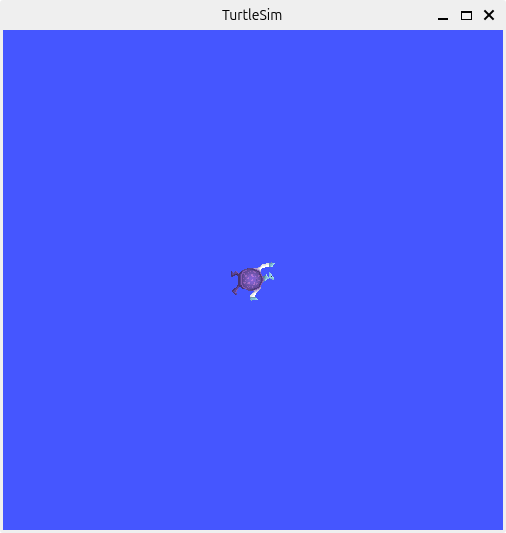
2.2 turtlesim 이용한 node 실습
2.2.1 turtlesim node 실행
rosjazzy
ros2 run turtlesim turtlesim_node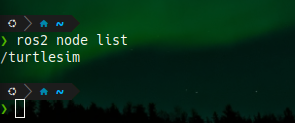
2.2.1 node 관련 명령어
-
ros2 node list: 현재 노드 리스트 볼 수 있음.
-
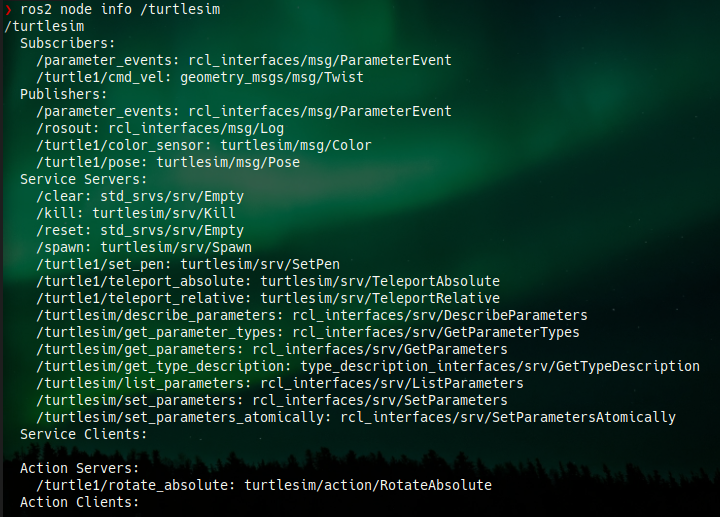
ros2 node info <nodename>: 특정 노드의 정보 볼 수 있음.
2.3 turtlesim 이용한 service 실습
ros2 service list: 현재 어떤 service가 사용가능한지 볼 수 있음.
ros2 service list
/clear
/kill
/reset
/spawn
/turtle1/set_pen
/turtle1/teleport_absolute
/turtle1/teleport_relative
/turtlesim/describe_parameters
/turtlesim/get_parameter_types
/turtlesim/get_parameters
/turtlesim/get_type_description
/turtlesim/list_parameters
/turtlesim/set_parameters
/turtlesim/set_parameters_atomically
ros2 service type <service name>: 해당 서비스의 타입 알 수 있음.
❯ ros2 service type /turtle1/teleport_absolute
turtlesim/srv/TeleportAbsolute
ros2 interface show <service type name>: 해당 서비스의 인터페이스 정의를 볼 수 있음.---기호를 통해 request와 response를 구분함.
❯ ros2 interface show turtlesim/srv/TeleportAbsolute
float32 x
float32 y
float32 theta
---
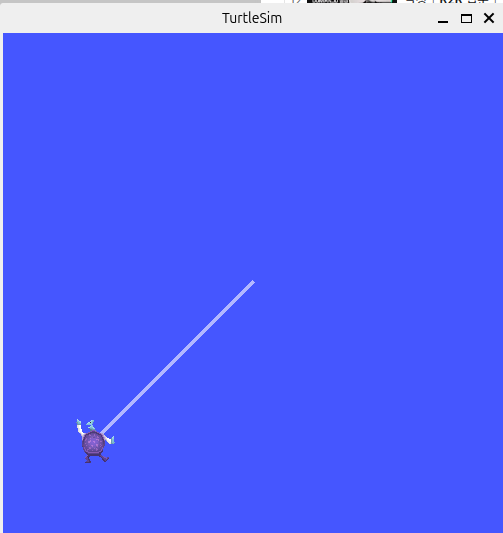
ros2 service call "service name" "service type" "{x: xxx, y: yyy ... }": service를 요청할 수 있음.
ros2 service call /turtle1/teleport_absolute turtlesim/srv/TeleportAbsolute "{x: 2, y: 2, theta: 1.57}"2.4 turtlesim 이용한 topic 실습
ros2 topic list: 현재 어떤 topic이 있는지 확인할 수 있음(-v(verbose)옵션 주면 타입정보, subscriber / publisher 정보 등을 추가로 줌.)
❯ ros2 topic list
/parameter_events
/rosout
/turtle1/cmd_vel
/turtle1/color_sensor
/turtle1/pose
/turtle2/cmd_vel
/turtle2/color_sensor
/turtle2/pose
❯ ros2 topic list -v
Published topics:
* /parameter_events [rcl_interfaces/msg/ParameterEvent] 2 publishers
* /rosout [rcl_interfaces/msg/Log] 2 publishers
* /turtle1/color_sensor [turtlesim/msg/Color] 1 publisher
* /turtle1/pose [turtlesim/msg/Pose] 1 publisher
* /turtle2/color_sensor [turtlesim/msg/Color] 1 publisher
* /turtle2/pose [turtlesim/msg/Pose] 1 publisher
Subscribed topics:
* /parameter_events [rcl_interfaces/msg/ParameterEvent] 2 subscribers
* /turtle1/cmd_vel [geometry_msgs/msg/Twist] 1 subscriber
* /turtle2/cmd_vel [geometry_msgs/msg/Twist] 1 subscriberros2 topic info: 해당 토픽의 타입, subcriber / publisher의 개수 등을 알려줌
❯ ros2 topic info /turtle1/pose
Type: turtlesim/msg/Pose
Publisher count: 1
Subscription count: 0
ros2 interface show <topic type name>: 해당 토픽의 인터페이스 정보를 볼 수 있음.(service와 동일)
❯ ros2 interface show turtlesim/msg/Pose
float32 x
float32 y
float32 theta

float32 linear_velocity
float32 angular_velocity
ros2 topic echo <topic name>: 실시간으로 해당 토픽의 값을 볼 수 있음.
❯ ros2 topic echo /turtle1/pose
x: 5.544444561004639
y: 5.544444561004639
theta: 0.0
linear_velocity: 0.0
angular_velocity: 0.0
---
x: 5.544444561004639
y: 5.544444561004639
theta: 0.0
linear_velocity: 0.0
angular_velocity: 0.0
---
x: 5.544444561004639
y: 5.544444561004639
theta: 0.0
linear_velocity: 0.0
angular_velocity: 0.0
---
x: 5.544444561004639
y: 5.544444561004639
theta: 0.0
linear_velocity: 0.0
angular_velocity: 0.0
---
ros2 topic pub <topic name> <topic type name> "{x: xxx, y: yyy..}":<topic type name>에 해당하는<topic name>이라는 토픽을 publish 함. 옵션에 따라 주기적으로 publish하거나 한번만 publish하거나가 가능함
ros2 topic pub --once /turtle1/cmd_vel geometry_msgs/msg/Twist "{linear: {x: 2.0, y: 0.0, z: 0.0}, angular: {x: 0.0, y: 0.0, z: 0.0}}"2.5 turtlesim 이용한 Action 실습 (/turtle1/rotate_absolute)
ros2 action list: 현재 사용 가능한 액션 이름 나열
❯ ros2 action list
/turtle1/rotate_absolute
ros2 action info: 해당 액션의 타입, client / server의 개수 등을 알려줌
❯ ros2 action info /turtle1/rotate_absolute
Action: /turtle1/rotate_absolute
Action clients: 0
Action servers: 1
    /turtlesim
참고자료

real-time system과 physical AI에 관심이 많습니다.