app 라우터
app이라는 디렉토리에서 작동하며 pages 디렉토리와 함께 작동하여 점진적 도입을 허용함
App Router는 Pages Router보다 우선 순위가 높아 디렉토리 간 경로가 동일한 URL 경로로 해석되면 빌드 타임 오류가 발생하여 충돌을 방지함
파일 규칙
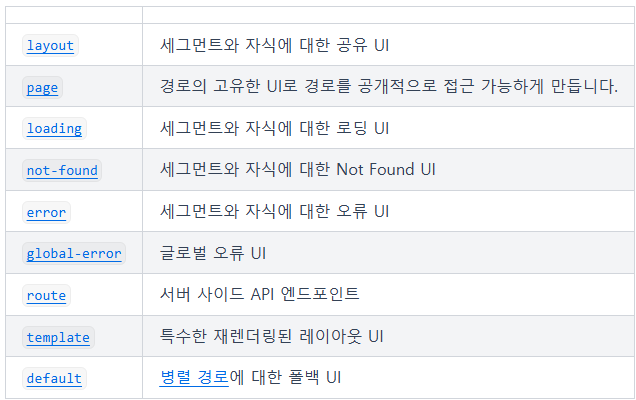
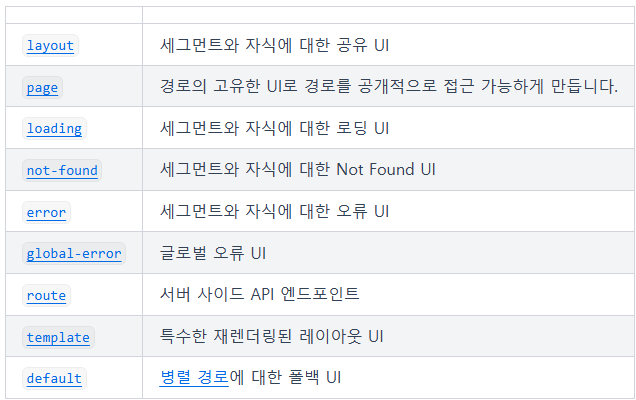
중첩 경로에서 특정 동작을 가진 UI를 생성하기 위해 일련의 특수 파일을 제공함
Layout
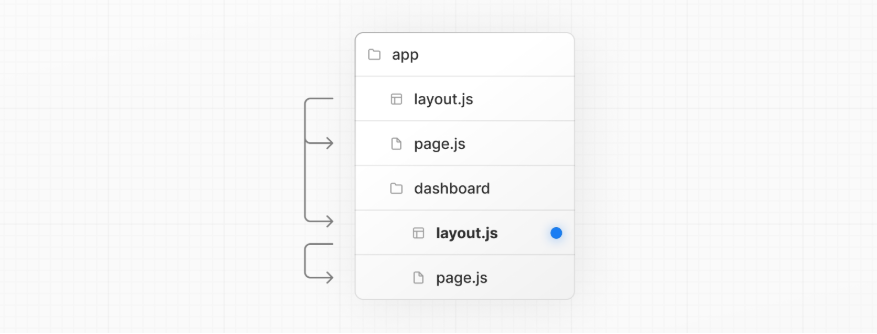
- 여러 경로 간에 공유되는 UI
- 탐색 시 레이아웃은 상태를 유지하고, 상호작용을 유지하며, 다시 렌더링되지 않음
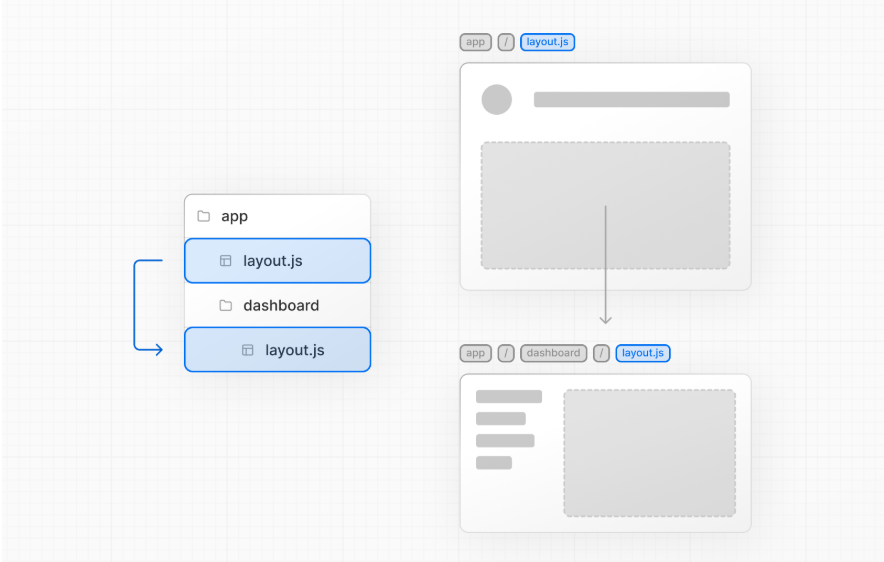
- 레이아웃은 중첩될 수 있음
- layout.ts 파일에서 React 컴포넌트를 기본 내보내기로 정의하여 생성할 수 있고, 이 컴포넌트는 렌더링 중 자식 레이아웃이 존재하는 경우 페이지로 채워질 children prop을 받아야 함
루트 레이아웃(필수)
- app 디렉토리의 최상위 레벨에서 정의되며 모든 경로에 적용됨
- 서버에서 반환되는 초기 HTML을 수정할 수 있도록 html 및 body 태그를 포함해야 함
app/layout.tsx

export default function RootLayout({
  children,
}: {
  children: React.ReactNode
}) {
  return (
    <html lang="en">
      <body>
        {/* 레이아웃 UI */}
        <main>{children}</main>
      </body>
    </html>
  )
}
레이아웃 중첩
app/dashboard/layout.tsx export default function DashboardLayout({ children, }: { children: React.ReactNode }) { return <section>{children}</section> }app/dashboard/layout.ts export default function DashboardLayout({ children }) { return <section>{children}</section> }위의 두 레이아웃을 결합하면, 루트 레이아웃(app/layout.ts)은 대시보드 레이아웃(app/dashboard/layout.ts)을 래핑하며, 이는 app/dashboard/* 내의 경로 세그먼트를 래핑함
Link 컴포넌트
Link는 HTML의 a태그를 확장하여 경로 간 사전 로드와 클라이언트 측 내비게이션을 제공하는 내장 컴포넌트
import Link from 'next/link'

export default function Page() {
  return <Link href="/dashboard">Dashboard</Link>
}
usePathname
링크가 활성화되었는지 확인 가능
예를 들어 pathname이 링크의 href와 일치하는지 확인하여 활성 링크에 클래스를 추가할 수 있음'use client' import { usePathname } from 'next/navigation' import Link from 'next/link' export function Links() { const pathname = usePathname() return ( <nav> <Link className={`link ${pathname === '/' ? 'active' : ''}`} href="/"> Home </Link> <Link className={`link ${pathname === '/about' ? 'active' : ''}`} href="/about" About </Link> </nav> ) }
Image 컴포넌트
app/page.ts

import Image from 'next/image'

export default function Page() {
  return (
    <Image
      src="/profile.png"
      width={500}
      height={500}
      alt="Picture of the author"
    />
  )
}
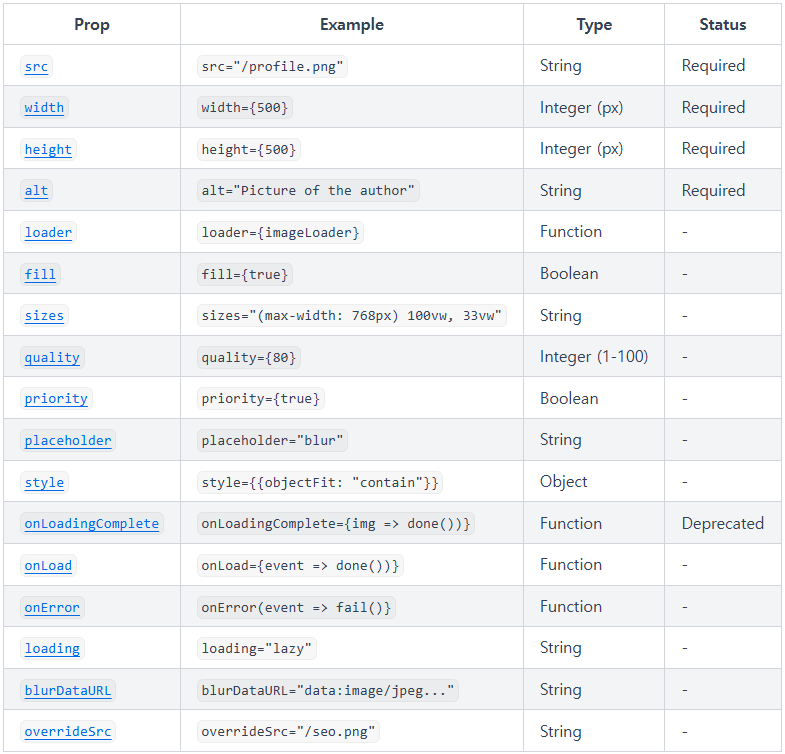
Image 컴포넌트에서 사용할 수 있는 props
필수 Props
app/page.ts

import Image from 'next/image'

export default function Page() {
  return (
    <div>
      <Image
        src="/profile.png"
        width={500}
        height={500}
        alt="Picture of the author"
      />
    </div>
  )
}
- src, alt, width, height(또는 fill)은 반드시 필요함
Error Handling
예상된 에러를 반환 값으로 모델링
서버 액션에서 예상된 에러를 try/catch로 처리하는 것을 피하고 useActionState를 사용하여 에러를 관리하고 클라이언트에 반환
app/ui/signup.tsx

'use client'

import { useActionState } from 'react'
import { createUser } from '@/app/actions'

const initialState = {
  message: '',
}

export function Signup() {
  const [state, formAction] = useActionState(createUser, initialState)

  return (
    <form action={formAction}>
      <label htmlFor="email">Email</label>
      <input type="text" id="email" name="email" required />
      {/* ... */}
      <p aria-live="polite">{state?.message}</p>
      <button>Sign up</button>
    </form>
  )
}
예상치 못한 에러는 에러 경계로 처리
error.tsx 및 global-error.tsx 파일을 사용하여 에러 경계를 구현하고 예상치 못한 에러를 처리하며 대체 UI를 제공
app/dashboard/error.tsx

'use client' // Error boundaries must be Client Components

import { useEffect } from 'react'

export default function Error({
  error,
  reset,
}: {
  error: Error & { digest?: string }
  reset: () => void
}) {
  useEffect(() => {
    // Log the error to an error reporting service
    console.error(error)
  }, [error])

  return (
    <div>
      <h2>Something went wrong!</h2>
      <button
        onClick={
          // Attempt to recover by trying to re-render the segment
          () => reset()
        }

        Try again
      </button>
    </div>
  )
}
global-error.tsx
루트 레이아웃에서 에러를 처리해야 할 때 사용
이 파일은 루트 앱 디렉토리에 위치함
전역 에러 UI는 활성화될 때 루트 레이아웃이나 템플릿을 대체하므로 자체 html 및 body 태그를 정의해야 함app/global-error.tsx 'use client' // Error boundaries must be Client Components export default function GlobalError({ error, reset, }: { error: Error & { digest?: string } reset: () => void }) { return ( // global-error must include html and body tags <html> <body> <h2>Something went wrong!</h2> <button onClick={() => reset()}>Try again</button> </body> </html> ) }
Redirecting
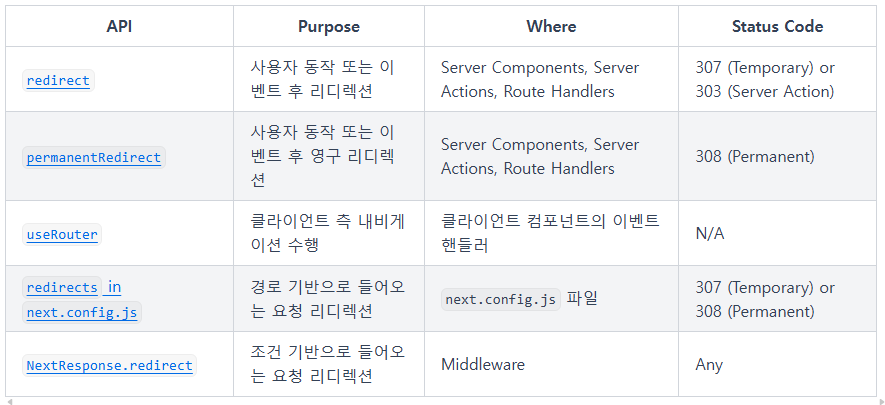
redirect 함수
- 사용자를 다른 URL로 리디렉션 할 수 있게 해줌
- server components, Route Handlers, Server Actions에서 redirect를 호출 할 수 있음
- 기본적으로 307 상태 코드를 반환하고. Server Actions에서 사용될 때는 303 상태 코드를 반환함
- 내부적으로 오류를 발생시키므로 try/catch 블록 외부에서 호출해야 함
- 렌더링 과정에서 Client Components에서도 호출할 수 있지만, 이벤트 핸들러에서는 호출할 수 없음. 대신 useRouter 훅을 사용할 수 있음
- 절대 URL도 허용하며 외부 링크로 리디렉션하는 데 사용할 수 있음
- 렌더링 프로세스 전에 리디렉션하려면 next.config.js 또는 Middleware 사용
app/actions.tsx

'use server'

import { redirect } from 'next/navigation'
import { revalidatePath } from 'next/cache'

export async function createPost(id: string) {
  try {
    // Call database
  } catch (error) {
    // Handle errors
  }

  revalidatePath('/posts') // Update cached posts
  redirect(`/post/${id}`) // Navigate to the new post page
}
permanentRedirect 함수
- 사용자를 다른 URL로 영구적으로 리디렉션 할 수 있게 해줌
- Server Components, Route Handlers, Server Actions에서 permanentRedirect를 호출할 수 있음
- 종종 엔터티의 캐노니컬 URL이 변경된 후 사용됨
- 기본적으로 308 상태 코드를 반환함
절대 URL도 허용하며 외부 링크로 리디렉션하는 데 사용할 수 있음- 렌더링 프로세스 전에 리디렉션하려면 next.config.js 또는 Middleware를 사용
캐노니컬 URL 의미: 여러 URL 중에서 콘텐츠의 원본 또는 대표 URL을 지정하는 표준 주소 목적: 여러 URL이 같은 콘텐츠를 가리키는 경우, 검색 엔진에 어떤 주소를 기준으로 인덱싱할지 알려줌으로써 중복 컨텐츠 문제를 해결하는 것 예를 들어, 같은 상품 페이지가 여러 URL로 존재한다면, <link rel="canonical" href="https://example.com/product/123">와 같이 선언하여 검색 엔진이 해당 URL을 중복 콘텐츠의 원본으로 인식하게 할 수 있음app/actions.tsx 'use server' import { permanentRedirect } from 'next/navigation' import { revalidateTag } from 'next/cache' export async function updateUsername(username: string, formData: FormData) { try { // Call database } catch (error) { // Handle errors } revalidateTag('username') // Update all references to the username permanentRedirect(`/profile/${username}`) // Navigate to the new user profile }useRouter() hook
- 클라이언트 컴포넌트의 이벤트 핸들러 내에서 리디렉션이 필요한 경우 useRouter 훅의 push 메서드를 사용할 수 있음
app/page.tsx

'use client'

import { useRouter } from 'next/navigation'

export default function Page() {
  const router = useRouter()

  return (
    <button type="button" onClick={() => router.push('/dashboard')}>
      Dashboard
    </button>
  )
}