Django - blog 만들기 (models.py, admin.py)
models.py
### 위치 이동
cd /Users/user/test/django/project/web/blog

### models.py
vi models.py

---

# from django.db import models
# Create your models here.

from __future__ import unicode_literals

from django.db import models
from django.core.urlresolvers import reverse

# create your models here.

class Post(models.Model):
    title = models.CharField('TITLE', max_length=50)
    slug = models.SlugField('SLUG', unique=True, allow_unicode=True, help_text='one word for title alias.')
    description = models.CharField('DESCRIPTION', max_length=100, blank=True, help_text='simple description text.')
    content = models.TextField('CONTENT')
    create_date = models.DateTimeField('Create Date', auto_now_add=True)
    modify_date = models.DateTimeField('Modify Date', auto_now=True)

    class Meta:
        verbose_name = 'post'
        verbose_name_plural = 'posts'
        db_table = 'my_post'
        ordering = ('-modify_date',)

    def __str__(self):
        return self.title

    def get_absolute_url(self):
        return reverse('blog:post_detail', args=(self.slug,))

    def get_previous_post(self):
        return self.get_previous_by_modify_date()

    def get_next_post(self):
return self.get_next_by_modify_date()- from django.core.urlresolvers import reverse : reverse() 함수 : URL 패턴을 만들어주는 django 의 내장 함수
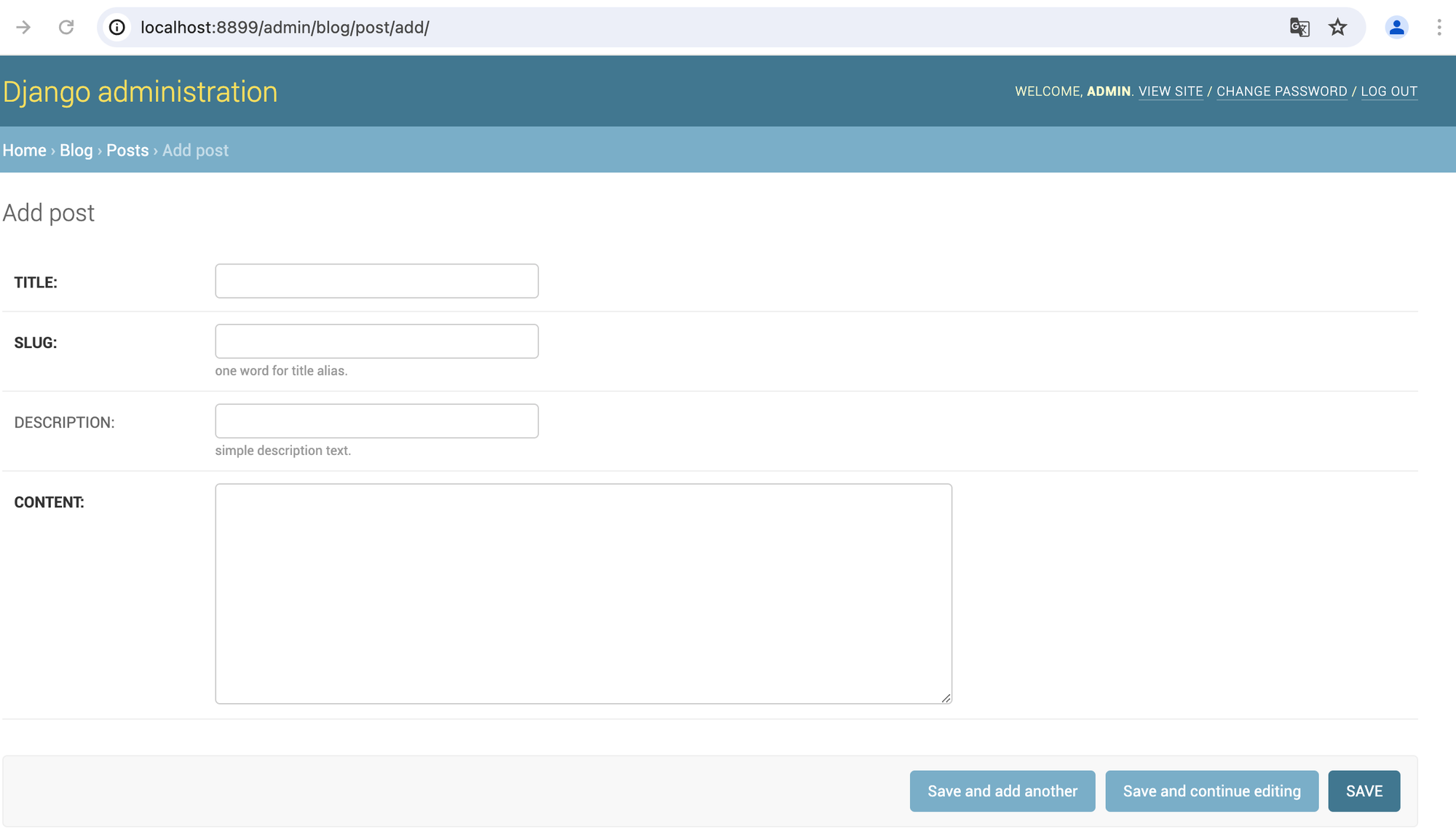
- title = models.CharField('TITLE', max_length=50) : title 칼럼은 CharField 이므로 한 줄로 입력되고, 컬럼에 대한 레이블은 TITLE 이며 최대 길이는 50 글자 (레이블은 form 화면에 나타나는 문구로 admin 화면에서 확인 가능)
- slug = models.SlugField('SLUG', unique=True, allow_unicode=True, help_text='one word for title alias.') : SlugField에 unique 옵션을 추가해 특정 포스트를 검색 시 기본 키 대신에 사용되며, allow_unicode 옵션을 통해 한글 처리 가능, help_text 는 해당 컬럼을 설명해주는 문구로 admin 페이지에서 확인 가능
- content = models.TextField('CONTENT') : content 컬럼은 TextField 옵션을 사용했으므로, 여러 줄 입력 가능
- create_date = models.DatetimeField('Create Date', auto_now_add=True) : DateTimeField 는 날짜와 시간을 입력하는 것, auto_now_add 속성은 객체가 생성될 때의 시각을 자동으로 입력
- modify_date = models.DateTimeField('Modify Date', auto_now=True) : DateTimeField 는 날짜와 시간을 입력하는 것, auto_now 속성은 객체가 데이터베이스에 저장될 때의 시각을 자동으로 기록
- class Meta : 필드 속성외에 필요한 파라미터가 있는 경우, Meta 내부 클래스로 정의
- verbose_name = 'post' : 테이블의 별칭을 단수와 복수로 가질 수 있음 → 단수 별칭을 post 라고 설정
- verbose_name_plural = 'posts' : 테이블의 복수 별칭을 posts 라고 설정
- dbtable = 'my_post' : DB에 저장되는 테이블의 이름을 my_post 로 설정 → default 값 = "appname""modelclassname" 이므로 blog_post
- ordering = ('-modify_date',) : 모델 객체의 리스트 출력 시 modify_date 컬럼을 기준으로 내림차순 정렬
- def str(self) : 객체의 문자열을 객체.title 속성으로 출력
- def get_absolute_url(self) : django 내장 함수 get_absolute_url() 이며, 객체의 절대 URL을 반환
- def get_previous_post(self) : django 내장 함수 get_previous_post() 메서드이며, 현재 객체보다 이전에 수정된 객체를 반환
- def get_next_post(self) : django 내장 함수 get_next_by_modify_date() 메소드이며, 현재 객체보다 이후에 수정된 다음 객체를 반환
admin.py
### 위치 이동
cd /Users/user/test/django/project/web/blog

### admin.py
vi admin.py

---

from django.contrib import admin
from blog.models import Post

class PostAdmin(admin.ModelAdmin):
    list_display  = ('title', 'modify_date')
    list_filter   = ('modify_date',)
    search_fields = ('title', 'content')
    prepopulated_fields = {'slug': ('title',)}

admin.site.register(Post, PostAdmin)- class PostAdmin(admin.ModelAdmin) : PostAdmin 클래스는 Post 클래스가 Admin 사이트에서 어떤 모습으로 보여줄지를 정의하는 클래스
- list_display = ('title', 'modify_date') : Post 객체를 보여줄 때, title 과 modify_date 를 화면에 출력하도록 하는 설정
- list_filter = ('modify_date',) : modify_date 컬럼을 사용하는 필터 사이드바를 보여주도록 설정
- search_fields = ('title', 'content') : 검색박스를 표시, 입력된 단어는 title과 content 컬럼에서 검색하도록 설정
- prepopulated_fields = {'slug': ('title',)} : slug 필드는 title 필드를 사용하여 미리 채워지도록 설정
- admin.site.register(Post, PostAdmin) : admin.site.register() 함수를 사용해서, Post 와 PostAdmin 클래스를 admin 사이트에 등록
변경 사항 적용
### 위치 이동
cd /Users/user/test/django/project/web

### makemigrations
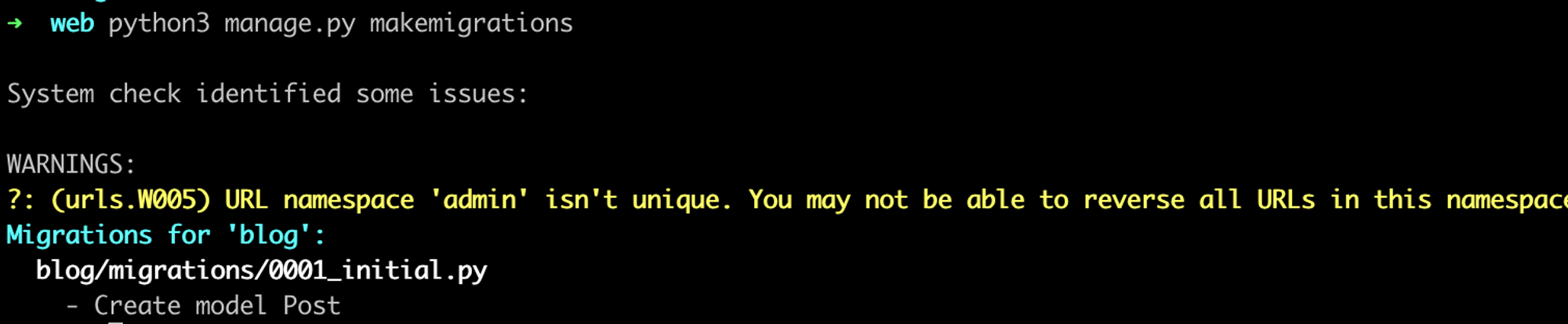
python3 manage.py makemigrations

### migrate
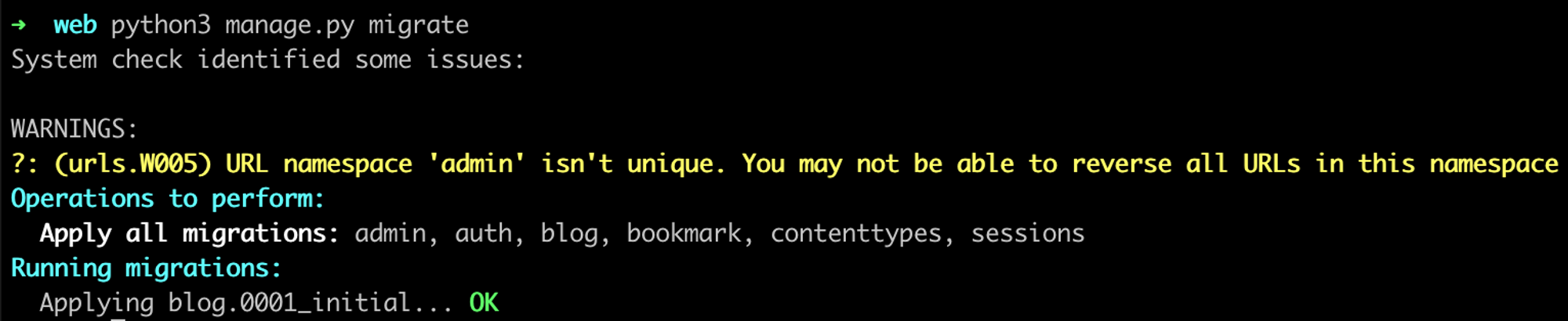
python3 manage.py migrate
error 발생
- from django.core.urlresolvers import reverseModuleNotFoundError: No module named 'django.core.urlresolvers'
- django 2.0 버전 부터 django.core.urlresolvers 모듈이 삭제되었으므로 update 된 모듈명으로 변경
- models.py 변경
- from django.core.urlresolvers import reverse → from django.urls import reverse
error 수정 후, 확인
makemigrations
migrate
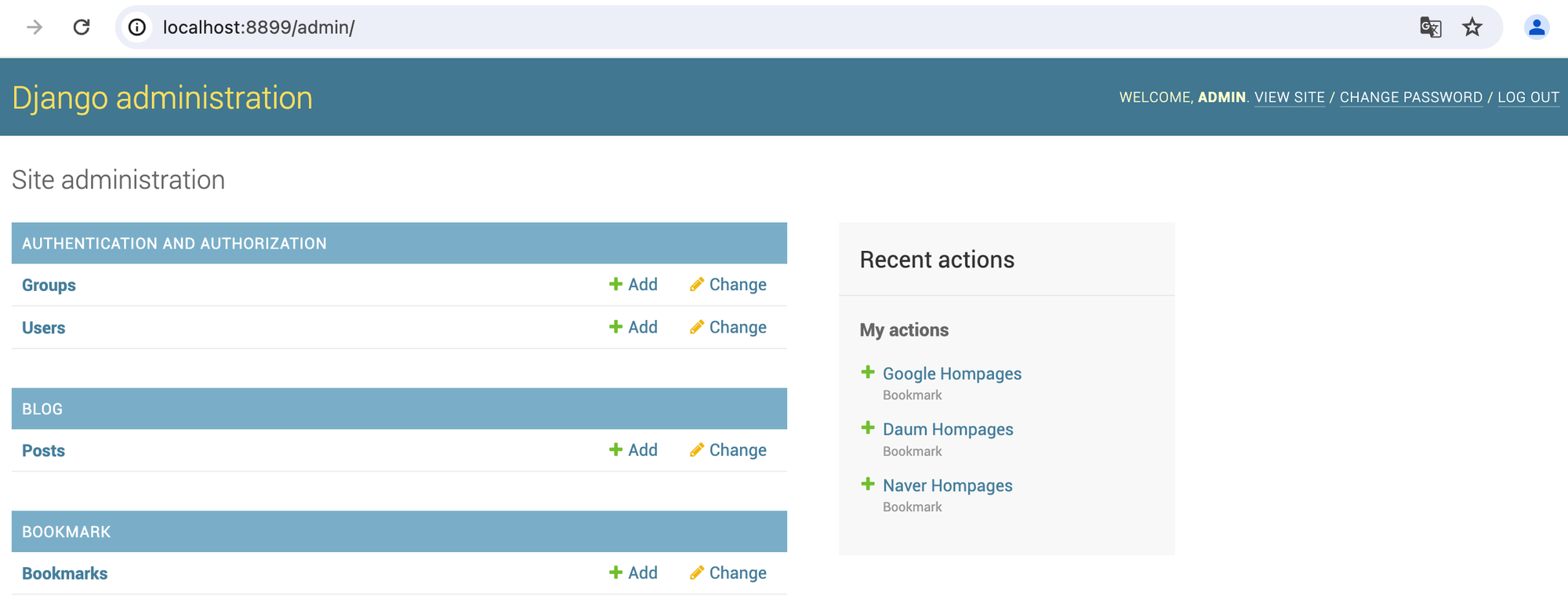
접속 확인
### 위치 이동
cd /Users/user/test/django/project/web

### django 실행
python3 manage.py runserver 0.0.0.0:8899- blog 생성 확인
- add post 확인
참고 자료

새로운 것을 시도하고 도전하는 것을 좋아하는 Engineer 입니다..