태그로 content 영역을 정의
HomeView 클래스 뷰에서 template_name 을 home.html 로 지정했으므로 home.html 파일이 존재해야 함
home.html 을 완벽하게 구현하기 위해서는 home.css 파일도 함께 작성을 해야 하지만, 현재까지 진행한 base.html 과 base.css 가 정상적으로 작성되었는지 확인하는 것이므로 임시 home.html 을 작성 후 확인
home.html 또한 개별 앱의 템플릿이 아닌, 프로젝트 디렉터리에 생성
home.html 생성
### 위치 이동
cd /Users/user/test/django/project/web/templates

### home.html
vi home.html

---

{% extends "base.html" %}

{% block title %}home.html{% endblock %}
{% block content %}
<div id="content">
This is CONTENT area.
</div>
{% endblock content %}

{% block footer %}
<div id="footer">
This is FOOTER area.
{% endblock footer %}- {% extends "base.html" %} : base.html 템플릿 파일을 상속
- {% block title %}home.html{% endblock %} : title 블록을 재정의 즉, 페이지 title 을 home.html 이라고 정의
- :
- This is CONTENT area. : content 영역을 표시하는 샘플 테스트
- This is FOOTER area. : footer 영역을 표시하는 샘플 텍스트
test 확인
### 위치 이동
cd /Users/user/test/django/project/web

### django 실행
python3 manage.py runserver 0.0.0.0:"port number"
웹페이지 접속

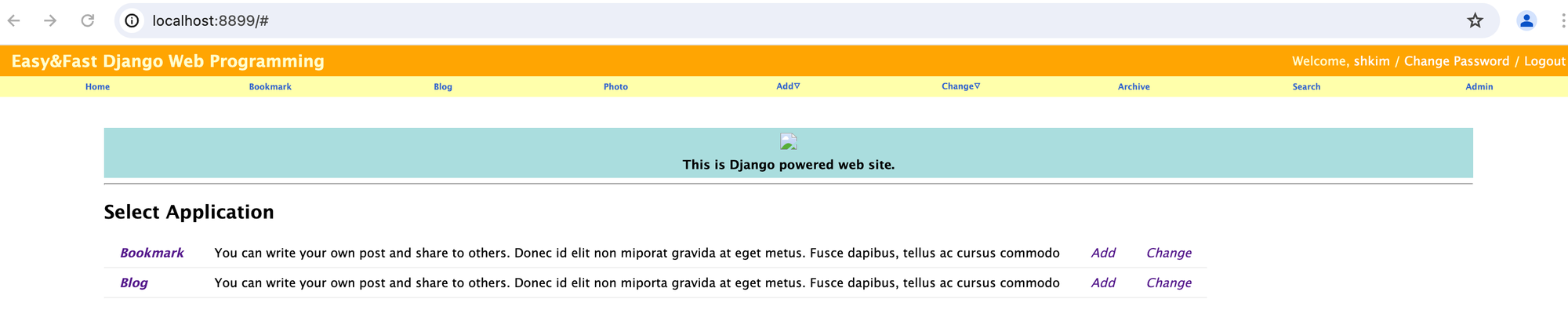
home.html 수정
### 위치 이동
cd /Users/user/test/django/project/web/templates
### home.html
vi home.html
---
{% extends "base.html" %}
{% block title %}home.html{% endblock %}
{% load static %}
{% block extrastyle %} {% static "css/home.css" %}{% endblock %}
{% block content %}
<div id="content_home">
<div id="homeimg">
<a href="/"><img src="{% static 'images/ruihui.jpg' %}" style="height:256px;"/></a>
<h4 style="margin: 5px 0;">This is cute web site.</h4>
</div>
<hr style="margin: 5px 0;">
<h2>Select Application</h2>
<table id="applist">
<tr>
<td><b><i><a href="#">Bookmark</a></i></b></td>
<td>You can write your own post and share to others. Donec id elit non miporat gravida at eget metus. Fusce dapibus, tellus ac cursus commodo</td>
<td class="Edit"><i><a href="#">Add</a></i></td>
<td class="Edit"><i><a href="#">Change</a></i></td>
</tr>
<tr>
<td><b><i><a href="#">Blog</a></i></b></td>
<td>You can write your own post and share to others. Donec id elit non miporta gravida at eget metus. Fusce dapibus, tellus ac cursus commodo</td>
<td class="Edit"><i><a href="#">Add</a></i></td>
<td class="Edit"><i><a href="#">Change</a></i></td>
</tr>
</table>
</div>
{% endblock content %}
{% block footer %}
<div id="footer">
© yunseul 2016
</div>
{% endblock footer %}웹페이지 접속
참고 자료

새로운 것을 시도하고 도전하는 것을 좋아하는 Engineer 입니다..