<section id="my-projects-section" class="section">
<article class="the-planet"></article>
<div class="this-planet-wrapper">
<article class="what-is-this-planet">
<div class="planet-name-wrapper">
<div class="planet-name">
<h2 class="uppercase text-balance">Skills</h2>
<p>행성 - 클릭 시 진입</p>
</div>
<div class="planet-bar"></div>
<div class="planet-skill-desc">Web Publisher</div>
</div>
<div class="planet-for-margin"></div>
<p class="text-balance my-speach">I like to create</p>
<p class="text-balance my-speach">web experiences with a passion.</p>
<div class="planet-for-margin-bottom"></div>
</article>
</div>
<section id="in-the-planet">
<article class="the-particles"></article>
<!-- Slider main container -->
<div id="theTextBoxBetweenCodingAndDesign">
<button class="about_coding betweenBtn">
<div class="betweenBtnFirst"></div>
<div class="betweenBtnSecond">
<p class="btnSecondFirstP">About Coding</p>
<p class="btnSecondSecondP">Click to navigate</p>
<p class="btnSecondThirdP">
<span class="ThirdPSpan">Task : </span>
"Publishing // GSAP"
</p>
</div>
</button>
<button class="about_desgin betweenBtn">
<div class="betweenBtnFirst"></div>
<div class="betweenBtnSecond">
<p class="btnSecondFirstP">About Design</p>
<p class="btnSecondSecondP">Click to navigate</p>
<p class="btnSecondThirdP">
<span class="ThirdPSpan">Tasks : </span>
"PS // Ai // Figma"
</p>
</div>
</button>
</div>
<div id="coding-swiper-wrapper" class="skill-swiper-wrapper">
<div class="swiper mySwiper skill-swiper skill-swiper-1">
<!-- Additional required wrapper -->
<div class="swiper-wrapper">
<!-- Slides -->
<div class="swiper-slide">
<div class="container">
<div class="overlay"></div>
<div class="card"></div>
<div class="skill-wrapper">
<div class="skill-svg-wrapper">
<svg viewBox="0 0 128 128">
<path fill="#E44D26" d="M19.037 113.876L9.032 1.661h109.936l-10.016 112.198-45.019 12.48z"></path><path fill="#F16529" d="M64 116.8l36.378-10.086 8.559-95.878H64z"></path><path fill="#EBEBEB" d="M64 52.455H45.788L44.53 38.361H64V24.599H29.489l.33 3.692 3.382 37.927H64zm0 35.743l-.061.017-15.327-4.14-.979-10.975H33.816l1.928 21.609 28.193 7.826.063-.017z"></path><path fill="#fff" d="M63.952 52.455v13.763h16.947l-1.597 17.849-15.35 4.143v14.319l28.215-7.82.207-2.325 3.234-36.233.335-3.696h-3.708zm0-27.856v13.762h33.244l.276-3.092.628-6.978.329-3.692z"></path>
</svg>
</div>
<div id="HTML5" class="skill-icon"></div>
<div class="skill-gage-wrapper" data-percent="85">
<div id="HTML-gage" class="skills">
<div class="gage-bar"><div class="fill skill_html5"></div></div>
</div>
<span>0%</span>
</div>
</div>
</div>
</div>
<div class="swiper-slide">
<div class="container">
<div class="overlay"></div>
<div class="card"></div>
<div class="skill-wrapper">
<div class="skill-svg-wrapper">
<svg viewBox="0 0 128 128">
<path fill="#1572B6" d="M18.814 114.123L8.76 1.352h110.48l-10.064 112.754-45.243 12.543-45.119-12.526z"></path><path fill="#33A9DC" d="M64.001 117.062l36.559-10.136 8.601-96.354h-45.16v106.49z"></path><path fill="#fff" d="M64.001 51.429h18.302l1.264-14.163H64.001V23.435h34.682l-.332 3.711-3.4 38.114h-30.95V51.429z"></path><path fill="#EBEBEB" d="M64.083 87.349l-.061.018-15.403-4.159-.985-11.031H33.752l1.937 21.717 28.331 7.863.063-.018v-14.39z"></path><path fill="#fff" d="M81.127 64.675l-1.666 18.522-15.426 4.164v14.39l28.354-7.858.208-2.337 2.406-26.881H81.127z"></path><path fill="#EBEBEB" d="M64.048 23.435v13.831H30.64l-.277-3.108-.63-7.012-.331-3.711h34.646zm-.047 27.996v13.831H48.792l-.277-3.108-.631-7.012-.33-3.711h16.447z"></path>
</svg>
</div>
<div id="CSS3" class="skill-icon"></div>
<div class="skill-gage-wrapper" data-percent="70">
<div id="CSS-gage" class="skills">
<div class="gage-bar"><div class="fill skill_css3"></div></div>
</div>
<span>0%</span>
</div>
</div>
</div>
</div>
<div class="swiper-slide">
<div class="container">
<div class="overlay"></div>
<div class="card"></div>
<div class="skill-wrapper">
<div class="skill-svg-wrapper">
<svg viewBox="0 0 128 128">
<path fill="#F0DB4F" d="M2 1v125h125V1H2zm66.119 106.513c-1.845 3.749-5.367 6.212-9.448 7.401-6.271 1.44-12.269.619-16.731-2.059-2.986-1.832-5.318-4.652-6.901-7.901l9.52-5.83c.083.035.333.487.667 1.071 1.214 2.034 2.261 3.474 4.319 4.485 2.022.69 6.461 1.131 8.175-2.427 1.047-1.81.714-7.628.714-14.065C58.433 78.073 58.48 68 58.48 58h11.709c0 11 .06 21.418 0 32.152.025 6.58.596 12.446-2.07 17.361zm48.574-3.308c-4.07 13.922-26.762 14.374-35.83 5.176-1.916-2.165-3.117-3.296-4.26-5.795 4.819-2.772 4.819-2.772 9.508-5.485 2.547 3.915 4.902 6.068 9.139 6.949 5.748.702 11.531-1.273 10.234-7.378-1.333-4.986-11.77-6.199-18.873-11.531-7.211-4.843-8.901-16.611-2.975-23.335 1.975-2.487 5.343-4.343 8.877-5.235l3.688-.477c7.081-.143 11.507 1.727 14.756 5.355.904.916 1.642 1.904 3.022 4.045-3.772 2.404-3.76 2.381-9.163 5.879-1.154-2.486-3.069-4.046-5.093-4.724-3.142-.952-7.104.083-7.926 3.403-.285 1.023-.226 1.975.227 3.665 1.273 2.903 5.545 4.165 9.377 5.926 11.031 4.474 14.756 9.271 15.672 14.981.882 4.916-.213 8.105-.38 8.581z"></path>
</svg>
</div>
<div id="JavaScript" class="skill-icon"></div>
<div class="skill-gage-wrapper" data-percent="45">
<div id="JS-gage" class="skills">
<div class="gage-bar"><div class="fill skill_js"></div></div>
</div>
<span>0%</span>
</div>
</div>
</div>
</div>
<div class="swiper-slide">
<div class="container">
<div class="overlay"></div>
<div class="card"></div>
<div class="skill-wrapper">
<div class="skill-svg-wrapper">
<svg viewBox="0 0 128 128">
<path fill="#0868AC" d="M9.625 32.181C-1.404 48.032-.031 68.657 8.394 85.501c.2.404.41.801.617 1.198l.394.759.246.437.439.786c.262.461.53.92.804 1.379l.459.756c.304.491.615.976.933 1.46l.398.614c.439.655.888 1.309 1.352 1.951l.039.05.228.308c.401.553.814 1.099 1.232 1.639l.464.59c.373.469.752.935 1.138 1.399l.435.52a75.27 75.27 0 001.586 1.812l.033.033.061.068a80.44 80.44 0 001.612 1.699l.517.521c.423.426.853.845 1.287 1.262l.527.5c.58.547 1.166 1.083 1.764 1.607l.028.022.307.262c.527.456 1.063.909 1.603 1.353l.664.529c.441.354.887.702 1.336 1.044l.714.543c.496.365.995.724 1.499 1.075l.546.387.15.107c.478.329.967.646 1.456.963l.63.42c.75.474 1.51.943 2.279 1.396l.63.355c.565.326 1.134.646 1.71.959.312.168.632.327.946.488.407.213.811.429 1.225.636l.283.137.501.242c.641.306 1.287.607 1.94.897l.41.184a66.92 66.92 0 002.263.941l.551.217c.704.271 1.418.539 2.135.791l.268.093c.787.275 1.581.53 2.381.779l.575.172c.814.245 1.619.538 2.458.693 53.339 9.727 68.833-32.053 68.833-32.053-13.013 16.953-36.111 21.425-57.996 16.446-.829-.187-1.633-.446-2.442-.685l-.609-.185a72.498 72.498 0 01-2.352-.765l-.323-.117a72.245 72.245 0 01-2.074-.769l-.582-.229c-.752-.297-1.5-.607-2.239-.931l-.447-.198a92.857 92.857 0 01-1.889-.879l-.546-.262c-.491-.239-.977-.493-1.461-.743-.324-.171-.654-.332-.975-.51a58.591 58.591 0 01-1.751-.982l-.591-.33a81.221 81.221 0 01-2.28-1.397l-.615-.41a59.283 59.283 0 01-1.623-1.079l-.522-.367a89.287 89.287 0 01-1.534-1.109l-.679-.514a64.473 64.473 0 01-1.384-1.082l-.617-.495a82.693 82.693 0 01-1.724-1.453l-.189-.159a83.466 83.466 0 01-1.812-1.647l-.511-.491c-.441-.42-.875-.843-1.302-1.277l-.51-.509a70.541 70.541 0 01-1.598-1.69l-.079-.084a67.39 67.39 0 01-1.621-1.844l-.424-.504a70.602 70.602 0 01-1.167-1.442l-.427-.532a78.406 78.406 0 01-1.347-1.794c-12.15-16.574-16.516-39.432-6.805-58.204m25.629-2.434c-7.977 11.478-7.543 26.844-1.321 38.983a50.581 50.581 0 003.528 5.889c1.195 1.713 2.52 3.751 4.106 5.127a48.111 48.111 0 001.79 1.858l.472.465a51.69 51.69 0 001.828 1.698l.074.064.018.018a55.268 55.268 0 002.135 1.767l.485.378a54.08 54.08 0 002.233 1.631l.065.049c.336.232.678.448 1.019.672l.483.319c.544.349 1.095.689 1.655 1.015l.235.136c.483.278.972.552 1.463.818l.521.271c.339.177.678.358 1.023.53l.155.07c.703.346 1.412.68 2.136.995l.472.194c.579.246 1.164.486 1.75.71l.75.275c.533.198 1.068.378 1.607.559l.727.233c.767.238 1.525.539 2.324.672 41.183 6.823 50.691-24.886 50.691-24.886-8.57 12.343-25.168 18.233-42.879 13.635a50.376 50.376 0 01-2.333-.674l-.701-.227a45.423 45.423 0 01-1.631-.562l-.736-.274a56.418 56.418 0 01-1.756-.708l-.473-.2a47.728 47.728 0 01-2.148-.999c-.363-.177-.72-.364-1.078-.548l-.622-.32a44.502 44.502 0 01-1.363-.77l-.326-.185a47.844 47.844 0 01-1.651-1.008l-.498-.332a61.759 61.759 0 01-1.069-.707 57.456 57.456 0 01-2.226-1.628l-.501-.395c-7.752-6.12-13.898-14.486-16.819-23.971-3.062-9.836-2.402-20.878 2.903-29.84m22.278-.775c-4.702 6.92-5.164 15.514-1.901 23.156 3.441 8.113 10.491 14.476 18.72 17.495.339.125.679.237 1.022.354l.451.143c.485.152.966.329 1.467.424 22.74 4.394 28.908-11.669 30.549-14.034-5.402 7.779-14.482 9.646-25.623 6.942-.88-.213-1.847-.531-2.695-.832a33.242 33.242 0 01-3.201-1.329 33.215 33.215 0 01-5.612-3.424c-9.969-7.565-16.162-21.994-9.657-33.745"></path>
</svg>
</div>
<div id="jQuery" class="skill-icon"></div>
<div class="skill-gage-wrapper" data-percent="50">
<div id="JQ-gage" class="skills">
<div class="gage-bar"><div class="fill skill_JQ"></div></div>
</div>
<span>0%</span>
</div>
</div>
</div>
</div>
<div class="swiper-slide">
<div class="container">
<div class="overlay"></div>
<div class="card"></div>
<div class="skill-wrapper">
<div class="skill-svg-wrapper">
<svg xmlns="http://www.w3.org/2000/svg" width="200" fill="none" viewBox="0 0 82 30">
<path fill="#0ae448" d="M23.81 14.013v.013l-1.075 4.665c-.058.264-.322.458-.626.458H20.81a.218.218 0 0 0-.208.155c-1.198 4.064-2.82 6.858-4.962 8.535-1.822 1.428-4.068 2.093-7.069 2.093-2.696 0-4.514-.867-6.056-2.578C.478 25.09-.364 21.388.146 16.926 1.065 8.549 5.41.096 13.776.096c2.545-.023 4.543.762 5.933 2.33 1.47 1.657 2.216 4.154 2.22 7.421a.55.55 0 0 1-.549.536h-6.13a.42.42 0 0 1-.407-.41c-.05-2.259-.72-3.36-2.052-3.36-2.35 0-3.736 3.19-4.471 4.959-1.027 2.47-1.55 5.152-1.447 7.824.049 1.244.249 2.994 1.43 3.718 1.047.643 2.541.217 3.446-.495.904-.711 1.632-1.942 1.938-3.065.043-.156.046-.277.005-.332-.043-.055-.162-.068-.253-.068h-1.574a.572.572 0 0 1-.438-.202.42.42 0 0 1-.087-.362l1.076-4.674c.053-.24.27-.42.537-.453v-.011h10.33c.024 0 .049 0 .072.005.268.034.457.284.452.556h.002Z"/>
<path fill="#0ae448" d="M41.594 8.65a.548.548 0 0 1-.548.531H35.4c-.37 0-.679-.3-.679-.665 0-1.648-.57-2.45-1.736-2.45s-1.918.717-1.94 1.968c-.025 1.395.764 2.662 3.01 4.84 2.957 2.774 4.142 5.232 4.085 8.48C38.047 26.605 34.476 30 29.042 30c-2.775 0-4.895-.743-6.305-2.207-1.431-1.486-2.087-3.668-1.95-6.485a.548.548 0 0 1 .549-.53h5.84a.55.55 0 0 1 .422.209.48.48 0 0 1 .106.384c-.065 1.016.112 1.775.512 2.195.256.272.613.41 1.058.41 1.079 0 1.711-.763 1.735-2.09.02-1.148-.343-2.155-2.321-4.19-2.555-2.496-4.846-5.075-4.775-9.13.042-2.351.976-4.502 2.631-6.056C28.294.868 30.687 0 33.465 0c2.783.02 4.892.813 6.269 2.359 1.304 1.466 1.932 3.582 1.862 6.29h-.002Z"/>
<path fill="#0ae448" d="m59.096 29.012.037-27.932a.525.525 0 0 0-.529-.533h-8.738c-.294 0-.423.252-.507.42L36.707 28.842v.005l-.005.006c-.14.343.126.71.497.71h6.108c.33 0 .548-.1.656-.308l1.213-2.915c.149-.388.177-.424.601-.424h5.836c.406 0 .415.008.408.405l-.131 2.71a.525.525 0 0 0 .529.532h6.17a.522.522 0 0 0 .403-.182.458.458 0 0 0 .104-.369Zm-10.81-9.326c-.057 0-.102-.001-.138-.005a.146.146 0 0 1-.13-.183c.012-.041.029-.095.053-.163l4.377-10.827c.038-.107.086-.212.136-.314.071-.145.157-.155.184-.047.023.09-.502 11.118-.502 11.118-.041.413-.06.43-.467.464l-3.509-.041h-.008l.003-.002Z"/>
<path fill="#0ae448" d="M71.545.547h-4.639c-.245 0-.52.13-.585.422l-6.455 28.029a.423.423 0 0 0 .088.364.572.572 0 0 0 .437.202h5.798c.311 0 .525-.153.583-.418 0 0 .703-3.168.704-3.178.05-.247-.036-.439-.258-.555-.105-.054-.209-.108-.312-.163l-1.005-.522-1-.522-.387-.201a.186.186 0 0 1-.102-.17.199.199 0 0 1 .198-.194l3.178.014c.95.005 1.901-.062 2.836-.234 6.58-1.215 10.95-6.485 11.076-13.656.107-6.12-3.309-9.221-10.15-9.221l-.005.003Zm-1.579 16.68h-.124c-.278 0-.328-.03-.337-.04-.004-.007 1.833-8.073 1.834-8.084.047-.233.045-.367-.099-.446-.184-.102-2.866-1.516-2.866-1.516a.188.188 0 0 1-.101-.172.197.197 0 0 1 .197-.192h4.241c1.32.04 2.056 1.221 2.021 3.237-.061 3.492-1.721 7.09-4.766 7.214Z"/>
</svg>
</div>
<div id="GSAP" class="skill-icon"></div>
<div class="skill-gage-wrapper" data-percent="35">
<div id="GSAP-gage" class="skills">
<div class="gage-bar"><div class="fill skill_GSAP"></div></div>
</div>
<span>0%</span>
</div>
</div>
</div>
</div>
</div>
</div>
</div>
<div id="design-swiper-wrapper" class="skill-swiper-wrapper">
<div class="swiper mySwiper skill-swiper skill-swiper-2">
<!-- Additional required wrapper -->
<div class="swiper-wrapper">
<!-- Slides -->
<div class="swiper-slide">
<div class="container">
<div class="overlay"></div>
<div class="card"></div>
<div class="skill-wrapper">
<div class="skill-svg-wrapper">
<svg viewBox="0 0 128 128">
<path fill="#001e36" d="M22.667 1.6h82.666C117.867 1.6 128 11.733 128 24.267v79.466c0 12.534-10.133 22.667-22.667 22.667H22.667C10.133 126.4 0 116.267 0 103.733V24.267C0 11.733 10.133 1.6 22.667 1.6Z"></path><path fill="#31a8ff" d="M45.867 33.333c-1.6 0-3.2 0-4.853.054-1.654.053-3.201.053-4.641.107-1.44.053-2.773.053-4.053.106-1.227.053-2.08.053-2.987.053-.373 0-.533.213-.533.587v54.88c0 .48.213.694.64.694h10.347c.373-.054.64-.374.586-.747v-17.12c1.013 0 1.76 0 2.294.053.533.053 1.386.053 2.666.053 4.374 0 8.374-.48 12-1.813 3.467-1.28 6.454-3.52 8.587-6.507 2.133-2.986 3.2-6.773 3.2-11.36 0-2.4-.426-4.693-1.226-6.933A16.98 16.98 0 0 0 64 39.36a19.049 19.049 0 0 0-7.147-4.374c-2.987-1.12-6.613-1.653-10.986-1.653Zm1.19 10.505c1.9.036 3.75.368 5.476 1.068 1.547.587 2.827 1.654 3.734 3.04a8.779 8.779 0 0 1 1.227 4.748c0 2.346-.534 4.16-1.654 5.493-1.174 1.333-2.667 2.347-4.373 2.827-1.974.64-4.054.959-6.134.959h-2.827c-.64 0-1.332-.053-2.079-.106v-17.92c.373-.054 1.12-.107 2.187-.053 1.013-.054 2.239-.054 3.626-.054.273-.007.546-.008.817-.002zm44.73 2.723c-3.787 0-6.934.586-9.44 1.866-2.293 1.067-4.267 2.773-5.6 4.906-1.173 1.974-1.814 4.16-1.814 6.454a11.447 11.447 0 0 0 1.227 5.44 13.809 13.809 0 0 0 4.054 4.533 32.629 32.629 0 0 0 7.573 3.84c2.613 1.013 4.373 1.813 5.227 2.506.853.694 1.28 1.387 1.28 2.134 0 .96-.587 1.867-1.44 2.24-.96.48-2.4.747-4.427.747-2.133 0-4.267-.267-6.294-.8a22.834 22.834 0 0 1-6.613-2.613c-.16-.107-.32-.16-.48-.053-.16.106-.213.319-.213.479v9.28c-.053.427.213.8.587 1.013a21.49 21.49 0 0 0 5.44 1.707c2.4.48 4.799.693 7.252.693 3.84 0 7.041-.586 9.654-1.706 2.4-.96 4.48-2.613 5.973-4.747a12.41 12.41 0 0 0 2.08-7.093 11.512 11.512 0 0 0-1.226-5.493c-1.014-1.814-2.454-3.307-4.214-4.427a38.625 38.625 0 0 0-8.213-3.894 48.784 48.784 0 0 1-3.787-1.76c-.693-.373-1.333-.853-1.813-1.44-.32-.427-.533-.906-.533-1.386 0-.48.16-1.013.426-1.44.374-.533.96-.907 1.653-1.067 1.014-.266 2.134-.427 3.2-.374 2.027 0 4 .267 5.974.694 1.814.373 3.52.96 5.12 1.814.213.106.48.106.96 0a.656.656 0 0 0 .267-.534v-8.693c0-.214-.054-.427-.107-.64-.107-.213-.32-.427-.533-.48A18.762 18.762 0 0 0 98.4 47.04a45.98 45.98 0 0 0-6.613-.48z"></path>
</svg>
</div>
<div id="Photoshop" class="skill-icon"></div>
<div class="skill-gage-wrapper" data-percent="30">
<div id="PS-gage" class="skills">
<div class="gage-bar"><div class="fill skill_PS"></div></div>
</div>
<span>0%</span>
</div>
</div>
</div>
</div>
<div class="swiper-slide">
<div class="container">
<div class="overlay"></div>
<div class="card"></div>
<div class="skill-wrapper">
<div class="skill-svg-wrapper">
<svg viewBox="0 0 128 128">
<path fill-rule="evenodd" clip-rule="evenodd" fill="#FAA625" d="M47.955 69h15.371c-2.646-9-5.252-17.32-7.816-25.776C53.022 51.71 50.498 60 47.955 69zm76.157-68H2.873C.687 1 1 1.476 1 3.585v121.394C1 127.086.687 127 2.719 127h121.547c2.031 0 2.734.086 2.734-2.022V3.739C127 1.476 126.298 1 124.112 1zM77.298 96c-1.637 0-3.28-.133-4.909-.016-1.175.088-1.568-.406-1.881-1.426-1.514-4.931-3.123-9.86-4.638-14.79-.305-.992-.741-1.354-1.816-1.341-5.523.064-11.049.058-16.573-.007-1.163-.014-1.698.296-2.03 1.45-1.406 4.904-2.944 9.768-4.365 14.667-.308 1.062-.776 1.433-1.904 1.404-3.318-.083-6.641-.032-10.274-.032.959-3.045 1.829-5.861 2.729-8.665 5.514-17.2 11.047-34.4 16.521-51.611.382-1.198.913-1.567 2.143-1.54 3.886.086 7.775.022 11.663 0 .727-.005 1.223.038 1.489.864 6.505 20.116 13.033 40.356 19.555 60.47.028.091.01.573.025.573h-5.735zM98 96H86V51h12v45zm-6.35-51.071c-3.665-.005-6.289-2.528-6.314-6.07-.024-3.532 2.707-6.159 6.406-6.163 3.728-.004 6.355 2.537 6.384 6.171.026 3.545-2.667 6.068-6.476 6.062z"></path>
</svg>
</div>
<div id="Illustrator" class="skill-icon"></div>
<div class="skill-gage-wrapper" data-percent="40">
<div id="ilu-gage" class="skills">
<div class="gage-bar"><div class="fill skill_ilu"></div></div>
</div>
<span>0%</span>
</div>
</div>
</div>
</div>
<div class="swiper-slide">
<div class="container">
<div class="overlay"></div>
<div class="card"></div>
<div class="skill-wrapper">
<div class="skill-svg-wrapper">
<svg viewBox="0 0 128 128">
<path fill="#0acf83" d="M45.5 129c11.9 0 21.5-9.6 21.5-21.5V86H45.5C33.6 86 24 95.6 24 107.5S33.6 129 45.5 129zm0 0"></path><path fill="#a259ff" d="M24 64.5C24 52.6 33.6 43 45.5 43H67v43H45.5C33.6 86 24 76.4 24 64.5zm0 0"></path><path fill="#f24e1e" d="M24 21.5C24 9.6 33.6 0 45.5 0H67v43H45.5C33.6 43 24 33.4 24 21.5zm0 0"></path><path fill="#ff7262" d="M67 0h21.5C100.4 0 110 9.6 110 21.5S100.4 43 88.5 43H67zm0 0"></path><path fill="#1abcfe" d="M110 64.5c0 11.9-9.6 21.5-21.5 21.5S67 76.4 67 64.5 76.6 43 88.5 43 110 52.6 110 64.5zm0 0"></path>
</svg>
</div>
<div id="Figma" class="skill-icon"></div>
<div class="skill-gage-wrapper" data-percent="25">
<div id="Fig-gage" class="skills">
<div class="gage-bar"><div class="fill skill_Fig"></div></div>
</div>
<span>0%</span>
</div>
</div>
</div>
</div>
</div>
</div>
</div>
<div id="go-outside-btn-wrapper" class="scramble-btn-wrapper">
<button id="go-oustide-btn" class="scramble-btn">
<?xml version="1.0" encoding="utf-8"?>
<!-- Generator: Adobe Illustrator 24.0.2, SVG Export Plug-In . SVG Version: 6.00 Build 0) -->
<svg version="1.1" id="레이어_1" xmlns="http://www.w3.org/2000/svg" xmlns:xlink="http://www.w3.org/1999/xlink" x="0px"
y="0px" viewBox="0 0 59 75" style="enable-background:new 0 0 59 75;" xml:space="preserve">
<style type="text/css">
.st0{fill:#5F6363;}
.st1{fill:#3B3E3F;}
.st2{fill:#5F6363;stroke:#040000;stroke-width:0.25;stroke-miterlimit:10;}
.st3{fill:#5A5D5E;}
.st4{fill:#2F3334;}
.st5{fill:none;stroke:#040000;stroke-width:0.25;stroke-miterlimit:10;}
.st6{opacity:0.79;fill:#2F3334;enable-background:new ;}
</style>
<g>
<path class="st0" d="M17.2,52l0.7,3.2c0,0-5.7,13.3-4.6,15.3s14.1,1.9,14.8,1.4s23.1-13.4,16.2-19.3c0,0-4-3.6-4.8-3.8
c0,0-0.5,0.7-0.6-0.7v-1.6c0,0,0.8-0.5,0.4-2.3c-0.5-1.8-18.8,4.7-18.8,4.7L17.2,52z"/>
<path class="st1" d="M22.8,72.2l15.8-25.3l0.7-0.8l0.2-1.3l-2,0.3l-8,3.3l-10.3,3.9l-1.8,0.5l0.6,2.4l-3.5,9.3l-1.3,5.4
c0,0,0.2,1,1,1.2C15.1,71.4,21.2,72.2,22.8,72.2z"/>
<path class="st2" d="M43.6,4.9c0,0-10.4-7.3-19,5.8c0,0-3.3,2.8-1.3,8.2c0,0-5.7,11.3-7,18.7c0,0,0.4,0.8,0,2.5c0,0-3,9.9-2.5,11.1
c0,0-0.6,1.8,1.7,1.8c0,0,8.7,1.1,16.5-2.6c0,0,7.8-3.4,7.9-6.9c0,0,0.5-6.1,0.6-6.3c0.1-0.3,1-0.3,1-0.3s1.9-0.8,2-1.5
s1.2-1.7,1.6-8.5s1.1-19,0.5-19.7S43.2,6,43.4,5.4C43.6,4.9,43.6,4.9,43.6,4.9z"/>
<path class="st3" d="M24,17.6c0,0-2.6,5.3-4,6.8s-2.6,2.7-2.8,3.3c-0.2,0.6-1.7,4.3,2.1,4.2s8.3-0.6,8.7-1.3s0.8-0.8,0.9-2.9
s0.5-11.9,0.5-11.9l-1.5-2.1L26.6,15l-2.1,1.9l-0.3,0.8L24,17.6z"/>
<path class="st4" d="M21.2,22.6l3.4-0.3l3.5-6.2c0,0,1.7-1.7,3.8,1.7l0.4,2.7c0,0,7.6-1.8,8.4-3c0,0,0-0.1,0.1-0.1
c0.3-1.2-6-7.1-7.4-7.1s-8.5,1.4-10.6,4.2c0,0-0.1,2.6,0.5,4"/>
<line class="st5" x1="40.7" y1="32.2" x2="42.5" y2="7.3"/>
<path class="st5" d="M39.6,8.6c0,0-1.6-2.7-8.7-0.4L24.2,11"/>
<path class="st4" d="M43.6,34.7c0,0-3.3-2.4-3.5-1.2c-0.3,1.2-0.4,4.9,0,6.5l0.3-2.3l0.1-0.6l0.5-0.4l0.8-0.2l1.2-0.6l0.5-0.4
L43.6,34.7z"/>
<path class="st5" d="M19.2,38.6c0,0-0.7,3.6,6,2.5c0,0,3.6-0.6,2.9-1.8c0,0,0-2-4.7-1.5C23.4,37.8,19.5,38,19.2,38.6z"/>
<path class="st6" d="M17.9,31.7c0,0,9.5,0.8,10.6-1.8c0,0-4.5,5-6.1,5.1c0,0,4.5,3.2,5.4,2.6c0,0-12.4,13.2-13.1,12.7
c-0.8-0.5-0.4-2.4-0.4-2.4S18.7,36.7,17.9,31.7z"/>
</g>
</svg>
<div class="scramble-btn-top-text">dustin</div>
<span>Warp</span>
<div class="scramble-btn-bottom-text">// into Space</div>
</button>
</div>
<div id="desc-wrapper-0" class="desc-wrapper">
<input class="sig" value="// HTML 🖥️" id="desc-wrapper-input-0">
<label class="label_hidden" name="desc-wrapper-input-0">Skill을 설명하는 디자인용 input</label>
<div class="desc-glow-con">
<div class="desc-box augs" data-augmented-ui></div>
</div>
<section class="desc-box desc-bg augs" data-augmented-ui>
<button class="desc-close-btn">Close 🗙</button>
<input class="desc-title" id="desc-title-input-0" value="SKILL - HTML">
<label class="label_hidden" name="desc-title-input-0">Skill을 설명하는 디자인용 타이틀 인풋</label>
<div class="desc-desc">
<div>
웹 개발에서 HTML은 단순한 마크업 언어가 아니라, 사용자 경험(UX)과 접근성(A11Y), 검색 최적화(SEO)를 결정하는 가장 중요한 요소라고 생각합니다.
HTML을 단순히 페이지를 구조화하는 도구로 사용하는 것이 아니라, 적절한 태그를 사용하여 의미 있는 구조를 구성하는 것이 웹 개발의 핵심이라고 믿습니다.
저는 웹 표준을 준수하고, 시멘틱 태그를 활용하여 접근성과 유지보수성을 고려한 HTML을 작성하는 데 익숙하면서도, HTML이 단순한 기술이 아니라, 더 나은 웹 환경을 만들기 위한 설계 과정이라는 점을 인지하고 있습니다.
그렇기 때문에 HTML의 방대한 영역과 깊이를 고려했을 때, 제 실력을 85%로 평가하며, 지속적인 성장과 개선이 필요하다고 생각합니다.
<span><strong class="lightblue">HTML을 활용하여 할 수 있는 것</strong></span>
- 웹 표준을 준수한 시멘틱 마크업 작성
- 검색 엔진 최적화를 고려한 HTML 구조 설계
- 웹 접근성을 위한 ARIA 속성 활용 및 스크린리더 대응
- 유지보수가 쉬운 HTML 설계 및 CSS, JavaScript와의 최적화된 연결
- 반응형 웹을 고려한 유연한 HTML 구조 구성
</div>
</div>
</section>
</div>
<div id="desc-wrapper-1" class="desc-wrapper">
<input class="sig" value="// HTML 🖥️" id="desc-wrapper-input-1">
<label class="label_hidden" name="desc-wrapper-input-0">Skill을 설명하는 디자인용 input</label>
<div class="desc-glow-con">
<div class="desc-box augs" data-augmented-ui></div>
</div>
<section class="desc-box desc-bg augs" data-augmented-ui>
<button class="desc-close-btn">Close 🗙</button>
<input class="desc-title" id="desc-title-input-1" value="SKILL - CSS">
<label class="label_hidden" name="desc-title-input-1">Skill을 설명하는 디자인용 타이틀 인풋</label>
<div class="desc-desc">
<div>
CSS는 시간이 지날수록 복잡해지기 쉽기 때문에, <em>재사용성을 높이고, 가독성을 유지할 수 있는 설계가 필수적</em>이라고 생각합니다.
BEM 네이밍, CSS 변수, <em>최소한의 코드로 효율적인 스타일링을 구축하는 것이 목표</em>입니다.
모든 화면 크기에서 균형 잡힌 UI를 유지하는 것이 중요하다고 생각합니다.
<strong>Flexbox와 Grid를 적극적으로 활용하여 유연한 레이아웃을 설계하고 있습니다.</strong>
추가로 단순히 정적인 화면이 아니라, 사용자가 직관적으로 이해할 수 있는 <em>자연스러운 동작</em>을 추가합니다.
GSAP과 CSS 트랜지션을 활용해 <em>부드러운 인터랙션을 구현하는 데 집중</em>하고 있습니다.
<strong>디자인 시스템 구축, 성능 최적화, 애니메이션 연구, BEM을 체계적으로 적용하여 더욱 발전하는 웹 퍼블리셔가 되는 것이 목표입니다.</strong>
CSS로 할 수 있는 것
- 웹표준을 준수한 스타일 설계 (Flexbox, Grid 활용)
- 반응형 웹 디자인(Media Queries & 유동적 레이아웃 적용)
- GSAP 및 CSS 애니메이션을 통한 인터랙션 구현
- CSS 변수 활용으로 유지보수성 강화
</div>
</div>
</section>
</div>
<div id="desc-wrapper-2" class="desc-wrapper">
<input class="sig" value="// HTML 🖥️" id="desc-wrapper-input-2">
<label class="label_hidden" name="desc-wrapper-input-0">Skill을 설명하는 디자인용 input</label>
<div class="desc-glow-con">
<div class="desc-box augs" data-augmented-ui></div>
</div>
<section class="desc-box desc-bg augs" data-augmented-ui>
<button class="desc-close-btn">Close 🗙</button>
<input class="desc-title" id="desc-title-input-2" value="SKILL - JS">
<label class="label_hidden" name="desc-title-input-2">Skill을 설명하는 디자인용 타이틀 인풋</label>
<div class="desc-desc">
<div>
자바스크립트는 웹의 동적인 요소를 제어할 뿐만 아니라, 사용자 경험을 극대화하고, 데이터를 다루며, 사고의 확장을 만들어주는 핵심 기술이라고 생각합니다.
저는 웹 퍼블리셔로서 HTML과 CSS를 넘어 JavaScript까지 활용할 수 있는 역량을 갖추는 것이 중요하다고 판단했고, 그 과정에서 자바스크립트의 방대한 영역을 체감했기 때문에 스스로 40%라고 평가했습니다.
하지만 이 40%는 제한적인 수치가 아니라, 앞으로의 성장을 위한 출발점입니다.
저는 JavaScript에서 코드 실행 순서를 고민하는 과정을 즐기먀, 어떤 코드가 먼저 실행되고, 어떤 값이 나오는지를 예측하고 확인하는 과정에서 자바스크립트의 흐름을 이해하는 것이 중요하다고 생각합니다.
이러한 사고력은 단순한 스크립트 작성이 아니라, 웹 퍼블리셔로서 더 직관적인 인터랙션을 설계하고 디버깅을 할 때 논리적인 문제 해결 능력을 높이는 데 도움이 된다고 보고 있습니다.
현재는 웹 퍼블리셔로서 단순한 이벤트 핸들링을 넘어, 배열과 반복문을 활용하여 더 효율적인 코드 작성을 고민하는 단계로 나아가고 있습니다.
JavaScript로 할 수 있는 것
- 웹 퍼블리셔로서 필수적인 DOM 조작 및 이벤트 핸들링 구현
- GSAP 및 CSS와 연동한 인터랙티브 애니메이션 효과
- forEach, map 등 배열 메서드를 활용한 효율적인 데이터 처리의 능력을 기르고 있음
- 디버깅 과정에서 문제를 분석하고 논리적으로 해결하는 사고력 발전
</div>
</div>
</section>
</div>
<div id="desc-wrapper-3" class="desc-wrapper">
<input class="sig" value="// HTML 🖥️" id="desc-wrapper-input-3">
<label class="label_hidden" name="desc-wrapper-input-0">Skill을 설명하는 디자인용 input</label>
<div class="desc-glow-con">
<div class="desc-box augs" data-augmented-ui></div>
</div>
<section class="desc-box desc-bg augs" data-augmented-ui>
<button class="desc-close-btn">Close 🗙</button>
<input class="desc-title" id="desc-title-input-3" value="SKILL - jQuery">
<label class="label_hidden" name="desc-title-input-3">Skill을 설명하는 디자인용 타이틀 인풋</label>
<div class="desc-desc">
<div>
저는 jQuery가 DOM 요소에 직접 접근하지 않는 방식 때문에, 자바스크립트의 퍼포먼스 최적화 측면에서 비효율적일 수 있다는 점을 인지하고 있으면서도, 여전히 jQuery를 사용하는 프로젝트들이 존재하고, 이를 다룰 줄 아는 것이 웹 퍼블리셔로서 유용할 수 있다고 생각합니다.
현재는 바닐라 JavaScript가 강력해졌고, React 같은 프레임워크가 대세가 된 상황이지만, 여전히 기존 레거시 프로젝트에서 jQuery를 사용하는 환경은 많은 것을 알고 있습니다.
그렇기 때문에, 저는 jQuery를 깊이 공부하지 않았지만, 기본적인 사용법을 알고 있으며, 필요할 경우 빠르게 익히고 적용할 수 있는 유연한 태도를 가지고 있습니다.
추가로 jQuery를 사용하면서 코드가 얼마나 줄어드는지 직접 체감했으며, 기본적인 DOM 조작이나 애니메이션을 구현할 때, jQuery의 체이닝 기법을 활용하면 코드가 훨씬 짧고 직관적으로 변한다는 것을 알고 있습니다.
jQuery를 통해 경험한 것
- 기본적인 JavaScript 문법을 jQuery로 변환해보며 코드 최적화 경험
- jQuery의 체이닝 기법을 활용하여 코드 길이를 줄이는 효과 체감
- jQuery를 이용한 프로젝트 진행 경험
- 이벤트 핸들링, 애니메이션 효과 사용 가능
</div>
</div>
</section>
</div>
<div id="desc-wrapper-4" class="desc-wrapper">
<input class="sig" value="// HTML 🖥️" id="desc-wrapper-input-4">
<label class="label_hidden" name="desc-wrapper-input-0">Skill을 설명하는 디자인용 input</label>
<div class="desc-glow-con">
<div class="desc-box augs" data-augmented-ui></div>
</div>
<section class="desc-box desc-bg augs" data-augmented-ui>
<button class="desc-close-btn">Close 🗙</button>
<input class="desc-title" id="desc-title-input-4" value="SKILL - gsap">
<label class="label_hidden" name="desc-title-input-4">Skill을 설명하는 디자인용 타이틀 인풋</label>
<div class="desc-desc">
<div>
GSAP(GreenSock Animation Platform)는 단순한 애니메이션 라이브러리가 아닌. CSS 애니메이션보다 더 강력하고, 더 세밀한 컨트롤이 가능하며, 퍼포먼스 최적화까지 고려된 강력한 도구라고 생각됩니다.
저는 GSAP을 활용해 웹사이트의 인터랙션을 더욱 직관적이고 자연스럽게 만들고자 하고, 현재 기본적인 애니메이션 및 타임라인 개념을 이해하고 있으며, 이전 프로젝트에서도 GSAP을 활용한 다양한 모션 효과를 구현해 본 경험이 있습니다.
하지만 GSAP은 단순한 애니메이션 효과가 아니라 사용자의 행동을 유도하고, 더 나은 경험을 제공하는 인터랙션 설계의 일부이기 때문에, 더 깊이 있는 연구와 실전 경험이 필요하다고 생각합니다.
GSAP을 활용하여 할 수 있는 것
- 기본적인 트윈 애니메이션 (Timeline 활용)
- 스크롤 연동 애니메이션 (ScrollTrigger 활용)
- SVG 애니메이션 및 Path Motion 적용
- CSS 애니메이션과의 비교 및 성능 최적화 이해
- GSAP의 성능 최적화를 이해하고, 불필요한 애니메이션을 최소화하는 사고 방식
</div>
</div>
</section>
</div>
<div id="desc-wrapper-5" class="desc-wrapper">
<input class="sig" value="// HTML 🖥️" id="desc-wrapper-input-0">
<label class="label_hidden" name="desc-wrapper-input-5">Skill을 설명하는 디자인용 input</label>
<div class="desc-glow-con">
<div class="desc-box augs" data-augmented-ui></div>
</div>
<section class="desc-box desc-bg augs" data-augmented-ui>
<button class="desc-close-btn">Close 🗙</button>
<input class="desc-title" id="desc-title-input-5" value="SKILL - HTML">
<label class="label_hidden" name="desc-title-input-5">Skill을 설명하는 디자인용 타이틀 인풋</label>
<div class="desc-desc">
<div>
let html = document.querySelector('html');<br>
console.log(`${<span class="lightblue">html</span>} :<br>
<span class="indent">마크업 랭귀지를 준수하며 홈페이지를 구조적으로 작성하는 법을 배웠으며</span><br>
<span class="indent">웹표준과 웹접근성을 준수하여 완성 할 수 있습니다.</span><br>
<span class="indent">SEO_검색엔진 최적화를 통해 상위 노출하는 법을 배웠습니다</span><br>
<span class="lightgreen">// SEO_검색엔진 : 구글이 검색엔진 최상단에 노출시키는 기준을 삼는 점수</span>`)
</div>
</div>
</section>
</div>
<div id="desc-wrapper-6" class="desc-wrapper">
<input class="sig" value="// HTML 🖥️" id="desc-wrapper-input-0">
<label class="label_hidden" name="desc-wrapper-input-5">Skill을 설명하는 디자인용 input</label>
<div class="desc-glow-con">
<div class="desc-box augs" data-augmented-ui></div>
</div>
<section class="desc-box desc-bg augs" data-augmented-ui>
<button class="desc-close-btn">Close 🗙</button>
<input class="desc-title" id="desc-title-input-5" value="SKILL - HTML">
<label class="label_hidden" name="desc-title-input-5">Skill을 설명하는 디자인용 타이틀 인풋</label>
<div class="desc-desc">
<div>
let html = document.querySelector('html');<br>
console.log(`${<span class="lightblue">html</span>} :<br>
<span class="indent">마크업 랭귀지를 준수하며 홈페이지를 구조적으로 작성하는 법을 배웠으며</span><br>
<span class="indent">웹표준과 웹접근성을 준수하여 완성 할 수 있습니다.</span><br>
<span class="indent">SEO_검색엔진 최적화를 통해 상위 노출하는 법을 배웠습니다</span><br>
<span class="lightgreen">// SEO_검색엔진 : 구글이 검색엔진 최상단에 노출시키는 기준을 삼는 점수</span>`)
</div>
</div>
</section>
</div>
<div id="desc-wrapper-7" class="desc-wrapper">
<input class="sig" value="// HTML 🖥️" id="desc-wrapper-input-0">
<label class="label_hidden" name="desc-wrapper-input-5">Skill을 설명하는 디자인용 input</label>
<div class="desc-glow-con">
<div class="desc-box augs" data-augmented-ui></div>
</div>
<section class="desc-box desc-bg augs" data-augmented-ui>
<button class="desc-close-btn">Close 🗙</button>
<input class="desc-title" id="desc-title-input-5" value="SKILL - HTML">
<label class="label_hidden" name="desc-title-input-5">Skill을 설명하는 디자인용 타이틀 인풋</label>
<div class="desc-desc">
<div>
let html = document.querySelector('html');<br>
console.log(`${<span class="lightblue">html</span>} :<br>
<span class="indent">마크업 랭귀지를 준수하며 홈페이지를 구조적으로 작성하는 법을 배웠으며</span><br>
<span class="indent">웹표준과 웹접근성을 준수하여 완성 할 수 있습니다.</span><br>
<span class="indent">SEO_검색엔진 최적화를 통해 상위 노출하는 법을 배웠습니다</span><br>
<span class="lightgreen">// SEO_검색엔진 : 구글이 검색엔진 최상단에 노출시키는 기준을 삼는 점수</span>`)
</div>
</div>
</section>
</div>
<div class="ifClickBgGoOff" aria-hidden="true"></div>
</section>
</section>--
<script>
function hoverThenPlanetGoesOn() {
let theTextBox = document.querySelector('#my-projects-section > .this-planet-wrapper');
let thePlanet = document.querySelector('.the-planet');
let timeout;
let inPlanet = document.querySelector('#in-the-planet');
let warp_btn = document.getElementById('go-oustide-btn');
let body = document.querySelector('body');
function planetHover() {
thePlanet.addEventListener('mouseenter', function() {
clearTimeout(timeout);
theTextBox.classList.add('on');
})
thePlanet.addEventListener('mouseleave', function() {
timeout = setTimeout(() => {
theTextBox.classList.remove('on');
}, 150);
})
}
function planetClick() {
thePlanet.addEventListener('click', function() {
this.classList.add('on');
setTimeout(() => {
thePlanet.style.touchAction = 'none';
this.style.pointerEvents = 'none';
this.style.touchAction = 'none';
this.style.cursor = 'none';
}, 2200);
setTimeout(() => {
this.classList.add('nowGo');
inPlanet.classList.add('on');
body.classList.remove('is-ready');
setTimeout(() => {
inPlanet.classList.add('goOn');
let theWrappers = document.querySelectorAll('.skill-gage-wrapper');
theWrappers.forEach((wrapper) => {
let span = wrapper.querySelector('span');
span.classList.add('on');
})
}, 50);
},2400);
})
}
function createParticles() {
let container = document.querySelector('.the-particles');
for (let i = 0; i < 20; i++) { //for문 돌리고
let particle = document.createElement('div'); //for문마다 particle이라는 변수의 div를 create(20개)
particle.classList.add('particle'); //그 div에 particle class를 추가.
let size = Math.random() * 5 + 2; // Math.random은 0 - 1 사이 랜덤값 생성/ 거기에 *5 + 2(2는 최소 크기)
let posX = Math.random() * window.innerWidth; //innerWidth는 브라우저 화면 가로 너비
let posY = Math.random() * window.innerHeight; // innerHeight => 브라우저 화면 세로 너비
let duration = Math.random() * 5 + 3; // 애니메이션 지속 시간도 랜덤하게 설정.
particle.style.width = `${size}px`;
particle.style.height = `${size}px`;
particle.style.left = `${posX}px`;
particle.style.top = `${posY}px`;
particle.style.animationDuration = `${duration}s`;
container.appendChild(particle); //container 안에 자식요소로 particle을 추가
}
}
function theCardEffect() {
let theSwiperWrappers = document.querySelectorAll('.skill-swiper-wrapper');
theSwiperWrappers.forEach((wrapper) => {
let containers = wrapper.querySelectorAll('.skill-swiper-wrapper .container');
let overlays = document.querySelectorAll('.skill-swiper-wrapper .overlay');
let swiper_wrapper = document.querySelector('.skill-swiper-wrapper');
let theBtn = document.getElementById('go-outside-btn-wrapper');
containers.forEach((container, i) => {
let animationFrame; // animationFrames 변수 선언
let desc_wrappers = document.querySelectorAll('.desc-wrapper');
let close_btn = desc_wrappers[i].querySelector('.desc-close-btn');
container.addEventListener('mousemove', function(e) {
if (isMoving) return;
cancelAnimationFrame(animationFrame); // 이전 애니메이션 예약 취소
animationFrame = requestAnimationFrame(() => { //requestAnimationFrame()은 브라우저에게 "다음 화면을 그릴 때 실행해줘!" 라고 요청하는 함수,
// CPU 자원을 효율적으로 사용하면서도 부드러운 애니메이션을 만들 수 있음
// 모니터 주사율(FPS)에 맞춰 자동 실행되는 게 장점
let x = e.offsetX; // 마우스 x, y값 가져오기
let y = e.offsetY;
let rotateY = (-1 / 5) * x + 20; // X축 회전 조정 / 최솟값과 최댓값이 20
let rotateX = (4 / 30) * y - 20; // Y축 회전 조정 / x보다 y가 긴 만큼 수치 적용 방향 다르게 적용
overlays[i].style.backgroundPosition = `${x / 5 + y / 5}%`; // 백그라운드 위치 조정, 마우스 위치보다 1/5 씩.
container.style.transform = `perspective(600px) rotateX(${rotateX}deg) rotateY(${rotateY}deg)`;
});
});
container.addEventListener('mouseleave', function() {
if (isMoving) return;
cancelAnimationFrame(animationFrame);
container.style.transform = `perspective(600px) rotateY(0deg) rotateX(0deg)`;
});
container.addEventListener('click', function() {
// 1. 일단 클릭된 카드의 위치를 계산해야 한다.
// 2. 그럴려면, getBoundingClientRect()를 쓸 수 있음.
if (isMoving) return; // isMoving이 true면 실행하지마
isMoving = true; // isMoving을 true로 바꿈
swiper_wrapper.classList.add('active');
container.classList.add('active');
theBtn.classList.add('active');
// getBoundingClientRect()는 **클릭된 카드(container)**의 위치 및 크기 정보를 반환하는 함수
// rect = {
// left: 현재 요소의 왼쪽 끝이 뷰포트에서 얼마나 떨어져 있는지,
// top: 현재 요소의 상단이 뷰포트에서 얼마나 떨어져 있는지,
// width: 요소의 너비,
// height: 요소의 높이
// }
// 화면(뷰포트)의 가로 크기를 window.innerWidth로 가져와서 2로 나누면 정중앙 좌표가 나옴.
// rect.left는 현재 카드의 왼쪽 시작 좌표
// rect.width / 2를 더하면 카드의 가로 중간 좌표
// 화면 중앙 - 카드 중앙 = 이동해야 할 거리
let rect = container.getBoundingClientRect();
let centerX = window.innerWidth / 2 - (rect.left + rect.width / 2); // 가로(X축) 정중앙으로 이동시키기 위한 translateX 값을 구하는 공식
let centerY = window.innerHeight / 2 - (rect.top + rect.height / 2); // 세로(Y축) 정중앙으로 이동시키기 위한 translateY 값을 구하는 공식
containers.forEach((c, index) => { // 포이치문 안에서 forEach를 한번 더 돌린다
if (index !== i) { // 전체 forEach문의 i값과 여기서 돌린 index가 다르다면
c.style.opacity = "0"; // 안에서 돌린 forEach문의 인자인 c의 opacity를 없앤다.
c.style.transition = "opacity 0.5s ease-in-out";
}
});
container.style.transform = `translate3D(${centerX}px, ${centerY}px, 0.1px) scale(1.2)`; // 그 후, 위에 조건문에서 걸리지 않은(리얼클릭한) container는 가운데로 이동 시킨다!
container.style.transition = "transform 0.6s ease-in-out, opacity .6s ease-out";
setTimeout(() => {
container.classList.add('fade-out');
container.style.opacity = '0';
container.style.filter = 'blur(20px)';
container.style.webkitFilter = 'blur(20px)';
container.style.transform = `translate3D(${centerX}px, ${centerY}px, 0.1px) scale(1.4)`
desc_wrappers[i].classList.add('active');
setTimeout(() => {
desc_wrappers[i].style.opacity = '1';
desc_wrappers[i].style.transform = 'translate(-50%, -50%) scale(1)';
}, 800)
}, 800);
});
close_btn.addEventListener('click', function() {
desc_wrappers[i].classList.remove('active');
desc_wrappers[i].style.opacity = '0';
desc_wrappers[i].style.transform = 'translate(-50%, -50%) scale(.2)';
container.style.webkitFilter = 'blur(0)';
container.style.filter = 'blur(0)';
container.style.transform = `translate3D(0%, 0%, 0.1px) scale(1)`
container.classList.remove('fade-out');
setTimeout(() => {
containers.forEach((c, index) => {
if (index !== i) {
c.style.opacity = "1";
c.style.transition = "opacity 0.5s ease-in-out";
}
});
container.style.transition = 'opacity .6s ease-out';
container.style.opacity = '1';
swiper_wrapper.classList.remove('active');
container.classList.remove('active');
theBtn.classList.remove('active');
setTimeout(() => {
container.style.transition = 'all 0.1s'
isMoving = false;
}, 100)
}, 850);
})
});
})
}
function go_warp_outside() {
let el1 = document.querySelector('#in-the-planet.goBig .the-particles');
let el2 = document.querySelector('#in-the-planet.goBig .skill-swiper-wrapper');
let el3 = document.getElementById('go-outside-btn-wrapper');
warp_btn.addEventListener('click', function() {
// 변수 1. theButtons의 on과 theTextBoxu의 off를 제거해야함.
// 변수 2. swiperWrapper의 css 구조가 변경되어서 기존 작아지는 효과가 이상하게 나옴 => 해결
let theTextBoxu = document.getElementById('theTextBoxBetweenCodingAndDesign');
let theButtons = theTextBoxu.querySelectorAll('button');
let theMatch = document.querySelectorAll('.skill-swiper-wrapper');
let theBg = document.querySelector('.ifClickBgGoOff');
// 1. 행성에서 나가는 애니메이션이 있어야 한다.
// 1 - 1 inPlanet의 내부 스케일이 작아지는 애니메이션 클래스(goBig) 추가 => goOn 클래스 제거 => 애니메이션 클래스 제거
// 1 - 2 애니메이션 클래스를 제거하면 forwards기 때문에 내부 요소의 스케일을 원래대로 되돌려야 함.
// 2. 더플래닛의 커진 스케일을 다시 원래대로 돌리는게 맞다.
// 3. 추가된 클래스는 삭제하는게 맞다.
// 4. 바디에 is-ready를 다시 줘야 한다.
inPlanet.classList.add('goBig'); // goBig에 반응해서 내부요소 두개에 애니메이션 추가하기, .5s 의 소요시간
thePlanet.classList.remove('nowGo'); // 행성 오퍼시티를 1에서 0으로 만들었던 클래스 ? .the-planet
thePlanet.classList.remove('on');
thePlanet.style.animation = 'none'; // 플로팅 애니메이션 속성 때문
thePlanet.style.transform = "translate3d(0, 1vmin, 100px) rotate3d(0, 0, 1, 2deg) scale(20)"; // 다시 보이게 만들어 놓고.
setTimeout(() => {
inPlanet.classList.remove('goOn'); //인플래닛 오퍼시티를 1로 만드는 클래스 #in-the-planet, 그걸 제거함.
}, 350);
setTimeout(() => {
thePlanet.style.transform = "translate3d(0, 1vmin, 100px) rotate3d(0, 0, 1, 2deg) scale(1)";
}, 600);
setTimeout(() => {
inPlanet.classList.remove('on'); // 인플레닛 비저블을 보이게 만드는 클래스
inPlanet.classList.remove('goBig'); // goBig 애니메이션 주는 클래스 제거하고 scale 원래대로 되돌리기.
if(el1) el1.style.transform = 'scale(1)'; // goBig 애니메이션 주는 클래스 제거하고 scale 원래대로 되돌리기.
if(el2) el2.style.transform = 'scale(1)'; // goBig 애니메이션 주는 클래스 제거하고 scale 원래대로 되돌리기.
if(el3) el3.style.transform = 'scale(1)'; // goBig 애니메이션 주는 클래스 제거하고 scale 원래대로 되돌리기.
}, 950);
setTimeout(() => {
body.classList.add('is-ready');// 바디 스크롤 클래스
let theWrappers = document.querySelectorAll('.skill-gage-wrapper');
theWrappers.forEach((wrapper) => {
let span = wrapper.querySelector('span.on');
let fill = wrapper.querySelector('.fill');
if (span) {
span.classList.remove('on');
span.innerText = "0%";
}
if (fill) {
fill.style.width = "0%"
}
});
}, 1250);
setTimeout(() => {
thePlanet.style.animation = 'floating 3s alternate ease-in-out infinite';
}, 1500)
setTimeout(() => {
thePlanet.style.touchAction = 'auto';
thePlanet.style.pointerEvents = 'auto';
thePlanet.style.cursor = 'pointer';
theButtons.forEach((button, i) => {
if(theTextBoxu.classList.contains('off') && theMatch[i].classList.contains('on')){
theTextBoxu.classList.remove('off');
theMatch[i].classList.remove('on');
theBg.classList.remove('on');
}
})
}, 1501)
})
}
function theTextBoxes() {
let theTextBoxu = document.getElementById('theTextBoxBetweenCodingAndDesign');
let theButtons = theTextBoxu.querySelectorAll('button');
let theMatch = document.querySelectorAll('.skill-swiper-wrapper');
let theBg = document.querySelector('.ifClickBgGoOff');
let desc_wrappers = document.querySelectorAll('.desc-wrapper');
theButtons.forEach((button, i) => {
button.addEventListener('click', function() {
theTextBoxu.classList.add('off');
theBg.classList.add('on');
setTimeout(() => {
theMatch[i].classList.add('on');
}, 50);
setTimeout(() => {
letSkillValueIncrease();
}, 300)
})
theBg.addEventListener('click', function() {
let theBtn = document.getElementById('go-outside-btn-wrapper');
if(theTextBoxu.classList.contains('off') && theMatch[i].classList.contains('on')){
theTextBoxu.classList.remove('off');
theMatch[i].classList.remove('on');
theBg.classList.remove('on');
let theSwiperWrappers = document.querySelectorAll('.skill-swiper-wrapper');
theSwiperWrappers.forEach((wrapper) => {
if(wrapper.classList.contains('active') || wrapper.classList.contains('on')) {
wrapper.classList.remove('active');
wrapper.classList.remove('on');
}
let containers = wrapper.querySelectorAll('.skill-swiper-wrapper .container');
containers.forEach((container, i) => {
container.classList.remove('active');
container.classList.remove('fade-out');
container.style.webkitFilter = 'blur(0)';
container.style.filter = 'blur(0)';
container.style.transform = `translate3D(0%, 0%, 0.1px) scale(1)`;
container.style.opacity = '1';
isMoving = false;
})
});
desc_wrappers.forEach((desc_wrapper) => {
desc_wrapper.classList.remove('active');
desc_wrapper.style.opacity = '0';
desc_wrapper.style.transform = 'translate(-50%, -50%) scale(.2)';
})
theBtn.classList.remove('active');
let theWrappers = document.querySelectorAll('.skill-gage-wrapper');
theWrappers.forEach((wrapper) => {
let span = wrapper.querySelector('span.on');
let fill = wrapper.querySelector('.fill');
if (span) {
span.classList.remove('on');
span.innerText = "0%";
}
if (fill) {
fill.style.width = '0%';
}
});
}
})
})
}
planetHover();
planetClick();
createParticles();
theCardEffect();
go_warp_outside();
theTextBoxes();
};
</script>무슨 문제가?
기존에는 skill-swiper-wrapper가 하나여서 swiper-slide와 desc-wrapper의 index를 맞춰서 동작했음.
하지만 UX적으로 디자인을 먼저 보고 싶은 사람과, 코딩적인 스킬을 먼저 보고싶은 사람을 위해 이 구조 전에 버튼으로 원하는 걸 바로 볼 수 있게끔 만들어 놨음.
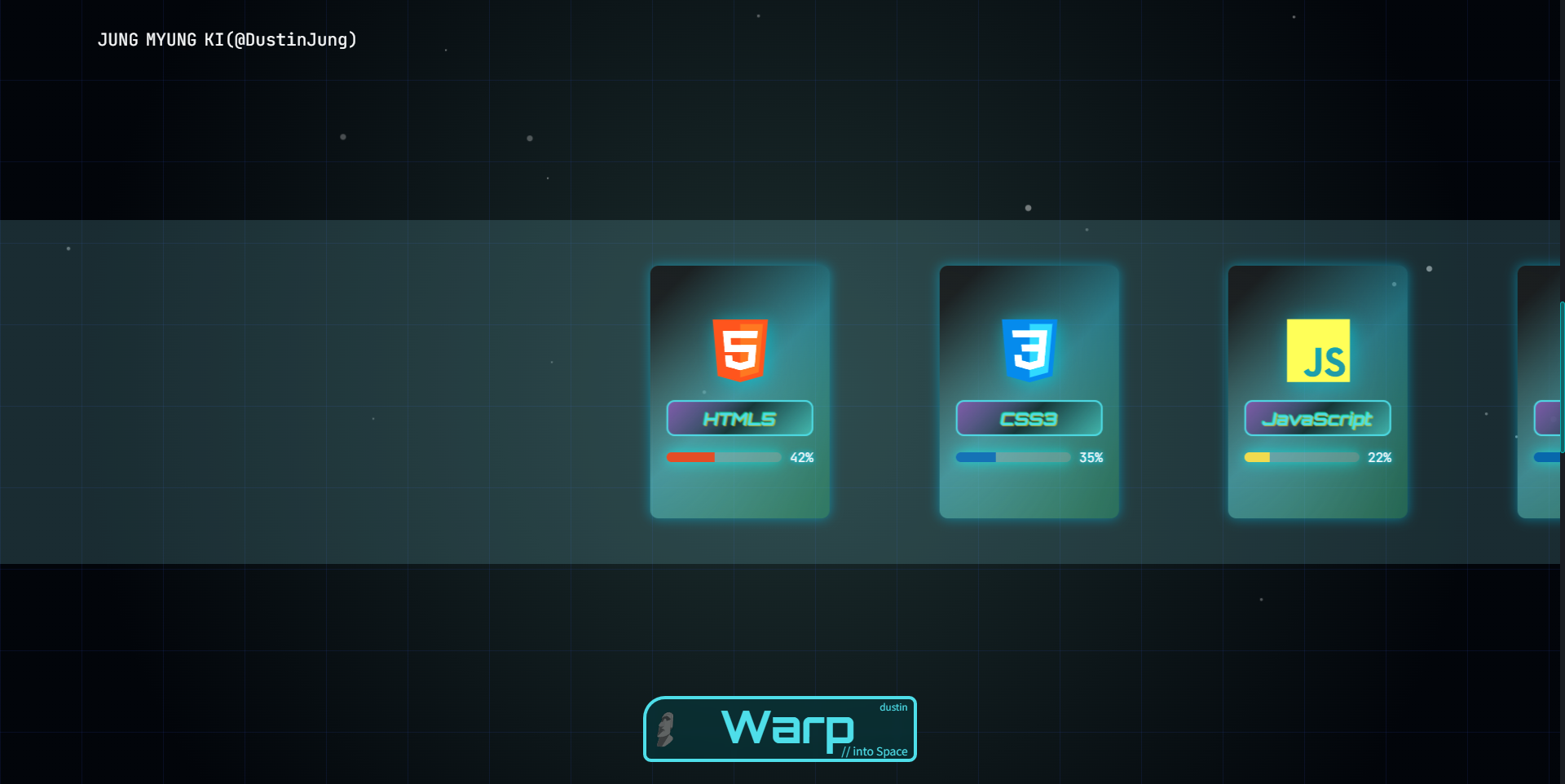
원래는 이렇게 쭉 가면서 끝에 디자인 관련 부분들도 있었는데,
바꾸고 나서는
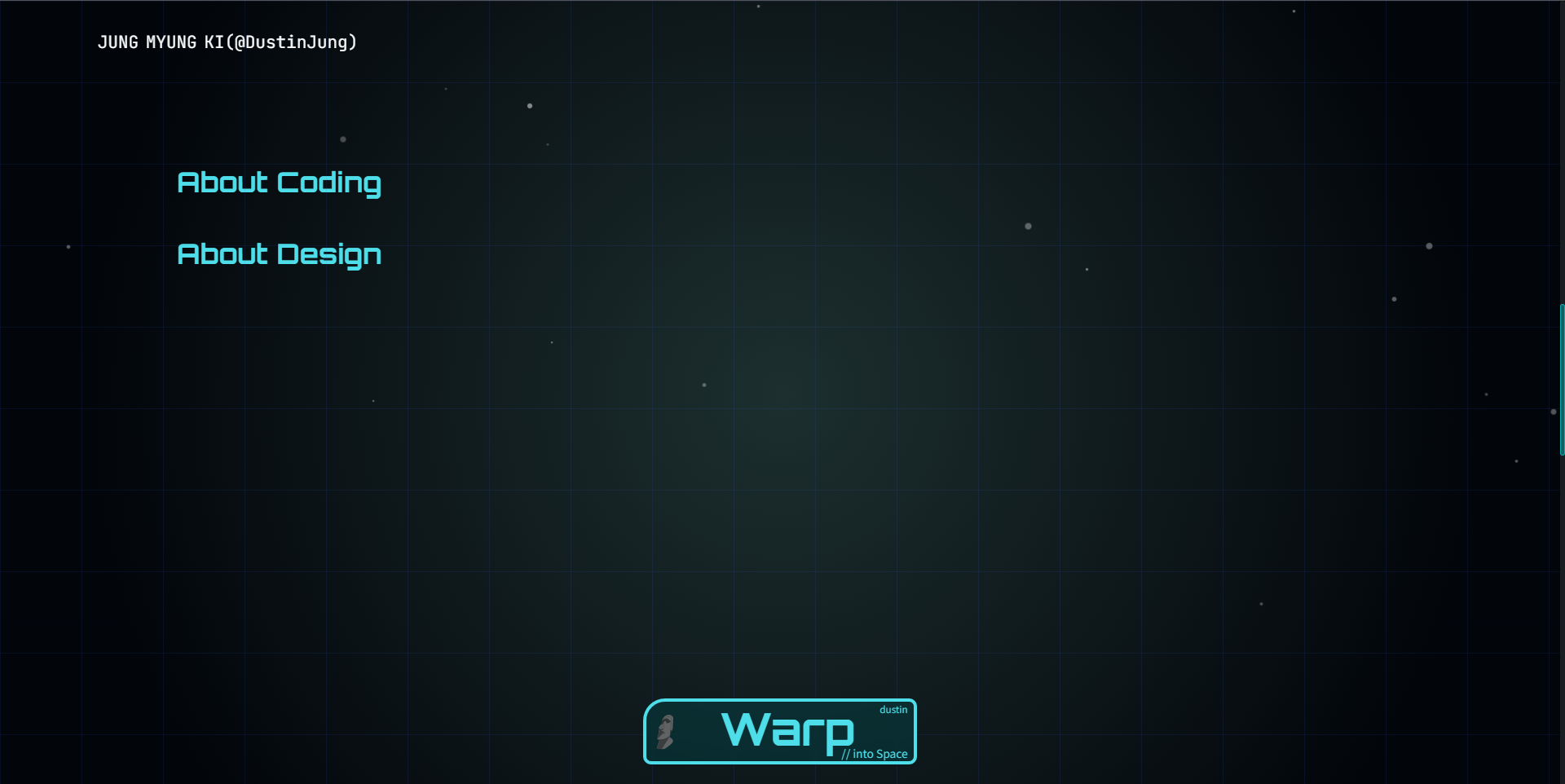
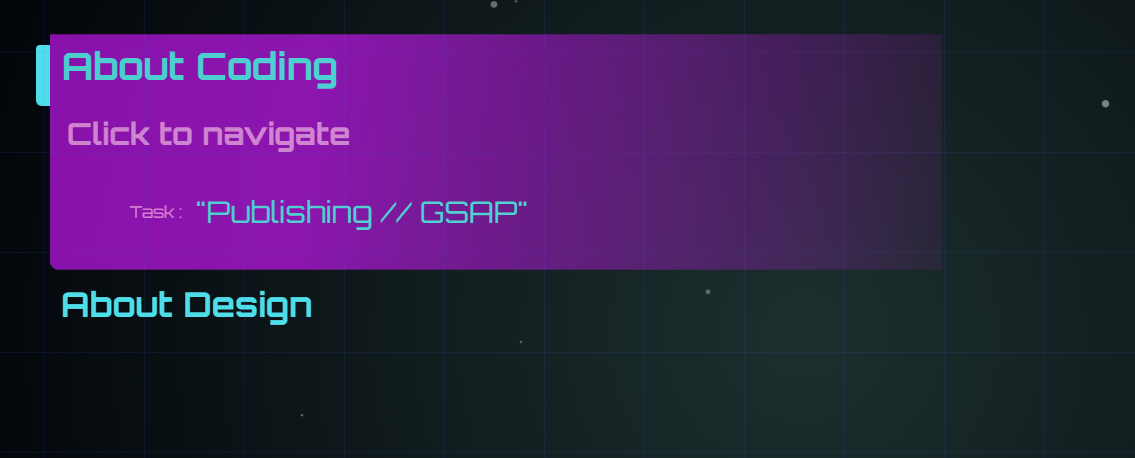
이렇게 버튼을 클릭하면 들어갈 수 있게끔 만들어 놓음.
그 과저에서 지금은 about coding과 about design으로 나누면서 skill-swiper-wrapper가 두 개가 됨.
그 결과, desc-wrapper를 띄우는 로직이 index를 기준으로 동작하는데, skill-swiper-wrapper가 두 개가 되면서 index가 어긋나는 문제 발생.
이걸 해결해 보아야 한다..
=> 이거 정리를 깜빡해서 25-03-26에 수정해서 정리 시작.
그냥 간단하게, about coding과 design을 나눈것처럼,
desc-wrapper도 coding과 design을 나누면 된다.
그래서 btn 클릭 시, 그 btn에 매치하는 걸 띄우면 된다 이 소리.
<script>
            function theTextBoxes() {
                let theTextBoxu = document.getElementById('theTextBoxBetweenCodingAndDesign');
                let theButtons = theTextBoxu.querySelectorAll('button');
                let theMatch = document.querySelectorAll('.skill-swiper-wrapper');
                let theBg = document.querySelector('.ifClickBgGoOff');
                let desc_wrappers = document.querySelectorAll('.desc-wrapper');

                theButtons.forEach((button, i) => {
                    button.addEventListener('click', function() {
                        theTextBoxu.classList.add('off');
                        theBg.classList.add('on');
                        setTimeout(() => {
                            theMatch[i].classList.add('on');
                        }, 50);
                        setTimeout(() => {
                            letSkillValueIncrease();
                        }, 300)
                    })
</script>
이런식으로 forEach를 돌려서 index값에 따라서 match하면 된다.
더스틴 정입니다