1. Step1 객체 지향 설계를 적용해 상품 관리 시스템을 프로그래밍해보자
- Step1 에서는 아래와 같은 기능을 구현 해보았다.
- 상품 목록 출력
- JAVA 프로그램을 실행하면 여러 전자제품을 출력합니다.
- 제시된 상품 중 입력받은 숫자에 따라 다른 로직을 실행하는 코드를 작성합니다.
Product클래스 생성하기
- 설명 : 개별 상품을 관리하는 클래스입니다. 현재는 전자제품만 관리합니다.
- 클래스는
상품명,가격,설명,재고수량필드를 갖습니다.main함수에서Product클래스를 생성하여 상품 목록을 추가합니다.
Product객체 생성을 통해상품명,가격,설명,재고수량을 세팅합니다.
- 키워드:
newList를 선언하여 여러Product을 추가합니다.
List<Product> products = new ArrayList<>();- 반복문을 활용해
products를 탐색하면서 하나씩 접근합니다.
2. Product 클래스 작성
- 상품을 관리하는 클래스를 생성해보았다.
public class Product {

	// 속성
    private String name; // 상품명
    private int price; // 가격
    private String description; // 상품설명
    private int quantity; // 재고수량

	// 기능
    // getter를 통해 private로 접근이 제한된 속성에 접근
    public String getName() {
        return name;
    }
    public int getPrice() {
        return price;
    }
    public String getDescription() {
        return description;
    }
    public int getQuantity() {
        return quantity;
    }

	// 생성자
    public Product(String name, int price, String description, int quantity) {
        this.name = name;
        this.price = price;
        this.description = description;
        this.quantity = quantity;
    }
}
3. Main 클래스
- Product 클래스를 활용하여 Main 클래스로 커머스 플랫폼을 구현하였다.
public class Main {

    public static void main(String[] args) {

        List<Product> products = new ArrayList<>(); // 리스트 생성
        Scanner scanner =  new Scanner(System.in); // 스캐너 생성

		// 상품 등록
        Product product1 = new Product("Galaxy S25", 1200000, "최신 안드로이드 스마트폰", 10 );
        Product product2 = new Product("iPhone 16",1350000,"Apple의 최신 스마트폰",20);
        Product product3 = new Product("MacBook Pro",2400000,"M3 칩셋이 탑재된 노트북",5);
        Product product4 = new Product("AirPods Pro",350000,"노이즈 캔슬링 무선 이어폰",40);
        // 리스트에 추가
        products.add(product1);
        products.add(product2);
        products.add(product3);
        products.add(product4);

		// 터미널에 보여질 내용 작성
        System.out.println("[ 실시간 커머스 플랫폼 - 전자제품 ]");
        int index = 1;
        for (Product product : products) { // 리스트에서 상품리스트를 조회하고 출력
            System.out.println(index + ". " + product.getName() + " | " + product.getPrice() + " | " + product.getDescription());
            index++;
        }
            System.out.println("0. 종료" + " | " + "프로그램 종료");
            String exit = scanner.nextLine();
           if (exit.equals("0")) { // 0 입력 시 프로그램 종료
               System.out.println("커머스 플랫폼을 종료합니다.");
           }
        }
    }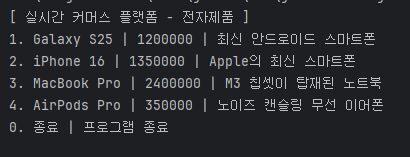
- 사진과 같은 내용으로 구현

개발공부 처음해보는 사람