💡 오늘의 글
폰트를 어떤식으로 사용해야 FOUC 이슈를 줄이고 사용 할 수 있는지 알아보자
📖 History
홈페이지에서 폰트가 적용이 안되고 깜빡 거리면서 나오는 이슈가 발생할때가 많았다.
로컬에서 테스트 시에는 큰이슈가 안됬으나 라이브서버 반영할 시 나왔던 이슈로 해결을 못하다가.
최근 애니메이션쪽 관련 공부하면서 FOUC 관련 이슈를 확인 해당 관련으로 검색했더니 FOUT와 함께 나오면서
다양한 해결방안을 적용하고 결국 해결한 이슈다.
⭐️FOUC FOUT?
FOUC(Flash of Unstyled Content)와 FOUT(Flash of Unstyled Text) 브라우저로 웹문서에 접근했을때,
CSS가 적용 안되는 이슈로 HTML과 CSS가 동시 적용되지 않는 이슈라고 생각하며 된다.
브라우저 랜더링 관련 있으며 자세한 내용은 해당문서 참고 하면 좋을것 같다.
⭐️ 최적화 방법
크게 3가지 방법을 사용해서 작업을 진행하였으며 그중에 2가지를 현재 적용 중이다.
-
💡 subset 폰트 적용
폰트사이즈를 줄이기 위해 subset font를 사용했다 subsetFont란 불필요한 글자를 줄이고
사용할 글자만 남겨둔 형태로 사이즈를 폰트 사이즈를 70%이상 줄일수 있었다. (600kb -> 214kb) -
❌ font-display : block
font-display : block을 사용 시 웹 폰트가 적용 안될시 폰트가 보이지 않고 웹폰트가 적용되는 순간 적용되는 방법으로
FOUT 현상은 발생되지 않았으나 컨텐츠도 안보이는 상태에서 호출되는 모습이 그렇게 만족스럽지는 않아서
적용하다가 다른방법으로 변경
-
💡 font-preload 사용
2번 방식으로 구현하다가 font-preload를 사용해서 이슈를 해결하였다.
기존에 font.scss에서 불러오는 방식에서 head에서 코드를 넣은 형태로 변경 후 정상적으로 동작하였으며
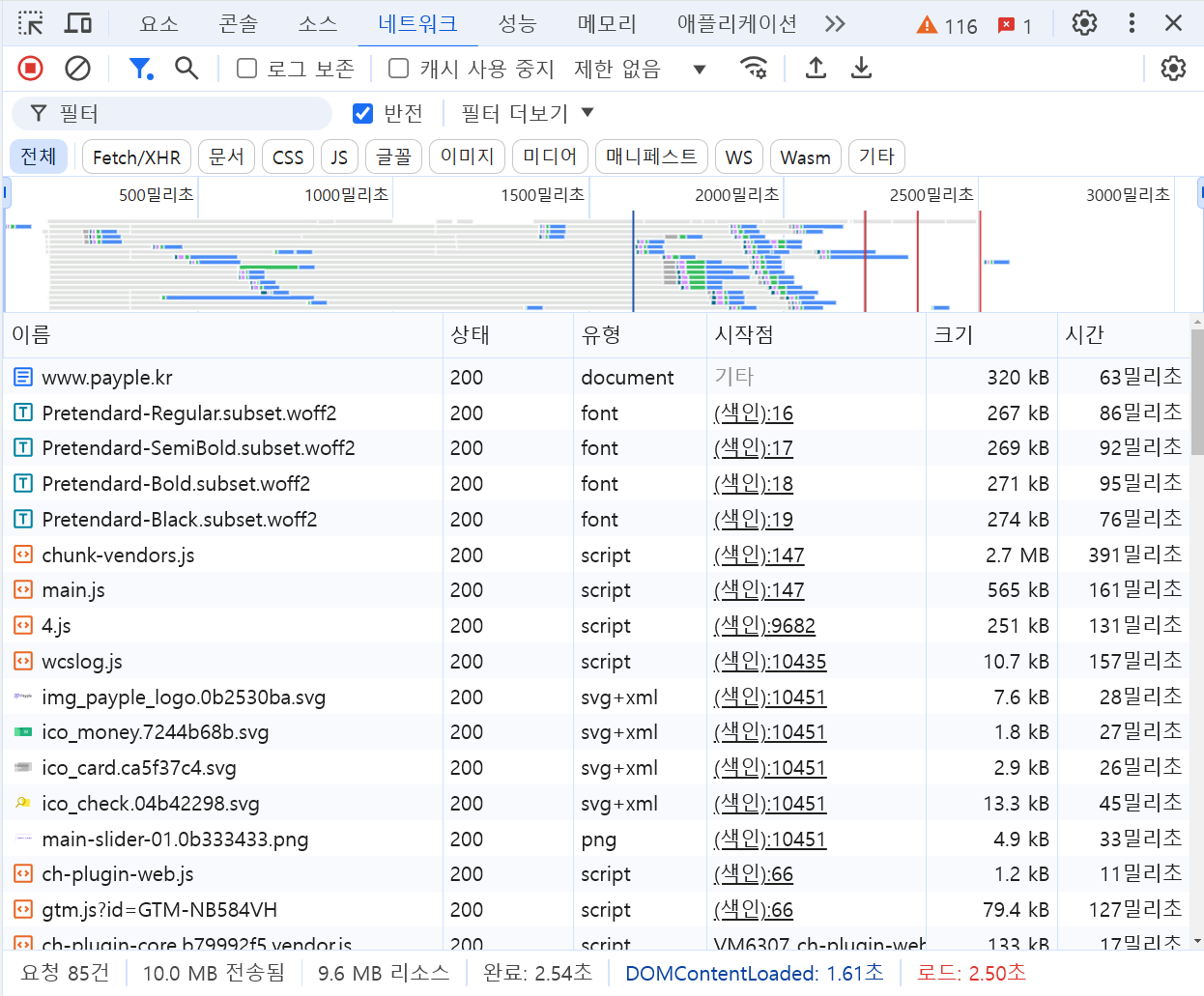
네트워크 환경에서 확인 시에도 기존에는 늦게 들어오던 폰트 적용파일이 가장 우선적으로 들어오는것을 확인 할 수있엇다.
head.html
 <!--font preload s-->
    <link rel="preload" href="https://image.payple.kr/download/fonts/Pretendard-Regular.subset.woff2" as="font" type="font/woff2" crossorigin />
    <link rel="preload" href="https://image.payple.kr/download/fonts/Pretendard-SemiBold.subset.woff2" as="font" type="font/woff2" crossorigin />
    <link rel="preload" href="https://image.payple.kr/download/fonts/Pretendard-Bold.subset.woff2" as="font" type="font/woff2" crossorigin />
    <link rel="preload" href="https://image.payple.kr/download/fonts/Pretendard-Black.subset.woff2" as="font" type="font/woff2" crossorigin />
    <style>
        @font-face {
            font-family: 'Pretendard';
            src: local('Pretendard'),
            url('https://image.payple.kr/download/fonts/Pretendard-Regular.subset.woff2') format('woff2');
            font-weight: 400;

        }

        @font-face {
            font-family: 'Pretendard';
            font-weight: 600;
            font-style: normal;
            src: local('Pretendard'),
            url('https://image.payple.kr/download/fonts/Pretendard-SemiBold.subset.woff2') format('woff2');

        }

        @font-face {
            font-family: 'Pretendard';
            src: local('Pretendard'),
            url('https://image.payple.kr/download/fonts/Pretendard-Bold.subset.woff2') format('woff2');
            font-weight: 700;

        }


        @font-face {
            font-family: 'Pretendard';
            font-weight: 800;
            font-style: normal;
            src: local('Pretendard'),
            url('https://image.payple.kr/download/fonts/Pretendard-Black.subset.woff2') format('woff2');
        }
        html,body {
            font-family: 'Pretendard', sans-serif; !important;
        }

    </style>
🖥️ 실무 응용 사례
✨ 정리
웹 폰트 최적화는 크게 두가지만 기억하면 될 것 같다.
- subsetFont
- FontPreload