1. MVC 패턴이란?
-
하나의 Servlet이 혼자 모든 것을 처리하던 문제를 해결하기 위해
애플리케이션의 코드를 세 가지 역할로 명확하게 나누는 설계 방식- Model:
데이터와비즈니스 로직을 담당 (예: 영화 데이터, 추천 로직) - View: 사용자에게 보여지는
화면(UI)을 담당 (예: HTML 페이지) - Controller: 사용자의 요청(Request)을 받아 Model과 View를 연결해주는
중간 다리 역할
- Model:
2. 구성 요소
2-1. Controller (요청 처리 담당)
-
사용자의 요청(URL)을 받아서 무슨 작업을 할지 결정
-
필요한 비즈니스 로직 호출 후 결과를 Model에 담고 View로 넘김
2-2. Model (데이터 전달 담당)
-
Controller가 처리한 결과 데이터를 저장하는 공간
-
View에 전달할 데이터 (Key-Value 형태)
2-3. View (화면 담당)
-
Model에 담긴 데이터를 이용해서 HTML 화면을 만들어 사용자에게 보여줌
3. DispatcherServlet
3-1. DispatcherServlet
- Spring MVC의 Front Controller 패턴을 구현한 핵심 컴포넌트
- 모든 HTTP 요청이 가장 먼저 도달하는 진입점, 전체 요청 처리 흐름을 중앙집중식으로 제어
- 주요 역할
- 모든 웹 요청을 최초로 받아들임
- 요청을 적절한 Handler(Controller)에게 위임
- 각 구성 요소들 간의 협력을 조정
- 최종 응답을 클라이언트에게 전달
3-2. HandlerMapping
-
들어온 요청 URL을 분석하여 해당 요청을 처리할 적절한 Handler(Controller)를 찾아주는 인터페이스
-
동작원리 :
- /users 요청이 오면 HandlerMapping이 UserController.getUserList() 메서드를 찾아줌
- @RequestMapping, @GetMapping 등의 어노테이션 정보를 기반으로 매핑 수행
 @RequestMapping("/users")
 public class UserController {

         @GetMapping
     public String getUserList() { ... }
 }
3-3. ModelAndView
- Controller가 비즈니스 로직 처리 후 반환하는 객체
- 데이터(Model)와 뷰 이름(View)을 함께 담고 있음
3-4. ViewResolver
- Controller가 반환한 논리적 뷰 이름을 실제 뷰 리소스로 변환해주는 컴포넌트
3-5. View
- ViewResolver에 의해 결정된 실제 뷰 구현체
- Model 데이터를 받아 최종 HTML 응답을 생성하는 컴포넌트
3-6. DispatcherServlet 연관 흐름도 🔥🔥🔥🔥🔥
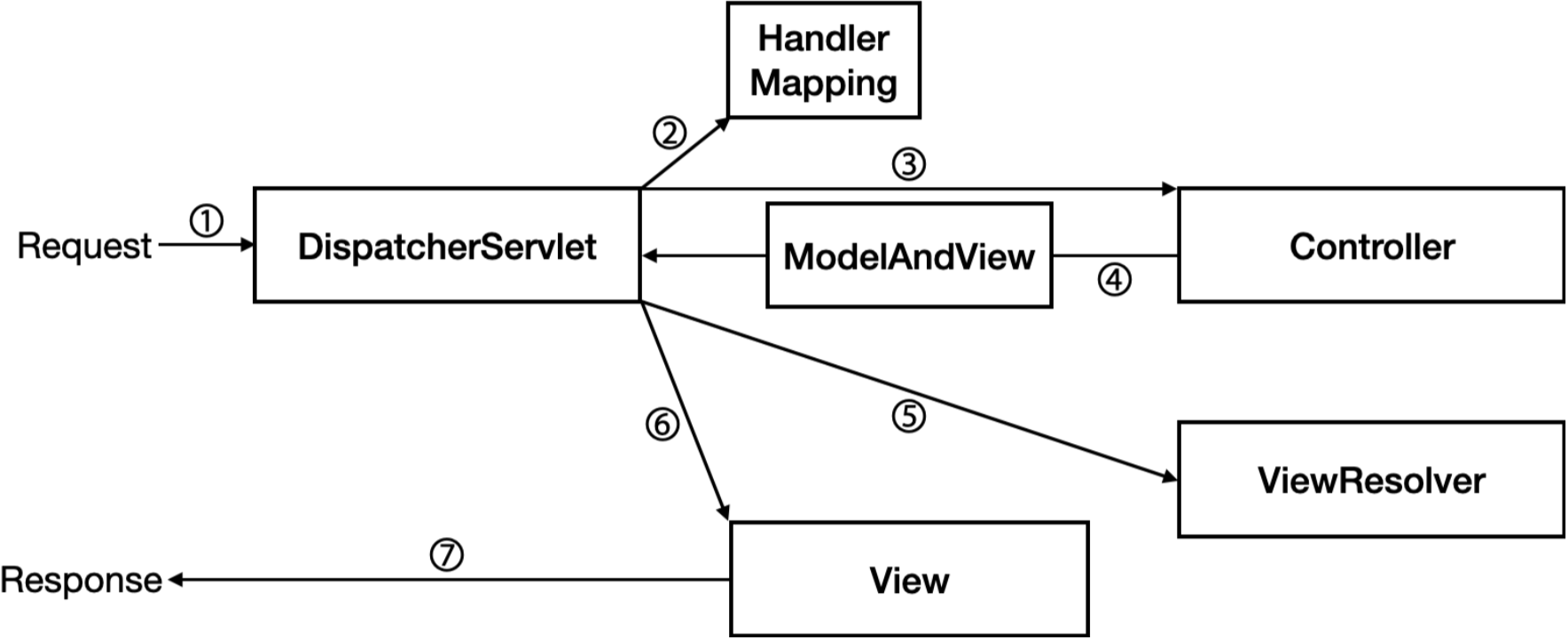
① 요청
클라이언트가 웹 애플리케이션에 요청(Request)을 보내고, 가장 먼저 DispatcherServlet에 도달
② 핸들러 조회
DispatcherServlet은 HandlerMapping에게 요청을 처리할 Handler(=Controller)를 찾아달라고 요청
③ 핸들러 실행
DispatcherServlet은 HandlerMapping으로부터 받은 정보를 이용해 해당 Controller에게 요청 처리 위임
④ ModelAndView 반환
Controller는 비즈니스 로직을 수행한 후, 결과 데이터(Model)와 뷰의 논리적 이름(View Name)을 담은 ModelAndView 객체를 DispatcherServlet에 반환
⑤ 뷰 해석
DispatcherServlet은 ModelAndView에서 뷰 이름을 추출하여 ViewResolver에게 전달하고, 해당하는 실제 View 객체를 찾아달라고 요청
⑥ 뷰 렌더링
DispatcherServlet은 ViewResolver로부터 받은 View 객체에게 모델 데이터를 전달하여 뷰를 렌더링하도록 요청
⑦ 응답
렌더링된 View의 결과물이 DispatcherServlet을 통해 클라이언트에게 최종적으로 응답(Response)
4. DispatcherServlet 최근 흐름도 (F/B)
- 프론트엔드가 백엔드로부터 분리되면서 아래와 같아졌다.
- Model 대신 JSON데이터를 프론트에게 응답
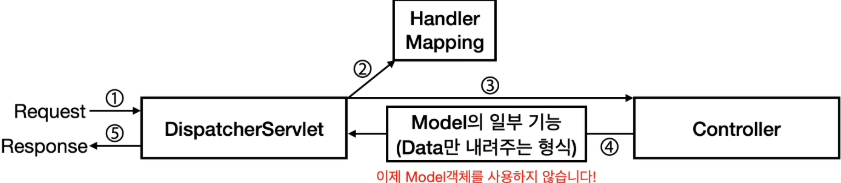
- 프론트 엔드가 가져간 M과 V의 역할
- V (View)
- 이제 View는 명백히 프론트엔드의 영역
- M (Model)
- 데이터 관리 또한 프론트엔드가 담당
- V (View)
- 변화된 Spring 백엔드의 역할
- C (Controller)
- View를 반환하는 대신 데이터(JSON)를 반환하는 API 엔드포인트 역할
- (변형된) M (Model)
- 백엔드에서 Model의 개념은 'View에 전달할 데이터'가 아니라 'API 응답으로 보낼 데이터(DTO: Data Transfer Object)'로 바뀜
- (사라진) V (View)
- View의 역할은 사라지고, 백엔드는 더 이상 HTML을 만들지 않음
- C (Controller)
5. @RestController
- 전통적인 Spring MVC 컨트롤러인 @Controller는 주로 View를 반환
- @RestController는 @Controller에 @ResponseBody가 추가된 것
- 아래 두개의 코드는 동일하다.
import org.springframework.stereotype.Controller;
import org.springframework.web.bind.annotation.GetMapping;
import org.springframework.web.bind.annotation.ResponseBody;

@Controller
public class UserController {

    @RequestMapping(value = "/users", method = RequestMethod.GET)
    @ResponseBody
    public User getUser() {
        // ...
    }
}
-----------------------------------------------------------------

import org.springframework.web.bind.annotation.GetMapping;
import org.springframework.web.bind.annotation.RestController;

@RestController // @Controller와 @ResponseBody가 합쳐졌다!
public class UserRestController {

    @RequestMapping(value = "/users", method = RequestMethod.GET)
    public User getUser() {
        // ...
    }
}
5-1. 요청 매핑 어노테이션
5-1-1. 기본 매핑 어노테이션 (@RequestMapping)
-
특정 URL로 Request를 보내면 들어온 요청을 Controller 내부의 특정 Method와 Mapping 하기 위해 사용
-
사용법 1. 해당 컨트롤러의 전체 경로 prefix 설정
@RestController @RequestMapping("/hello") public class HelloController { // ... } -
사용법 2. 특정 API 전체 경로 허용
-
해당 방법으론 거의 ❌ -> HTTP 메서드별 전용 어노테이션으로 대체
@RestController
public class HelloController {

		@RequestMapping(value = "/hello", method = RequestMethod.GET)
  public void getHello() {
		    // ...
  }

		@RequestMapping(value = "/hello", method = RequestMethod.POST)
  public void postHello() {
		    // ...
  }

		@RequestMapping(value = "/hello", method = RequestMethod.PUT)
  public void putHello() {
		    // ...
  }

		@RequestMapping(value = "/hello", method = RequestMethod.PATCH)
  public void patchHello() {
		    // ...
  }

		@RequestMapping(value = "/hello", method = RequestMethod.DELETE)
  public void deleteHello() {
		    // ...
  }
}
-
5-1-2. 메서드별 전용 어노테이션
-
주로 사용하는 HTTP 메서드 : GET, POST, PUT, PATCH, DELETE
-
GET :
@GetMapping사용@RestController public class HelloController { @GetMapping("/hello") public void getHello() { // ... } } -
POST :
@PostMapping사용@RestController public class HelloController { @PostMapping("/hello") public void postHello() { // ... } } -
PUT :
@PutMapping사용@RestController public class HelloController { @PutMapping("/hello") public void putHello() { // ... } } -
PATCH :
@PatchMapping사용@RestController public class HelloController { @PatchMapping("/hello") public void patchHello() { // ... } } -
DELETE :
@DeleteMapping사용@RestController public class HelloController { @DeleteMapping("/hello") public void deleteHello() { // ... } }
5-2. 데이터 전달 어노테이션
5-2-1. 쿼리 파라미터 (@RequestParam)
- URL의
?뒤에 오는 파라미터들을 처리할 때 사용
- 각 Key/Value 값은 조건부이므로 있어도 되고 없어도 되는 값일 때 사용
- 기본 사용법
  @RestController
  public class UserController {

      // /users?name=john&age=30 요청이 들어온 상황이라면
      @GetMapping("/users")
      public String getUser(
                      @RequestParam String name, // name 값은 john
                      @RequestParam int age // age 값은 30
      ) {
                  // ...
      }
}- 선택적 파라미터와 기본값 설정
- required = false로 설정하지 않으면 파라미터가 필수
- @RequestParam의 default required 값은 true
- defaultValue를 설정하면 자동으로 required = false
- required = false로 설정하지 않으면 파라미터가 필수
  @RestController
  public class UserController {

      // /users?page=1&size=10 요청이 들어온 상황이라면
      @GetMapping("/users")
      public List<String> getUsers(
              @RequestParam(defaultValue = "0") int page, // 1
              @RequestParam(defaultValue = "10") int size, // 10
              @RequestParam(required = false) String sort // null
      ) {
          // ...
      }
  }
5-2-2. 폼 데이터 or 쿼리 파라미터 여러개 (@ModelAttribute)
- HTML 폼 or 쿼리 파라미터 여러 개를 객체로 바인딩 할 때 사용
- @RequestParam을 여러 개 쓰는 대신 객체 하나로 받을 수 있음
  // @RequestParam이 너무 많은 경우
  @GetMapping("/api/search")
  public List<String> searchUsers(
          @RequestParam(required = false) String name,
          @RequestParam(required = false) String email,
          @RequestParam(required = false) Integer minAge,
          @RequestParam(required = false) Integer maxAge,
          @RequestParam(defaultValue = "0") int page,
          @RequestParam(defaultValue = "10") int size
  ) {
      // 파라미터가 많아서 복잡함!
  }

  // @ModelAttribute 사용 (추천)
  @GetMapping("/api/search")
  public List<String> searchUsers(@ModelAttribute UserSearchDto dto) {
      // 하나의 @ModelAttribute로 데이터를 받을 수 있다.
  }

  // 바인딩용 DTO 클래스
  public class UserSearchDto {
      private String name;
      private String email;
      private Integer minAge;
      private Integer maxAge;
      private Integer page = 0;      // 기본값 설정 가능
      private Integer size = 10;     // 기본값 설정 가능

      // ...
  }
5-2-3. 경로 변수 (@PathVariable)
- URL 경로의 일부를 변수로 받을 때 사용
- GET
/users/123형태의 요청에서 123 값 받을 수 있음
- URL 경로 자체에 값이 포함되기 때문에 반드시 값이 있어야함 없으면 다른 API 임
- 기본 사용법
  @RestController
  public class UserController {

      // GET /users/123
      @GetMapping("/users/{userId}")
      public String getUser(@PathVariable Long userId) { // userId는 123
          // ...
      }
  }
5-2-4. 요청 본문 (@RequestBody)
- HTTP 요청의 본문(Body)에 있는 데이터를 객체로 변환할 때 사용
- 주로 JSON 형태의 데이터를 받을 때 사용하며, REST API에서 가장 많이 사용
  @RestController
  public class UserController {

      // POST /users
      // Body: {"name": "John", "email": "john@example.com", "age": 30}
      @PostMapping("/api/users")
      public String createUser(@RequestBody CreateUserRequest request) {
          // ...
      }
  }

  @Getter
  public class CreateUserRequest {
          // 위의 요청의 경우 아래와 같이 값이 매핑됩니다.
          private String name; // John
          private String email; // john@example.com
          private int age; // 30
  }