
1. 네트워크
여러대의 컴퓨터를 통신 회선으로 연결할 것
2. 서버와 클라이언트
2-1. 서버
서비스를 제공하는 프로그램
- 웹 서버, FTP 서버, DBNS서버, 메신저 서버
- 클라이언트의 연결을 수락하고, 요청 내용을 처리한 후 응답을 보내는 역할
2-2. 클라이언트
서비스를 받는 프로그램
- 웹브라우저, FRP 클라이언트, 메신저
- 네트워크 데이터를 필요로하는 모든 애플리케이션이 해당(모바일앱 포함)
3. IP 주소와 포트(port)
3-1. IP주소
네트워크 상에서 컴퓨터를 식별하는 번호
네트워크 어댑터(랜카드) 마다 할당
3-2. 포트(port)
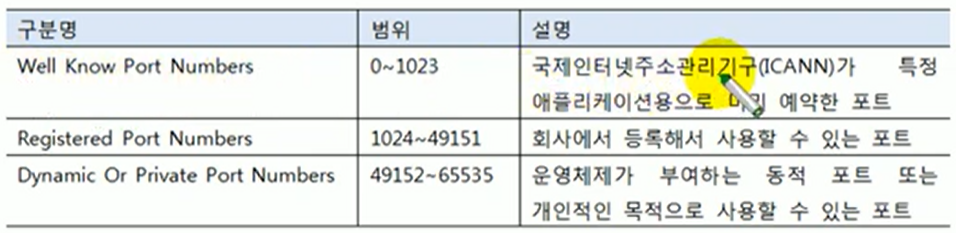
- 같은 컴퓨터 내에서 프로그램을 식별하는 번호
- 클라이언트는 서버 연결 요청시 I{ wnthdhk ㅔㅐㄳfmf rkxdl wprhd
- 0~65535 범위의 값을 가짐. 세가지 범위로 구분.
3-3. InetAddress로 IP주소 얻기
- java.net.InetAddress
IP 주소를 표현한 클래스
로컬 컴퓨터의 IP주소 뿐만 아니라 도메인 이름(www.naver.com)을 DNS에서 검색한 후 I{주소를 가져오는 기능을 제공 - 로컬 컴퓨터에서 얻기
InetAddress ia = InetAddress.getLocalHost(); - 도메인 이름으로 얻기
//방법1  (메개값이 도메인 이름)
InetAddress is = InetAddress.getByNae(String host);
//방법2  (도메인 이름으로 등록돼있는 복수 개의 ip를 가지고 와서 각각 inetadress객체를 만든 다음 배열로)
InetAddress[] iaArr = InetAddress.getAllByName(String host);- InetAdress로 IP주소 얻기(ip주소를 문자열로 반환)
String ip = InetAddress.getHostAddress();
보통 도메인에 여러 ip가 연결되어있습니다.
예시
public class InetAddressExample {

	public static void main(String[] args) throws Exception {

		//로컬 컴퓨터의ip주소 얻어오기
		InetAddress local = InetAddress.getLocalHost();
		System.out.println("내 컴퓨터 IP주소:" + local.getHostAddress());

		//도메인으로 ip주소 검색해서 가져오기
		InetAddress[] iaArr = InetAddress.getAllByName("www.naver.com");
		for(InetAddress remote : iaArr) {
			System.out.println("www.naver.com IP 주소 :" + remote.getHostAddress());
		}
	}
}
4. TCP 네트워킹
특징 1 : 연결 지향 프로토콜 >> 시간 소요가 됨
특징 2 : 통신 선로 고정 >> 전송 속도 느려질 수도 있음
특징 3 : 데이터를 정확하고 안정적으로 전달
- TCP를 이용하기 위해 제공되는 APU
ServerSocket과Socket - serverSocket과 Socket 용도
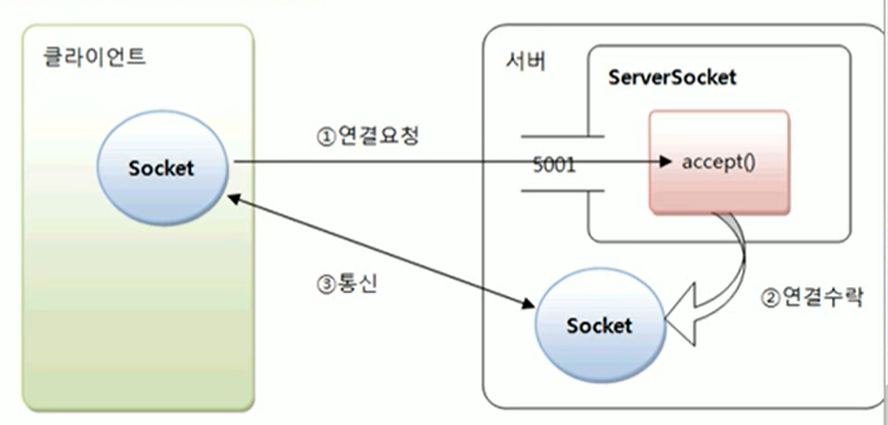
accept() : 클라이언트가 연결 요청을 하면 수락하는 역할. 그리고 socket객체를 만듦
클라이언트는 Socket을 만들어야 연결요청할 수 있음.
socket은 두 사용자의 전화기 역할.
4-1. ServerSocket생성과 포트 바인딩 (서버 쪽)
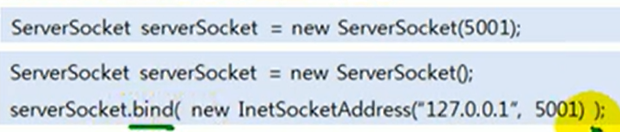
여기서 5001 : 바인딩 할 포트 번호
- 연결 수락
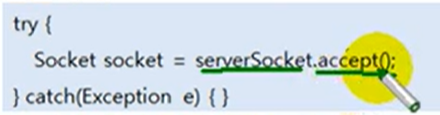
- 연결된 클라이언트 IP주소 얻기 (어떤 클라이언트가 연결 요청했는지)
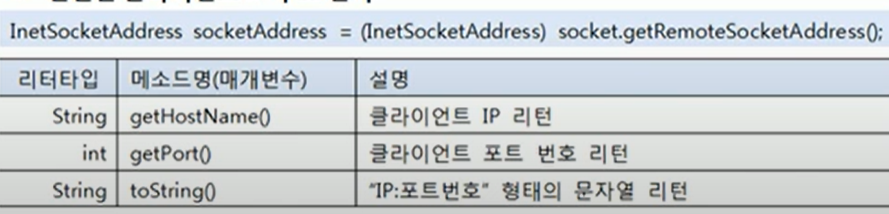
- ServerSocket 포트 언바인딩(종료하기)
ServerSoket.close();
4-2. Socket 생성과 연결 요청 (클라이언트 쪽)
- Socket 생성 및 연결 요청
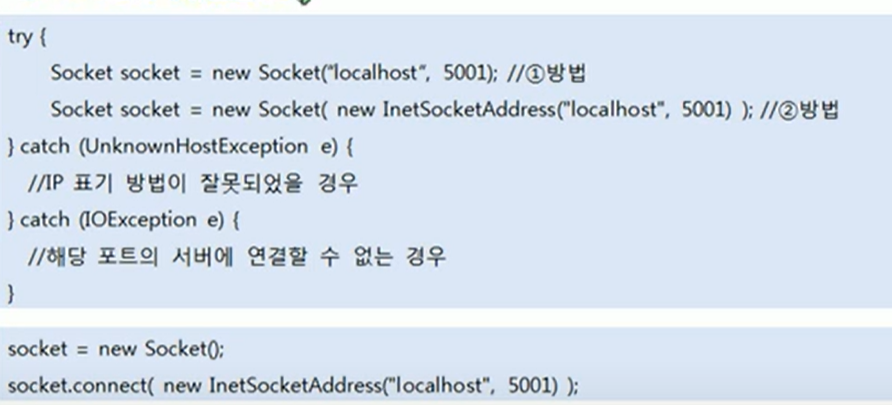
localhost : 로컬호스트가 아니라, 연결하고자하는 서버의 IP주소.
5001 : 연결하고자하는 포트 번호 - 연결 끊기
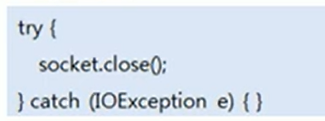
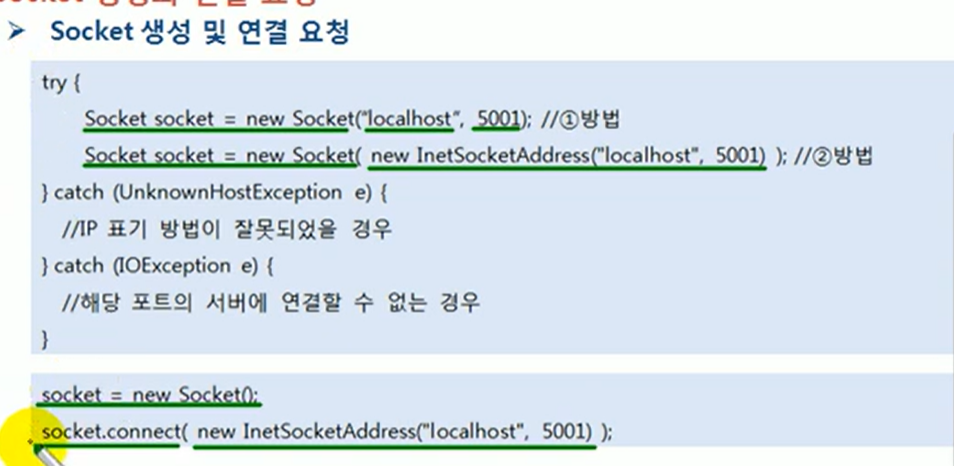
방법이 두개인거. - 연결 끊기
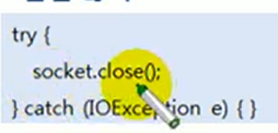
- 서버측
public class ServerExample {

	public static void main(String[] args) {
		ServerSocket serverSocket = null;

		try {
			serverSocket = new ServerSocket();

			//포트와 바인딩하기
			//이 경우는 "localhost"서버의 5001번 포트와 바인딩하겠다
			serverSocket.bind(new InetSocketAddress("localhost",5001));
			while(true) {
				System.out.println("[연결 기다림]");
				//accept() :  클라이언트의 연결 요청을 수락하는 역할
				//클라이언트가 연결요청 해오기 전까지는 대기상태가 됨(블로킹 상태)
				//연결 요청이 들어오게 되면 이 포트는 socket객체를 만들고 리턴한다.
				//이 socket가지고 클라이언트와 통신한다
				Socket socket = serverSocket.accept();
				//클라이언트의 ip주소를 받아서 출력해볼까요
				InetSocketAddress isa = (InetSocketAddress) socket.getRemoteSocketAddress();
				System.out.println("연결수락함" + isa.getHostName());

			}
		} catch (Exception e) {

			e.printStackTrace();
		}
		//ui에서 버튼 눌렀을 때 서버 종료하기 위해
		if(!serverSocket.isClosed()) {
			try {
				serverSocket.close();
			} catch (IOException e) {
				// TODO Auto-generated catch block
				e.printStackTrace();
			}
		}
	}
}- 클라이언트 측
public class ClientExample {

	public static void main(String[] args) {

		Socket socket = null;


		System.out.println("[연결 요청]");
		try {
			socket = new Socket();
			socket.connect(new InetSocketAddress("localhost",5001));
			System.out.println("[연결 성공]");
		} catch (IOException e) {
			e.printStackTrace();
		}

		if(!socket.isClosed()) {
			try {
				socket.close();
			} catch (IOException e) {
				e.printStackTrace();
			}
		}
	}
}
4-3. socket 데이터 통신
- 입출력 스트림 얻기
//입력 스트림 얻기
InpuStream is = socket.getInputSream();
//출력 스트림 얻기
OutputStream os = socket.getOutputStream();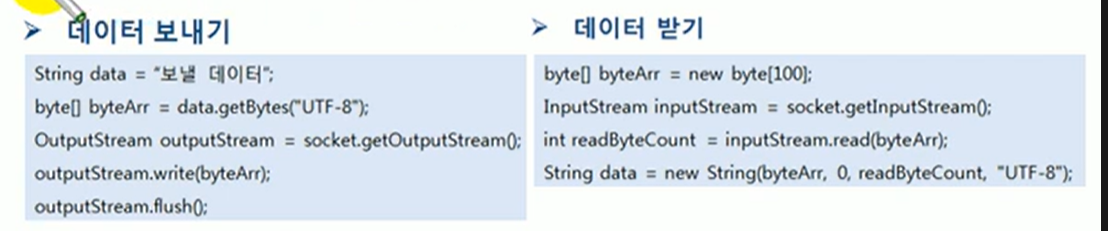
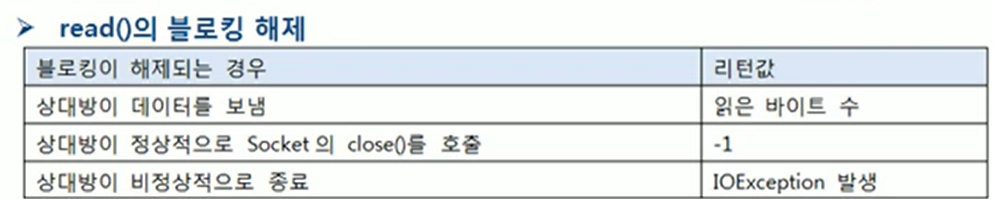
예시
- 서버 쪽 (앞 예시 try쪽에 이거 추가)
				byte[] bytes = null;
				String message = null;
				//데이터 받기
				InputStream is = socket.getInputStream();
				bytes = new byte[100];
				int readByteCount = is.read(bytes);
				message = new String(bytes,0,readByteCount,"UTF-8");
				System.out.println("[데이터 받기 성공]"+ message);

                //서버가 데이터 보내기
				OutputStream os = socket.getOutputStream();
				message = "hello client";
				bytes = message.getBytes("UTF-8");
				os.write(bytes);
				os.flush();
				System.out.println("[데이터 보내기 성공]");

				is.close();
				os.close();
socket.close();- 클라이언트 쪽 (try쪽에 이거 추가)
			//서버로 데이터 보내기
			byte[] bytes = null;
			String message = null;

			OutputStream os = socket.getOutputStream();
			message = "Hello server";
			bytes = message.getBytes("UTF-8");
			os.write(bytes);
			os.flush();
			System.out.println("[데이터 보내기 성공]");

            //서버로부터 데이터 받기
            			InputStream is = socket.getInputStream();
			bytes = new byte[100];
			int readByteCount = is.read(bytes);
			message = new String(bytes,0,readByteCount,"UTF-8");
			System.out.println("[데이터 받기 성공]"+ message);

			os.close();
			is.close();
5. 스레드 병렬 처리
- 블로킹(대기 상태)가 되는 메소드
- ServerSocket의 accept()
- Socket 생성자 또는 connet()
- Socket의 read(), write() - 병렬 처리의 필요성
- 스레드가 블로킹되면 다른 작업을 수행하지 못한다
- 입출력 할 동안 다른 클라이언트의 연결 요청을 수락하지 못한다
- 입출력 할 동안 다른 클라이언트의 입출력을 하지 못한다.- UI 생성/변경 스레드에서 블로킹 메소드를 호출하지 않도록 한다.
- 스레드 병렬처리
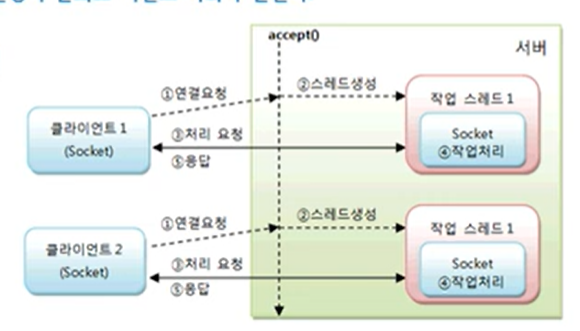
만약 클라이언트가 수천개면 어떡하죠? 스레드도 수천개를 만들어야할까요?
=> 답은 스레드 풀
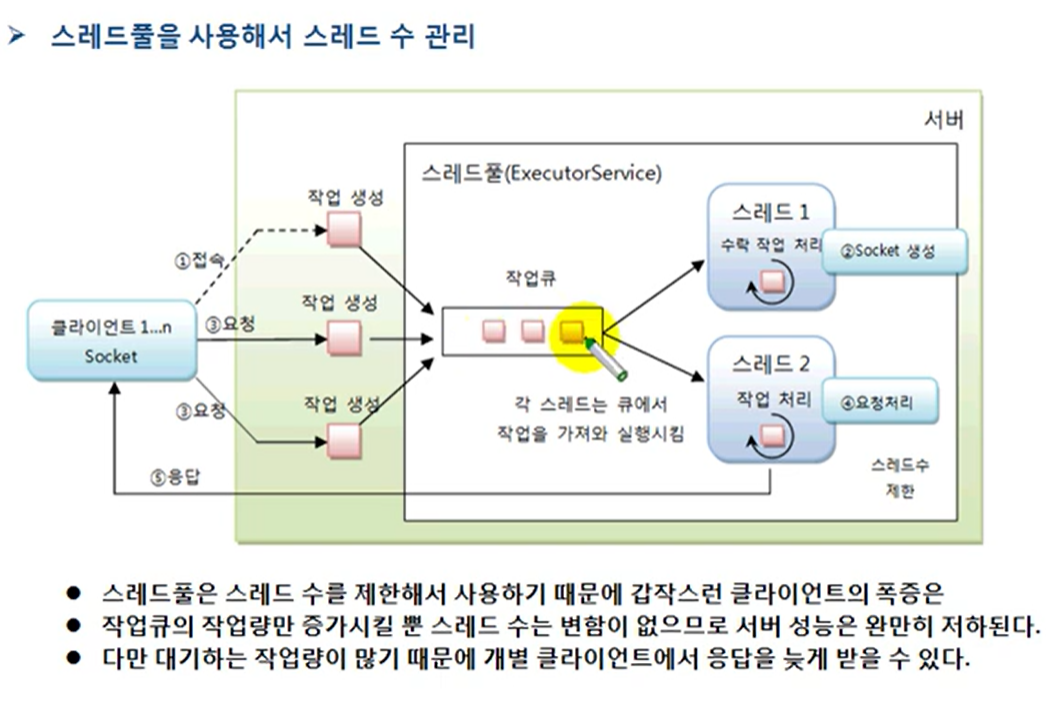
이렇게 하면 클라이언트의 수가 많아져도 작업큐 내의 작업은 많아지지만스레드의 수는 일정할 것입니다.
6. Echo 네트워크 예제
- Server측
package java14_net.echoQuiz;

import java.io.BufferedOutputStream;
import java.io.BufferedReader;
import java.io.IOException;
import java.io.InputStreamReader;
import java.io.PrintWriter;
import java.net.ServerSocket;
import java.net.Socket;

public class EchoServer {
	public static void main(String[] args) {

		ServerSocket servSock = null; //리슨 소켓
		Socket sock = null; //통신 소켓

		BufferedReader in = null; //소켓 입력 스트림
		PrintWriter out = null; //소켓 출력 스트림

		try {
			servSock = new ServerSocket(10005);
			System.out.println("+ + + 서버 소켓 생성 + + +");

			//반복으로 새로운 클라이언트의 접속 처리
			while( true ) {
				try {
					System.out.println("\n---- 접속 대기중 ----");
					System.out.println(" Listen Port : " + servSock.getLocalPort());
					System.out.println("---------------------");
					sock = servSock.accept(); //Listen

					//--- BLOCKED ---

					System.out.println("\n 클라이언트 접속!!");
					System.out.println("\t>> 클라이언트 IP : " + sock.getInetAddress().getHostAddress());
					System.out.println("\t>> 클라이언트 Port : " + sock.getPort());

					//--- 데이터 통신 준비 ---
					//소켓 입출력 스트림
					in = new BufferedReader(new InputStreamReader(sock.getInputStream()));
					out = new PrintWriter(new BufferedOutputStream(sock.getOutputStream()), true);

					//--- 데이터 통신 ---
					String msg = null;

					while( (msg = in.readLine()) != null ) { //입력 데이터가 EOF면 종료

						out.println(msg); //에코(Echo) 출력

						System.out.println(" 입력받은 메시지>> " + msg); //모니터 출력
					}

					System.out.println("+ + + 클라이언트의 정상 종료 + + +");

				} catch (IOException e) {
					e.printStackTrace();
				} finally {
					if(out!=null)	out.close(); //소켓 출력스트림 닫기
					try {
						if(in!=null)	in.close(); //소켓 입력스트림 닫기
						if(sock!=null)	sock.close(); //클라이언트 통신 소켓 닫기
					} catch (IOException e) {
						e.printStackTrace();
					}
				}

			} //while(true) end - 클라이언트의 접속 및 통신 종료

		} catch (IOException e) {
			e.printStackTrace();
		} finally {
			try {
				if(servSock!=null)	servSock.close(); //리슨 소켓 닫기
			} catch (IOException e) {
				e.printStackTrace();
			}
		}

	}
}- Clinet측
package java14_net.echoQuiz;

import java.io.BufferedOutputStream;
import java.io.BufferedReader;
import java.io.IOException;
import java.io.InputStreamReader;
import java.io.PrintWriter;
import java.net.Socket;
import java.net.UnknownHostException;
import java.util.Scanner;

public class EchoClient {
	public static void main(String[] args) {

		Socket sock = null; //클라이언트 소켓

		BufferedReader in = null; //소켓 입력 스트림
		PrintWriter out = null; //소켓 출력 스트림

		Scanner sc = new Scanner(System.in); //키보드 입력 스트림

		System.out.println("+ + + 클라이언트 실행 + + +");
		try {
			sock = new Socket("localhost", 10005); //연결 및 통신 준비

			//--- 데이터 통신 준비 ---
			//소켓 입출력 스트림
			in = new BufferedReader(new InputStreamReader(sock.getInputStream()));
			out = new PrintWriter(new BufferedOutputStream(sock.getOutputStream()), true);

			//--- 데이터 통신 ---
			String msg = null;

			while(true) {
				System.out.print("\t보낼 데이터 : ");
				msg = sc.nextLine();

				//통신 중단 명령어
				if( "/exit".equals(msg) ) {
					break;
				}

				out.println(msg); //서버로 전송

				//Echo(에코) 받은 데이터 출력
				System.out.println(">>받은 메시지 : " + in.readLine());
			}

			System.out.println("+ + + 통신 종료 + + +");

		} catch (UnknownHostException e) {
			e.printStackTrace();
		} catch (IOException e) {
			e.printStackTrace();
		} finally {
			if(out!=null)	out.close(); //소켓 출력스트림 닫기
			try {
				if(in!=null)	in.close(); //소켓 입력스트림 닫기
				if(sock!=null)	sock.close(); //소켓 닫기
			} catch (IOException e) {
				e.printStackTrace();
			}
		}

	}
}