과정을 모두 적어서 내용이 길어요 ---> 오른쪽에 결론
프로젝트를 하며 검색기능을 맡게 되었다.
기존방식은 post_body에 검색어 포함으로 필터링 하였다(icontain)
개선 방향
1. 연관된 상품 추천 (검색어와 비슷한 상품 노출)
2. 오타 정정
3. 텍스트로 이미지 검색
시행착오, 과정
openapi text embedding, postgresql pgvector extension 사용
pgvector 관련 글은 따로 작성
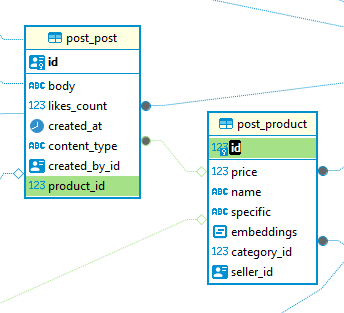
다음과 같은 ERD
product_specific값으로 embedding 생성
def get_embedding(text):
    headers = {
        'Content-Type': 'application/json',
        'Authorization': f'Bearer {OPENAI_API_KEY}',
    }
    data = {
        "input": text,
        "model": "text-embedding-3-small"
    }
    response = requests.post('https://api.openai.com/v1/embeddings', headers=headers, json=data)
    response_data = response.json()
    return response_data['data'][0]['embedding']

@api_view(['POST'])
def search(request):
    data = request.data
    query = data['query']
    query_embedding = get_embedding(query)
    products = Product.objects.annotate(
        similarity=CosineDistance(F('embeddings'), query_embedding)
    ).order_by('similarity')[:10]

    posts = Post.objects.filter(product__in=products)
    posts_serializer = PostSerializer(posts, many=True)

    return JsonResponse({
        'posts': posts_serializer.data
    }, safe=False)
db에 있는 모든 product에 similarity필드를 annotate하고 상위 10개 정렬
모든 product를 조회하니까 당연히 성능에 문제가 있을 것이다
class SearchPerformanceTestCase(TestCase):
    def setUp(self):
        self.client = APIClient()
        self.url = reverse('search')
        self.user = User.objects.create_user(name='testuser', email='testuser@example.com', password='testpassword')
        self.client.login(username='testuser', password='testpassword')
        self.category = Category.objects.create(id=1, name='TestCategory')

    def create_products(self, count):
        for i in range(count):
            Product.objects.create(
                category=self.category,
                price=100,
                name=f'TestProduct{i}',
                specific='TestSpecific',
                seller=self.user,
                embeddings=[0.01] * 1536
            )

    def test_search_performance_10(self):
        self.create_products(10)
        self._test_search_performance()

    def test_search_performance_100(self):
        self.create_products(100)
        self._test_search_performance()

    def test_search_performance_1000(self):
        self.create_products(1000)
        self._test_search_performance()

    def _test_search_performance(self):
        data = {
            'query': 'test query'
        }

        start_time = time.time()
        response = self.client.post(self.url, data, format='json')
        end_time = time.time()

        self.assertEqual(response.status_code, 200)
        print(f"Search execution time with {Product.objects.count()} products: {end_time - start_time} seconds")

pgvector github페이지에서
Indexing
By default, pgvector performs exact nearest neighbor search, which provides perfect recall.
You can add an index to use approximate nearest neighbor search, which trades some recall for speed. Unlike typical indexes, you will see different results for queries after adding an approximate index.
Supported index types are:
HNSW - added in 0.5.0
IVFFlat
HNSW
An HNSW index creates a multilayer graph. It has better query performance than IVFFlat (in terms of speed-recall tradeoff), but has slower build times and uses more memory. Also, an index can be created without any data in the table since there isn’t a training step like IVFFlat.
Add an index for each distance function you want to use.
HNSW
(Hierarchical navigable small world graphs)
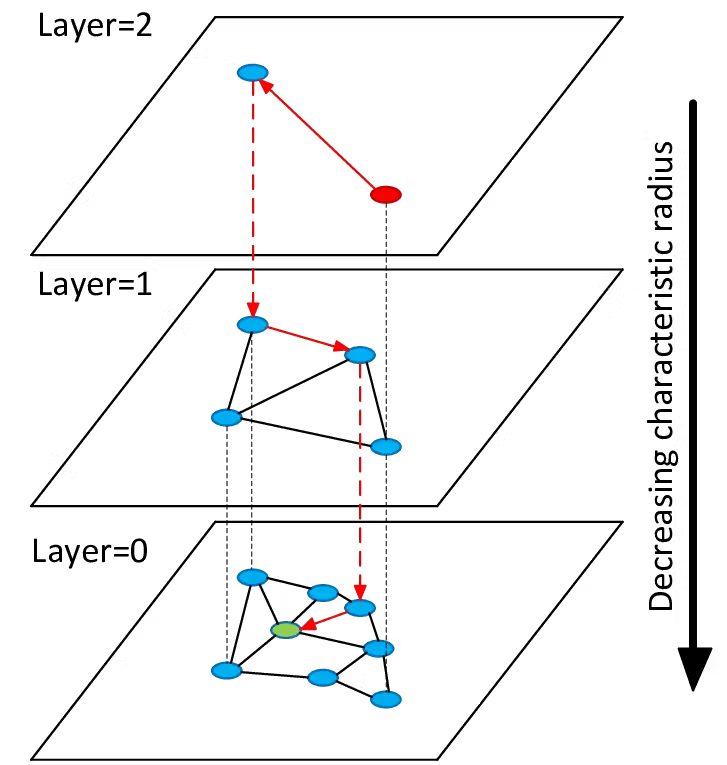
모든 기술이 그렇듯 KNN, navigable small worlds, index-IVFFLAT등 다른 방법의 단점을 개선한 인덱싱 알고리즘이고, 이를 이용하라고 추천한다.
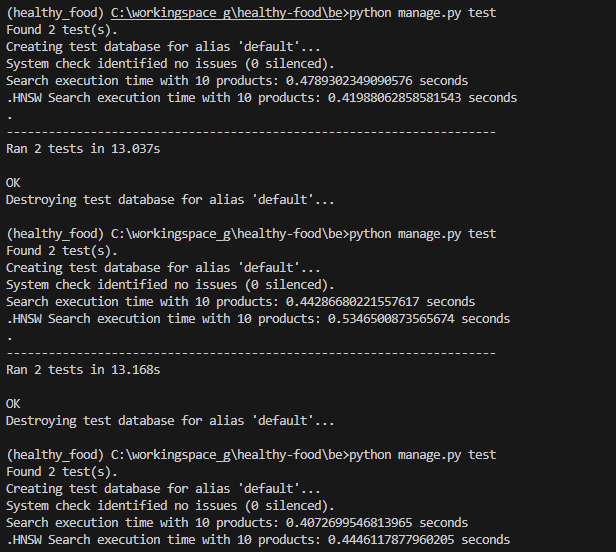
10개는 결과가 이상하다
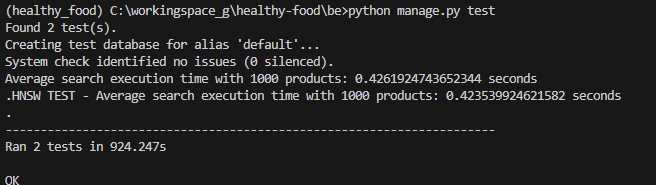
5번의 search 시간을 평균값을 내도록 수정하여 1000개의 product가 있는 경우를 실험했는데 별 차이가 없었다..
1000개밖에 안되어서 그런걸까?
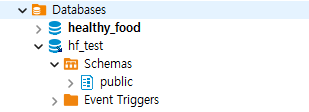
그냥 testdb를 하나 더 만들어서 시원하게 100,000개의 product 데이터를 넣었다
너무 오래걸려 여기까지만 32224개로 test
sys.path.append(os.path.join(os.path.abspath(os.path.dirname(__file__)), '..'))
os.environ.setdefault("DJANGO_SETTINGS_MODULE", "config.settings")
django.setup()

def populate_db():
    user = User.objects.create_user(name='testuser2', email='testuser2@example.com', password='testpassword')
    category, created = Category.objects.get_or_create(id=1, name='fruit')

    for i in range(100000):
        Product.objects.create(
            category=category,
            price=random.randint(50, 150),
            name=f'TestProduct{i}',
            specific='TestSpecific',
            seller=user,
            embeddings=[random.uniform(-1, 1) for _ in range(1536)]
        )

if __name__ == "__main__":
populate_db()>>> Product.objects.count()
32224그 전에, 미리 생각했어야 할 부분을 놓치고 지나갔다. 왜 저렇게 시간이 들쭉날쭉 할까? 그리고 차이가 별로 나지 않을까?
약간 딴길로 잠시 새자면
@api_view(['POST'])
def search(request):
    data = request.data
    query = data['query']
    start = time.time()
    query_embedding = get_embedding(query)
    end = time.time()
    print(f"Embedding generation time: {end - start} seconds")

    start = time.time()
    with connection.cursor() as cursor:
        cursor.execute("""
            SELECT id
            FROM post_product
            ORDER BY embeddings <=> %s::vector
            LIMIT 10
        """, [query_embedding])
        product_ids = [row[0] for row in cursor.fetchall()]

    end = time.time()
    print(f"Search execution time: {end - start} seconds")

    start = time.time()
    products = Product.objects.filter(id__in=product_ids)
    end = time.time()
    print(f"Product retrieval time: {end - start} seconds")

    # products에 해당하는 posts를 추출
    start = time.time()
    posts = Post.objects.filter(product__in=products)
    end = time.time()
    print(f"Post retrieval time: {end - start} seconds")
    posts_serializer = PostSerializer(posts, many=True)

    return JsonResponse({
        'posts': posts_serializer.data
    }, safe=False)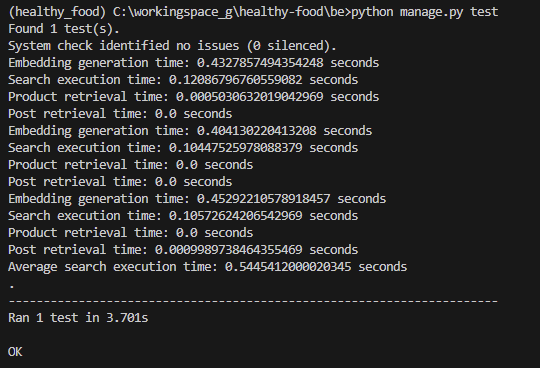
사실은 open api에서 검색어의 embedding을 가져오는 시간이 80%정도 차지했다..
test 부분에서 시간을 측정하는 것이 아니라, 내가 원하는 search execution 부분의 시간을 측정하는게 맞다.
결론
다시 원래 하던 test로 돌아와서
testcode (여기 작성한 average타임은 위에서 말했듯 크게 유의미 하지 않은걸로)
class SearchPerformanceTest(unittest.TestCase):
    def setUp(self):
        self.client = APIClient()
        self.url = reverse('search')
        self.user = User.objects.get(name='testuser')
        self.client.login(name='testuser', password='testpassword')
        self.category = Category.objects.get(name='fruit')

    def test_search_performance(self):
        data = {
            'query': 'test query'
        }

        times = []
        for _ in range(10):
            start_time = time.time()
            response = self.client.post(self.url, data, format='json')
            end_time = time.time()
            times.append(end_time - start_time)

        avg_time = sum(times) / len(times)

        self.assertEqual(response.status_code, 200)
        print(f"Average search execution time: {avg_time} seconds")
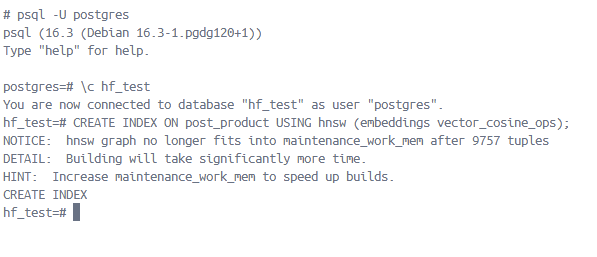
indexing 전, 후 search execution 결과
(32224개의 product 데이터)
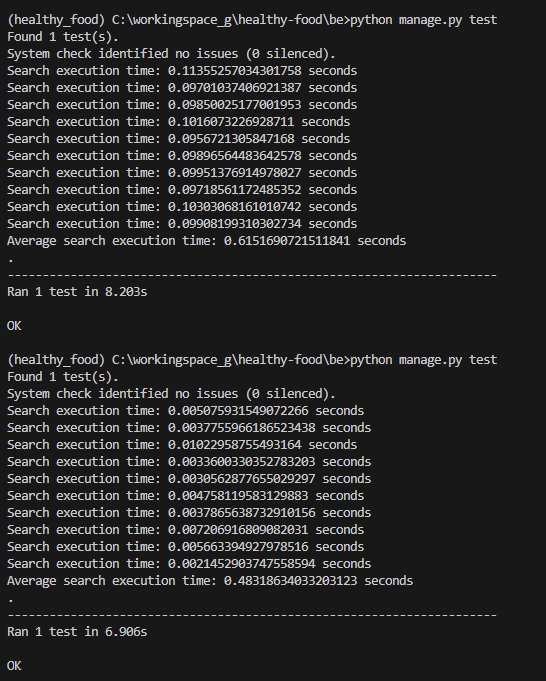
생각보다 차이가 엄청나다..
계산은 gpt에게
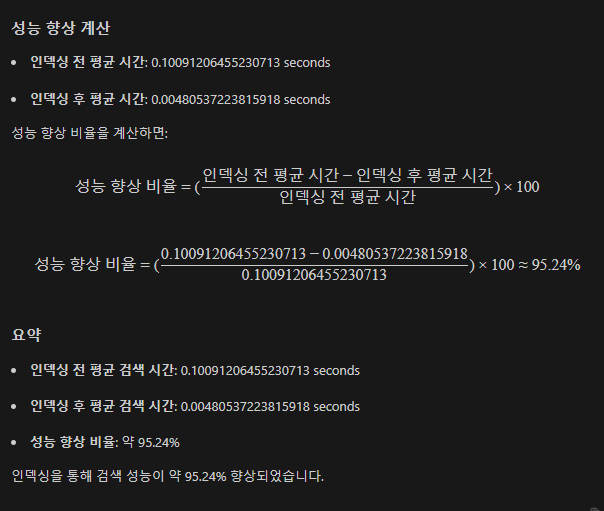
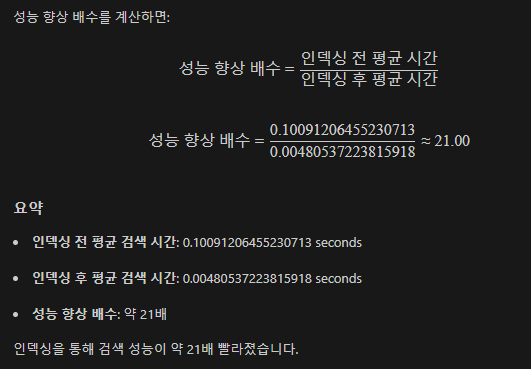
21배.. 알고리즘의 힘은 엄청나다는걸 또 느낀다
참조
https://github.com/pgvector/pgvector
https://inspirit941.tistory.com/504
