
질문
- 260p - 스프링을 도입해서 얻는 이득은 무엇일까?
자동차의 타이어 브랜드를 변경할 때 그 무엇도 재컴파일/재배포 하지 않아도 XML 파일만 수정하면 프로그램의 실행 결과를 바꿀 수 있다는 것이다.
내용
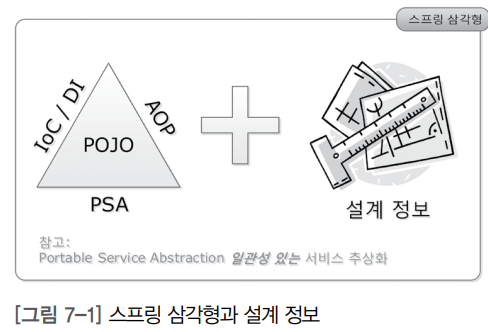
POJO(Plain Old Java Object)를 기반으로 스프링 삼각형이라는 애칭을 가진 IoC/DI, AOP,
PSA라는 스프링의 3대 프로그래밍 모델에 대한 이해가 필수다.
IoC/DI - 제어의 역전/의존성 주입
프로그래밍에서 의존성이란?
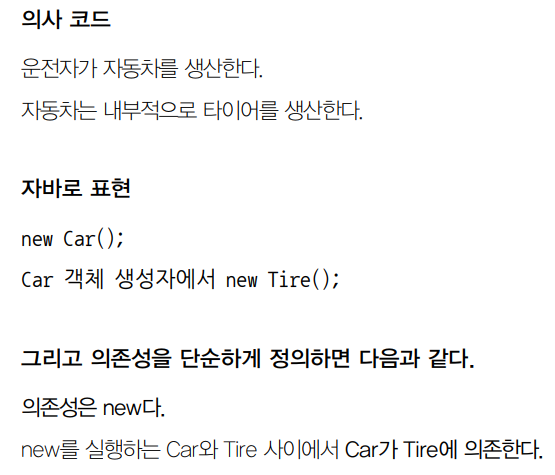
- 프로그래밍에서의 의존 관계는
new로 표현된다!
- 집합(aggregation) 관계: 부분이 전체와 다른 생명 주기를 가질 수 있다. ex) 집 vs 냉장고
- 구성(composition) 관계: 부분은 전체와 같은 생명 주기를 갖는다. ex) 사람 vs 심장
- 자동차는 타이어에 의존한다.
- 운전자는 자동차를 사용한다.
- 운전자가 자동차에 의존한다고 봐도 된다.
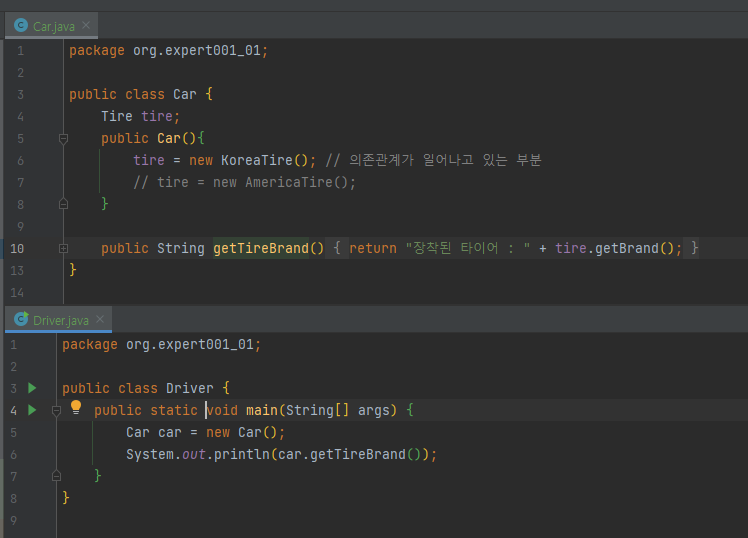
- 자동차의 생성자 코드에서 tire 속성에 새로운 타이어를 생성해서 참조할 수 있게 해주었다.
스프링 없이 의존성 주입하기1 - 생성자를 통한 의존성 주입
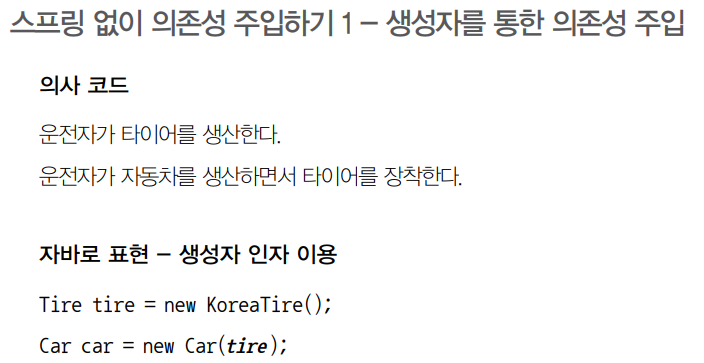
주입이란?
- 외부에서라는 뜻을 내포
- 외부에서 생산된 타이어를 자동차에 장착하는 작업
기존 코드
변경된 코드
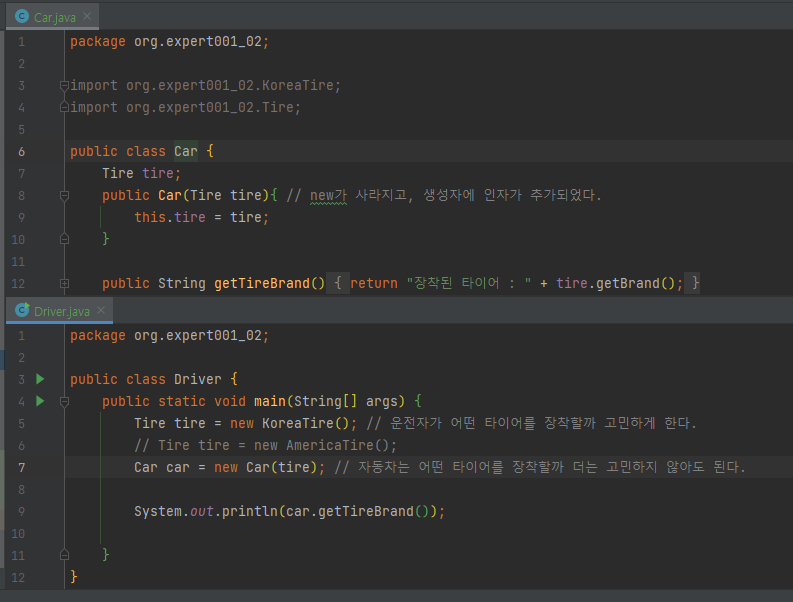
🌸전략 패턴의 3요소
- 전략 객체: 전략 메서드를 가짐
- 전략: Tire를 구현한 KoreaTire, AmericaTire
- 컨텍스트: 전략 객체를 사용
- 컨텍스트: Car의 getTireBrand() 메서드
- 클라이언트: 전략 객체를 생성해 컨텍스트에 주입하는 클라이언트(제3자)
- 클라이언트: Driver의 main() 메서드
스프링 없이 의존성 주입하기 2 - 속성을 통한 의존성 주입
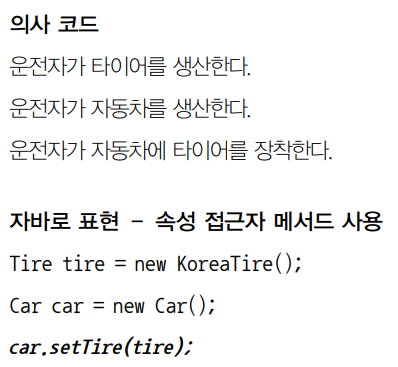
- 생성자 통해 의존성을 주입하게 되면-> 자동차를 생산(구입) 시 한번 타이어를 장착하면 교체할 방법이 없다는 문제가 생긴다.
- 💡운전자가 원할 때 Car의 Tire를 교체하는 것이다! ->
속성을 통한의존성 주입이 필요
프로그램 상에서는 한 번 주입된 의존성을 계쏙 사용하는 경우가 일반적
➡️ 생성자를 통한 의존성 주입 선호
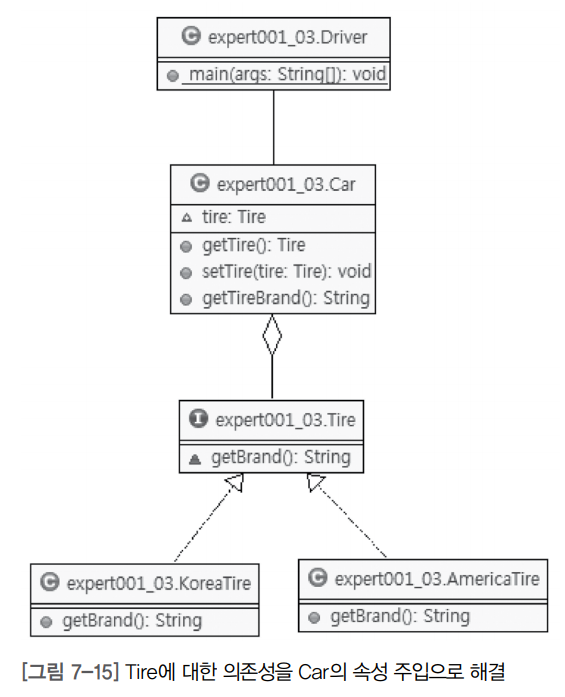

- Car 클래스에서 생성자가 사라지고, 기본생성자 제공
- tire 속성의 get/set 속성 메서드가 보이는 것이 기존 코드와 달라진 부분이다.
250p
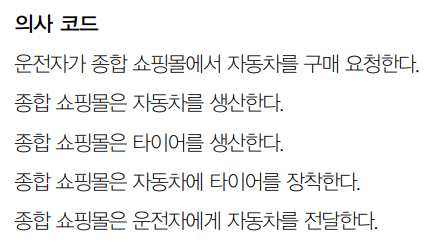
스프링을 통한 의존성 주입 - XML 파일 사용
2) 연구2. XML 설정 - 두 개의 빈이 id 없이 tire 인터페이스를 구현한 경우
- Driver.java 는 조금 변했다. 기존 생산 과정이 구매 과정으로 바뀌었다. 상품을 구매할 종합 쇼핑몰에 대한 정보가 필요하기 때문이다.

// Driver.java
package org.example.expert002;

import org.springframework.context.ApplicationContext; // 쇼핑몰(스프링 프레임워크)에 대한 정보를 가진 패키지
import org.springframework.context.support.ClassPathXmlApplicationContext;
public class Driver {
    public static void main(String[] args) {
       ApplicationContext context = new ClassPathXmlApplicationContext("expert002/expert002.xml");

       Car car = context.getBean("car", Car.class); // 상품을 구매하는 코드.

       Tire tire = context.getBean("tire", Tire.class);

       car.setTire(tire);

        System.out.println(car.getTireBrand());
    }
}
// src/main/resources/expert002/expert002.xml
<?xml version="1.0" encoding="UTF-8" ?>
<beans xmlns="http://www.springframework.org/schema/beans"
    xmlns:xsi="http://www.w3.org/2001/XMLSchema-instance"
    xsi:schemaLocation="http://www.springframework.org/schema/beans http://www.springframework.org/schema/beans/spring-beans.xsd">
<bean id="tire" class="org.example.expert002.KoreaTire"></bean>
<bean id="americaTire" class="org.example.expert002.AmericaTire"></bean>
<bean id="car" class="org.example.expert002.Car"></bean>
</beans>
context.getBean에서 타이어를 구매하는 부분인데, KoreaTire 클래스나, AmericaTire 클래스를 지칭하는 부분이 없다. xml에 내용이 담겨있다.
id가 tire인 bean 태그의 class 어트리뷰트가 KoreaTire로 지정되어 있는데, AmericaTire로 타이어를 바꿔도 자바 코드를 변경/재컴파일/재배포할 필요가 없다.
XML 파일을 변경하고 프로그램을 바로 실행하면 변경사항이 적용된다.
<bean id="koreaTire" class="org.example.expert002.KoreaTire"></bean>
<bean id="tire" class="org.example.expert002.AmericaTire"></bean>
로 내용을 살짝만 바꾸게 되면...

스프링을 통한 의존성 주입 - 스프링 설정 파일(XML)에서 속성 주입
//CarTest.java
package expert003;

import static org.junit.Assert.assertEquals;

import org.junit.Test;
import org.junit.runner.RunWith;
import org.example.expert003.Car;
import org.springframework.beans.factory.annotation.Autowired;
import org.springframework.test.context.ContextConfiguration;
import org.springframework.test.context.junit4.SpringJUnit4ClassRunner;

@RunWith(SpringJUnit4ClassRunner.class)
@ContextConfiguration("expert003.xml")
public class CarTest {
    @Autowired
    Car car;

    @Test
    public void 자동차_코리아타이어_장착_타이어브랜드_테스트(){
        assertEquals("장착된 타이어 : 코리아 타이어", car.getTireBrand());
    }
}
// expert003.xml
- XML 파일에 새롭게 property라고 하는 부분이 보인다.
- 자바에서 접근자 및 설정자 메서드를 속성 메서드라고 한다.
- Driver.java에서 car.setTire(tire)라고 하던 부분을 XML 파일의 property 태그를 이용해 대체하는 것이다.
<?xml version="1.0" encoding="UTF-8" ?>
<beans xmlns="http://www.springframework.org/schema/beans"
    xmlns:xsi="http://www.w3.org/2001/XMLSchema-instance"
    xsi:schemaLocation="http://www.springframework.org/schema/beans http://www.springframework.org/schema/beans/spring-beans.xsd">
<bean id="koreaTire" class="org.example.expert003.KoreaTire"></bean>
<bean id="americaTire" class="org.example.expert003.AmericaTire"></bean>
<bean id="car" class="org.example.expert003.Car">
    <property name="tire" ref="koreaTire"></property>
</bean>
</beans>
스프링을 통한 의존성 주입 - @Autowired를 통한 속성 주입
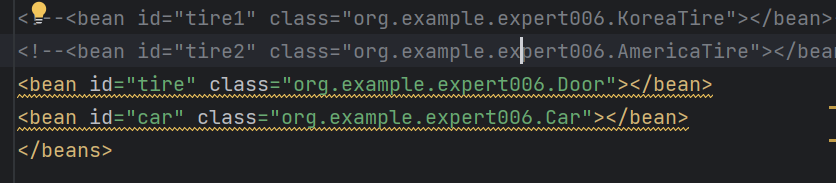
- 만약 같은 타입을 구현한 클래스가 여러 개 있다면, 그때 bean 태그의 id로 구분해서 매칭하게 된다.
- id와 type 중 type 구현에 우선순위가 있음을 알 수 있다.
//Driver.java

package org.example.expert004;

import org.springframework.context.ApplicationContext;
import org.springframework.context.support.ClassPathXmlApplicationContext;
public class Driver {
    public static void main(String[] args) {
       ApplicationContext context = new ClassPathXmlApplicationContext("expert004/expert004.xml");

       Car car = context.getBean("car", Car.class); // 상품을 구매하는 코드.

       //Tire tire = context.getBean("tire", Tire.class);

       //car.setTire(tire);

       System.out.println(car.getTireBrand());
    }
}
//expert004.xml
<?xml version="1.0" encoding="UTF-8" ?>
<beans xmlns="http://www.springframework.org/schema/beans"
       xmlns:xsi="http://www.w3.org/2001/XMLSchema-instance"
    xmlns:context="http://www.springframework.org/schema/context"
    xsi:schemaLocation="
           http://www.springframework.org/schema/beans
           http://www.springframework.org/schema/beans/spring-beans.xsd
           http://www.springframework.org/schema/context
           http://www.springframework.org/schema/context/spring-context.xsd">
    <context:annotation-config />
<bean class="org.example.expert004.KoreaTire"></bean>
<bean id="tire" class="org.example.expert004.Door"></bean>
<!--<bean id="tire" class="org.example.expert004.AmericaTire"></bean>-->
<bean id="car" class="org.example.expert004.Car"></bean>
</beans>
// Car.java
package org.example.expert004;
import org.springframework.beans.factory.annotation.Autowired;
public class Car {
@Autowired
Tire tire;
public String getTireBrand(){
return "장착된 타이어 : " + tire.getBrand();
}
}
스프링을 통한 의존성 주입 - @Resource를 통한 속성 주입
- 이제 Autowired 표현 대신 Resource라는 표현을 사용하도록 한다.
- 변경되는 부분은 @Autowired 부분 뿐이다.
- @Autowired는 스프링의 어노테이션이다. @Resource는 자바 표준 어노테이션이다. 스프링 프레임워크를 사용하지 않는다면 @Autowired는 사용할 수 없고, 오직 @Resource만을 사용해야 한다.
- @Resource의 경우에는 id로 매칭할 빈을 찾지 못한 경우, type으로 매칭할 빈을 찾게 된다.
// Car.java
package org.example.expert005;

import javax.annotation.Resource;
import org.springframework.beans.factory.annotation.Autowired;

public class Car {
  👉 @Resource
    Tire tire;
    public String getTireBrand(){
        return "장착된 타이어 : " + tire.getBrand();
    }
}
// expert005.xml
<?xml version="1.0" encoding="UTF-8" ?>
<beans xmlns="http://www.springframework.org/schema/beans"
       xmlns:xsi="http://www.w3.org/2001/XMLSchema-instance"
    xmlns:context="http://www.springframework.org/schema/context"
    xsi:schemaLocation<="
           http://www.springframework.org/schema/beans
           http://www.springframework.org/schema/beans/spring-beans.xsd
           http://www.springframework.org/schema/context
           http://www.springframework.org/schema/context/spring-context.xsd">
    <context:annotation-config />
<bean id="tire" class="org.example.expert005.KoreaTire"></bean>
<bean id="americaTire" class="org.example.expert005.AmericaTire"></bean>
<bean id="car" class="org.example.expert005.Car"></bean>
</beans>
스프링을 통한 의존성 주입 - @Autowired vs. @Resource vs. <property> 태그
1) 연구1. XML 설정 - 한 개의 빈이 id 없이 tire 인터페이스를 구현한 경우
- @Resource, @Autowired 모두 아무 문제 없이 실행된다.
2) 연구2. XML 설정 - 두 개의 빈이 id 없이 tire 인터페이스를 구현한 경우
-
@Resource 사용 했을 경우 에러 :
-
@Autowired 사용했을 경우 에러 :
3) 연구3. XML 설정 - 두 개의 빈이 tire 인터페이스를 구현하고 하나가 일치하는 id를 가진 경우
- @Autowired, @Resource 모두 정상 실행된다.
4) 연구4. XML 설정 - 두 개의 빈이 tire 인터페이스를 구현하고 일치하는 id가 없는 경우
- @Autowired, @Resource 둘 다 에러가 발생한다.
5) 연구5. XML설정 - 일치하는 id가 하나 있지만 인터페이스를 구현하지 않은 경우
- @Resource의 경우 에러
- @Autowired 에러
- @Autowired와 @Resource 중에서는 @Resource 추천
- (스프링이 아닌 다른 프레임워크로 교체되는 경우를 대비할 경우 유리)
- @Resource와
<property>중에서는<property>추천
- (유지보수성이 좋다)