함수에서 undefined를 반환하는 것이 가능해졌다.
이 전에는 undefined를 반환하려면 반환 type을 void나 any로 해야 했지만, 이제는 undefined로 설정 가능해 질 것
/* Before */
// ✅ fine - we inferred that 'f1' returns 'void'
function f1() {
    // no returns
}

// ✅ fine - 'void' doesn't need a return statement
function f2(): void {
    // no returns
}

// ✅ fine - 'any' doesn't need a return statement
function f3(): any {
    // no returns
}

// ❌ error!
// A function whose declared type is neither 'void' nor 'any' must return a value.
function f4(): undefined {
    // no returns
}


/* After */
// ✅ Works in TypeScript 5.1!
function f4(): undefined {
    // no returns
}

// ✅ Works in TypeScript 5.1!
takesFunction((): undefined => {
    // no returns
});
이 변화는 일부 API에서 undefined를 반환하는것을 예상할때 어려움을 해소 시켜줌
예시)
declare function takesFunction(f: () => undefined): undefined;

// ❌ error!
// Argument of type '() => void' is not assignable to parameter of type '() => undefined'.
takesFunction(() => {
    // no returns
});

// ❌ error!
// A function whose declared type is neither 'void' nor 'any' must return a value.
takesFunction((): undefined => {
    // no returns
});

// ❌ error!
// Argument of type '() => void' is not assignable to parameter of type '() => undefined'.
takesFunction(() => {
    return;
});

// ✅ works
takesFunction(() => {
    return undefined;
});

// ✅ works
takesFunction((): undefined => {
    return;
});
typescript에서 반환값이 없을때 추론하는 기본 타입을 void에서 undefined로 변경
// ✅ Works in TypeScript 5.1!
takesFunction(function f() {
    //                 ^ return type is undefined

    // no returns
});

// ✅ Works in TypeScript 5.1!
takesFunction(function f() {
    //                 ^ return type is undefined

    return;
});
JSX Element와 JSX 태그 타입 사이의 타입체크를 디커플링 시켰다.
리액트가 Promise를 반환하는 컴포넌트를 제한적으로 지원하는것을 고려하고 있는데(서버 컴포넌트), 현재 버전의 타입스크립트로는 이것을 지원할수 없다.
import * as React from "react";

async function Foo() {
    return <div></div>;
}

let element = <Foo />;
//             ~~~
// 'Foo' cannot be used as a JSX component.
//   Its return type 'Promise<Element>' is not a valid JSX element.
5.1 버전에서는 JSX.ElementType. ElementType타입을 타입스크립트에서 검색해서 적용시켜주게 된다. 이것을 선언해주면 된다.
namespace JSX {
    export type ElementType =
        // All the valid lowercase tags
        keyof IntrinsicAttributes
        // Function components
        (props: any) => Element
        // Class components
        new (props: any) => ElementClass;

    export interface IntrinsictAttributes extends /*...*/ {}
    export type Element = /*...*/;
    export type ClassElement = /*...*/;
}
JSX 태그를 위한 Linked Cursor
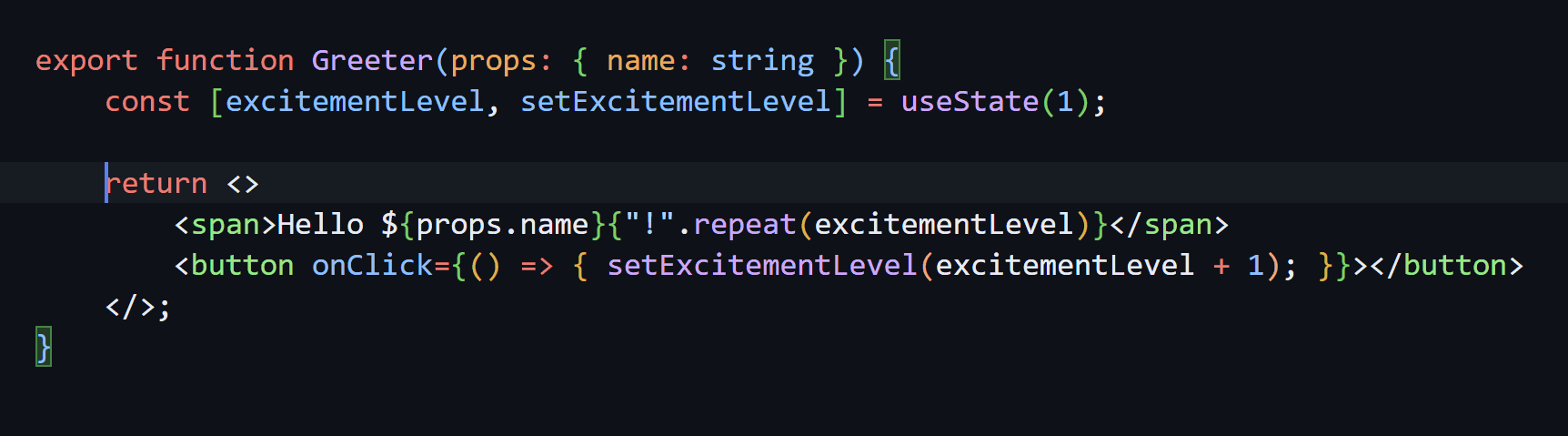
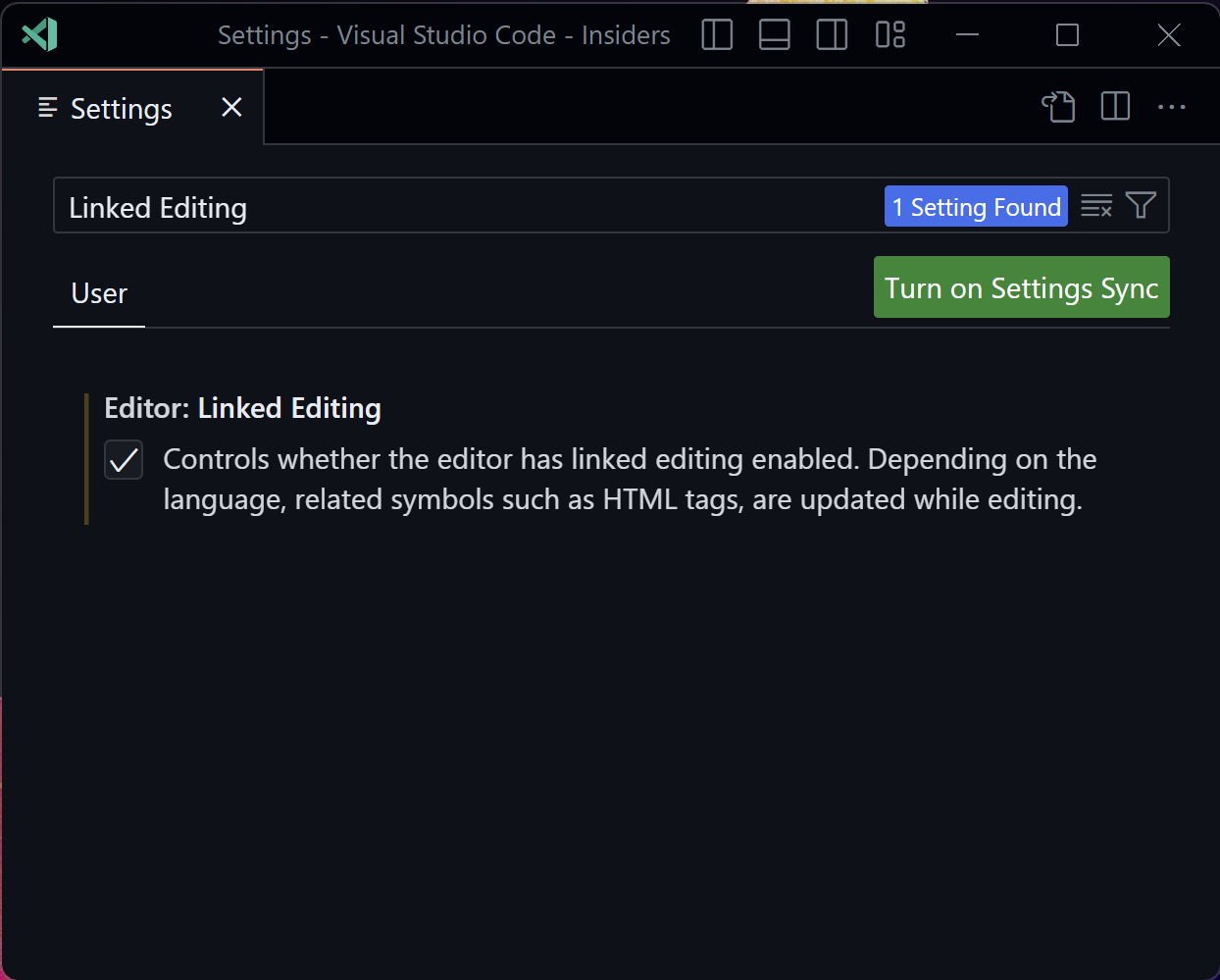
Auto rename tag 익스텐션과 같은 기능으로 보인다
vscode의 Editor: Linked Editing 설정을 체크해 주면 된다. jsx, tsx 모두 지원한다.
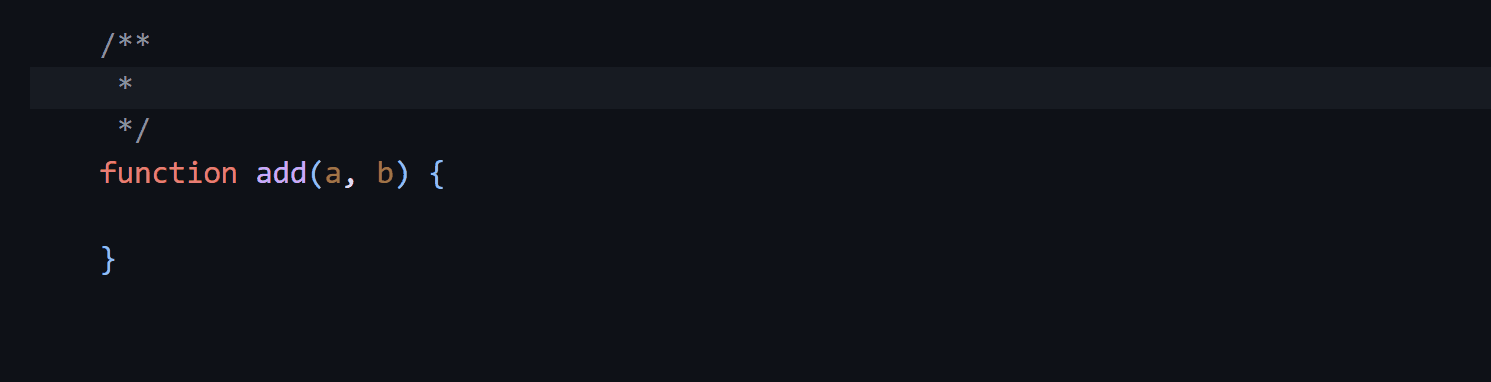
JSDoc 태그의 @param을 위한 스니펫 추가
Breaking Changes
es2020 와 node.js 14.17버전이 최소 런타임 요구사항으로 설정됨
명시적 typeRoots가 node_modules/@types를 찾아보는것을 disable시킴
이전에는 tsconfig.json파일에 typeRoots가 지정되었지만 typeRoots 디렉토리에 맞는것들이 없었으면, 타입스크립트는 계속해서 부모 directory로 올라가 각각 부모의 node_modules/@types 폴더에서 타입을 찾으려고 했는데, 이런 행동은 너무 많은 검색을 유발시킬수 있어서 5.1 버전에서는 disable됨. 그에 따라 아래와 같은 에러들이 보일수도 있다.
error TS2688: Cannot find type definition file for 'node'.
error TS2688: Cannot find type definition file for 'mocha'.
error TS2688: Cannot find type definition file for 'jasmine'.
error TS2688: Cannot find type definition file for 'chai-http'.
error TS2688: Cannot find type definition file for 'webpack-env"'.
해결책은 다음과 같음
// tsconfig.json
{
    "compilerOptions": {
        "types": [
            "node",
            "mocha"
        ],
        "typeRoots": [
            // Keep whatever you had around before.
            "./some-custom-types/",

            // You might need your local 'node_modules/@types'.
            "./node_modules/@types",

            // You might also need to specify a shared 'node_modules/@types'
            // if you're using a "monorepo" layout.
            "../../node_modules/@types",
        ]
    }
}
모든 것을 번역한 것은 아니라서 더 자세히 알고싶으시다면 상단의 링크로 원문을 확인하실수 있습니다.

프론트엔드 개발자