MVC 디자인 패턴
MVC란 Model-View-Controller의 약자로, 소프트웨어 디자인 패턴 중 하나입니다.
Model
- 데이터와 비즈니스 로직을 담당합니다.
- 데이터베이스와 연동하여 데이터를 저장하고 불러오는 등의 작업을 수행합니다.
View
- 사용자 인터페이스를 담당합니다.
- 사용자가 보는 화면과 버튼, 폼 등을 디자인하고 구현합니다.
Controller
- Model과 View 사이의 상호작용을 조정하고 제어합니다.
- 사용자의 입력을 받아 Model에 전달하고, Model의 결과를 바탕으로 View를 업데이트합니다.
Spring Web MVC
Servlet API를 기반으로 구축된 독창적인 웹 프레임워크!
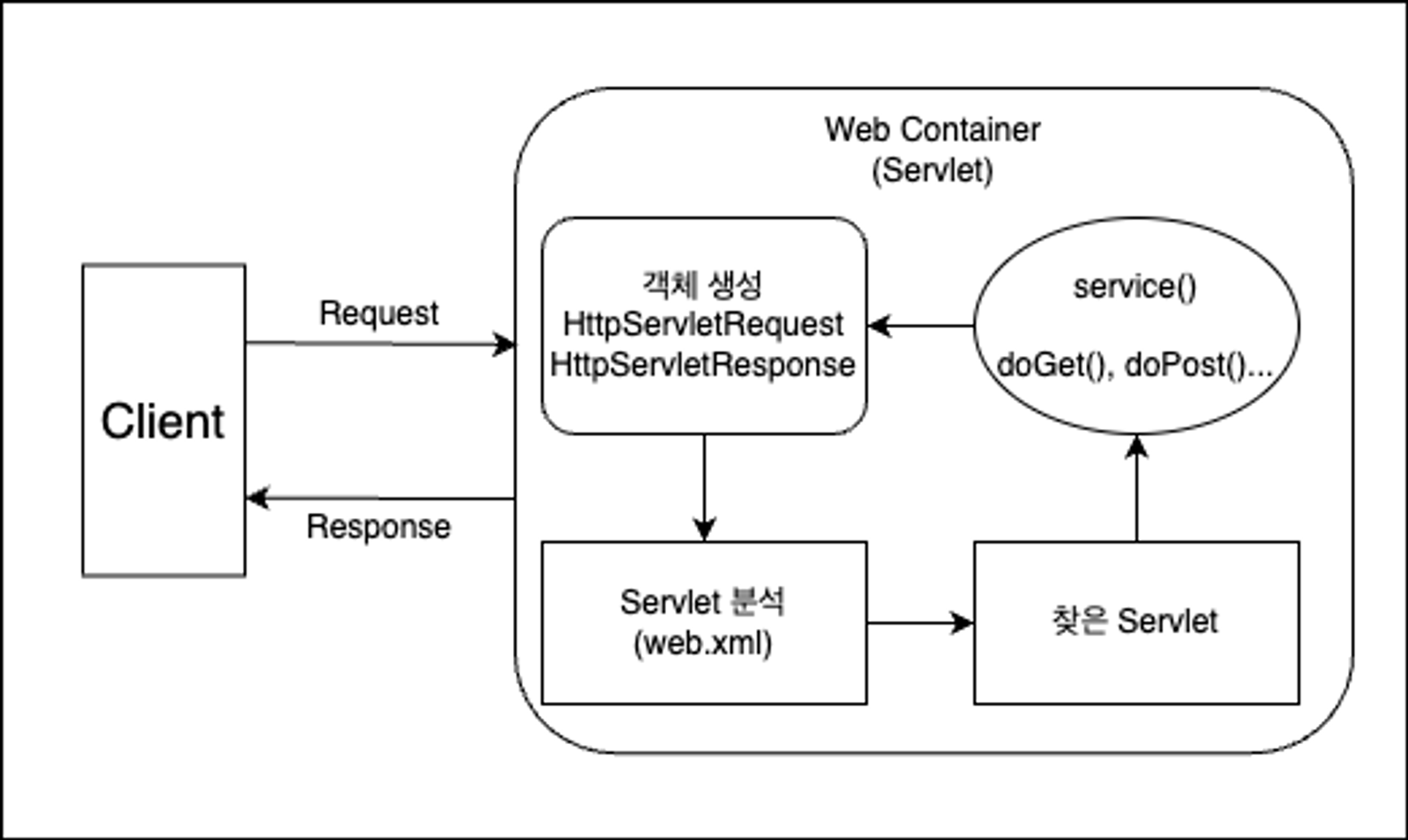
- 사용자가 Client(브라우저)를 통해 서버에 HTTP Request 즉, API 요청을 합니다.
- 요청을 받은 Servlet 컨테이너는 HttpServletRequest, HttpServletResponse 객체를 생성합니다.
- 설정된 정보를 통해 어떠한 Servlet에 대한 요청인지 찾습니다.
- 해당 Servlet에서 service 메서드를 호출한 뒤 브라우저의 요청 Method에 따라 doGet 혹은 doPost 등의 메서드를 호출합니다.
- 호출한 메서드들의 결과를 그대로 반환하거나 동적 페이지를 생성한 뒤 HttpServletResponse 객체에 응답을 담아 Client(브라우저)에 반환합니다.
- 응답이 완료되면 생성한 HttpServletRequest, HttpServletResponse 객체를 소멸합니다.
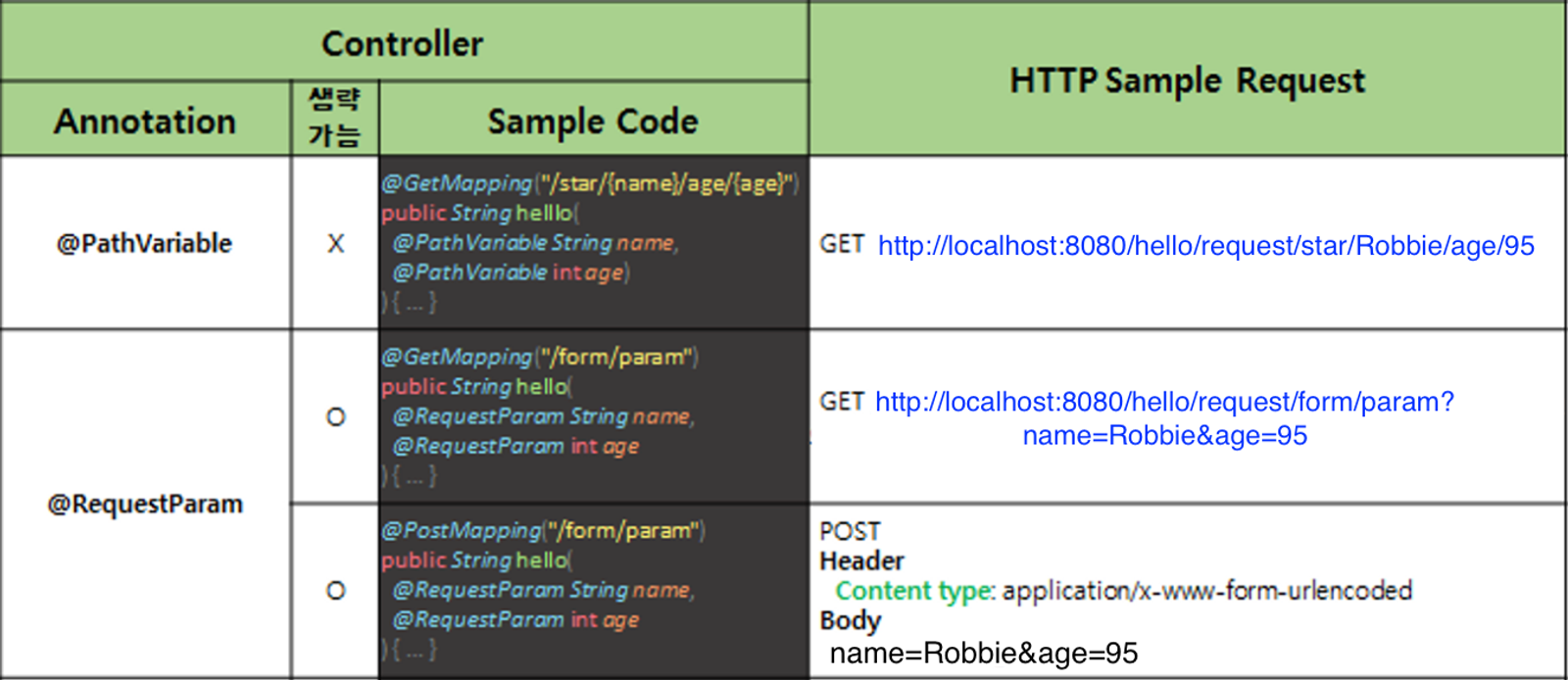
Path Variable
// [Request sample]
// GET http://localhost:8080/hello/request/star/Robbie/age/95
@GetMapping("/star/{name}/age/{age}")
@ResponseBody
public String helloRequestPath(@PathVariable String name, @PathVariable int age)
{
    return String.format("Hello, @PathVariable.<br> name = %s, age = %d", name, age);
}
데이터를 받기 위해서는 /star/{name}/age/{age} 이처럼 URL 경로에서 데이터를 받고자 하는 위치의 경로에 {data} 중괄호를 사용합니다. 그리고 해당 요청 메서드 파라미터에 @PathVariable 애너테이션과 함께 {name} 중괄호에 선언한 변수명과 변수타입을 선언하면 해당 경로의 데이터를 받아올 수 있습니다.
Request Param
// [Request sample]
// GET http://localhost:8080/hello/request/form/param?name=Robbie&age=95
@GetMapping("/form/param")
@ResponseBody
public String helloGetRequestParam(@RequestParam String name, @RequestParam int age) {
    return String.format("Hello, @RequestParam.<br> name = %s, age = %d", name, age);
}
데이터를 받기 위해서는 ?name=Robbie&age=95 에서 key 부분에 선언한 name과 age를 사용하여 value에 선언된 Robbie, 95 데이터를 받아올 수 있습니다. 해당 요청 메서드 파라미터에 @RequestParam 애너테이션과 함께 key 부분에 선언한 변수명과 변수타입을 선언하면 데이터를 받아올 수 있습니다.
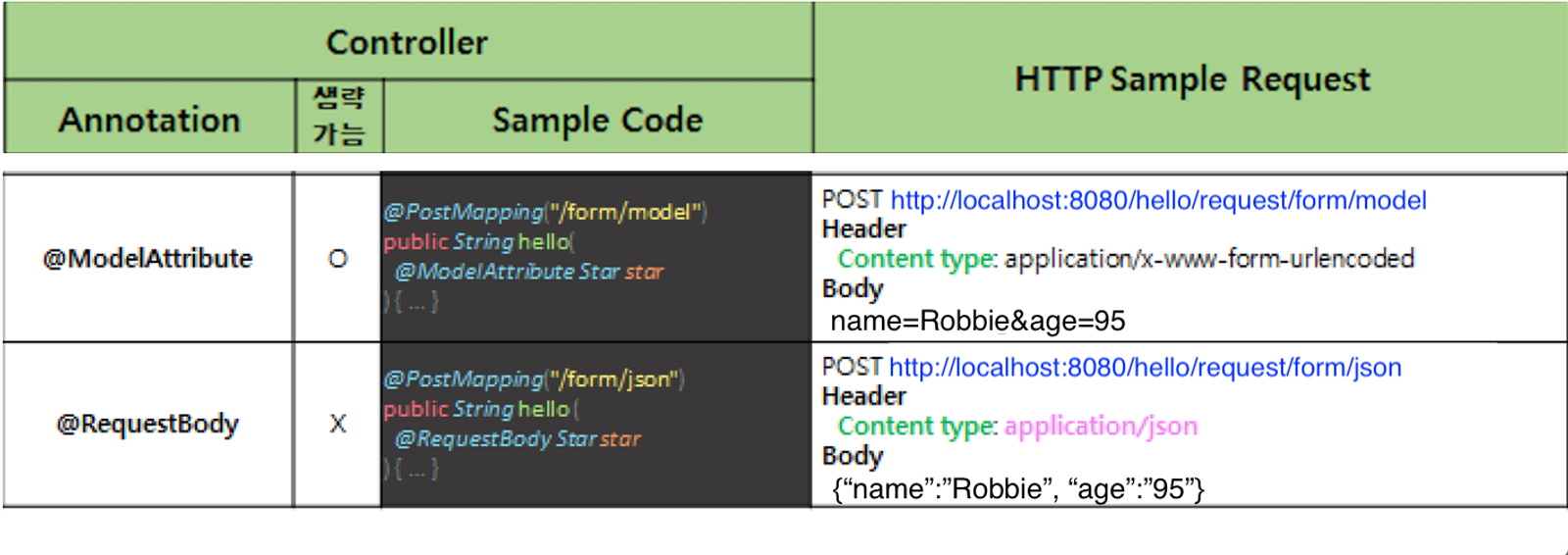
@ModelAttribute
// [Request sample]
// POST http://localhost:8080/hello/request/form/model
// Header
//  Content type: application/x-www-form-urlencoded
// Body
//  name=Robbie&age=95
@PostMapping("/form/model")
@ResponseBody
public String helloRequestBodyForm(@ModelAttribute Star star) {
    return String.format("Hello, @ModelAttribute.<br> (name = %s, age = %d) ", star.name, star.age);
}- HTML의 form 태그를 사용하여 POST 방식으로 HTTP 요청을 보낼 수 있습니다.
- 이때 해당 데이터는 HTTP Body에
name=Robbie&age=95형태로 담겨져서 서버로 전달됩니다. - 해당 데이터를 Java의 객체 형태로 받는 방법은 @ModelAttribute 애너테이션을 사용한 후 Body 데이터를
Star star받아올 객체를 선언합니다.
@RequestBody
// [Request sample]
// POST http://localhost:8080/hello/request/form/json
// Header
//  Content type: application/json
// Body
//  {"name":"Robbie","age":"95"}
@PostMapping("/form/json")
@ResponseBody
public String helloPostRequestJson(@RequestBody Star star) {
    return String.format("Hello, @RequestBody.<br> (name = %s, age = %d) ", star.name, star.age);
}
HTTP Body에 {"name":"Robbie","age":"95"} JSON 형태로 데이터가 서버에 전달되었을 때 @RequestBody 애너테이션을 사용해 데이터를 객체 형태로 받을 수 있습니다.
데이터를 받아오는 방법이 여러가지여서 정리를 하게 되었고, 앞으로의 Spring공부에 도움이 많이 될거라고 생각한다.

2025.04.01~