Todo프로젝트의 Test
UserRequestDto - POJO 테스트
@Getter
@Setter
@AllArgsConstructor
@NoArgsConstructor
public class UserRequestDto {
    @Pattern(regexp = "^[a-z0-9]{4,10}$")
    private String username;

    @Pattern(regexp = "^[a-zA-Z0-9]{8,15}$")
    private String password;

}
username과 password에서 패턴을 필요로 하기 때문에 제대로 기능이 동작을 하는 지 test를 할 필요가 있다.
CommonTest - test에 필요한 상수 값
public interface CommonTest {
    String ANOTHER_PREFIX = "another-";
    Long TEST_USER_ID = 1L;
    Long TEST_ANOTHER_USER_ID = 2L;
    String TEST_USER_NAME = "username";
    String TEST_USER_PASSWORD = "password";
    User TEST_USER = User.builder()
            .username(TEST_USER_NAME)
            .password(TEST_USER_PASSWORD)
            .build();
    User TEST_ANOTHER_USER = User.builder()
            .username(ANOTHER_PREFIX + TEST_USER_NAME)
            .password(ANOTHER_PREFIX + TEST_USER_PASSWORD)
            .build();
}
UserRequestDTOTest - createUserRequestDTO
    @DisplayName("유저 요청 DTO 생성")
    @Nested
    class createUserRequestDTO {
        @DisplayName("유저 요청 DTO 생성 성공")
        @Test
        void createUserRequestDTO_success() {
            // given
            UserRequestDto userRequestDto = new UserRequestDto();
            userRequestDto.setUsername(TEST_USER_NAME);
            userRequestDto.setPassword(TEST_USER_PASSWORD);

            // when
            Set<ConstraintViolation<UserRequestDto>> violations = validate(userRequestDto);

            // then
            assertThat(violations).isEmpty();
        }

        @DisplayName("유저 요청 DTO 생성 실패 - 잘못된 username")
        @Test
        void createUserRequestDTO_fail_wrongUserName() {
            // given
            UserRequestDto userRequestDto = new UserRequestDto();
            userRequestDto.setUsername("Invalid user name"); // Invalid username pattern
            userRequestDto.setPassword(TEST_USER_PASSWORD);     // Invalid password pattern

            // when
            Set<ConstraintViolation<UserRequestDto>> violations = validate(userRequestDto);

            // then
            assertThat(violations).hasSize(1);
            assertThat(violations)
                    .extracting("message")
                    .contains("\"^[a-z0-9]{4,10}$\"와 일치해야 합니다");
        }

        @DisplayName("유저 요청 DTO 생성 실패 - 잘못된 password")
        @Test
        void createUserRequestDTO_wrongPassword() {
            UserRequestDto userRequestDto = new UserRequestDto();
            userRequestDto.setUsername(TEST_USER_NAME); // Invalid username pattern
            userRequestDto.setPassword("Invalid password");     // Invalid password pattern

            // when
            Set<ConstraintViolation<UserRequestDto>> violations = validate(userRequestDto);

            // then
            assertThat(violations).hasSize(1);
            assertThat(violations)
                    .extracting("message")
                    .contains("\"^[a-zA-Z0-9]{8,15}$\"와 일치해야 합니다");
        }
    }
UserRequestDTOTest - validate
    private Set<ConstraintViolation<UserRequestDto>> validate(UserRequestDto userRequestDto) {
        ValidatorFactory factory = Validation.buildDefaultValidatorFactory();
        Validator validator = factory.getValidator();
        return validator.validate(userRequestDto);
    }
//when에서 사용되고 있는 validate 메서드는 userRequestDto의 패턴이 만족하는 지 검증을 해주는 메서드이다.
validate메서드의 결과값으로 Set형식으로 오류를 반환하는데, 값이 들어있다면 오류가 발생한 것이고, 비어있다면 오류가 발생하지 않은 것이다.
createUserRequestDTO_success()에서 assertThat(violations).isEmpty()처럼 비어있는 지 확인을 하고 비어있다면 정상적으로 유저 요청 DTO가 생성된 것으로 판단할 수 있다.
요청 실패의 경우에서는 assertThat(violations).hasSize(1);를 통해 오류가 몇개 틀렸는 지를 알려주고 .extracting("message")으로 메시지에 있는 값을 뽑아오고, 그 값에 .contains("\"^[a-z0-9]{4,10}$\"와 일치해야 합니다")안에 있는 패턴을 만족하는 지 검증을 한다.
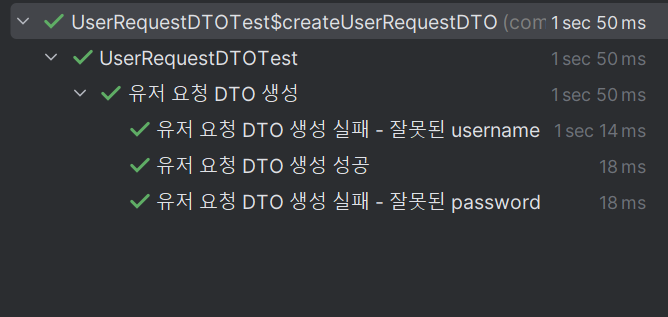
원래의 코드에서는 UserController에서 @Valid를 통해 userRequestDto를 검증했는데, test에서는 또 다르게 검증을 하는 방법을 알 수 있는 시간이었다.

2025.04.01~