프로퍼티 바인딩
설정 파일이나 환경 변수에서 읽은 값을 자바 객체에 맞춰 연결하는 것
예:application.properties
@Value
@Service
public class PostService {
    private final int maxPostCount;

    public PostService(@Value("${board.post.max-count:3}") int maxPostCount) {
        this.maxPostCount = maxPostCount;
    }
}- 설정값 하나를 생성자에게 전달
{설정키:기본값}형식을 통해 해당 키가 없을 때 기본값을 적용할 수 있음- 기본값은 설정이 없어도 안전하게 동작하는 경우에만 사용
- 반드시 입력받아야 하는 값(비밀번호, 외부 주소 등)에는 기본값을 두지 않아야 누락을 즉시 발견할 수 있음
@ConfigurationProperties
- 여러 환경 변수를 클래스로 묶어 한 번에 관리
- Bean Validation 사용 가능
- 다음 세 환경 변수를 사용한다고 하자. 키값을 보면
board.postprefix를 공유하고 있다.
board.post.max-count=3
board.post.default-page-size=50
board.post.max-page-size=100- 아래와 같이 묶어서 사용할 수 있다.
- 필드명은 알아서 매핑된다. (여러 명명 규칙 간에 느슨한 바인딩)
@ConfigurationProperties(prefix = "board.post") // board.post.xxx 환경변수를 묶음
@Validated
@Getter
public class PostProperties {
    @Min(1)
    private final int maxCount;
    @Min(1)
    private final int defaultPageSize;
    @Min(1)
    private final int maxPageSize;

    // 3. 생성자 바인딩. final 필드를 유지할 수 있습니다.
    public PostProperties(int maxCount, int defaultPageSize, int maxPageSize) {
        this.maxCount = maxCount;
        this.defaultPageSize = defaultPageSize;
        this.maxPageSize = maxPageSize;
    }
}- 이 클래스를 빈으로 등록할 때는, 별도의
@Configuration클래스에서@EnableConfigurationProperties(PostProperties.class)을 사용해 등록한다.
@Configuration
@EnableConfigurationProperties(PostProperties.class)
public class BoardConfig {
}- 혹은
PostProperties에 직접@Component를 붙일 수도 있다. (프로퍼티 클래스 자체를 빈으로 만들기) - 메인 애플리케이션 클래스에서 일괄 활성화도 가능하다.
@ConfigurationPropertiesScan을 붙여주면 프로젝트 내의 모든@ConfigurationProperties클래스를 자동으로 빈에 등록한다.
어떤 식으로든 빈 등록을 해두면, DI를 하여 사용할 수 있다.
@Service
@RequiredArgsConstructor
public class TestService {
		private final PostProperties postProperties; // DI를 하여 사용
		// ...
}
프로필별 설정
실행 환경에 따라 다른 설정값을 선택할 수 있다.
-
공통값은
application.properties -
로컬 환경에서 바꿀 값은
application-local.properties(-뒤의 문자열이 프로필 이름) -
프로필 활성화 시 공통값보다 로컬값 우선
-
SPRING_PROFILES_ACTIVE=local또는 실행 인자--spring.profiles.active=local와 같이 활성화 -
IntelliJ에서도 설정할 수 있다. (활성화된 프로파일)
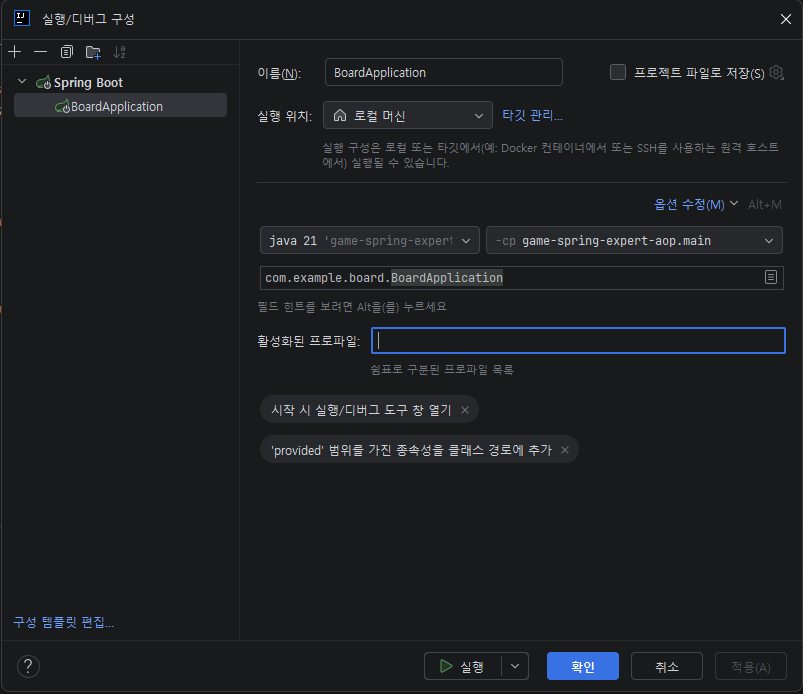
-
프로필에 따라 빈 등록 여부도 정할 수 있다. 빈 등록 대상인 클래스(예를 들어,
@Component클래스)에@Profile("local")을 붙여주면,local프로필 활성화 시에만 빈에 등록된다.