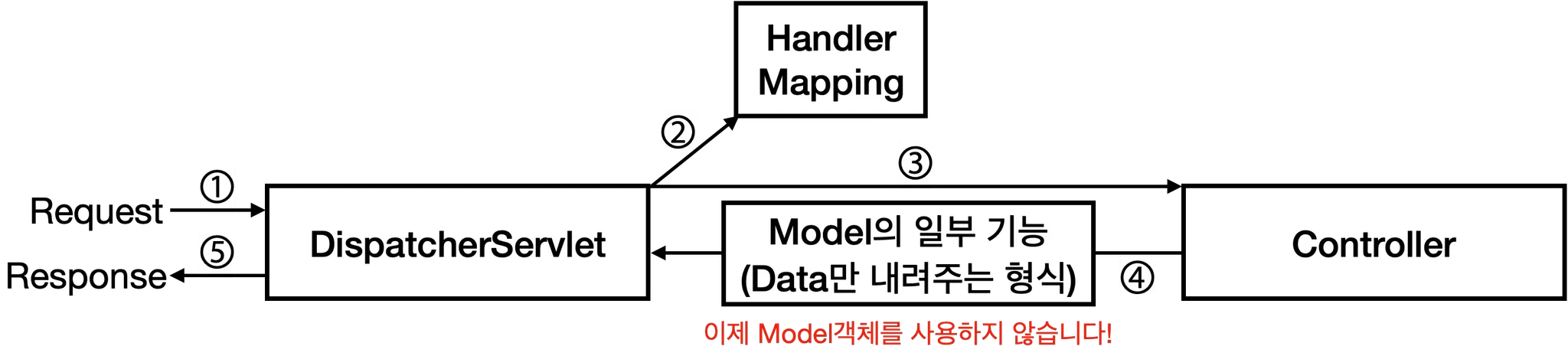
현대 스프링 MVC는 SSR에서 CSR로 전환됨에 따라, 백엔드는 더이상 View 렌더링이 아닌 Data(JSON)로 응답한다.@Controller
전통적인 MVC 컨트롤러
- 컨트롤러의 메서드는 View 이름을 반환할 것으로 기대됨
- 반환한 문제열은 ViewResolver를 통해 View 객체를 조회하는 데 사용
@RestController
@Controller + @ResponseBody
@ResponseBody- MVC 컨트롤러의 메서드에 사용되는 어노테이션
- 이 어노테이션이 붙은 메서드는 View 이름으로 쓰이지 않고, 데이터로써 HTTP 응답 본문에 작성됨
- JSON 형식 리턴을 위해 필수
@RestController가 붙은 컨트롤러는 모든 메서드에@ResponseBody어노테이션이 붙어있다고 간주
아래 코드 1과 코드 2는 완전히 동일하다!
- 코드 1:
@Controller+@ResponseBody
import org.springframework.stereotype.Controller;
import org.springframework.web.bind.annotation.GetMapping;
import org.springframework.web.bind.annotation.ResponseBody;

@Controller
public class UserController {

    @RequestMapping(value = "/users", method = RequestMethod.GET)
    @ResponseBody
    public User getUser() {
        // ...
    }
}- 코드 2:
@RestController
import org.springframework.web.bind.annotation.GetMapping;
import org.springframework.web.bind.annotation.RestController;

@RestController // @Controller와 @ResponseBody가 합쳐졌다!
public class UserRestController {

    @RequestMapping(value = "/users", method = RequestMethod.GET)
    public User getUser() {
        // ...
    }
}
@RequestMapping: 요청 매핑 어노테이션
요청과 컨트롤러의 메서드를 매핑하는데 사용@RequestMapping
- 특정 URL prefix로 오는 요청을 컨트롤러와 매핑
@RestController
@RequestMapping("/hello")
public class HelloController {
		// ...
}
@RequestMapping(value = "/hello", method = RequestMethod.GET)으로 후술할@GetMapping("/hello")와 같은 효과를 얻을 수 있지만, 잘 쓰지 않는다.
@GetMapping, @PostMapping, @PutMapping, @PatchMapping, @DeleteMapping
- 각각 대응되는 HTTP 메서드 별 매핑
@RestController
public class HelloController {
    @GetMapping("/hello")
    public void getHello() {
		    // ...
    }
}
데이터 전달 어노테이션
1. @RequestParam: 쿼리 파라미터
@RequestParam- URL의
?뒤에 오는 쿼리 문자열 처리 (웹 기초 - URL 구성 요소 참조)
예시: GET /users?name=john&age=30 요청을 처리할 때
@RestController
public class UserController {
    @GetMapping("/users")
    public String getUser(
				    @RequestParam String name, // name 값은 john
				    @RequestParam int age // age 값은 30
    ) {
				// ...
    }
}
@RequestParam(required = false): 해당 파라미터가 선택 파라미터가 된다.@RequestParam(defaultValue = "value"): 선택 파라미터가 되며, 쿼리에 파라미터가 없을 경우 해당 기본값으로 설정된다.
@RestController
public class UserController {

    // /users?page=1 요청이 들어온 상황이라면
    @GetMapping("/users")
    public List<String> getUsers(
            @RequestParam(defaultValue = "0") int page, // 1
            @RequestParam(defaultValue = "10") int size, // 10
            @RequestParam(required = false) String sort // null
    ) {
        // ...
    }
}
2. @ModelAttribute: 폼 데이터 or 여러 파라미터
@ModelAttribute- 파라미터가 많을 경우 일일이
@RequestParam을 붙이기엔 번거롭다. - DTO(Data Trasfer Object)를 정의하여 사용한다.
// @RequestParam이 너무 많은 경우
@GetMapping("/api/search")
public List<String> searchUsers(
        @RequestParam(required = false) String name,
        @RequestParam(required = false) String email,
        @RequestParam(required = false) Integer minAge,
        @RequestParam(required = false) Integer maxAge,
        @RequestParam(defaultValue = "0") int page,
        @RequestParam(defaultValue = "10") int size
) {
    // 파라미터가 많아서 복잡함!
}

// @ModelAttribute 사용 (추천)
@GetMapping("/api/search")
public List<String> searchUsers(@ModelAttribute UserSearchDto dto) {
    // 하나의 @ModelAttribute로 데이터를 받을 수 있다.
}

// 바인딩용 DTO 클래스
public class UserSearchDto {
    private String name;
    private String email;
    private Integer minAge;
    private Integer maxAge;
    private Integer page = 0;      // 기본값 설정 가능
    private Integer size = 10;     // 기본값 설정 가능

    // ...
}- HTML의 폼 데이터 객체를 바인딩하는데 사용할 수도 있다.
- 요청의
Content-Type: application/x-www-form-urlencoded인 경우 - 요즘은 자주 쓰이진 않는다. 우선 있다는 것만 알고 넘어가기
- 요청의
3. @PathVariable: 경로 변수
@PathVariable- URL 경로의 일부를 변수로 받을 수 있다.
@RequsetParam과 달리, 쿼리가 아닌 Path에서 값을 얻는다.
@RestController
public class UserController {
    // GET /users/123
    @GetMapping("/users/{userId}")
    public String getUser(@PathVariable Long userId) { // userId는 123
        // ...
    }
}- Path가 다르면 다른 API이다. 예를 들어,
/posts/123과/posts는 다른 API이다. - Query가 달라도 같은 API이다. 예를 들어,
/users?nickname=gwangmin과/users는 같은 API이다. - PathVariable은 일종의 필수 파라미터라고 생각할 수 있다.
4. @RequestBody: 요청 본문
@RequestBody- HTTP 요청 본문(Body)의 데이터를 DTO 객체로 변환한다.
- JSON 요청 본문을 처리한다.
@RestController
public class UserController {

    // POST /users
    // Body: {"name": "John", "email": "john@example.com", "age": 30}
    @PostMapping("/users")
    public String createUser(@RequestBody CreateUserRequest request) {
        // ...
    }
}

@Getter
public class CreateUserRequest {
		// 위의 요청의 경우 아래와 같이 값이 매핑됩니다.
		private String name; // John
		private String email; // john@example.com
		private int age; // 30
}