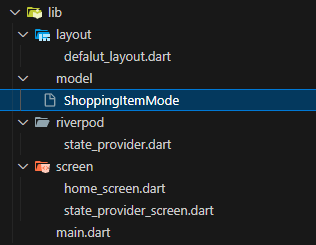
StateNotifierProvider는 자주 사용되는 Provider 중 하나로 잘 알고 넘어가자!!!
① ilb/model/shopping_item_model.dart 폴더 및 파일 생성
StateNotifierProvider에 넣어줄 모델을 작성할 폴더, 파일 만들어주기.
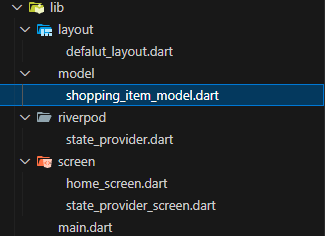
- shopping_item_model.dart 코드
class ShoppingItemModel {
  final String name; // 이름
  final int quantity; // 갯수
  final bool hasBought; // 구매 여부
  final bool isSpicy; // 매운맛 여부

  ShoppingItemModel({
    required this.name,
    required this.quantity,
    required this.hasBought,
    required this.isSpicy,
  });
}
③ riverpod/state_notifier_provider.dart 파일 만들기
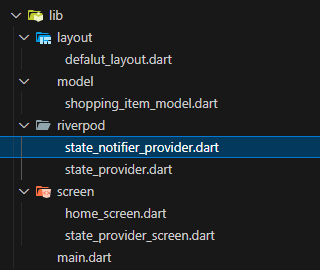
import 'package:flutter_riverpod/flutter_riverpod.dart';
import 'package:riverpod_study/model/shopping_item_model.dart';

// 나는 ShoppingItemModel을 List로 관리할 거임!
// 즉, ShoppingItemModel 여러 개를 관리하겠다는 뜻!
// 어디서?? ShoppingListNotifier에서!
class ShoppingListNotifier extends StateNotifier<List<ShoppingItemModel>> {

}
📍 StateNotifierProvider
⭐ StateNotifierProvider 사용할 땐, class를 선언해줘야 함!
⭐ 그리고 무조건 상속을 해 줘야 함... 무엇을?? 👉 StateNotifier 를!!!
⭐ StateNotifier는 무조건 상태 관리할 타입이 어떤 타입인지 제너릭 안에 지정해 줘야함.
⭐ StateNotifier를 extends하는 클래스 안에서는 생성자를 선언해줘야 함!
④ StateNotifier를 extends하는 클래스 안에 생성자 선언하기
super 값에는 처음에 어던 값으로 상태를 초기화할지 넣어준다.
그리고 타입은 내가 <List< ShoppingItemModel >> 라고 정했기 때문에 무조건 <List< ShoppingItemModel >> 이 타입이어야 한다.
일단 나는 시작할 때, 몇 가지 값들을 넣고 시작할거임..
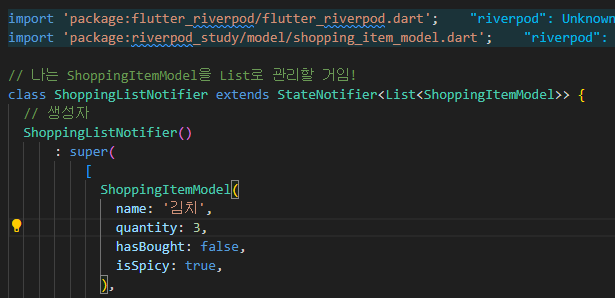
- state_notifier_provider.dart 코드
- super ( ) 안에는 ShoppingListNotifier의 상태를 초기화하는 값이 들어감.
- 그리고 StateNotifier 안에 선언한 ShoppingItemModel을 List로 집어 넣음.
- 그러면 ShoppingListNotifier를 처음 선언했을 때, super 안에 선언한 값들로부터 시작할 수가 있는 것!
import 'package:flutter_riverpod/flutter_riverpod.dart';
import 'package:riverpod_study/model/shopping_item_model.dart';

// 나는 ShoppingItemModel을 List로 관리할 거임!
class ShoppingListNotifier extends StateNotifier<List<ShoppingItemModel>> {
  // 생성자
  ShoppingListNotifier()
      : super(
          [
            ShoppingItemModel(
              name: '김치',
              quantity: 3,
              hasBought: false,
              isSpicy: true,
            ),
            ShoppingItemModel(
              name: '라면',
              quantity: 5,
              hasBought: false,
              isSpicy: true,
            ),
            ShoppingItemModel(
              name: '삼겹살',
              quantity: 10,
              hasBought: false,
              isSpicy: false,
            ),
            ShoppingItemModel(
              name: '수박',
              quantity: 2,
              hasBought: false,
              isSpicy: false,
            ),
            ShoppingItemModel(
              name: '카스테라',
              quantity: 6,
              hasBought: false,
              isSpicy: false,
            ),
          ],
        );
}
현재 ShoppingListNotifier는 class임.
전에 StateProvider를 사용했을 땐, 그냥 간단한 값이었기 때문에
0, +1, -1 등을 집어넣어서 작업할 수 있었음.
그런데 StateNotifierProvider의 경우에는
ShoppingListNotifier라는 calss 안에서 super 안에 집어 넣은 값들(상태)을
관리하고 있기 때문에 StateProvider보다 복잡하게 상태 관리 중임!
👉 그래서... 메소드를 사용해 super 안의 값들을 변경시키는 작업을 해 줘야 함!
그럼... 이어서!
구매한 아이템은 hasBought를 true로 토글할 수 있게 작업해보자.
⑤ 메소드 만들기
state_notifier_provider.dart 코드 아래에 메소드를 만든다.
(return 하지 않고 그냥 변경만 할 거임!)
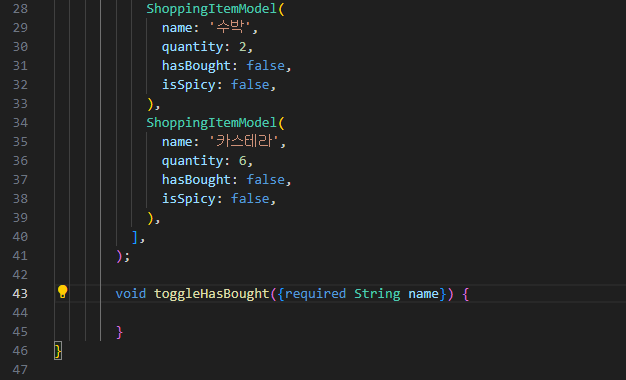
어떤 쇼핑 아이템을 토글하고싶은지를 받을거임.
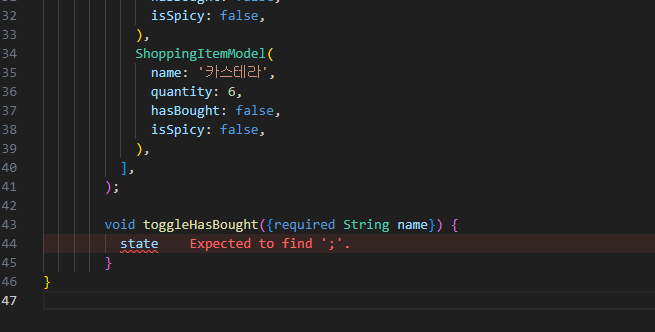
ShoppingItemModel 리스트 하나하나는 상태라고 볼 수 있음.
현재 이 값을 가져오고 싶으면 state로 불러오면 된다.
이 state라는 변수는 extends한 StateNotifier에서 자동으로 제공되는 값임.
그리고 그 값은 무조건 super 컨스트럭트에 들어가는 첫번째 파라미터 값으로 초기화됨.
그럼 이 state에서는 뭘 할까???
만약 입력한 name 값과 똑같은 ShoppingItemModel이 나오면
hasBought라는 값을 반대 값으로 변경하기.
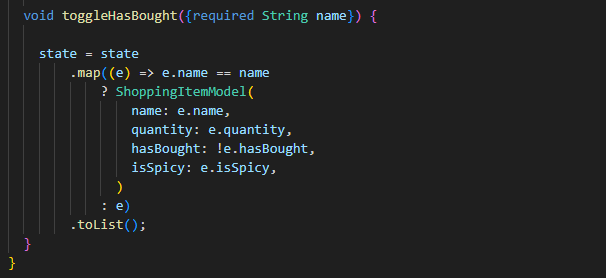
.map => 하나식 매핑을 하고...
e.name이 만약에 name이랑 똑같으면 ShoppingItemModel을 다시 하나 생성한다.
(먄약에 name이 똑같다면....에 해당하는 부분은 드래그한 부분임.)
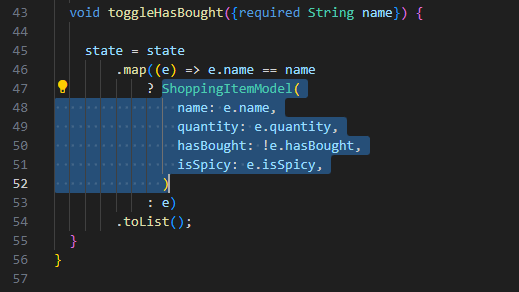
그리고 만약에 다르면 그대로 똑같이 e를 반환
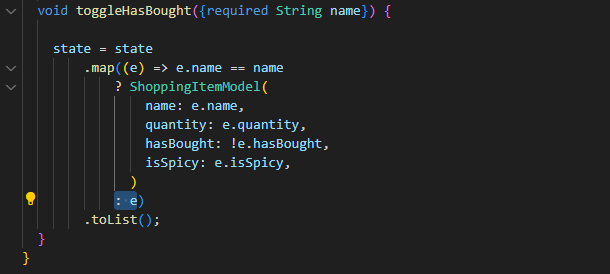
그러니까... 매핑(state)하면서 어떤 아이템(e)의 이름(e.name의 name)이
({required String name}) 여기서 인풋 받은 == name 이 이름과 똑같으면
ShoppingItemModel(
                name: e.name,
                quantity: e.quantity,
                hasBought: !e.hasBought,
                isSpicy: e.isSpicy,
              )
이렇게 토글을 해 주고(hasBought만 ! 느낌표로 반대값으로 토글),
아닐 경우에는 그냥 똑같이 ShoppingItemModel( : e)
이 e 값을 넣어주면 된다.
여기서 중요한 건, 완전히 새로운 List를 반환하고 있다는 점이다.
.map하면 새로운 값을 반환해줌.
⑥ ShoppingListNotifier를 Provider로 만들기
ShoppingListNotifier를 어떻게 Provider로 만들 수 있을까?
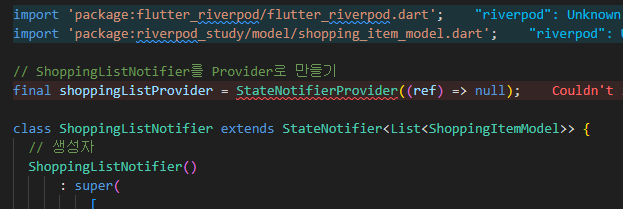
잠깐!!!
StateNotifierProvider와 StateNotifier의 상관 관계가 보이는지...!?
StateNotifier에서 Provider만 붙어있는 거임.
그래서...
- StateNotifier 👉 StateNotifierProvider 안에 제공이 될 클래스가 상속하는 것
- StateNotifierProvider 👉 StateNotifier 값을 상속한 클래스를 Provider로 만들 수 있는 클래스임
⑥-1. StateNotifierProvider< > 안에 값 넣기
StateNotifierProvider에 제너릭(< >)을 작성하고, 그 안에 두 가지 값 넣어주기!

- 값 하나 👉 일단 어떤 Notifier인지!
- 나는 ShoppingListNotifier를 쓸거니까 ShoppingListNotifier를 넣어준다.
- 값 둘 👉 ShoppingListNotifier가 관리하는 state의 타입
- ShoppingListNotifier가 관리하는 state의 타입인 List< ShoppingItemModel >
⑥-2. 반환 값에는 ShoppingListNotifier 넣어주기
반환 값에는 ShoppingListNotifier를 반환해주면 된다.
📍 StateNotifierProvider
final shoppingListProvider =
    StateNotifierProvider<ShoppingListNotifier, List<ShoppingItemModel>>(
        (ref) => ShoppingListNotifier(),
        );
⭐ StateNotifier를 상속한 class를 사용하려면 무조건 StateNotifierProvider를 사용해야 한다!
- StateNotifierProvider<ShoppingListNotifier, List< ShoppingItemModel >>
- 그리고 < >에 어떤 StateNotifier를 상속한 클래스를 쓸 건지 타입을 넣어주고,
그 클래스가 관리하는 상태의 타입을 넣어준다.
- (ref) => ShoppingListNotifier( )
- 그리고 관리할 클래스를 인스턴스로 만들어주면 된다.
그럼 이 shoppingListProvider를 어떻게 쓸 수 있을까??
numberProvider를 쓴 것처럼 사용할 수 있음!!!
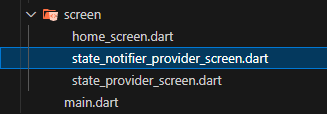
⑦ screen/state_notifier_provider_screen 파일 만들기
그 안에 StatelessWidget StateNotifierProviderScreen 클래스를 생성한다.
⑦-1. StatelessWidget를 ConsumerWidget으로 변경
⑦-2. build 함수 안에 WidgetRef ref 파라미터 추가
- state_notifier_provider_screen.dart 코드
import 'package:flutter/material.dart';
import 'package:flutter_riverpod/flutter_riverpod.dart';
import 'package:riverpod_study/layout/defalut_layout.dart';
class StateNotifierProviderScreen extends ConsumerWidget {
const StateNotifierProviderScreen({super.key});
Widget build(BuildContext context, WidgetRef ref) {
return DefalutLayout(
title: 'StateNotifierProvider',
body: ListView(
children: const [],
),
);
}
}
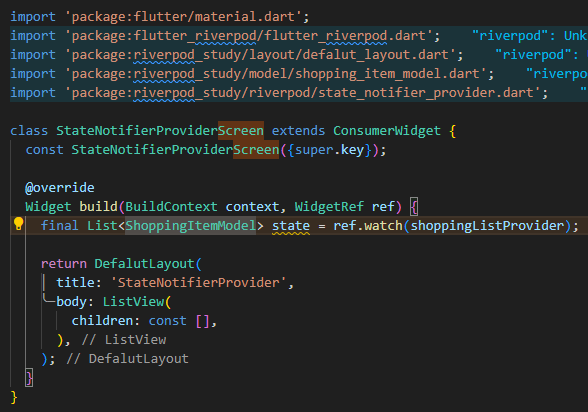
⑧ state 변수 선언하고, ref.watch 작성해주기
이렇게 하면 state에서 watch하면 ShoppingListNotifier의 state(super[ ] 안에 작성한 모델 하나하나)를 그대로 받아올 수 있음.
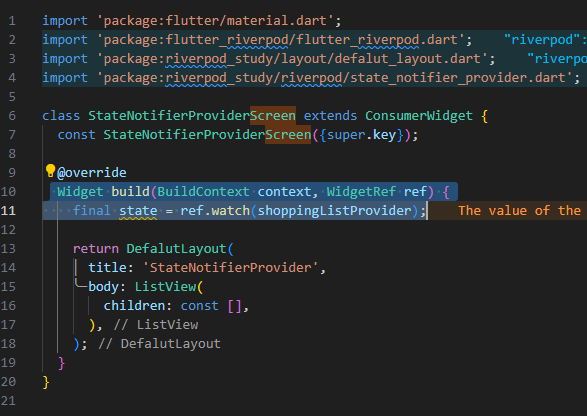
그럼... 이게 된다는 걸 증명해보이겠다!!!
state의 타입을 List< ShoppingItemModel >로 넣어보자.
에러가 없다 = 실제로 watch를 했을 때 state가 그대로 주입됨
⑨ 위젯 만들어보기
ListView에서 state. 하고서 map 해서 위젯 만들어보기.
- state_notifier_provider.dart 코드
import 'package:flutter/material.dart';
import 'package:flutter_riverpod/flutter_riverpod.dart';
import 'package:riverpod_study/layout/defalut_layout.dart';
import 'package:riverpod_study/model/shopping_item_model.dart';
import 'package:riverpod_study/riverpod/state_notifier_provider.dart';
class StateNotifierProviderScreen extends ConsumerWidget {
const StateNotifierProviderScreen({super.key});
Widget build(BuildContext context, WidgetRef ref) {
final List<ShoppingItemModel> state = ref.watch(shoppingListProvider);
return DefalutLayout(
title: 'StateNotifierProvider',
body: ListView(
children: state
.map(
(e) => Text(e.name),
)
.toList(),
),
);
}
}
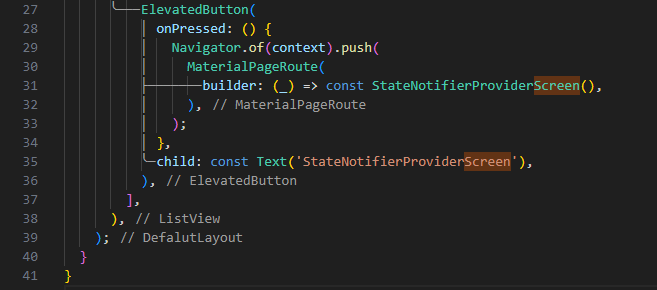
⑩ StateNotifierProvider 버튼 만들기
HomeScreen에 만들어주자.
결과 화면은???
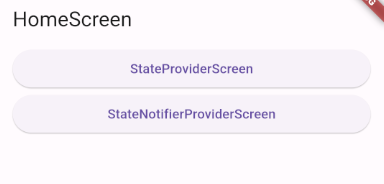
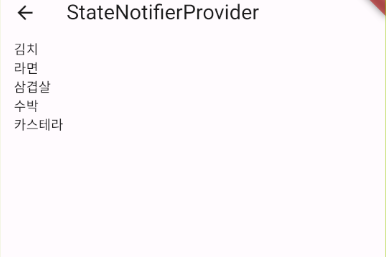
ref.watch 기능을 통해서 상태를 바로 가져온 것을 알 수 있음!
이걸 조금 더 매핑해보자...
⑨ 매핑하기
Text 대신 CheckboxListTile로 바꿔보자.
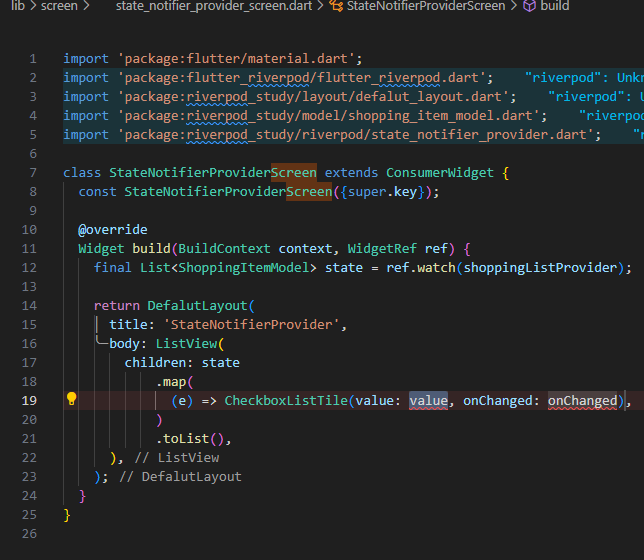
- state_notifier_provider_screen.dart 코드
import 'package:flutter/material.dart';
import 'package:flutter_riverpod/flutter_riverpod.dart';
import 'package:riverpod_study/layout/defalut_layout.dart';
import 'package:riverpod_study/model/shopping_item_model.dart';
import 'package:riverpod_study/riverpod/state_notifier_provider.dart';
class StateNotifierProviderScreen extends ConsumerWidget {
const StateNotifierProviderScreen({super.key});
Widget build(BuildContext context, WidgetRef ref) {
final List<ShoppingItemModel> state = ref.watch(shoppingListProvider);
return DefalutLayout(
title: 'StateNotifierProvider',
body: ListView(
children: state
.map(
(e) => CheckboxListTile(
title: Text(e.name),
// value => 체크박스의 체크 여부
// 이미 구매한 상태라면 체크가 되어 있음(true가 반환될테니깐)
value: e.hasBought,
onChanged: (value) {}),
)
.toList(),
),
);
}
}
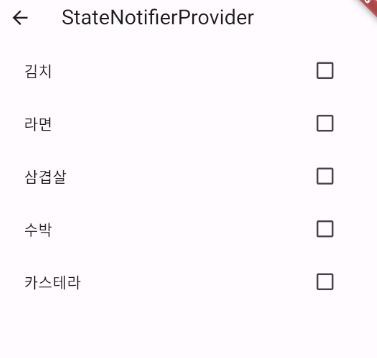
- title: Text(e.name) => 아이템 이름
- value = 체크박스 값
그리고 산 물건은 체크 토글이 되게 하고 싶음...
이건 onChanged 함수를 사용하면 된다!
onChanged는 누를 때마다 각각의 값들이 불린다.
그런데 함수에서 레퍼런스를 가져올 때...
그러니까 Provider를 가져올 땐, 어떻게 하지?? 👉 ref.read(가져오고 싶은 provider);
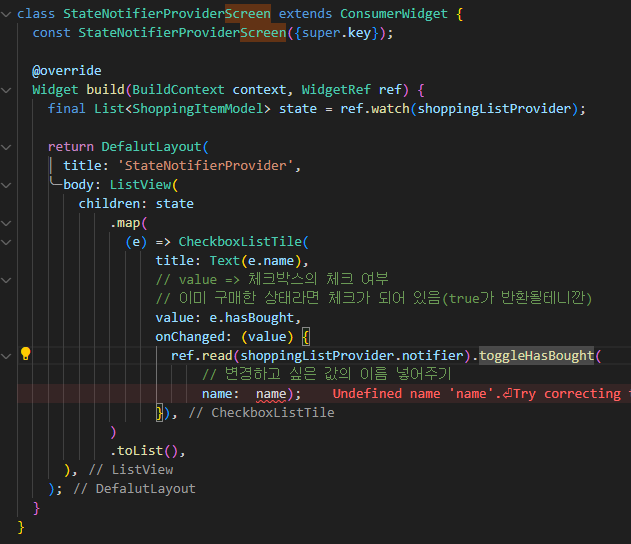
toggleHasBought은 왜 있지?
shoppingListProvider에 정의를 해 뒀기 때문!
- state_notifier_provider_screen.dart 코드
import 'package:flutter/material.dart';
import 'package:flutter_riverpod/flutter_riverpod.dart';
import 'package:riverpod_study/layout/defalut_layout.dart';
import 'package:riverpod_study/model/shopping_item_model.dart';
import 'package:riverpod_study/riverpod/state_notifier_provider.dart';
class StateNotifierProviderScreen extends ConsumerWidget {
const StateNotifierProviderScreen({super.key});
Widget build(BuildContext context, WidgetRef ref) {
final List<ShoppingItemModel> state = ref.watch(shoppingListProvider);
return DefalutLayout(
title: 'StateNotifierProvider',
body: ListView(
children: state
.map(
(e) => CheckboxListTile(
title: Text(e.name),
// value => 체크박스의 체크 여부
// 이미 구매한 상태라면 체크가 되어 있음(true가 반환될테니깐)
value: e.hasBought,
onChanged: (value) {
ref.read(shoppingListProvider.notifier).toggleHasBought(
// 변경하고 싶은 값의 이름 넣어주기
name: e.name);
}),
)
.toList(),
),
);
}
}
그럼 아래와 같이 체크 박스에 체크가 되는 걸 볼 수 있다.
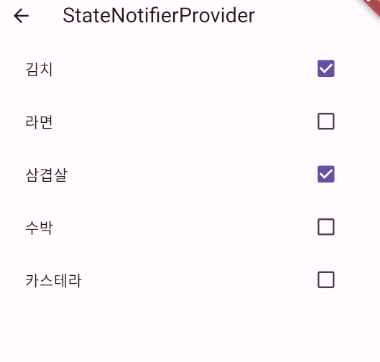
⭐ StateNotifierProvider 최종 정리
- state_notifier_provider.dart 파일을 보면 ShoppingListNotifier 라는 클래스를 선언했음.
그리고 ShoppingListNotifier 클래스는 StateNotifier를 extends했음.- StateNotifier를 extends하는 모든 클래스들은 무조건 state를 정의해줘야 함!
(어떤 상태, 데이터를 관리하고 싶니? 라는 질문에 대한 대답과도 같은 것)
현재 나는 StateNotifier에다가 <List> 타입을 넣어주고,
실제 값은 super 컨스트럭트( [ ] )에 넣어줬음.
(근데 여기에 아무 것도 안 넣어줘도 상관은 없음...)- 아래다가 toggleHasBought 함수를 정의함.
toggleHasBought 함수를 실행하면 state는 ShoppingListNotifier 클래스 안의
상태(super [ ] 안에 값들)를 또 다른 상태로서 저장함.
어떤 상태냐면, 상태에서 만약 이름이 파라미터로 받은 이름({required String name})과
같은 이름을 가진 ShoppingItemModel이 있다면, hasBought만 true에서 false로,
false에서 true로 토글을 하고 그걸 다시 .toList( )로 만든 다음 state에 다시 저장하라는 거임!- 하지만, ShoppingListNotifier 클래스는 그냥 super[ ]라는 상태를 관리할 수 있는
클래스일 뿐이고, ShoppingListNotifier를 위젯에서 사용하려면 provider로 만들어줘야 한다.- 그래서 위에 shoppingListProvider라는 StateNotifier를 관리할 수 있는 provider를 만들어줌.
그 안에서 ShoppingListNotifier( )를 생성함.
그러면 어디에서든 shoppingListProvider를 불러오게 될 때, 이 ShoppingListNotifier( ) 똑같은 인스턴스가 반환이 됨.- 부를 곳인 StateNotifierProviderScreen으로 돌아가면
ref.watch(shoppingListProvider)를 했을 때 바로 state가 반환이 된다.- state를 매핑해서 CheckboxListTile로 만들어줌.
title은 이 값의 이름으로 지정함.
체크가 됐는지 안됐는지의 여부인 value는 e.hasBought 라는
구매 했는지 안 했는지 여부를 가지고 체크하게 해 뒀음.
여기서 가장 중요한 건 onChanged임.
눌렀을 때마다 실행되는 함수에서 ref.read를 사용해서 shoppingListProvider.notifier 함.
⭐ notifier를 가져와야지만 업데이트를 할 수 있음!!!
그리고 다시 .toggleHasBought(name: e.name);로
미리 정의해뒀던 toggleHasBought 함수를 직접적으로 실행.