📍 리액트 컴포넌트에는 라이프사이클(수명 주기)이 존재한다. 컴포넌트의 수명은 페이지에 렌더링되기 전인 준비 과정에서 시작해 페이지에서 사라질 때 끝난다.
❓🤔 컴포넌트의 라이프사이클 메서드는 언제 사용할까?
- 가끔 컴포넌트를 처음으로 렌더링할 때
- 어떤 작업을 처리해야 하거나 컴포넌트를 업데이트하기 전후로 어떤 작업을 처리해야 할 때
- 불필요한 업데이트를 방지해야 할 때
👉 라이프사이클 메서드는 클래스형 컴포넌트에서만 사용할 수 있음!
: 컴포넌트 클래스에서 덮어 써 선언함으로써 사용
👉 함수형 컴포넌트에서는 사용할 수 없음!
: 대신에 Hooks 기능을 사용하여 비슷한 작업을 처리
라이프사이클 카테고리
👉 마운트, 업데이트, 언마운트
- 컴포넌트의 라이프사이클
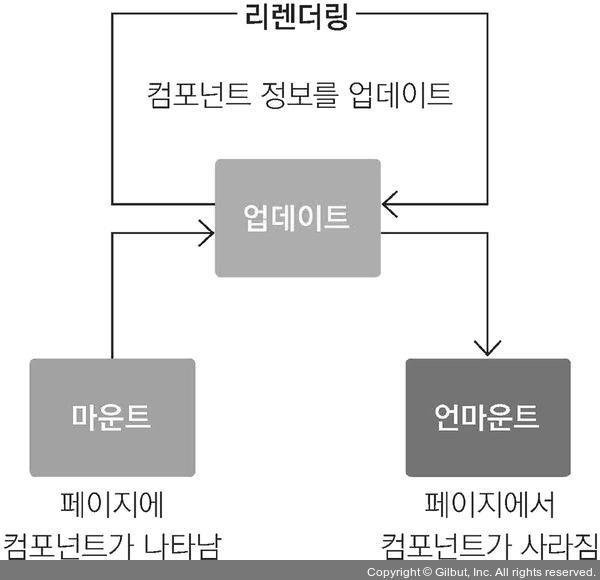
- 컴포넌트의 라이프사이클 메서드 흐름
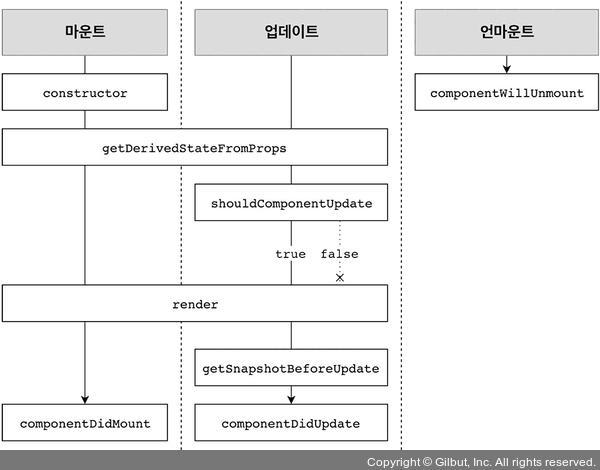
1) 마운트(mount) : DOM이 생성되고 웹 브라우저상에 나타나는 것
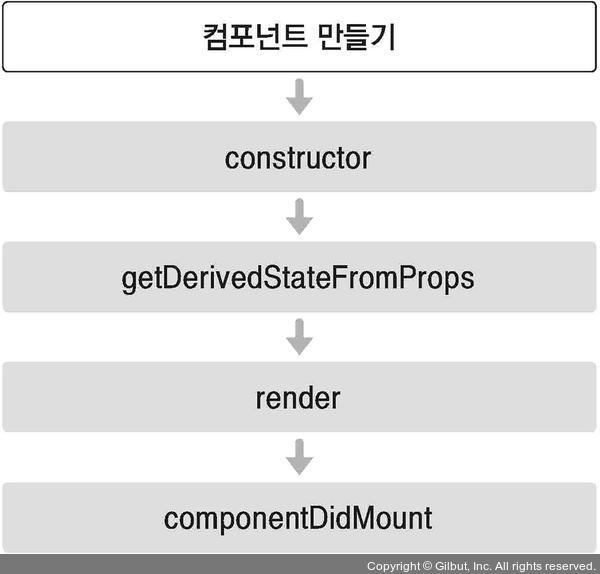
✔️ 마운트할 때 호출되는 메서드
-
constructor
- 컴포넌트를 새로 만들 때마다 호출되는 클래스 생성자 메서드 -
getDerivedStateFromProps
- props에 있는 값을 state에 넣을 때 사용하는 메서드 -
render
- 우리가 준비한 UI를 렌더링하는 메서드 -
componentDidMount
- 컴포넌트가 웹 브라우저상에 나타난 후 호출하는 메서드
2) 업데이트(update) : 업데이트할 때 호출하는 메서드
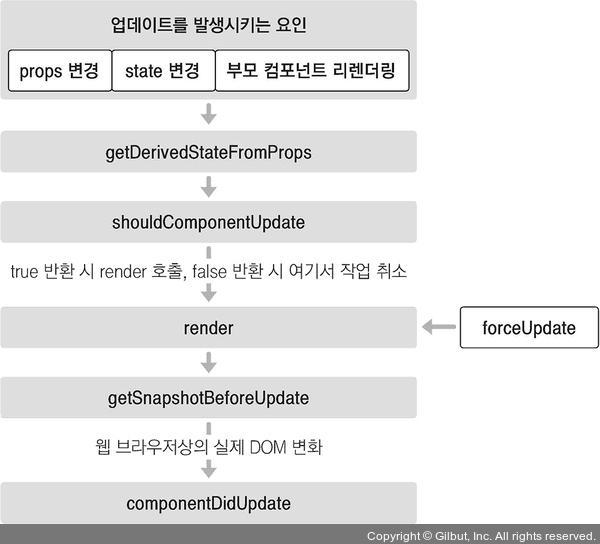
❓🤔 업데이트를 하는 경우는?
1) props가 바뀔 때
예: 부모 컴포넌트에서 넘겨주는 props가 바뀔 때
2) state가 바뀔 때
예: 컴포넌트 자신이 들고 있는 state가 setState를 통해 업데이트될 때
3) 부모 컴포넌트가 리렌더링될 때
: 자신에게 할당된 props가 바뀌지 않아도, 또는 자신이 들고 있는 state가 바뀌지 않아도, 부모 컴포넌트가 리렌더링되면 자식 컴포넌트 또한 리렌더링됨
4) this.forceUpdate로 강제로 렌더링을 트리거할 때
✔️ 업데이트할 때 호출되는 메서드
-
getDerivedStateFromProps
- 마운트 과정에서도 호출되며, 업데이트가 시작하기 전에도 호출됨.
- props의 변화에 따라 state 값에도 변화를 주고 싶을 때 사용. -
shouldComponentUpdate
- 컴포넌트가 리렌더링을 해야 할지 말아야 할지를 결정하는 메서드.
- true 혹은 false 값을 반환해야 함. true를 반환하면 다음 라이프사이클 메서드를 계속 실행하고, false를 반환하면 작업을 중지. 즉, 컴포넌트가 리렌더링되지 않음.
만약 특정 함수에서 this.forceUpdate() 함수를 호출한다면? 이 과정을 생략하고 바로 render 함수를 호출함. -
render
- 컴포넌트를 리렌더링합니다. -
getSnapshotBeforeUpdate
- 컴포넌트 변화를 DOM에 반영하기 바로 직전에 호출하는 메서드 -
componentDidUpdate
- 컴포넌트의 업데이트 작업이 끝난 후 호출하는 메서드
3) 언마운트(unmount) : 마운트의 반대 과정, 즉 컴포넌트를 DOM에서 제거하는 것
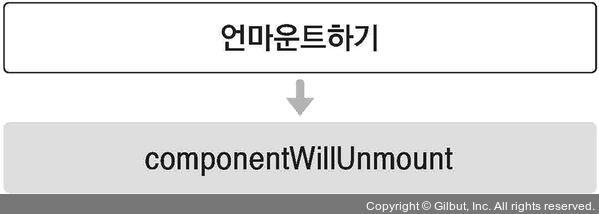
✔️ 언마운트할 때 호출되는 메서드
- componentWillUnmount
- 컴포넌트가 웹 브라우저상에서 사라지기 전에 호출하는 메서드
라이프사이클 메서드의 종류
- Will 접두사가 붙은 메서드 (어떤 작업을 작동하기 전에 실행되는 메서드)
- Did 접두사가 붙은 메서드는 (어떤 작업을 작동한 후에 실행되는 메서드)
1) render( ) 함수
render() { ... }- 컴포넌트 모양새를 정의하며, 라이프사이클 메서드 중 유일한 필수 메서드.
- this.props와 this.state에 접근할 수 있으며 리액트 요소를 반환.
- 이벤트 설정이 아닌 곳에서 setState를 사용하면 안 되며, 브라우저의 DOM에 접근해서도 안 됨.
- DOM 정보를 가져오거나 state에 변화를 줄 때는 componentDidMount에서 처리
2) constructor 메서드
constructor(props) { ... }- 컴포넌트의 생성자 메서드로 컴포넌트를 만들 때 처음으로 실행됨되며, 초기 state를 정할 수 있음.
3) getDerivedStateFromProps 메서드
- props로 받아 온 값을 state에 동기화시키는 용도로 사용하며, 컴포넌트가 마운트될 때와 업데이트될 때 호출됨.
static getDerivedStateFromProps(nextProps, prevState) {
    if(nextProps.value != = prevState.value) { // 조건에 따라 특정 값 동기화
      return { value: nextProps.value };
    }
    return null; // state를 변경할 필요가 없다면 null을 반환
}
4) componentDidMount 메서드
componentDidMount() { ... }- 컴포넌트를 만들고, 첫 렌더링을 다 마친 후 실행됨.
- 이 안에서 다른 자바스크립트 라이브러리 또는 프레임워크의 함수를 호출하거나 이벤트 등록, setTimeout, setInterval, 네트워크 요청 같은 비동기 작업을 처리함.
5) shouldComponentUpdate 메서드
shouldComponentUpdate(nextProps, nextState) { ... }-
props 또는 state를 변경했을 때, 리렌더링을 시작할지 여부를 지정하는 메서드.
-
반드시 true 값 또는 false 값을 반환해야 함.
컴포넌트를 만들 때 이 메서드를 따로 생성하지 않으면 기본적으로 언제나 true 값을 반환.
이 메서드가 false 값을 반환하면 업데이트 과정은 여기서 중지됨.
이 메서드 안에서 현재 props와 state는 this.props와 this.state로 접근하고, 새로 설정될 props 또는 state는 nextProps와 nextState로 접근 가능.프로젝트 성능을 최적화할 때, 상황에 맞는 알고리즘을 작성해 리렌더링을 방지할 때는 false 값을 반환하게 함.
6) getSnapshotBeforeUpdate 메서드
- render에서 만들어진 결과물이 브라우저에 실제로 반영되기 직전에 호출됨.
- 이 메서드에서 반환하는 값은 componentDidUpdate에서 세 번째 파라미터인 snapshot 값으로 전달받을 수 있음.
- 주로 업데이트하기 직전의 값을 참고할 일이 있을 때 활용됨. (예: 스크롤바 위치 유지).
getSnapshotBeforeUpdate(prevProps, prevState) {
    if(prevState.array != = this.state.array) {
    const { scrollTop, scrollHeight } = this.list
      return { scrollTop, scrollHeight };
    }
}
7) componentDidUpdate 메서드
componentDidUpdate(prevProps, prevState, snapshot) { ... }- 리렌더링을 완료한 후 실행됨.
- 업데이트가 끝난 직후이므로, DOM 관련 처리를 해도 무방함.
- 여기서는 prevProps 또는 prevState를 사용하여 컴포넌트가 이전에 가졌던 데이터에 접근할 수 있음.
- getSnapshotBeforeUpdate에서 반환한 값이 있다면 여기서 snapshot 값을 전달받을 수 있음.
8) componentWillUnmount 메서드
componentWillUnmount() { ... }- 컴포넌트를 DOM에서 제거할 때 실행함.
- componentDidMount에서 등록한 이벤트, 타이머, 직접 생성한 DOM이 있다면 여기서 제거 작업을 해야 함.
9) componentDidCatch 메서드
- 컴포넌트 렌더링 도중에 에러가 발생했을 때 애플리케이션이 먹통이 되지 않고, 오류 UI를 보여 줄 수 있게 해 줌.
componentDidCatch(error, info) {
  this.setState({
      error: true
  });
  console.log({ error, info });
}

// 여기서 error는 파라미터에 어떤 에러가 발생했는지 알려 주며,
// info 파라미터는 어디에 있는 코드에서 오류가 발생했는지에 대한 정보를 줌.
// 앞의 코드에서는 그저 console.log만 했지만,
// 나중에 실제로 사용할 때 오류가 발생하면 서버 API를 호출하여 따로 수집할 수도 있음.- 이 메서드를 사용할 때는 컴포넌트 자신에게 발생하는 에러를 잡아낼 수 없고, 자신의 this.props.children으로 전달되는 컴포넌트에서 발생하는 에러만 잡아낼 수 있음.
(+) 예제 따라해보기
// App.jsx
import React from 'react';
import LifeCycleSample from './features/7_Component_LifecycleMethod/LifeCycleSample';

const App = () => {
  return (
    <div>
      <LifeCycleSample />
    </div>
  );
};

export default App;
// LifeCycleSample.jsx
import { number } from 'prop-types';
import React, { Component } from 'react';

export default class LifeCycleSample extends Component {
  state = {
    number: 0,
    color: null,
  };

  myRef = null; // ref 설정할 부분

  constructor(props) {
    super(props);
    console.log('constructor');
  }

  static getDerivedStateFromProps(nextProps, prevState) {
    console.log('getDerivedStateFromProps');
    if (nextProps.color !== prevState.color) {
      return { color: nextProps.color };
    }
    return null;
  }

  componentDidMount() {
    console.log('componentDidMount');
  }

  shouldComponentUpdate(nextProps, nextState) {
    console.log('shouldComponentUpdate', nextProps, nextState);
    // 숫자의 마지막 자리가 4면 리렌더링 X
    return nextState.number % 10 !== 4;
  }
  componentWillUnmount() {
    console.log('componentWillUnmount');
  }

  handleClick = () => {
    this.setState({
      number: this.state.number + 1,
    });
  };

  getSnapshotBeforeUpdate(prevProps, prevState) {
    console.log('getSnapshotBeforeUpdate');
    if (prevProps.color !== this.props.color) {
      return this.myRef.style.color;
    }
    return null;
  }

  componentDidUpdate(prevProps, prevState, snapshot) {
    console.log('componentDidUpdate', prevProps, prevState);
    if (snapshot) {
      console.log('업데이트되기 직전 색상: ', snapshot);
    }
  }

  render() {
    console.log('render');

    const style = {
        color: this.props.color
    };

    return <div>
        <h1 style={style} ref={ref => this.myRef = ref}>
            {this.state.number}
        </h1>
        <p>color: {this.state.color}</p>
        <button onClick={this.handleClick}>더하기</button>
    </div>;
  }

}
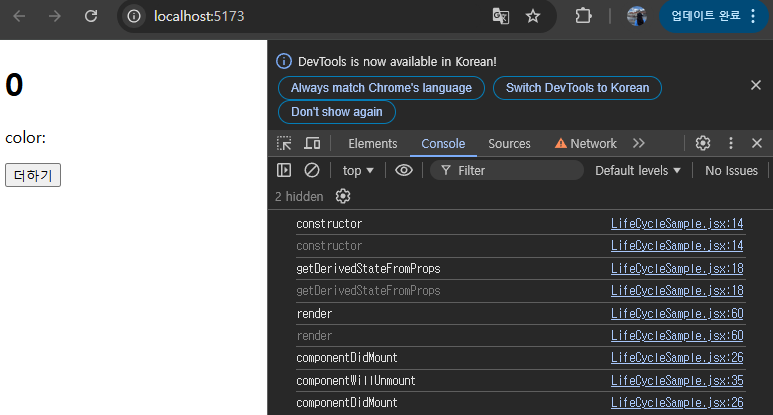

아까 작성한 App.jsx를 아래와 같이 수정해보자.
// App.jsx
// import React from 'react';
import React, { Component } from 'react';
import LifeCycleSample from './features/7_Component_LifecycleMethod/LifeCycleSample';

// 랜덤 색상을 생성합니다.
function getRandomColor() {
  return '#' + Math.floor(Math.random() * 16777215).toString(16);
}

class App extends Component {
  state = {
    color: '#000000',
  };

  handleClick = () => {
    this.setState({
      color: getRandomColor(),
    });
  };

  render() {
    return (
      <div>
        <button onClick={this.handleClick}>랜덤 색상</button>
        <LifeCycleSample color={this.state.color} />
      </div>
    );
  }
}
export default App;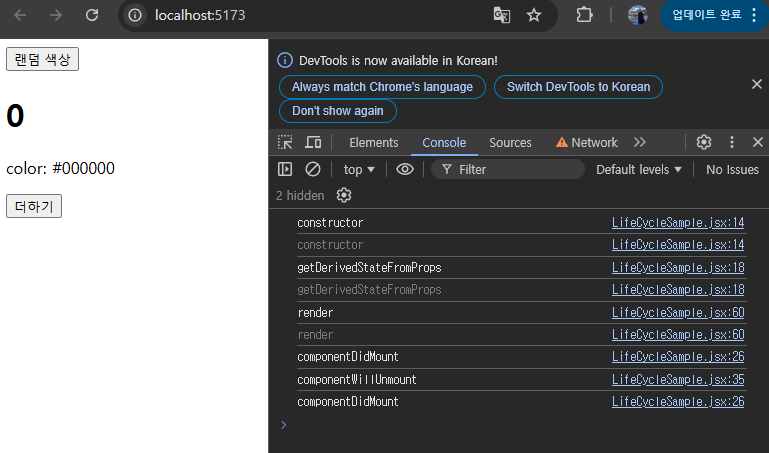
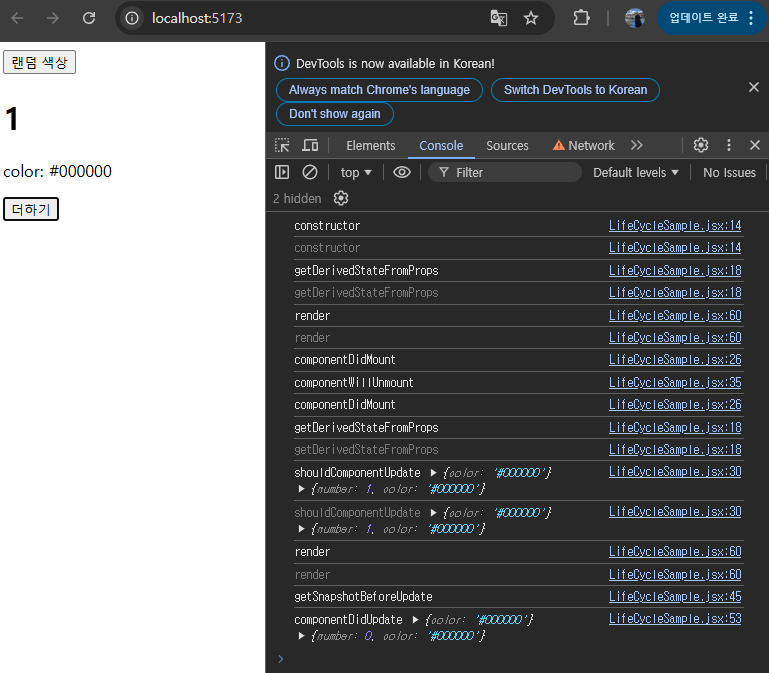
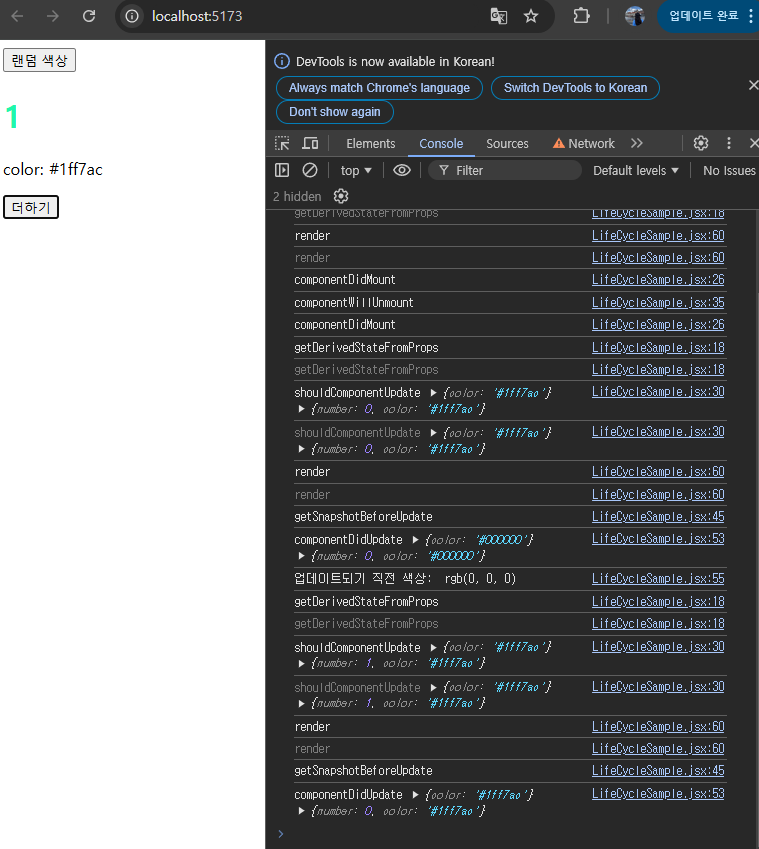
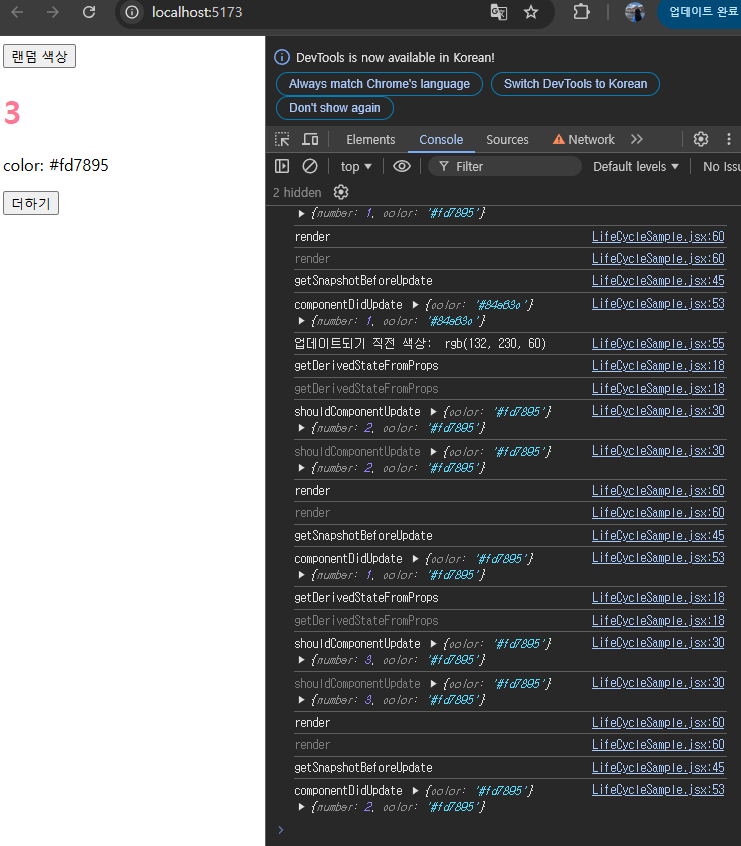
(+) 일부러 에러를 발생시켜보자
아까 위에서 작성했던 App.jsx의 render 함수 부분만 다음과 같이 수정한다.
// App.jsx

 // render() {
  //   return (
  //     <div>
  //       <button onClick={this.handleClick}>랜덤 색상</button>
  //       <LifeCycleSample color={this.state.color} />
  //     </div>
  //   );
  // }

  // 기존 render 함수 주석처리하고 새로 만들어서
  // 일부러 에러를 발새시켜보자.
  render() {
    console.log('render');
    const style = {
      color: this.props.color,
    };

    return (
      <div>
        {this.props.missing.value}
        <h1 style={style} ref={(ref) => (this.myRef = ref)}>
          {this.state.number}
        </h1>
        <p>color: {this.state.color}</p>
        <button onClick={this.handleClick}>더하기</button>
      </div>
    );
  }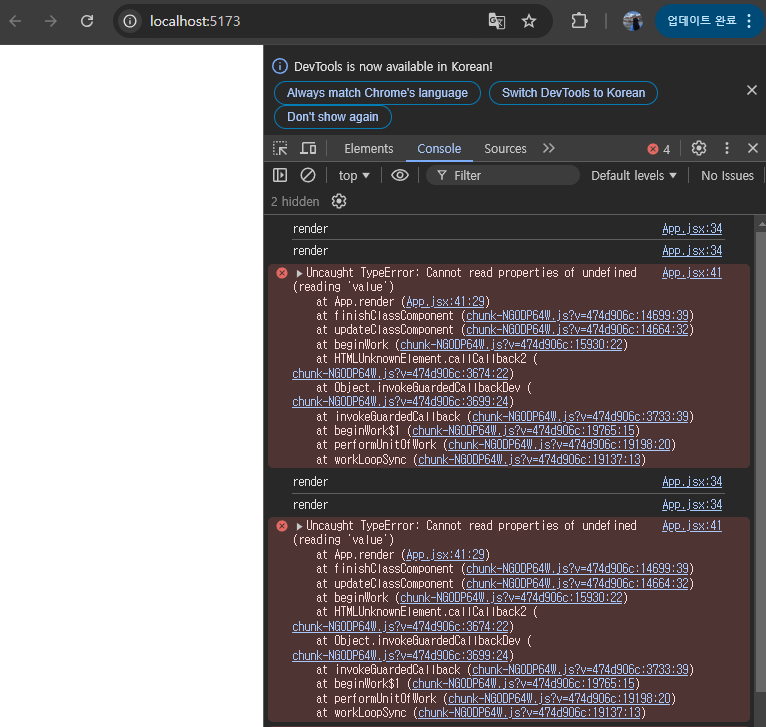
만약 사용자가 웹 서비스를 실제로 사용할 때 이렇게 흰 화면만 나타나면 어리둥절하겠지...? 이럴 때는 에러가 발생했다고 사용자에게 인지시켜 주어야 한다.
에러를 잡아 주는 ErrorBoundary라는 컴포넌트를 생성해서 사용자에게 인지시켜주자.
// ErrorBoundary 컴포넌트 파일 새로 추가
import React, { Component } from 'react';

export default class ErrorBoundary extends Component {
  state = {
    error: false,
  };

  // 에러가 발생하면 componentDidCatch 메서드 호출
  // this.state.error 값을 true로 업데이트
  componentDidCatch(error, info) {
    this.setState({
      error: true,
    });
    console.log({ error, info });
  }

  // render 함수
  // this.state.error 값이 true라면
  // 에러가 발생했음을 알려 주는 문구를 보여줌.
  render() {
    if (this.state.error) return <div>에러가 발생했습니다!</div>;
    return this.props.children;
  }
}
// App.jsx
import React, { Component } from 'react';
import LifeCycleSample from './features/7_Component_LifecycleMethod/LifeCycleSample';
import ErrorBoundary from './features/7_Component_LifecycleMethod/ErrorBoundary';

// 랜덤 색상을 생성합니다.
function getRandomColor() {
  return '#' + Math.floor(Math.random() * 16777215).toString(16);
}

class App extends Component {
  state = {
    color: '#000000',
  };

  handleClick = () => {
    this.setState({
      color: getRandomColor(),
    });
  };

  render() {
    return (
      <div>
        <button onClick={this.handleClick}>랜덤 색상</button>
        <ErrorBoundary>
          <LifeCycleSample color={this.state.color} />
        </ErrorBoundary>
      </div>
    );
  }
}

export default App;
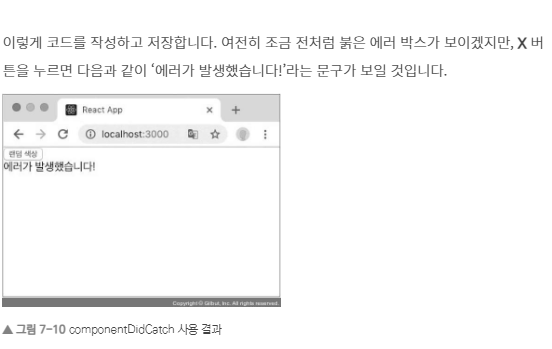
근데 왜 ... 나는 안 되고 있지?;; (다시 봐봐야 할 것 같다)