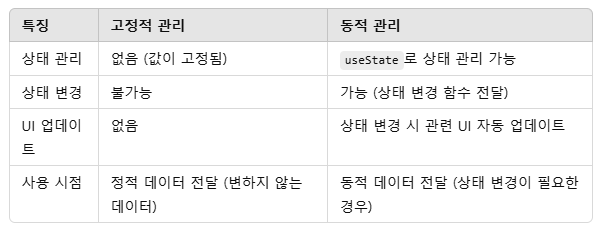
고정적 관리
- StaticContext.jsx
import React, { createContext } from 'react';

export const StaticContext = createContext("Hello, Static Context!");

export const StaticProvider = ({ children }) => {
  return (
    <StaticContext.Provider value="This is a static value">
      {children}
    </StaticContext.Provider>
  );
};- StaticComponent.jsx
import React, { useContext } from 'react';
import { StaticContext } from './StaticContext';

const StaticComponent = () => {
  const value = useContext(StaticContext);

  return <p>{value}</p>; // 항상 "This is a static value" 출력
};

export default StaticComponent;
동적 관리
- DynamicContext.jsx
import React, { createContext, useState } from 'react';

export const DynamicContext = createContext();

export const DynamicProvider = ({ children }) => {
  const [value, setValue] = useState("Hello, Dynamic Context!");

  return (
    <DynamicContext.Provider value={{ value, setValue }}>
      {children}
    </DynamicContext.Provider>
  );
};- DynamicComponent.jsx
import React, { useContext } from 'react';
import { DynamicContext } from './DynamicContext';

const DynamicComponent = () => {
  const { value, setValue } = useContext(DynamicContext);

  return (
    <div>
      <p>{value}</p>
      <button onClick={() => setValue("New Dynamic Value")}>
        Update Value
      </button>
    </div>
  );
};

export default DynamicComponent;
두 코드를 App에 사용
두 가지 Context를 아래와 같이 App에서 각각 사용할 수 있다.
- App.jsx
import React from 'react';
import { StaticProvider } from './StaticContext';
import StaticComponent from './StaticComponent';

import { DynamicProvider } from './DynamicContext';
import DynamicComponent from './DynamicComponent';

const App = () => (
  <div>
    {/* 고정적인 Context */}
    <StaticProvider>
      <h2>Static Context Example:</h2>
      <StaticComponent />
    </StaticProvider>

    {/* 동적인 Context */}
    <DynamicProvider>
      <h2>Dynamic Context Example:</h2>
      <DynamicComponent />
    </DynamicProvider>
  </div>
);

export default App;
✅ 고정적 관리
StaticComponent는 항상 같은 값("This is a static value")을 표시하며 값이 변경되지 않음!
✅ 동적 관리
DynamicComponent는 버튼 클릭 시 상태가 변경되고, 변경된 값("New Dynamic Value")이 표시됨!

호떡 신문지에서 개발자로 환생