2-2.3) TodoListItem과 TodoList 만들기
일정 관리 항목이 보일 TodoListItem과 TodoList를 만들어보자.
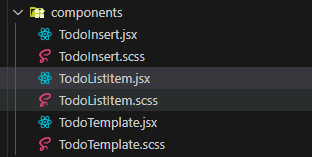
① components 디렉터리에 TodoListItem.js와 TodoListItem.scss를 생성한다.
- TodoListItem.jsx
import React from 'react';
import {
  MdCheckBoxOutlineBlank,
  MdRemoveCircleOutline,
  MdCheckBox,
} from 'react-icons/md';
import './TodoListItem.scss';

export default function TodoListItem() {
  return (
    <div className="TodoListItem">
      <div className="checkbox">
        <MdCheckBoxOutlineBlank />
        <div className="text">할 일</div>
      </div>
      <div className="remove">
        <MdRemoveCircleOutline />
      </div>
    </div>
  );
}
② TodoList.jsx 파일, TodoList.scss 파일 생성

- TodoList.jsx
TodoList 컴포넌트에 TodoListItem을 불러와서 별도의 props 전달 없이 그대로 여러 번 보여 주고 있음. 나중에는 여기에 기능을 추가하고 다양한 데이터를 전달해 볼 예정!
import React from 'react';
import './TodoList.scss';
import TodoListItem from './TodoListItem';

const TodoList = () => {
  return (
    <div className="TodoList">
      <TodoListItem />
      <TodoListItem />
      <TodoListItem />
    </div>
  );
};

export default TodoList;
- App.jsx
import React from 'react';
import TodoTemplate from './components/TodoTemplate';
import TodoInsert from './components/TodoInsert';
import TodoList from './components/TodoList';

const App = () => {
  return (
    <TodoTemplate>
      <TodoInsert />
      <TodoList />
    </TodoTemplate>
  );
};

export default App;
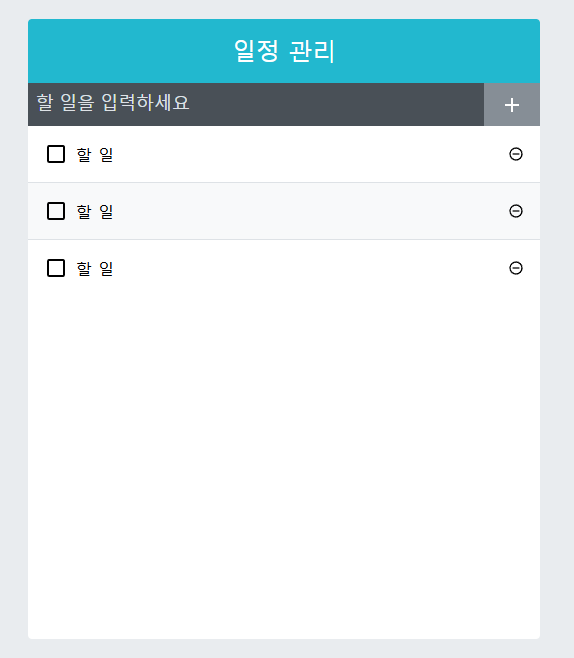
지금까지의 결과물

TodoList.scss, TodoListItem.scss 스타일링을 좀 해보자...
- TodoList.scss
.TodoList {
    // 요소의 최소 높이
    min-height: 320px;
    // 요소의 최대 높이
    min-height: 513px;
    // 요소의 세로 방향 콘텐츠 넘침 처리
    // overflow-y : auto, scroll, visible
    overflow-y: auto; // 콘텐츠가 넘칠 때 스크롤 표시
}- TodoListItem.scss
.TodoListItem {
    padding: 1rem;
    display: flex; /* TodoListItem 요소를 Flexbox로 설정해 자식 요소들을 Flexbox 레이아웃으로 배치 */
    align-items: center; // 세로 중앙 정렬
     // 짝수 번째 자식 요소(:nth-child(even))에 배경 색상 적용
     // & => 현재 선택자를 참조 (.TodoListItem)
    &:nth-child(even) {
        background: #f8f9fa;
    }
    .checkbox {
        cursor: pointer;
        flex: 1; // 차지할 수 있는 영역 모두 차지
        display: flex;
        align-items: center;
        // 아이콘
        svg {
            font-size: 1.5rem;
        }
        .text{
            margin-left: 0.5rem;
            flex: 1;
        }
        // 체크됐을 때 보여 줄 스타일
        &.checked {
            svg {
                color: #22b8cf;
            }
            .text {
                color: #adb5bd;
        text-decoration: line-through;
            }
        }
    }
    .remove {
        display: flex;
        align-items: center;
        font-size: 1.5rem;
        color: #ff6b6b;
        cursor: pointer;
        &:hover {
          color: #ff8787;
        }
    }
    // 엘리먼트 사이사이에 테두리 넣기
    // & + & => 인접 형제 요소에 스타일 적용
    // & = .TodoListItem
    // & + & = 현재 .TodoListItem 바로 뒤에 오는 또 다른 .TodoListItem 요소 (checkbox 아님!!!!)
    & + & {
     border-top: 1px solid #dee2e6;;
    }
}
(+) 이번 장에서 조금 헷갈렸던 부분

호떡 신문지에서 개발자로 환생